

GetApp offers objective, independent research and verified user reviews. We may earn a referral fee when you visit a vendor through our links.
Our commitment
Independent research methodology
Our researchers use a mix of verified reviews, independent research, and objective methodologies to bring you selection and ranking information you can trust. While we may earn a referral fee when you visit a provider through our links or speak to an advisor, this has no influence on our research or methodology.
Verified user reviews
GetApp maintains a proprietary database of millions of in-depth, verified user reviews across thousands of products in hundreds of software categories. Our data scientists apply advanced modeling techniques to identify key insights about products based on those reviews. We may also share aggregated ratings and select excerpts from those reviews throughout our site.
Our human moderators verify that reviewers are real people and that reviews are authentic. They use leading tech to analyze text quality and to detect plagiarism and generative AI.
How GetApp ensures transparency
GetApp lists all providers across its website—not just those that pay us—so that users can make informed purchase decisions. GetApp is free for users. Software providers pay us for sponsored profiles to receive web traffic and sales opportunities. Sponsored profiles include a link-out icon that takes users to the provider’s website.
Load Testing vs. Stress Testing: Understand the Difference
Both load and stress tests can be helpful to your business, but which one should you prioritize? Know the difference to decide.


Load and stress testing are two types of performance testing both crucial for small businesses in ensuring their digital platforms can handle everyday and extreme scenarios efficiently.
Business leaders who are new to performance testing should first understand the nature of their businesses to pick the best approach. We say this because eCommerce websites and basic online sites might benefit more from load testing, whereas SaaS or web apps may need stress testing.
Even though these two methods seem similar, there are subtle differences that set them apart and are crucial to understanding for addressing specific business challenges like handling peak traffic times or unexpected system overloads.
What is load testing?
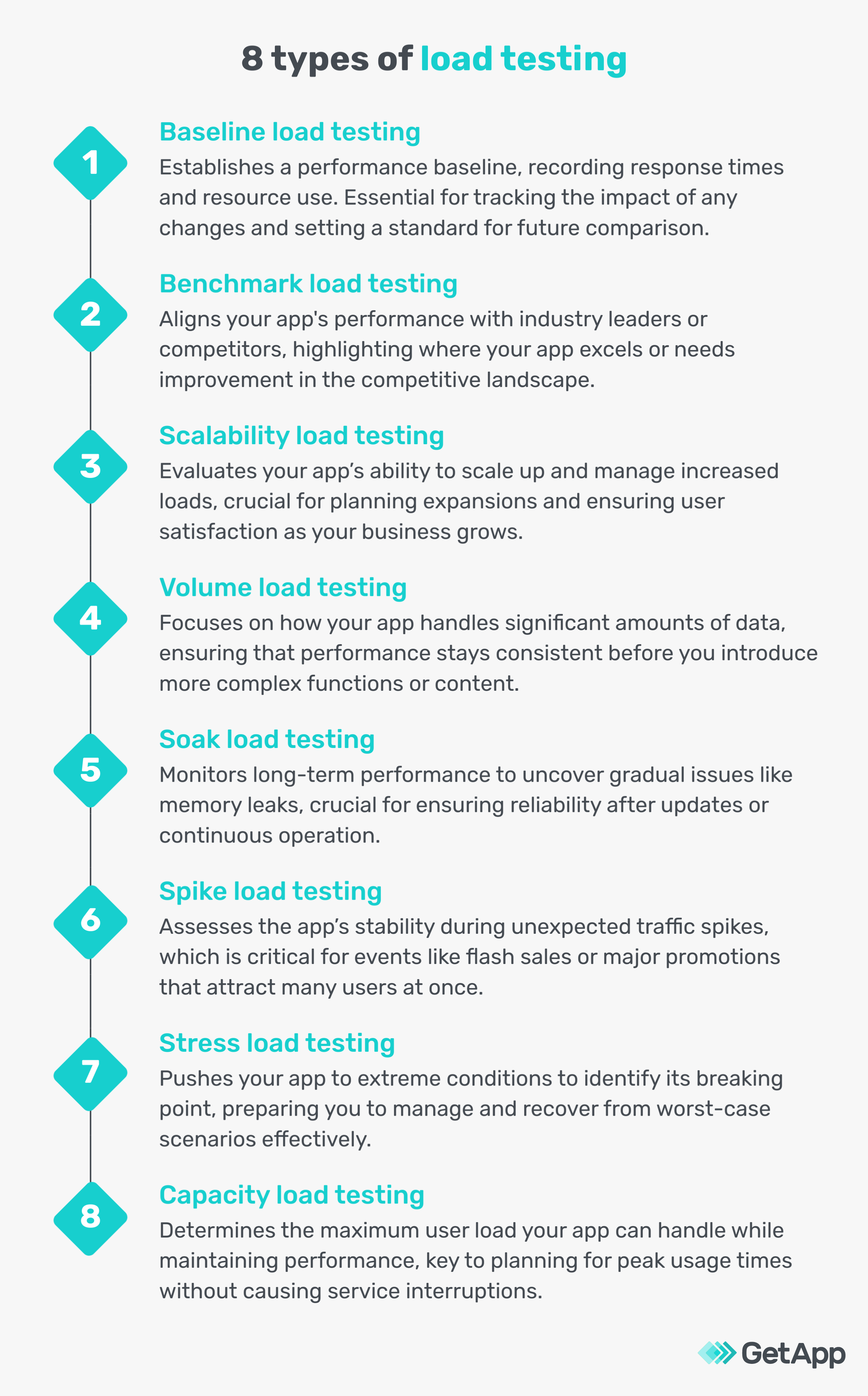
Load testing is the process of checking your website’s capacity to manage high-traffic load. It is performed by quality assurance (QA) engineers using load testing software and other network tools. They work with a team of system admins, network engineers, and web/app developers to uncover performance bottlenecks such as server crashes, slow page loads, and transactional errors that tend to arise under extreme load conditions.
There are several different types of load testing that use various techniques or strategies. We’ve outlined the eight types below:
What is stress testing?
Stress testing is the process of examining how your systems behave under extreme, often unexpected conditions such as sudden spikes in user activity or processing large volumes of transactions in a short time. This type of testing deliberately pushes the system to its limits and beyond, to identify its breaking point and observe how it handles extreme stress.
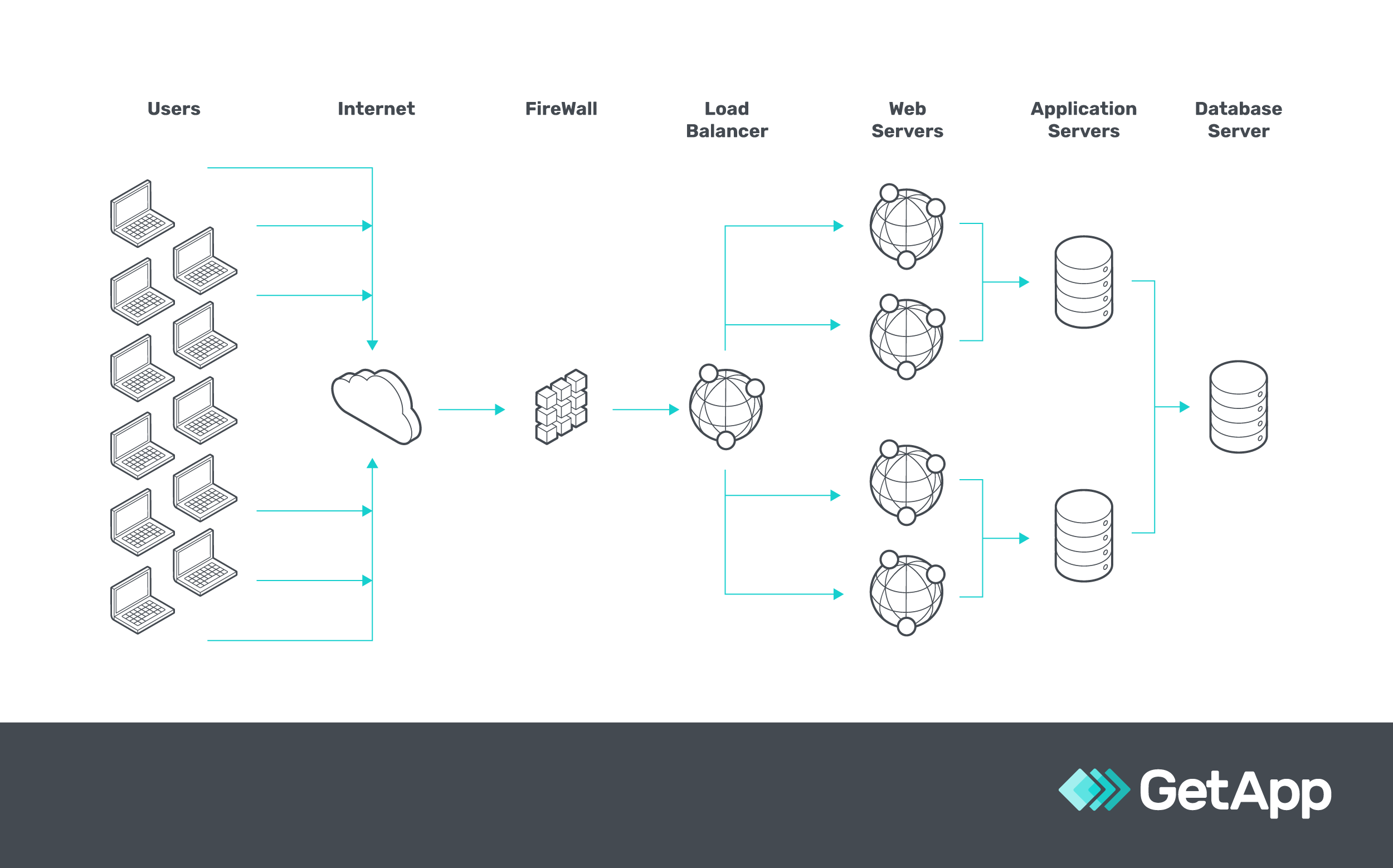
A representation of how stress testing works
Stress testing’s main goal is to ensure that the system remains stable and secure under overwhelming conditions and to understand how it recovers from failure. It's not about simulating normal user behavior, like load testing, but about creating scenarios that stress the system to the point of breaking, such as simulating a cyber-attack or handling more requests than the system is designed for.
A stress test also can be performed in several ways, as outlined below:
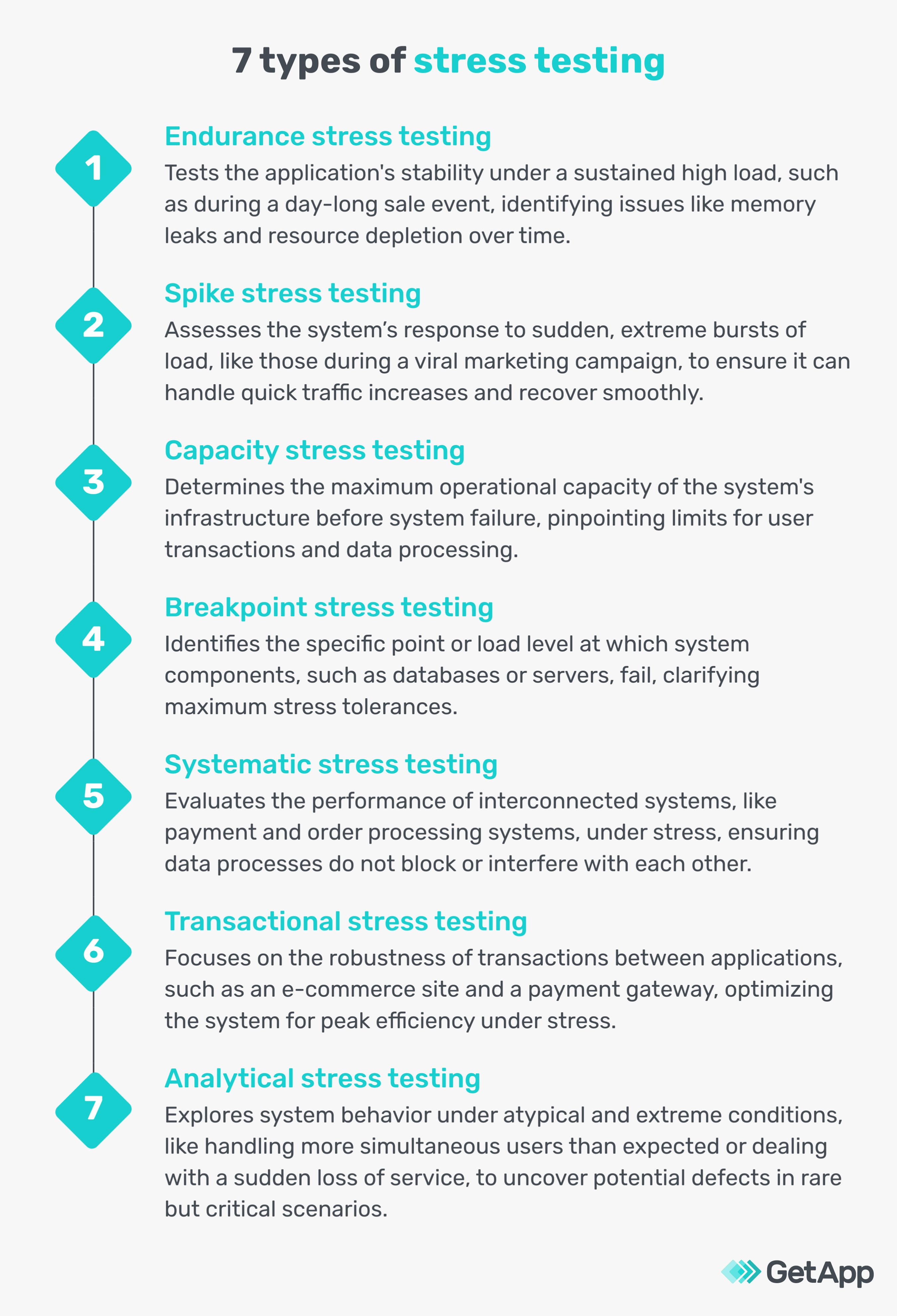
Stress testing can reveal potential vulnerabilities in data integrity, security, and overall system resilience, such as how the system handles data loss or unauthorized access, that might not surface under normal conditions of software testing.
However, it is advised not to use it as a method to uncover system vulnerabilities or potential entry points for cyber attackers. For that, vulnerability scanning and penetration testing are used.
To get more clarity, we talked to Aleksie Pichukov [1], a software engineer at Raiffeisen Bank International AG. He highlights the main difference between load test vs stress test.
Pichukov's opinion on load vs stress testing
With load testing, you're looking at how well your site or app deals with lots of requests or multiple users—more than usual, but still within a range you might actually see. For example, an eCommerce website might use load testing to prepare for a big sale like Cyber Monday, ensuring it can handle the rush. A basic online site might load test for expected traffic increases after a marketing campaign.
Stress testing goes a step further, into the territory of really extreme use—like what might happen during a DDoS (Distributed Denial of Service) attack or if your app suddenly goes viral. It's about finding your breaking point. For a SaaS platform, which might quickly scale due to demand, stress testing checks if it can cope with sudden, massive spikes in use.
While small businesses, such as a local flower shop's loyalty app, might not need to worry about millions of users at once, they could benefit from understanding how their app performs under unexpected surges— which is essential if they're planning to expand rapidly.
Load testing helps maintain a good user experience by finding and fixing issues that slow down the site or cause crashes, while stress testing helps you plan for growth and ensures you're ready for any surprises in traffic.

Aleksie Pichukov
Software engineer at Raiffeisen Bank International AG
5 key differences between load testing and stress testing
These are a few minor, but valid differences between load and stress tests that matter when deciding which one to use for your business:
1. Load testing focuses on typical loads, stress testing on extreme loads
Load testing evaluates how well your system performs under expected or heavy load user traffic. Stress testing, on the other hand, examines the system's resilience when faced with peak load, often beyond normal conditions.
If you are anticipating excessive user traffic, due to a seasonal sale or new product launch, proceed with load testing. Otherwise, it is advised to conduct stress testing once a year to check if your systems are resilient enough to handle unexpected loads.
2. Stress test’s load limits go beyond the threshold
In load testing, the emphasis is on finding the system's breaking point under heavy but expected loads. Stress testing pushes the system past this breaking point to understand how it behaves under extreme stress.
You may use both methods: load testing to find your site's capacity limits, then stress testing to prepare for unexpected surges. An automation testing software can help with the process.
3. Load testing checks for user load, stress testing checks for data load
Load testing involves checking the software's performance with many concurrent users accessing it, like customer logins or product searches.
Stress testing, conversely, assesses performance under varying, often extreme, amounts of data, such as processing large financial transactions or handling bulk data uploads.
4. Load test’s metric is performance, stress test’s metric is stability
The key performance metrics in load testing are the system’s speed, server quantity, and responsiveness. In stress testing, the focus shifts to stability, especially in high-stress scenarios like a data breach or attack.
5. Load testing for bug identification, stress testing for system failure response
Load testing is crucial for uncovering performance issues like memory overflows and determining if the current infrastructure can support software application demands using a load balancing software. Stress testing is essential for seeing how a system saves data before crashing and assessing if unexpected failures compromise security.
Regardless of what you choose, precautions are necessary
Load and stress testing can pose risks if not handled carefully. Improper testing can lead to system overloads, data corruption, or other significant issues. Therefore, it's crucial to approach these tests with caution, especially if it's your first time. Here are some precautionary tips:
Always conduct these tests in a controlled testing environment, not on your live system, to prevent customer-facing disruptions.
Keep a close watch on your system's health during testing to quickly identify and address any unforeseen issues.
In case something goes wrong, be ready with a rollback plan to revert your systems to their previous stable state.
If you're new to this, consider consulting with IT specialists to ensure your testing process is set up and executed correctly.
As you prepare for load or stress testing, remember that a strategic approach is key. GetApp offers a free strategy on a page template, perfect for businesses venturing into these testing waters.
Just fill in your details below to download it. This template acts like a scorecard, giving you a bird’s eye view of your strategy, and helping you spot any potential errors before they impact your business.
Sources
1. Aleksie Pichukov, LinkedIn
Bhavya Aggarwal
More on IT Management


Aug 08, 2024



Sep 18, 2024

May 29, 2024