

GetApp offers objective, independent research and verified user reviews. We may earn a referral fee when you visit a vendor through our links.
Our commitment
Independent research methodology
Our researchers use a mix of verified reviews, independent research, and objective methodologies to bring you selection and ranking information you can trust. While we may earn a referral fee when you visit a provider through our links or speak to an advisor, this has no influence on our research or methodology.
Verified user reviews
GetApp maintains a proprietary database of millions of in-depth, verified user reviews across thousands of products in hundreds of software categories. Our data scientists apply advanced modeling techniques to identify key insights about products based on those reviews. We may also share aggregated ratings and select excerpts from those reviews throughout our site.
Our human moderators verify that reviewers are real people and that reviews are authentic. They use leading tech to analyze text quality and to detect plagiarism and generative AI.
How GetApp ensures transparency
GetApp lists all providers across its website—not just those that pay us—so that users can make informed purchase decisions. GetApp is free for users. Software providers pay us for sponsored profiles to receive web traffic and sales opportunities. Sponsored profiles include a link-out icon that takes users to the provider’s website.
5 Best Application Development Tools
Selecting the right app development tool can be tricky. We’ve shortlisted the best app development tools so you spend less time on research and more on app development.


Software applications (referred to as app/apps hereafter) are no longer mere tools to transact with customers. Today, they play a key role in defining brands and are instrumental in customer acquisition by means of lead generation and identification.
While it’s easy to see the relevance of app development, selecting the right software platform for the task can be tricky. You have to evaluate several criteria such as server requirements, payment methods, and authorization options. Add to this the sheer number of app development tools on the market and the research and selection process can easily take weeks.
To help make your search less daunting, we have created a list of the best app development tools.
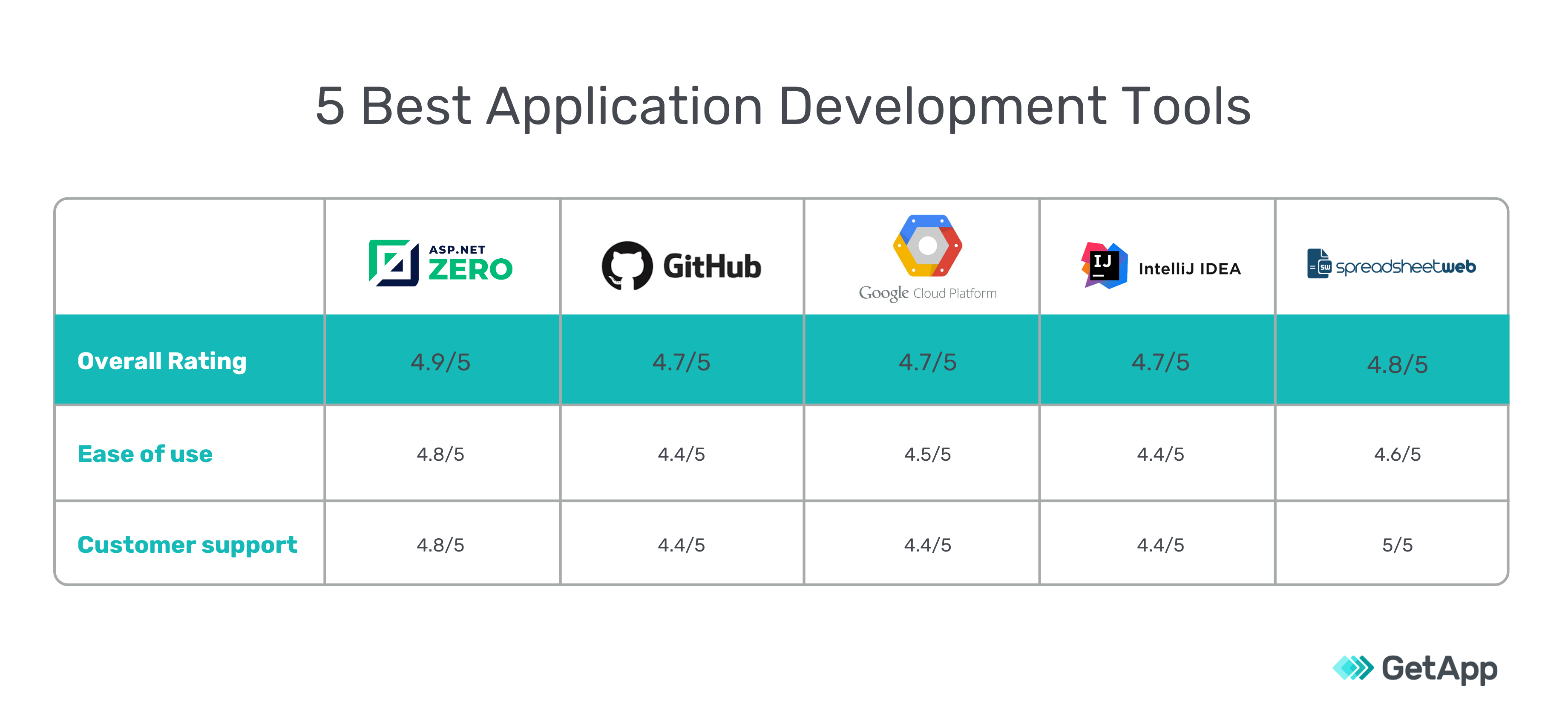
Why do we call them best? These tools have more than ten reviews, user ratings higher than 4.5 (out of 5), and offer key app development features.
See the products right away
ASP.NET Zero
User ratings: 4.9/5
Number of reviews: 12+
ASP.NET Zero is a platform that offers tools and libraries for developing apps via Visual Studio. It simplifies development activities such as role management, UI localization, and exception handling. It also offers an open source development environment to provide developers more customization capabilities.
ASP.NET Zero’s app development capabilities
Create a basic user interface (UI) for apps using ASP.NET’s Visual Studio extension.
Develop single and multi-tenant architecture using the SaaS development kit. The tool also provides customer tenant logos, CSS support, subscription and payment management, and database support.
Create iOS and Android apps using Xamarin.
Manage host and tenant hierarchy with a configurable settings management page.
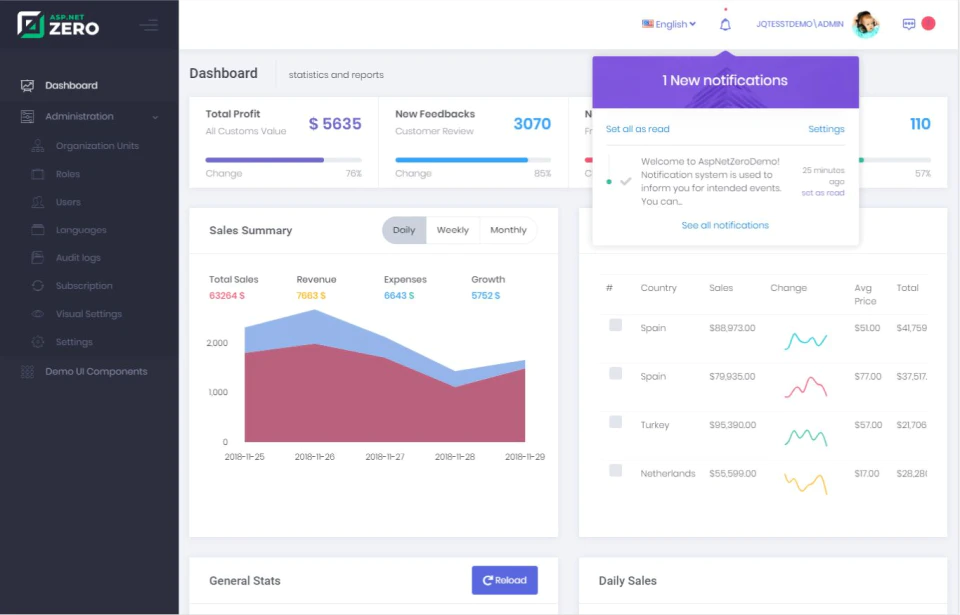
Dashboard in ASP.NET Zero
User feedback trends
Based on the reviews on GetApp, here’s what the users of ASP.NET Zero feel about its app development features:
Reviewers like that the tool has a short implementation period and offers some out-of-the-box development features that can be used without any additional coding.
Users find the ability to add their own features without authentication, logging in, and defining user roles useful.
Reviewers would like to see automatic upgrades to the tool as opposed to the manual upgrade required currently.
Some users would like to see more organized and advanced code documentation.
Who should select ASP.NET Zero?
The tool is useful for any software developer as most companies use .NET technologies. It’s also useful for developers looking for an open source development environment.
GitHub
User ratings: 4.7/5
Number of reviews: 3,028+
GitHub is a fully open source development platform that makes it easy to collaborate on projects and code reviews. It provides several extensions and repositories to make code access easier.
GitHub’s app development capabilities
Create, test, and deploy apps with automated workflows. You can also choose from workflows created by the developer community.
Install packages hosted on GitHub Packages to any registry of record.
Receive security alerts about vulnerabilities in code. Stay updated with common vulnerabilities and exposures with GitHub’s advisory database.
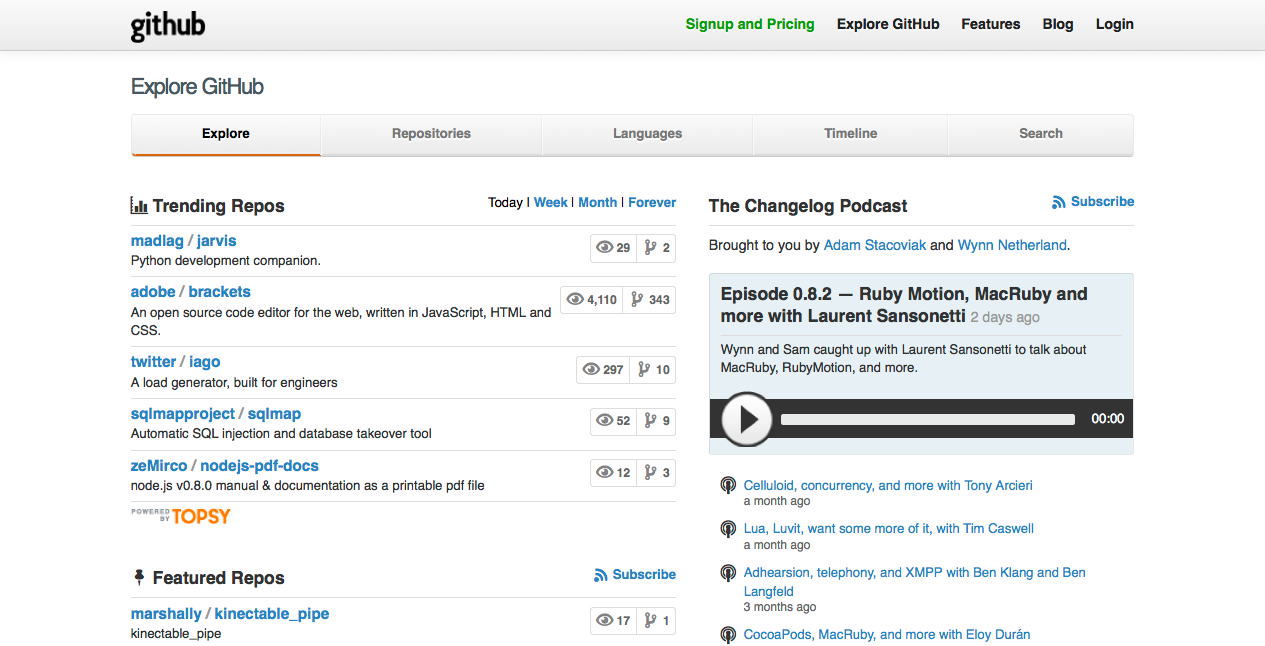
Dashboard in GitHub
User feedback trends
Based on the reviews on GetApp, here’s what the users of GitHub feel about its app development features:
Reviewers like that the tool is easy to get started with and it’s easy to add contributors, follow and request changes, and integrate with third-party tools.
Users also appreciate GitHub’s website speed as it allows quick search and navigation within projects.
Reviewers who use the free version would like to see more space in repositories that use Large File Storage (LFS).
Some users would also like to see fewer bugs in the desktop app.
Who should select GitHub?
GitHub is ideal for both small and large businesses. The tool is completely open source, which makes it accessible to even small businesses with budget constraints. It also offers an Enterprise version that comes with advanced features suited to the needs of large businesses.
Google Cloud Platform
User ratings: 4.7/5
Number of reviews: 1,984+
Google Cloud Platform offers a number of tools for developers to build, test, and deploy apps. It supports several cloud development platforms and third-party apps that make app development easier.
Google Cloud Platform’s app development capabilities
Build, test, and deploy apps in multiple languages and across development platforms such as Kubernetes and Firebase.
Extend Git workflow and manage code by connecting to tools such as App Engine, Cloud Logging, Cloud Monitoring.
Take code from GitHub or Bitbucket repositories for easier code browsing, code search, and diagnostics.
Track changes and the location and time of the change with Cloud Audit Logs.
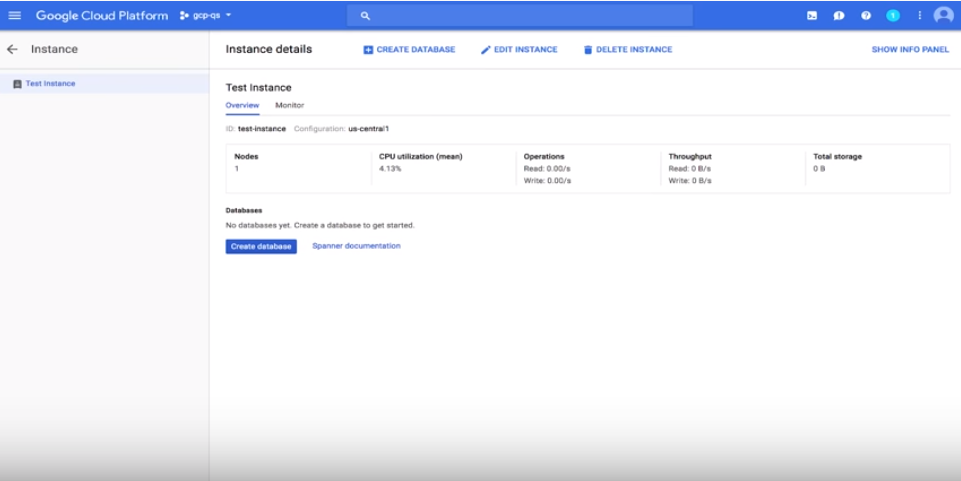
Instance creation in Google Cloud Platform
User feedback trends
Based on the reviews on GetApp, here’s what the users of Google Cloud Platform feel about its app development features:
Reviewers like that the tool allows to upscale or downscale server resources as per project requirements.
Users also appreciate the intuitive dashboard and live pricing when building new apps.
Some reviewers would like to see a more cost-effective graphics processing unit.
Users would also like to see fewer bugs while creating instances.
Who should select Google Cloud Platform?
Google Cloud Platform is ideal for businesses of all sizes as it offers a wide range of integrations and features suited to the needs of every business. It’s also ideal for independent developers and coders.
IntelliJ IDEA
User ratings: 4.7/5
Number of reviews: 662+
IntelliJ IDEA is a ready-to-use development platform that offers features such as coding assistance, version control, and decompiling. The tool primarily focuses on improving the productivity of developers by automating everyday coding tasks.
IntelliJ IDEA’s app development capabilities
Automate code compilation, packaging, tests, deployment, and other development activities.
Manage versions with version control systems such as Git, SVN, CVS, Mercurial, and Perforce.
Perform unit testing with an integrated development environment that supports test runner and coverage tools for major frameworks.
Get coding assistance with IntelliJ IDEA’s database tools for editing SQL, running queries, and exporting data.
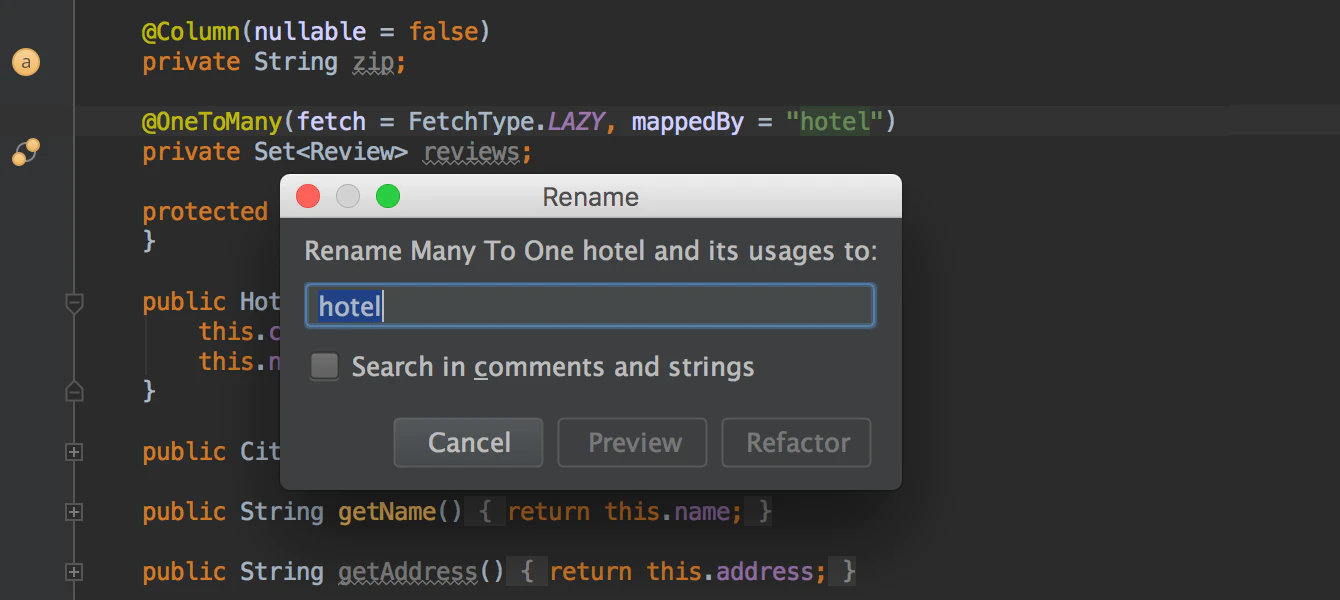
Cross-language refactoring in IntelliJ IDEA
User feedback trends
Based on the reviews on GetApp, here’s what the users of IntelliJ IDEA feel about its app development features:
Reviewers like that they can quickly adjust projects and index files and debug apps.
Users also like the modular integrated development environment that extends capabilities via plugins.
Reviewers would like to see plugins that take up less memory as currently, it impacts the tool’s performance.
Some users would also like to see faster processing with fewer freezes and crashes.
Who should select IntelliJ IDEA?
IntelliJ IDEA is particularly handy for those businesses and developers that work with Kotlin, Groovy, Java, and Scala. It’s also useful for those looking for commercial development or an open source development environment.
SpreadsheetWEB
User ratings: 4.8/5
Number of reviews: 13+
SpreadsheetWEB simplifies app development for even those with little to no coding knowledge. It offers a drag-and-drop interface that helps build apps from MS Excel by adding drop-down menus and checkboxes and populating columns with data and query results.
SpreadsheetWEB’s app development capabilities
Create apps using the drag-and-drop interface wherein you can associate each cell with a particular control.
Get started with ready-to-use, customizable stylesheets or upload one of your own.
Manage apps using a web interface that lets you configure security options, manage user accounts, and access app data.
Save user data into a web database from where you can view the data and share it with others.
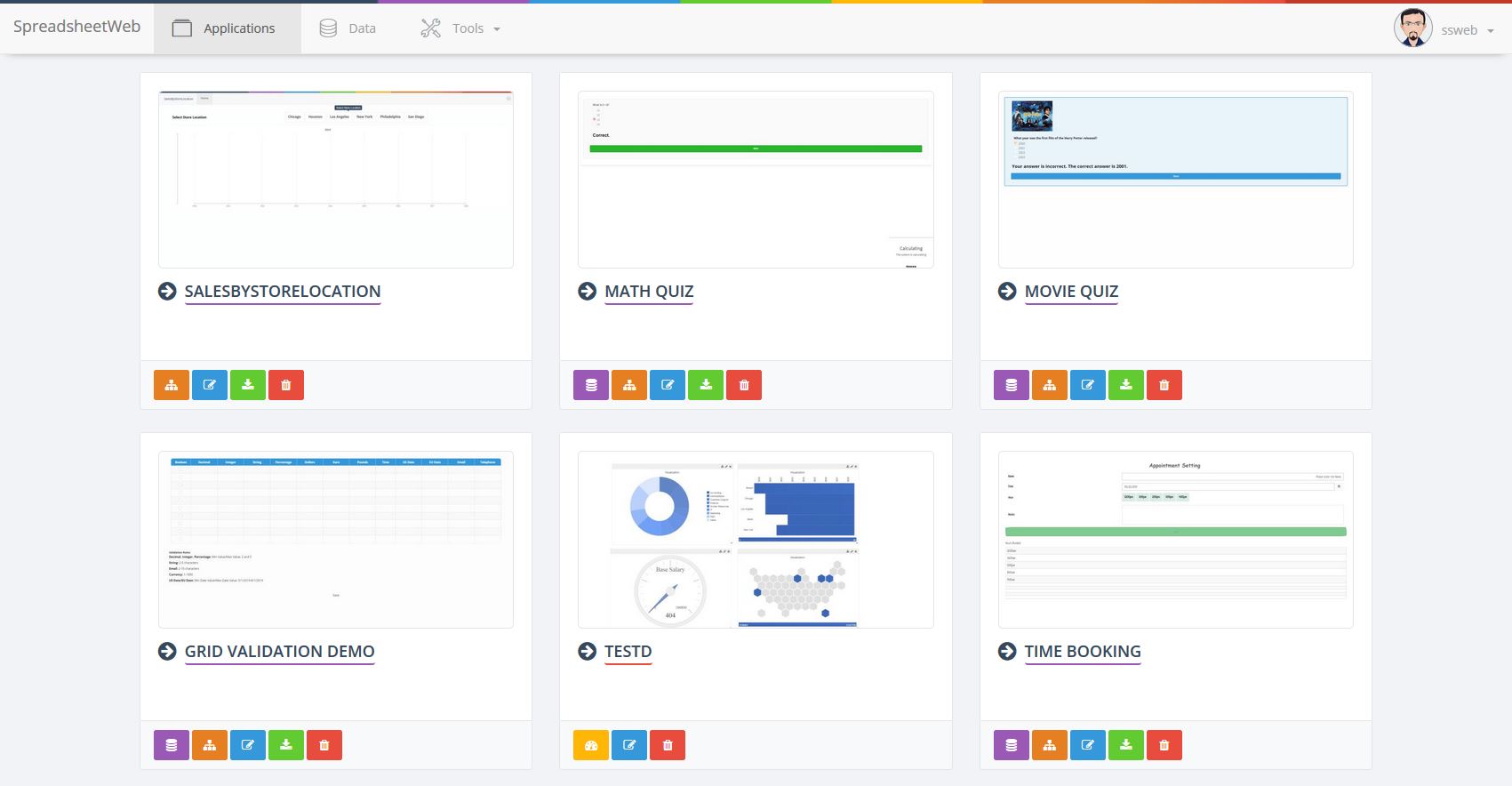
Custom interfaces in SpreadsheetWEB
User feedback trends
Based on the reviews on GetApp, here’s what the users of SpreadsheetWEB feel about its app development features:
Reviewers like that the tool has a short implementation period and changes can be updated quickly.
Users also find the back-end to be quick and responsive.
Some reviewers would like the ability to add more artificial intelligence algorithms.
Users would also like to see more elaborate tutorials on how to use the tool.
Who should select SpreadsheetWEB?
SpreadsheetWEB is ideal for users that are not well-versed in coding and technical skills. The tool is mostly used in insurance, investment, and financial services industries.
Next steps
Read reviews: Read user reviews to get a better idea about the tool’s performance, capabilities, and shortcomings. Although many vendor websites offer user reviews, to ensure the reviews are unbiased, refer to third-party websites such as ours.
Speak with the vendor: Get in touch with the vendor before making a final selection. It will help you understand the tool better. You may learn from the vendor about features or upgrades that may not be listed on the website or are launched yet. You will also get an opportunity to discuss your configuration, payment option preference, or server bandwidth requirements.
Product selection methodology and disclaimer
To identify the products featured in this article, we used the following methodology:
We identified tools that had more than 10 user reviews on GetApp (information accessed on May 19, 2020).
We arranged the tools in the order of their user ratings (from highest to lowest), with the minimum rating threshold being 4.5 out of 5 (information accessed on May 19, 2020).
We picked the top five tools that offered at least four out of these seven app development features: compatibility testing, debugging, analytics, integrated development environment, mobile app development, web app development, and software development.
For the “user feedback trends" sections, we performed sentiment analysis of reviews left for each product in the 12 months previous to the creation of this report. Reviews data may have changed since publication and may not reflect current conditions. The content in this piece that provides opinions and points of view expressed by users. It does not represent the views of GetApp.
Bandita Awasthi
More on IT Management


Aug 08, 2024



Sep 18, 2024

May 29, 2024