GetApp offers objective, independent research and verified user reviews. We may earn a referral fee when you visit a vendor through our links.
Our commitment
Independent research methodology
Our researchers use a mix of verified reviews, independent research, and objective methodologies to bring you selection and ranking information you can trust. While we may earn a referral fee when you visit a provider through our links or speak to an advisor, this has no influence on our research or methodology.
Verified user reviews
GetApp maintains a proprietary database of millions of in-depth, verified user reviews across thousands of products in hundreds of software categories. Our data scientists apply advanced modeling techniques to identify key insights about products based on those reviews. We may also share aggregated ratings and select excerpts from those reviews throughout our site.
Our human moderators verify that reviewers are real people and that reviews are authentic. They use leading tech to analyze text quality and to detect plagiarism and generative AI.
How GetApp ensures transparency
GetApp lists all providers across its website—not just those that pay us—so that users can make informed purchase decisions. GetApp is free for users. Software providers pay us for sponsored profiles to receive web traffic and sales opportunities. Sponsored profiles include a link-out icon that takes users to the provider’s website.
6 Top-Rated Affordable Video Editing Software
Discover how the choice of cost-effective video editing tools can transform ordinary footage into captivating visual stories.


Have you ever wondered what separates a mundane video from a captivating visual masterpiece? The answer often lies in the choice of video editing software that lets you polish your raw footage, improve audio/visual quality, add special effects, and align with your branding style—all to enhance your storytelling capabilities and captivate your audience.
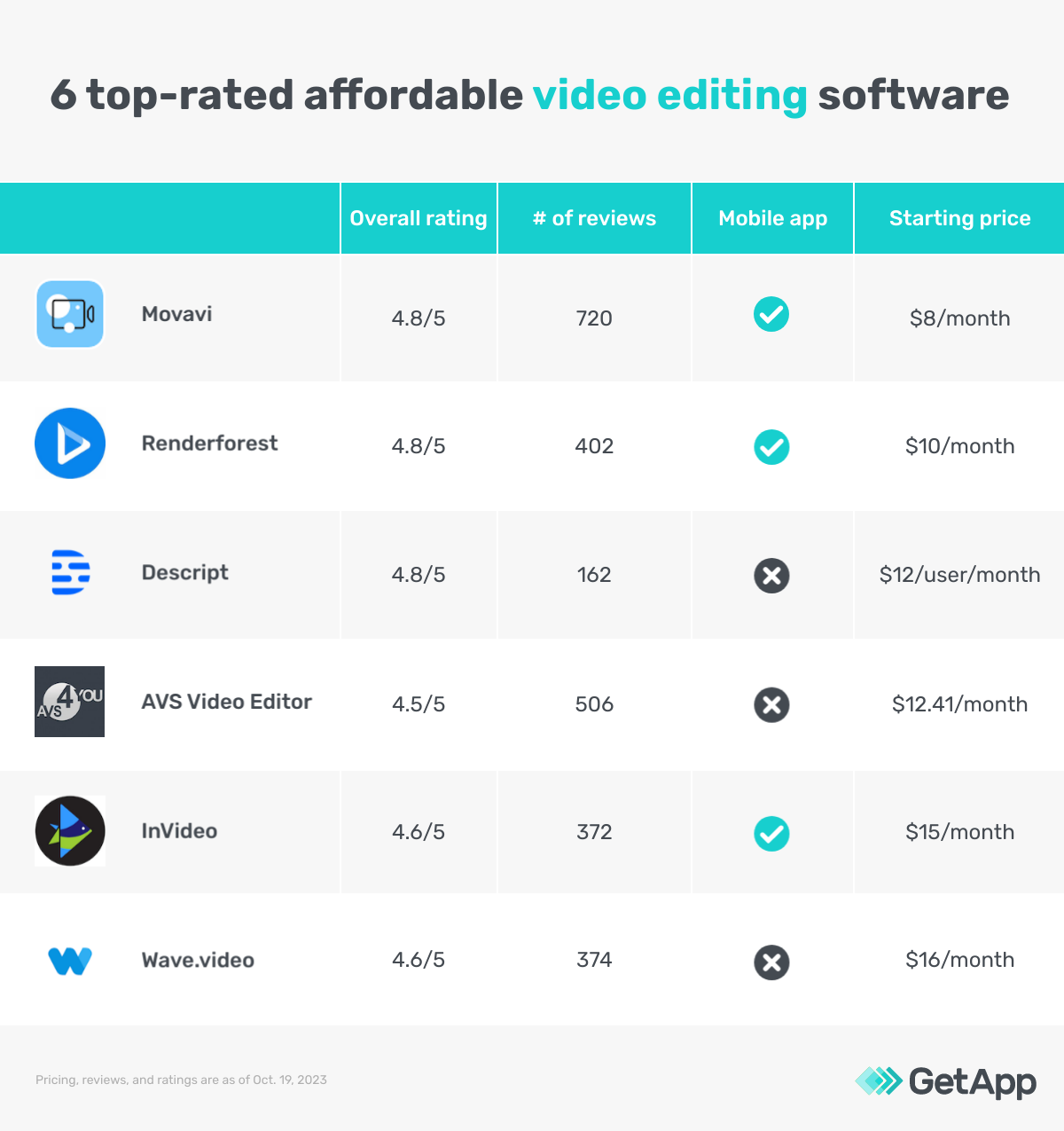
Luckily, the power of compelling video creation does not always need a Hollywood-sized budget. This article highlights the top six affordable video editing software options, in ascending order, based on their pricing as found on vendor websites and verified software reviews. Read more on our methodology at the end of this article.
The tools featured in this article fall under two categories: AI video editing tools that provide automated prompt-based video editing and drag-and-drop manual editors.
1. Movavi Video Editor Plus
Movavi video editor suite leverages artificial intelligence (AI) to reduce noise, enhance colors, and swap out backgrounds, producing a more professional look. The built-in AI motion tracking feature lets you apply effects to specific objects or highlight specific areas in the video. Additionally, the tool enables creating backgrounds using the chroma key (Replacing a specific color (usually green or blue) in the background of a video or image.) or green screen effect and adds titles, filters, and transitions.
This video editor supports picture-in-picture to show a scene from two different angles. You can also add video commentary to existing videos.
Product features of interest*:
Color correction: Modify the color balance, contrast, brightness, and saturation levels of the footage. The feature allows applying specific color filters, tints, or effects to create unique visuals.
Filters and LUTs: Use pre-designed filter effects to change the video’s appearance, mood, or style. Look-up tables (LUTs) are for advanced color grading with precise control for balancing different colors to create the desired effect.
Video stabilization: Identify erratic movement in videos and detect how the camera shakes and wobbles. Then, shift and adjust individual frames within the video to align with a stable reference point.
Customer support options: FAQs, how-to blogs, help center, and tips and tutorials
Starting price: $8 per month
Billing cycle: Annual
Who should consider Movavi Video Editor?
Movavi Video Editor Plus is worth considering for its AI tools that automate fine-tuning videos for simplified video editing with little to no technical expertise. For example, it can automatically identify and trim the unwanted noise from the video or highlight moving objects using colors and effects. Automation also saves a lot of time from manual editing, which can be utilized for better creative conceptualization.
*Analysis performed October 2023
2. Renderforest
Renderforest lets you create and edit video product previews or project prototypes. All the product images can be combined into a video along with a voiceover or music track. Additionally, you can use the tool to create animations and video presentations with custom text, objects, voiceover, music, and transitions that match your brand voice and clearly communicate the intended message.
Product features of interest*:
Customizable video template: Select from multiple categories, such as product launches, logo reveals, or YouTube video intros, and customize these templates for your topic. All the customized templates are stored in the tool’s media library for users to repurpose at any time.
Text to speech: Type in the text, select the preferred language from 10 available options in male and female voice, and generate voiceover. The feature allows adjusting the voiceover speed to sync with the video.
Custom watermark: Use the Renderforest watermark or create new using text or image to brand the videos.
Customer support options: FAQs, how-to videos, calls, and query forms
Starting price: $10 per month
Billing cycle: Monthly
Who should consider Renderforest?
Consider Renderforest when seeking to create videos for marketing campaigns, portfolios, or client pitches to showcase your product or service within a realistic video environment. The tool lets you experiment with different scenes, text placement, and transitions to ensure the message is conveyed effectively. Plus, adding a custom watermark to your marketing material asserts your ownership and copyright over the video. This helps brand recognition and establishes a consistent visual identity across various channels or clients.
*Analysis performed October 2023
Pro tip
Consider built-in cloud storage with video editing software to export and store files within the platform instead of exchanging data between two systems. Scattered data storage can result in data silos, inconsistent collaboration, and data loss risk.
3. Descript
Descript is another AI-based video editor that lets you adjust the eye contact of the people recorded, eliminate noise to focus on the audio and the visuals, and generate synthetic voiceovers that sound like you. You can also use AI to remove the background from videos or replace it with your selected graphic, image, or video element. The background editor builds multiple layers of sound and visual, and you can adjust the video opacity and size for layers to play in the same frame.
Product features of interest*:
Studio sound effect: Eliminate background noise and dim unwanted sounds to enhance the audio clarity. The corrections include noise removal, crosstalk elimination, and voice enhancement.
Filler words: Identify and highlight instances of filler words, such as ‘aa,’ ‘um,’ ‘like,’ ‘you know, ‘ or sound, people unconsciously use while speaking, from the video transcript using AI.
AI voices: Type in the text and convert them into human-like voiceovers. The feature allows transcribing and editing the existing voiceover text, and AI will make the corrections automatically in the same voice as the speaker.
Customer support options: Blog, help center, and community forum
Starting price: $12 per user, per month
Billing cycle: Annually
Who should consider Descript?
Consider Descript to create videos focusing on voiceovers, such as tutorials or video presentations. You can leverage the AI capabilities of the tool to edit voiceovers without needing to re-record. The tool seamlessly replicates human voices to re-create and replace the original content, saving your time, effort, and the cost of video production.
*Analysis performed October 2023
4. AVS Video Editor
AVS video editor lets you edit and save video files in a variety of formats, including MP4, M4V, MOV, MKV, AVI, and WMV, in high-definition, 2k, 4k, and DCI 4K. You can transfer videos from cameras, webcams, or VHS and even record screens to add to your video footage.
This video editor provides automatic preset options with a range of video configuration parameters, including resolution, frame rate, bit rate, compression format, and audio setting. For example, a web streaming preset optimizes the video for online streaming by adjusting the frame size, format, and video quality accordingly.
Product features of interest*:
Screen recorder: Capture the webcam and/or screen activity based on video requirements. The feature allows capturing full screen or a specific area and setting the time limit or maximum video file size.
Slideshows: Assemble and customize images, video clips, transitions, audio, and effects sourced from the media library or the device storage. This arrangement determines the sequence in which the elements will appear in the video slideshows.
Social sharing: Integrate the preferred social media channels and upload the edited videos from the tool’s dashboard. The feature allows selecting the preferred or pre-defined video format for specific social media channels.
Customer support options: Online forms, knowledge hub, guides, and FAQs
Starting price: $12.41 per month
Billing cycle: Annual
Who should consider AVS Video Editor?
Consider AVS video editor for its flexibility to import videos and related elements from a variety of sources and in different formats. This makes it suitable for creating and editing video content for multiple channels, including YouTube, Instagram, Facebook, TikTok, and video hosting platforms. The tool’s preset video configuration settings save a lot of time from manual formatting and settings, which you can utilize in enhancing the video quality.
*Analysis performed October 2023
Pro tip
Opt for a WYSIWYG (what you see is what you get) and advanced editor for experienced video editors to make precise changes to visuals, audio, and effects. They can also benefit from drag-and-drop functionality to make basic changes to the video without hampering other elements with manual edits.
5. InVideo
InVideo editor offers an AI-enabled text-to-video feature for converting articles and blogs into appealing videos. Depending on your topic, you can add different types of avatars, voiceovers, text, and backgrounds to the video. The tool offers a media library with over 16 million stock clips to select, customize, and add to your AI-generated footage.
Using InVideo’s AI editing capabilities, you can prompt the AI assistant to transcribe the generated videos and edit using keywords, such as ‘replace stock clips,’ ‘change voiceover accents,’ ‘delete scenes,’ and more.
Product features of interest*:
Team collaboration: Create a shared workspace or project to save all media files. Invite team members via email to access media files or edit videos. The feature enables version control, where all the changes made by team members are tracked with time stamps.
Script generator: Prompt the AI assistant to generate video scripts. The assistant analyzes the provided keywords and gives suggestions relevant to the topic.
Talking avatar: Create a realistic avatar of a human presenter using AI. Select from preset avatars in the media library or create new ones based on the video topic, text script, and voiceover.
Customer support options: Email, tutorial videos, knowledge hub, community forum, and chat
Starting price: $15 per month
Billing cycle: Annual
Who should consider InVideo?
Consider InVideo's automation capabilities to create and edit videos with unique avatars and save the cost of hiring professional speakers or video presenters. You can utilize workspaces to collaborate with team members on video projects within the tool instead of third-party sharing platforms, which are prone to delays and data leaks.
*Analysis performed October 2023
6. Wave.video
Wave.video online editor lets you work with video collages, GIFs, and memes. You can trim and crop videos for 30-plus platforms, including Instagram, Facebook, and YouTube, add animated text and special effects and merge multiple short clips into a single footage. The tool lets you record and add voiceovers to your videos or automatically turn your speech into captions and subtitles. Their text can be customized for your choice of font type, size, color, and placement on the screen.
This video editor provides stock photos, video clips, audio tracks, thumbnails, and visual effects such as transitions, overlays, and animation that you can use in your videos. You can also access video templates for live streaming, social media, advertisements, and promos and customize them per your branding requirements.
Product features of interest*:
GIF maker: Import the video clip, edit it to the desired duration, and export it as a GIF. The feature allows adding GIFs to the edited videos. You can also share GIFs via email and direct message or post on social media.
Image to video converter: Import single or multiple images, sort them in the desired sequence, set the duration, and export in an available video format. The feature further enhances these videos with music, voiceovers, text, and background.
Animated text generator: Add various animations to the text, such as fade-in, slide, or typewriter effects, from the stock library. The feature allows specifying the animation duration and time.
Customer support options: Knowledge base, video tutorials, chat, FAQs, and social media community
Starting price: $16 per month
Billing cycle: Monthly
Who should consider Wave.video?
Wave.video editing tool’s ability to edit memes, GIFs, and video collages and sharing them on multiple video hosting and social media platforms makes it suitable for video editors focusing on marketing content. The image-to-video converter and animated text generator give you additional capabilities to make your marketing content eye catchy and drive engagement.
*Analysis performed October 2023
Pro tip
Evaluate the collaboration capabilities of a video editing tool for editors to share and work on projects simultaneously and stay updated on changes and discussions. These include comments, version history, link share, and alerts and notifications on tasks updates.
How much does video editing software cost?
A video editing tool can cost as low as $8 per month or up to $48+ per month, depending on various factors, including types of videos, templates and stock images, and AI editing capabilities. Most video editing solutions typically include these pricing plans:
Free trials: No-cost trial plans range from a week to a month and offer access to all or limited software features. These are ideal for businesses that want to try a tool before investing.
Free versions: Free plans offer limited access to basic software features. These are ideal for small-business owners on a budget.
Entry-level plans: Start at $8 monthly and offer limited features. These are suitable for video editors who need basic features such as a drag-and-drop editor and stock library. Some products may also offer AI-based script generation and motion tracking.
Mid-tier plans: Range from $9 to $30 per month and offer advanced features such as text-to-speed, captions and subtitles, media file conversion, and screen recorder in addition to AI video editing. These are suitable for video editors that require advanced editing capabilities.
High-end plans: Can cost more than $48 per month and offer both entry level and advanced features with custom training sessions and priority support.
Hidden costs associated with video editing software
Besides the software license, there may be additional costs, including
Plug-ins and add-ons: Some video editing software may require purchasing additional plug-ins and add-ons for advanced editing features or effects, resulting in added costs.
Stock media: If your video project requires additional stock footage, music, images, or effects, you may have to purchase them for an added cost.
Support and maintenance: Ongoing support and maintenance fee is necessary to ensure the software remains up-to-date, secure, and functional. These costs can vary depending on the software provider.
Frequently asked questions when selecting video editing software
Ask these common questions to software vendors when selecting the best video editing software.
What are the types of videos created using the tool?
Different video editing software are designed for video types, including vlogs, product mockups, ads, or social media content, and offer specific editing features. This includes formats, frame sizes, text, animation, and other video elements. You need to evaluate the video editing software for its supported video types and editing features that align with your business or project requirements.
What type of editor does the software provide?
Video editing software typically offers a drag-and-drop editor, also known as a WYSIWYG (what you see is what you get) editor. This suits beginner video editors looking for a quick and straightforward process. Then, some advanced editors enable manual color correction, grading, object cropping, and adding filters and effects. You must evaluate these editors based on your editing team’s skills and experience for a smooth, error-free experience.
Is there an option to remove or customize the watermark on videos?
Most of these tools watermark the edited videos exported to your device or shared on social media or video hosting platforms. In some cases, you get an option to either remove or customize the watermark for your branding. However, this feature varies for different software vendors and their subscription plans.
Methodology
For this article, we selected the top six products that met the following criteria:
Each product should be a part of GetApp’s Category Leaders Report 2023 for video editing software.
We assessed all 15 products in the Category Leaders report for their monthly starting pricing (as of October 19, 2023) and considered the products with publicly available pricing information. Based on the assessment, the average price was calculated to be $21. Products with a monthly subscription price lower than $21 were then shortlisted to be included in this list and arranged in ascending order.
Each product must include a media library and video editing as core features.
Each product must meet our market definition for video editing software: “Video editing software helps create professionally looking educational, promotional, and entertainment video clips and movies.”
Read more about our editorial independence: We select and rank products based on an objective methodology developed by our research team. While some vendors may pay us when they receive web traffic or leads, this has no influence on our methodology.
*Our research team identified these features from vendor websites (as of October 19, 2023) based on their analysis of what users find valuable in or expect from video editing software. This list is not exhaustive. For additional features, refer to the vendor's website.
To present the most up-to-date information, the information in the product cards show the latest real-time ratings, which may differ from the ratings values at the time this report's analysis was conducted, since new reviews may have been left in the meantime.
**Products evaluated for the pricing calculation were taken from GetApp’s video editing software directory. The pricing ranges exclude freemium versions of the products. The features highlighted were identified based on their relevance and the percentage of products in the GetApp directory that offer them.