GetApp offers objective, independent research and verified user reviews. We may earn a referral fee when you visit a vendor through our links.
Our commitment
Independent research methodology
Our researchers use a mix of verified reviews, independent research, and objective methodologies to bring you selection and ranking information you can trust. While we may earn a referral fee when you visit a provider through our links or speak to an advisor, this has no influence on our research or methodology.
Verified user reviews
GetApp maintains a proprietary database of millions of in-depth, verified user reviews across thousands of products in hundreds of software categories. Our data scientists apply advanced modeling techniques to identify key insights about products based on those reviews. We may also share aggregated ratings and select excerpts from those reviews throughout our site.
Our human moderators verify that reviewers are real people and that reviews are authentic. They use leading tech to analyze text quality and to detect plagiarism and generative AI.
How GetApp ensures transparency
GetApp lists all providers across its website—not just those that pay us—so that users can make informed purchase decisions. GetApp is free for users. Software providers pay us for sponsored profiles to receive web traffic and sales opportunities. Sponsored profiles include a link-out icon that takes users to the provider’s website.
Experts Share 7 Email Security Best Practices For Businesses
Changing account passwords every quarter isn't enough. Discover new email security technologies and best practices to protect your business's email ecosystem.


Leaders and IT managers at small to mid-sized companies already understand the basics of email security. In fact, more than half (56%) of them use email security software, according to GetApp's 2023 Data Security Survey.*
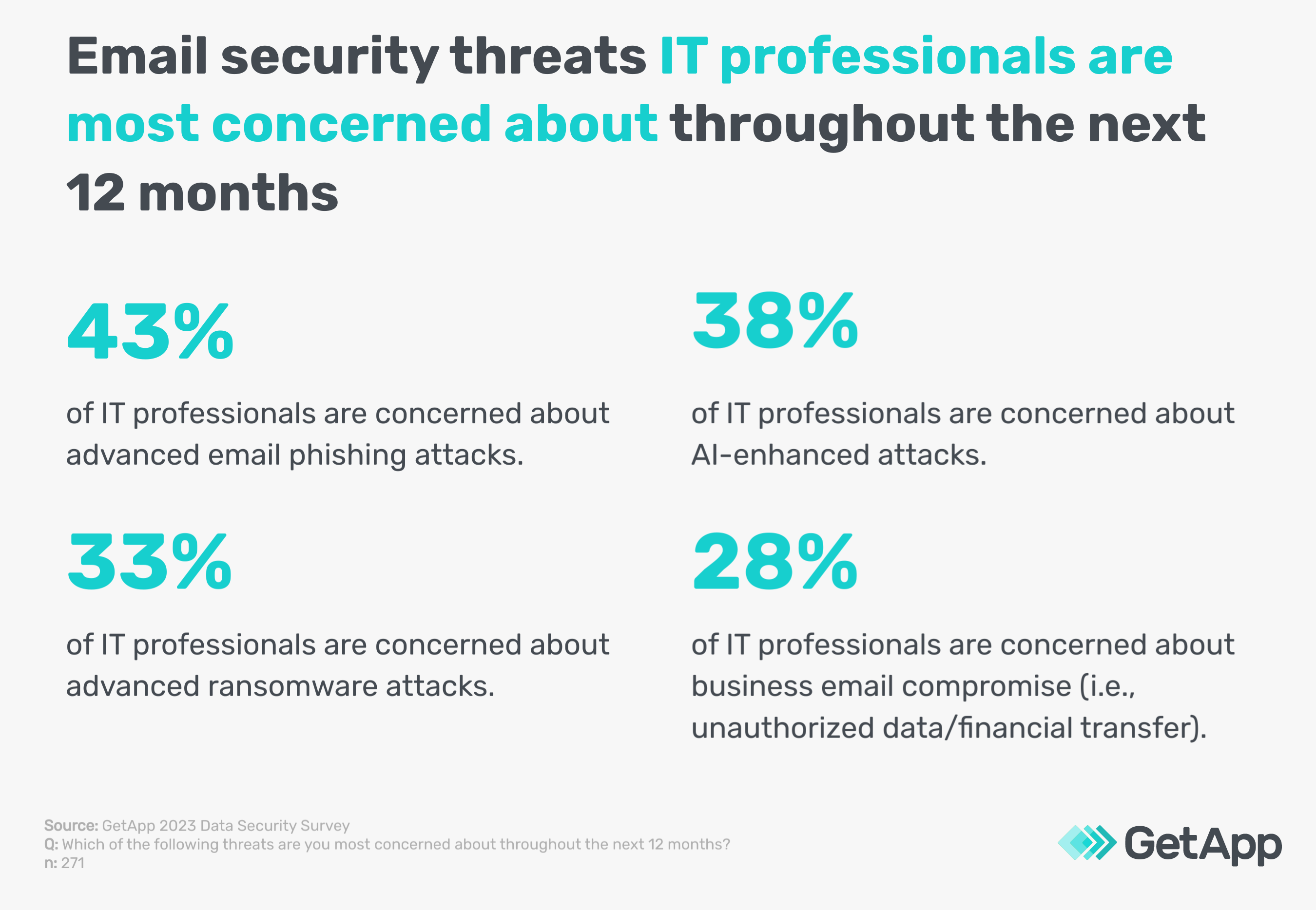
Email security best practices extend beyond using strong passwords and changing them every three months. Email security threats have evolved, and so must our approaches. Our survey* reveals IT professionals are most concerned about advanced email phishing attacks, AI-enhanced email attacks, advanced ransomware attacks, and business email compromise practices.
Using insights from Gartner [1], we share seven best practices for email security to curtail sophisticated email attacks. But before we dive in, it’s important to understand the types of email security so any emerging tech we mention ahead doesn’t seem impractical to you.
10 types of email security businesses should know
These email security types are a combination of software and best practices.
1. Spam filters: Spam filters, AKA anti-spam software screens incoming emails to block unsolicited, potentially harmful email messages. They use keyword filtering and sender verification to protect users' inboxes.
2. Antivirus protection: An antivirus scans emails for malware like viruses and Trojans, protecting the system from harmful software that could compromise data or functionality.
3. Anti-phishing techniques: These techniques identify and block deceptive phishing attack emails to steal sensitive information. They scrutinize email content for suspicious characteristics.
4. Encryption: Email encryption encodes messages to protect sensitive information, ensuring that only intended recipients can read the content, in transit or end-to-end.
5. Secure email gateways: Secure email gateways (SEGs) monitor emails entering and leaving an organization, scanning for malware, spam, and enforcing email traffic rules.
6. Data loss prevention (DLP): DLP tools prevent the unauthorized transmission of sensitive data via email, monitoring and protecting data in transit, use, and at rest.
7. Authentication protocols: Email security protocols like SPF, DKIM, and DMARC verify sender authenticity, preventing email spoofing and ensuring message integrity.
8. Email archiving solutions: Secure email archiving stores important messages for retrieval, protecting against data loss and maintaining an audit trail for compliance.
9. User awareness and training: Educating users on safe email practices is crucial, including identifying phishing, handling suspicious emails, and following organizational email policies.
10. Multi-Factor authentication (MFA): MFA adds an extra security layer by requiring multiple verification factors to access email accounts, significantly reducing unauthorized access risks.
Having understood the types of email security, let’s talk about essential email security tips.
7 best practices for email security
Researchers at Gartner consider these email security best practices top-of-the-line for businesses of all sizes. [1] These unconventional methods are new and thriving, so they may seem intimidating to implement at first. However, when utilized, they can shield your small to midsize business from even the most advanced email cyber attacks.
1. Implement advanced email security with artificial intelligence (AI) and machine learning (ML)
As we stated in the beginning, per our survey*, 38% of IT professionals are concerned about AI-enhanced attacks, where cyberattackers use automation capabilities to penetrate businesses’ email server networks. A report also surfaced stating that over 80% of security leaders have received AI email attacks. [2]
It’s vital for SMBs to use AI for their defense. Employ email security solutions like secure email gateways, which leverage machine learning (ML) and artificial intelligence (AI) to protect against business email compromise (BEC). BEC is a sophisticated scam that targets businesses through email fraud.
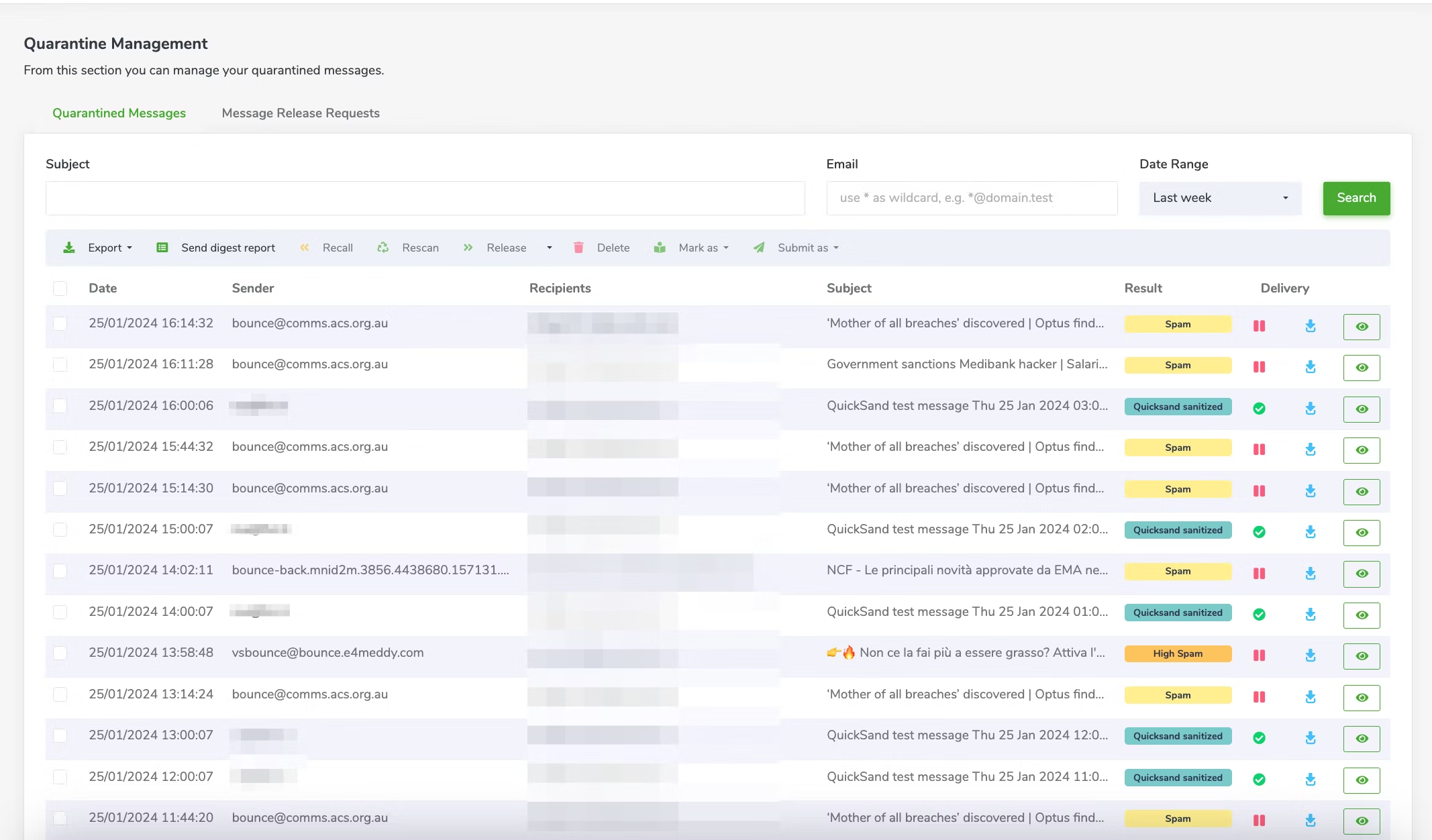
Libraesva secure email gateway uses threat intelligence to quarantine potential spam emails automatically (Source)
These advanced systems use email threat intelligence to analyze conversation histories to detect unusual patterns, such as abrupt changes in language or tone, or anomalies like unexpected requests for sensitive information. Organizations of all sizes use them, primarily in their email communication channels.
The tech scans incoming and outgoing emails, identifying and mitigating potential threats like sophisticated phishing schemes or malware-infected email attachments. The rationale for using such tools is to preemptively catch phishing attempts, which might be overlooked by conventional methods like basic spam filters or simple rule-based systems. Without these, companies risk financial losses and data breaches.
Tip to ace this step
Regularly update your email security software. New threats emerge constantly, and updated software can adapt better with the latest ML and AI capabilities, ensuring stronger protection against evolving email threats.
2. Augment cloud-email security with third-party solutions
It's crucial to evaluate the built-in security features of your cloud communication platforms, such as spam filtering and basic malware detection, to enhance them with third-party solutions like advanced threat protection services and encryption tools.
Most cloud email providers offer basic security features, like spam filters and simple virus scanning, but these may not be enough for sophisticated cyberattacks, such as targeted spear-phishing or advanced persistent threats (APTs).
This best practice is adopted by organizations that rely on cloud-based email services. Implement it by initially assessing the native security features of your email platform and then integrating additional third-party security tools.
These tools provide an extra layer of security, including detailed threat analysis and multi-factor authentication, against advanced threats, such as zero-day exploits and complex malware attacks. Failing to augment these systems could leave organizations vulnerable to intricate phishing schemes and malware attacks.
Tip to ace this step
Choose a third-party email security solution that complements and fills the gaps in your cloud email provider's native security features. Look for solutions with advanced threat intelligence capabilities like real-time link scanning and anomaly detection to fortify your email defense.
3. Ensure multifaceted protection against credential theft
It's crucial to ensure that your email security solution offers multifaceted protection against credential theft. This means having a system in place that not only safeguards against traditional phishing attempts but also employs computer vision technology to scrutinize URLs.
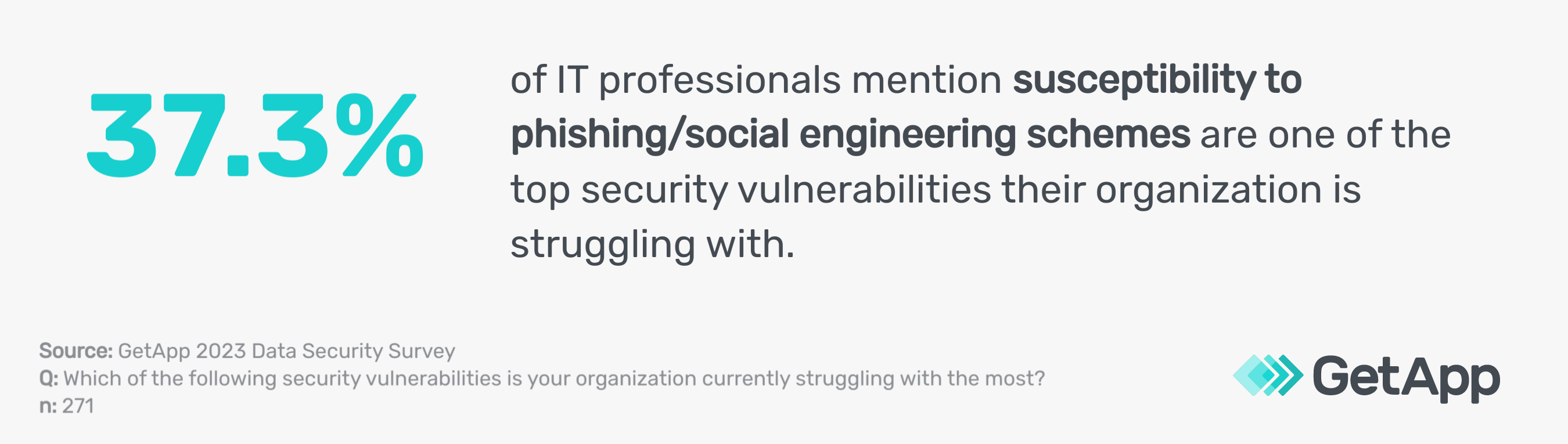
Phishing and social engineering schemes are one of the top concerns of IT professionals per our data security survey.*
This advanced feature helps detect and neutralize threats posed by URLs impersonating common log-on pages, a common tactic in credential phishing scams.
Organizations implement this by choosing anti-spam software with SURLB/URIBL filtering, including analyzing email content for deceptive links. The goal is to prevent unauthorized access to sensitive data by identifying and blocking attempts to steal login credentials.
Neglecting this aspect of email security could lead to significant data breaches and unauthorized access to critical systems.
Tip to ace this step
Regularly conduct phishing simulations within your organization to educate employees on recognizing and reporting potential credential theft attempts. This proactive approach enhances your overall email security strategy and complements technical safeguards.
4. Incorporate API-based ICES in email security evaluation
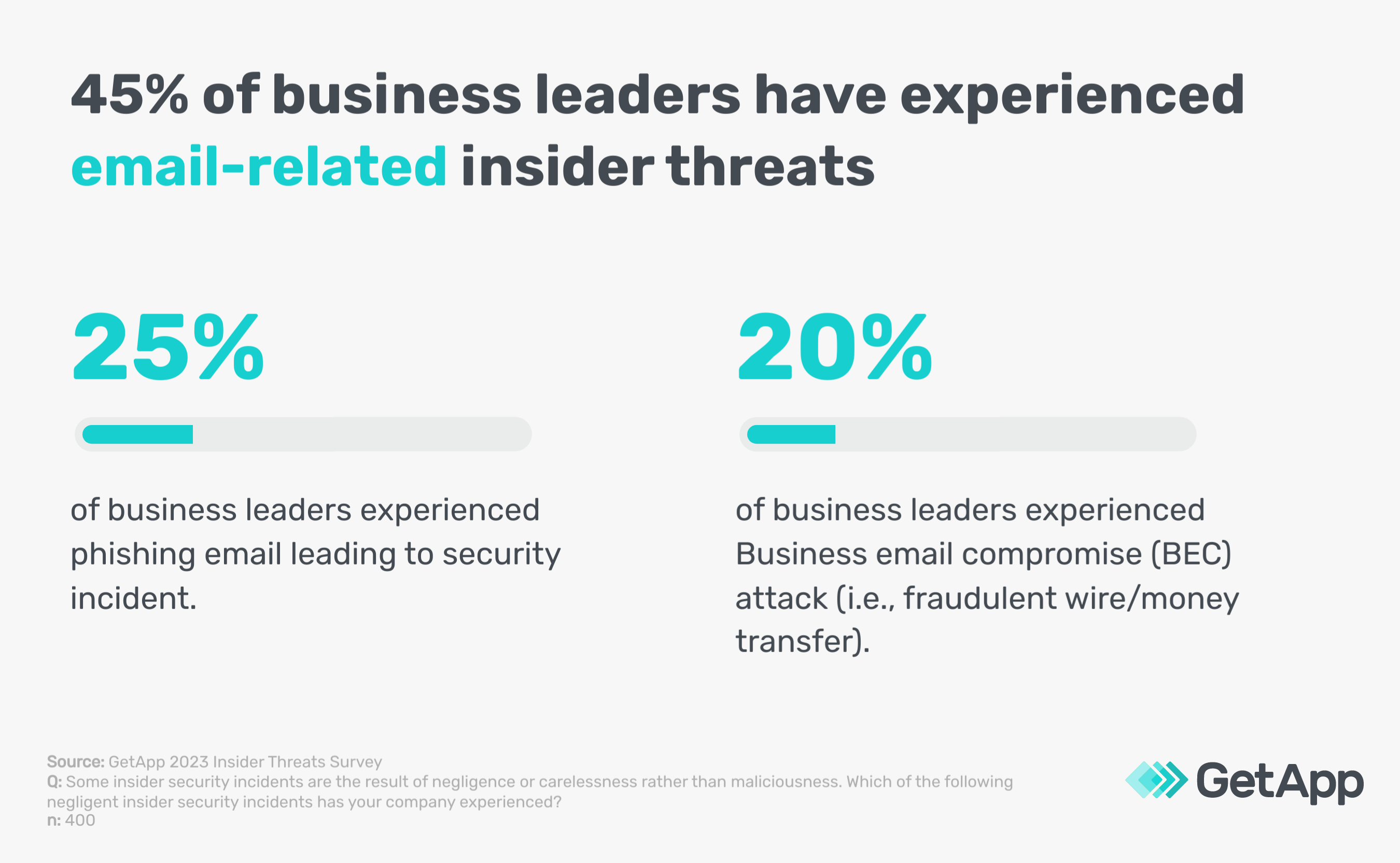
When evaluating your email security solutions, also include API-based Internal Communication and Email Security (ICES) solutions. These solutions stand out for their simplicity in evaluation and the additional visibility they provide into internal traffic and other communication channels. This enhanced oversight is crucial to reducing insider threat risk, which is pretty common among SMBs per our 2023 Insider Threats Survey.**
API-based ICES solutions create communication graphs and establish baselines of user activity. This approach helps detect suspicious behavior that might otherwise go unnoticed. These systems can effectively identify potential internal threats or compromised accounts by analyzing patterns and deviations in internal communications.
Organizations benefit from this by gaining a more comprehensive understanding of their internal communication security landscape. This, in turn, allows for quicker response and mitigation of threats from within the network. Neglecting to include such tools in your security arsenal could leave blind spots in detecting insider threats or subtle signs of compromise.
Tip to ace this step
Integrate your API-based ICES solutions with your overall security infrastructure for a more unified defense strategy. This integration allows for seamless threat detection and response across different communication platforms and internal networks.
5. Prevent account takeover with multi-factor authentication
MFA adds an essential layer of security that requires users to provide two or more verification factors. It could be something the user knows (like a password), something the user has (like a mobile device for receiving a verification code), or biometric identification (like a fingerprint or facial recognition) before accessing their email accounts.
This multi-layered approach ensures that even if one authentication factor is breached, unauthorized access is still barred. Almost every business is required to use MFA for business applications according to GetApp’s 2022 Biometrics/Passwordless survey.***
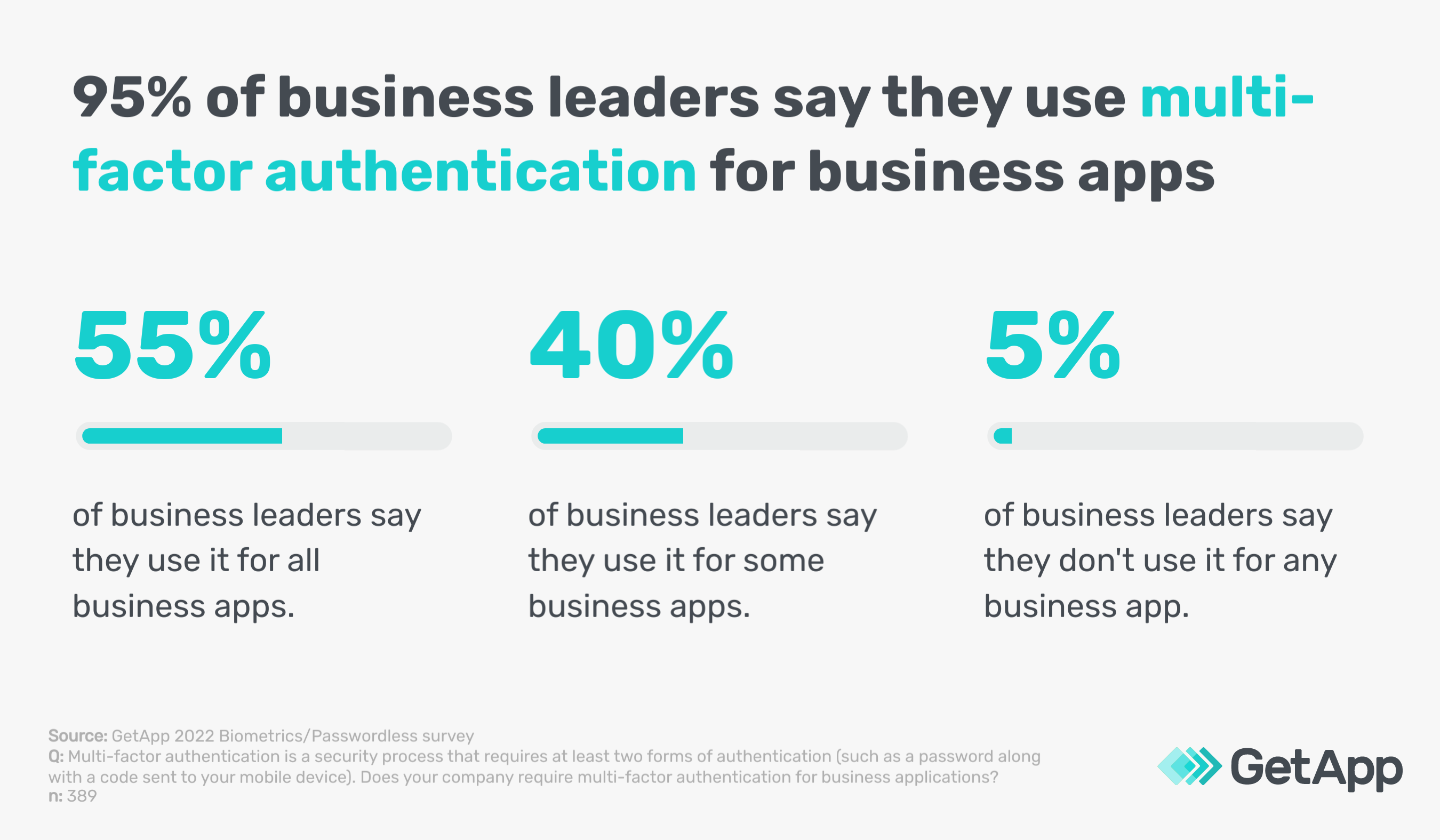
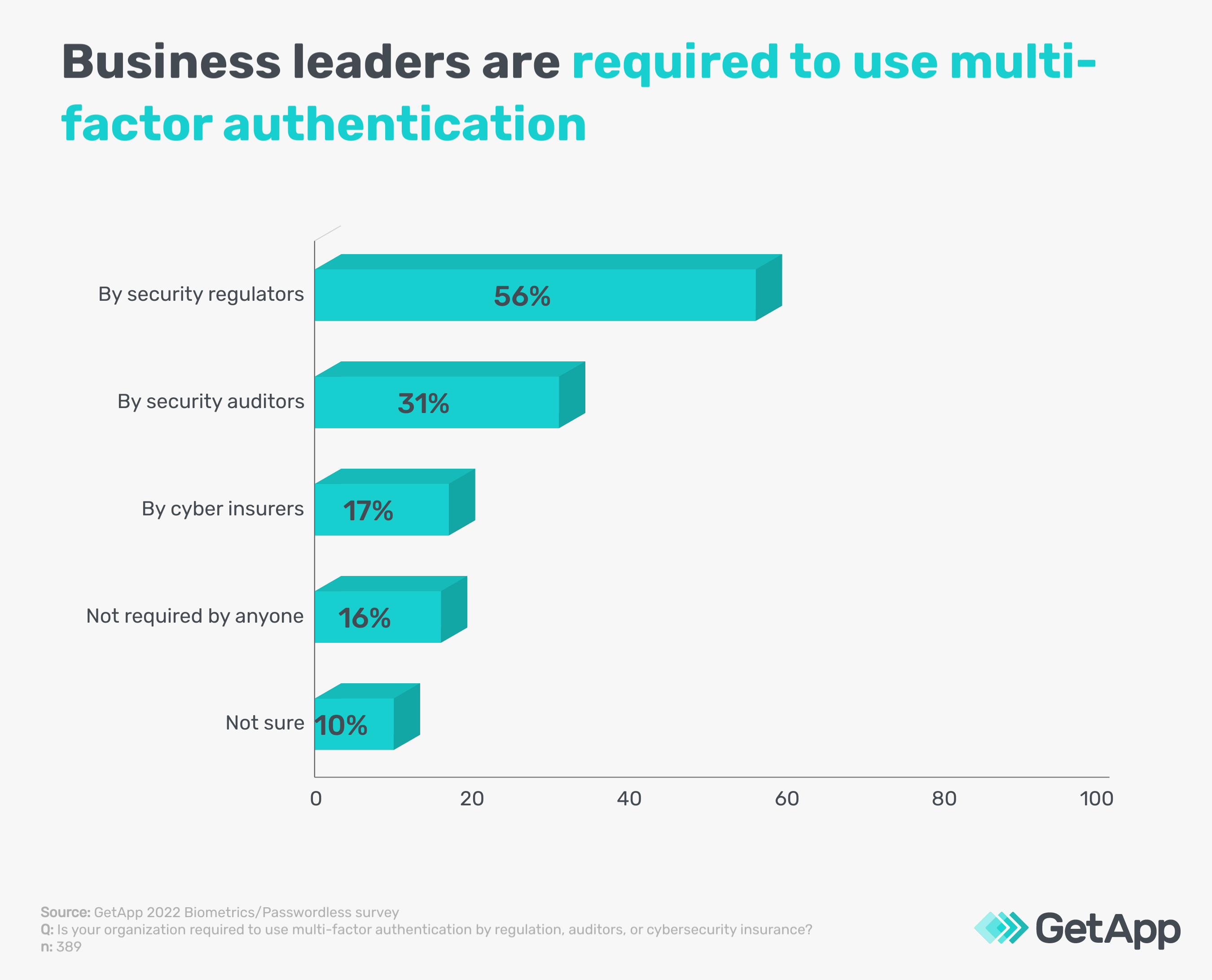
Given the simplicity of implementing MFA and its effectiveness in enhancing security, it's a critical step that many organizations across various sectors are required to follow as a standard email security protocol by security regulators, auditors, and cyber security insurance providers.
Tip to ace this step
Use a time-based one-time password (TOTP) as a part of your MFA setup. Unlike SMS-based codes, TOTPs are generated by an app and are valid only for a short period, offering a more secure alternative in the MFA process.
Also read: 5 Types of Authentication To Secure Your Small Business
6. Invest in user education and standard operating procedures
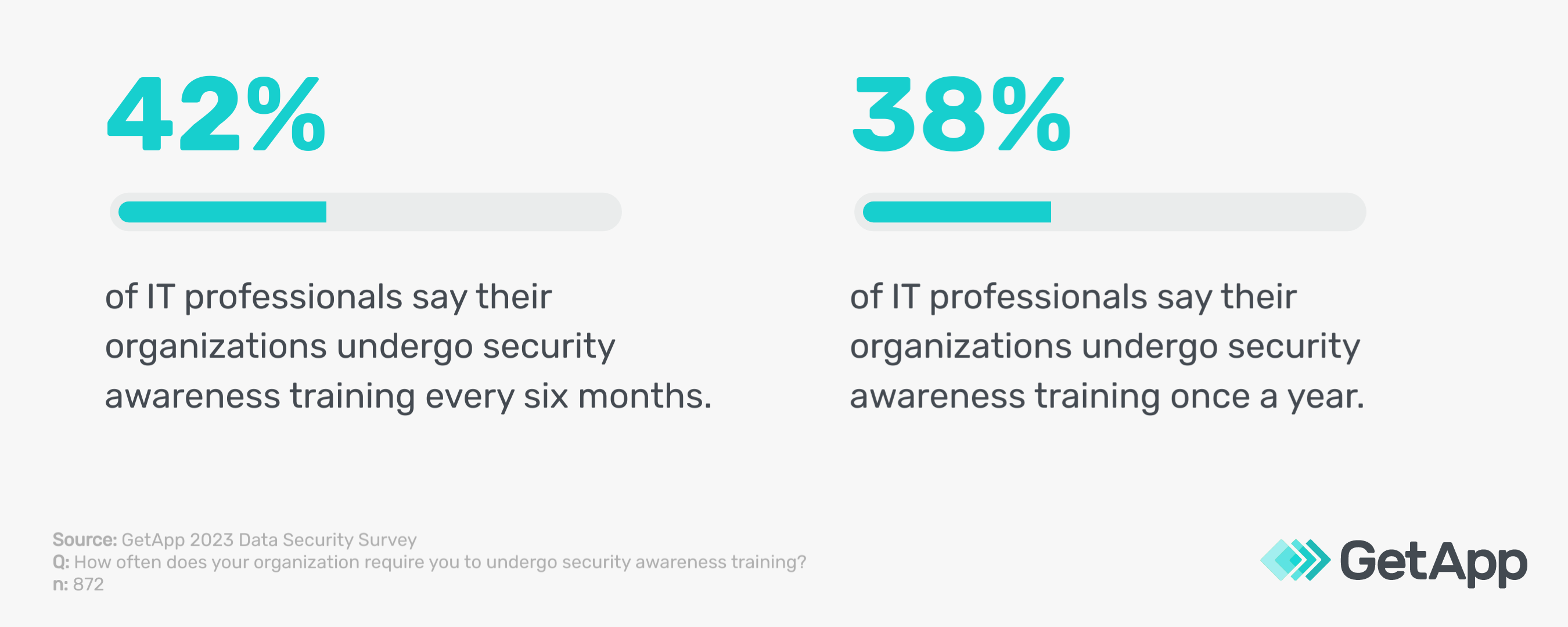
Employee education is crucial to prevent data breaches and financial fraud. This includes training on standard operating procedures, such as double-checking email origins.
It also involves verifying requests through secondary communication channels when handling financial and sensitive data transactions. Impersonation attacks, such as CEO fraud and payment diversion scams, often target these transactions.
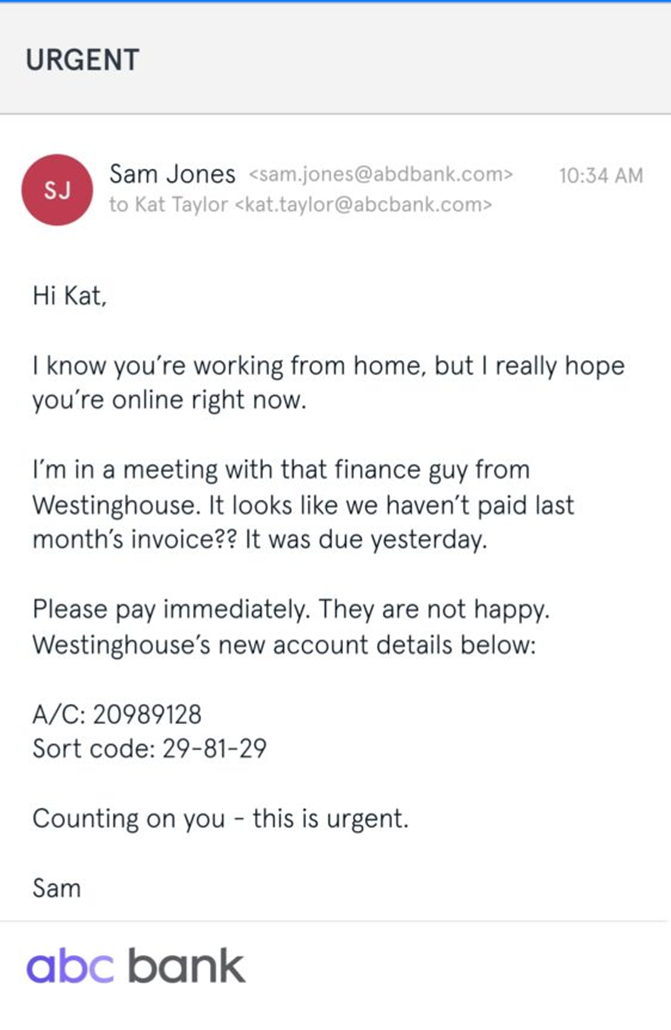
An example of CEO-fraud impersonation attack by cyber criminals [3]
Enhance this training with context-aware banners (alerts within the email platform indicating suspicious emails) and in-line prompts (messages prompting users to re-evaluate emails with unusual requests), which serve as real-time reminders and educational tools.
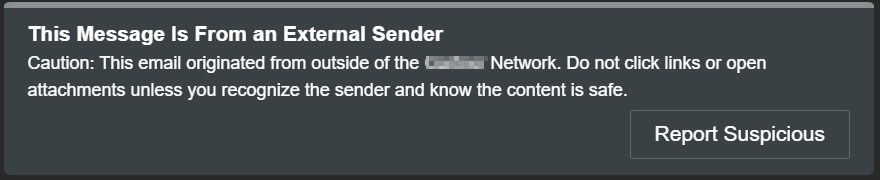
An example of a context-aware banner indicating suspicious email [Screenshot taken by the author]
Use security awareness training software to conduct this type of training. These tools offer interactive modules and simulated phishing email exercises. This approach not only maintains your employees’ ability to recognize and respond to threats but also ingrains safe practices as a part of their routine email interactions.
Tip to ace this step
Regularly update training materials and prompts by subscribing to security newsletters and updates from reputable cybersecurity organizations and tech-research firms like Gartner. Utilize these resources to stay informed about the latest threat patterns and adjust your training content accordingly. Keeping users informed about current threats ensures they remain vigilant and prepared.
Recommended read: 5 Tips To Maintain Security When Employees Work Remotely
7. Deploy advanced security technologies for new-gen email protection
You need to integrate a range of specialized email security technologies to create a strong email defense ecosystem. First, manage user-reported unwanted emails efficiently with an integrated managed security operations and response automation (SOAR) capability, which uses features like threat intelligence and automated response protocols. Integrate SOAR with your existing email systems and security tools for seamless threat management.
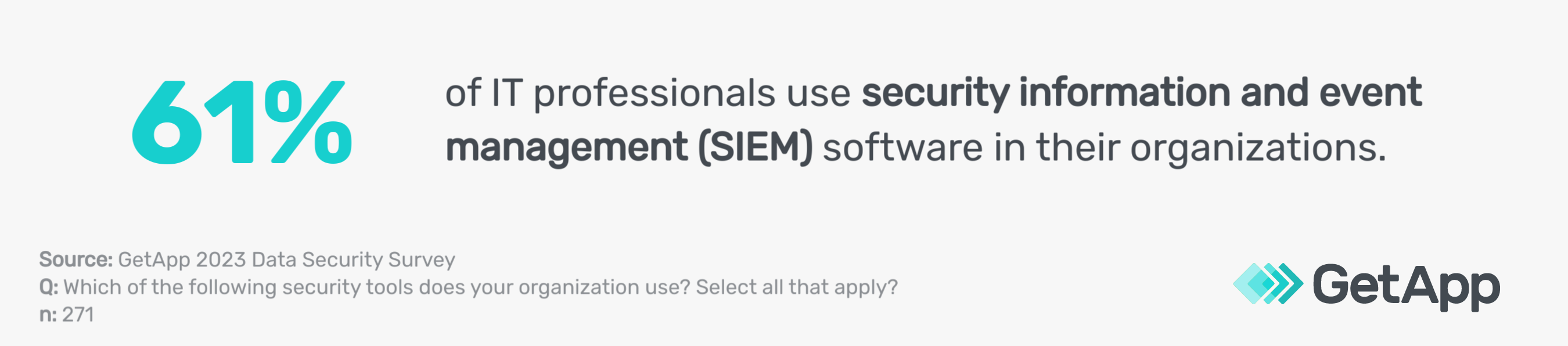
Next, incorporate email events, such as suspicious attachments and unusual sender behavior, into a broader extended detection and response (XDR) or security information and event management (SIEM) strategy. XDR provides comprehensive threat detection across networks, while SIEM/SOAR offers real-time analysis and automated response to security incidents. To incorporate them, align their functionalities with your current security infrastructure.
When selecting vendors for these tools, look for those offering comprehensive integration capabilities, strong customer support, a proven track record in threat detection, and continuous updates to their threat intelligence databases.
Implement domain-based message authentication, reporting, and conformance (DMARC) to combat exact domain spoofing attacks, where attackers mimic legitimate email domains. DMARC verifies the sender's authenticity and ensures email integrity.
Monitor DMARC rejects, which are emails that fail DMARC authentication, to identify potential spoofing attempts. Manage sender policy framework (SPF) records, which validate email sources, to enhance email authenticity.
Lastly, consider the solution's role in your data security governance framework, which outlines how data is managed and protected. Use data loss prevention (DLP) strategies to prevent unauthorized data transmission, email encryption to secure data, and stored data discovery tools to locate and manage stored sensitive data—like personal identification information and financial records—protecting them from unauthorized access or external leaks.
Tip to ace this step
Regularly review and update your security protocols, such as access controls and encryption standards, to align with these technologies. Stay informed about the latest cyber threats via news and research reports of firms like Gartner so you can adjust your strategies accordingly to address vulnerabilities like zero-day exploits and advanced persistent threats.
Evaluate your current security strategy first
Understanding where your current security posture stands is a critical first step before you adopt these email security best practices. Often, business owners eager to enhance security rush into searching for software vendors. However, this enthusiasm can lead to over-investing or misdirected investments that don't align with your existing security needs.
We suggest filling in your details below to download GetApp’s free security assessment template. Collaborate with your key stakeholders in security and operations to complete the template detailing your current security practices. Feel free to customize specific columns to suit your needs better.
This process will provide a comprehensive overview of your organization's security infrastructure, highlighting areas that require attention and helping you to integrate necessary security upgrades strategically.
Methodology
*GetApp's 2023 Data Security Survey was conducted in August 2023 among 872 respondents to learn more about data security practices at U.S. businesses. All respondents were screened for full-time employment at U.S. businesses. 362 respondents identified as IT management professionals and 271 identified as IT security managers.
**GetApp conducted the Insider Threats survey in March 2023 among 400 respondents to learn more about insider threats at U.S. businesses. All respondents were screened for leadership positions within their company.
***GetApp 2022 Biometrics/Passwordless survey conducted this survey in January 2022 among 974 consumers, including 389 business leaders who reported management responsibilities or above to learn about attitudes toward biometrics and the use of multi-factor authentication by U.S. businesses.
Sources
Market Guide for Email Security, Gartner
Over 80% of security leaders have already received AI email attacks, Security Magazine
An example of CEO fraud, IT Governance US
Bhavya Aggarwal