

GetApp offers objective, independent research and verified user reviews. We may earn a referral fee when you visit a vendor through our links.
Our commitment
Independent research methodology
Our researchers use a mix of verified reviews, independent research, and objective methodologies to bring you selection and ranking information you can trust. While we may earn a referral fee when you visit a provider through our links or speak to an advisor, this has no influence on our research or methodology.
Verified user reviews
GetApp maintains a proprietary database of millions of in-depth, verified user reviews across thousands of products in hundreds of software categories. Our data scientists apply advanced modeling techniques to identify key insights about products based on those reviews. We may also share aggregated ratings and select excerpts from those reviews throughout our site.
Our human moderators verify that reviewers are real people and that reviews are authentic. They use leading tech to analyze text quality and to detect plagiarism and generative AI.
How GetApp ensures transparency
GetApp lists all providers across its website—not just those that pay us—so that users can make informed purchase decisions. GetApp is free for users. Software providers pay us for sponsored profiles to receive web traffic and sales opportunities. Sponsored profiles include a link-out icon that takes users to the provider’s website.
Top 4 Moodle Alternatives for Educators and Learners
Four user-recommended Moodle alternatives to support educators’ and students’ learning and development needs.


In the era of eLearning, the role of a learning management system (LMS) is inevitable. LMS software provides a framework to build, deliver, and track learning content. Moodle is an LMS tool that helps educators and trainers build an interactive online learning experience with a custom website, a set of learner-centric features, and dynamic courses.
The software consists of online course-building capabilities and advanced features such as reporting, gamification, course creation, and virtual learning. Moodle has a modular design that enables developers to integrate with third-party apps and achieve specific capabilities.
While Moodle comes with course building capabilities, it may not be the right fit for video-conferencing and advanced data analysis requirements. Hence, you should consider Moodle alternatives when searching for an LMS that aligns with your needs.
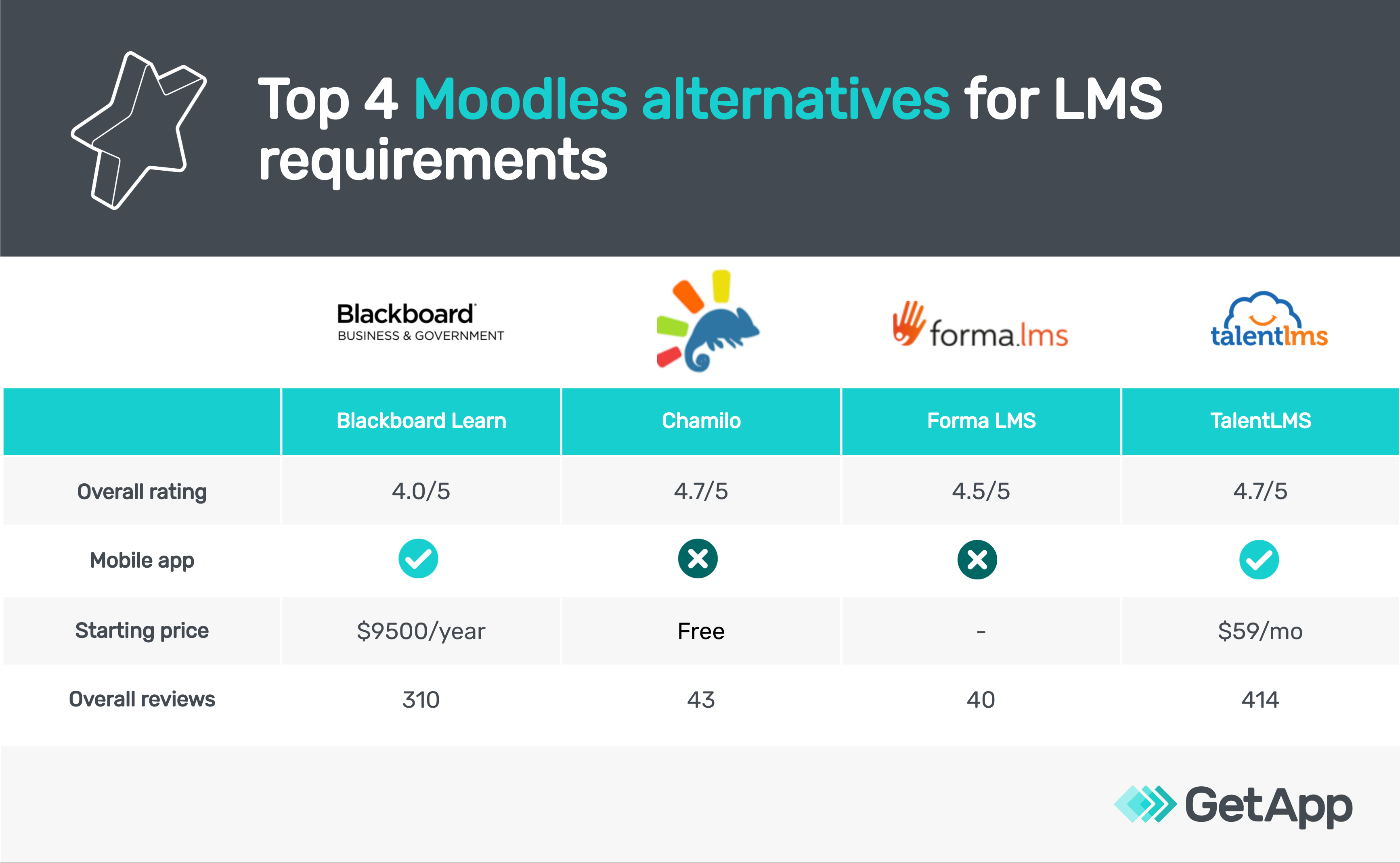
We asked users like you about the Moodle alternatives they considered when purchasing a learning management system. Here are the top four tools they identified; our list (sorted alphabetically) can provide a starting point for your software search.
*See our full methodology for selecting these four tools at the bottom of this article.
1. Blackboard Learn
Blackboard Learn is a learning management system (LMS) suitable for higher-education institutions, K-12 schools, and large businesses. The software allows teachers to choose the best pedagogical practices in the classroom via an online or hybrid learning model. It comes with a suite of features, including content authoring and virtual learning, class discussions, assignment scheduling, certification management, and social learning.
Blackboard Learn makes assignment submission simple with a range of in-built e-portfolios and blogs, helping students build their content. It eases communication with the available methods such as email, threaded discussions, grade portals, and live discussions. Teachers can use metric-based scoring, comments, and threaded discussions for grading and providing feedback. The system includes an in-built calendar that records upcoming deadlines and an activity feed that prioritizes key communications, projects, and courses.
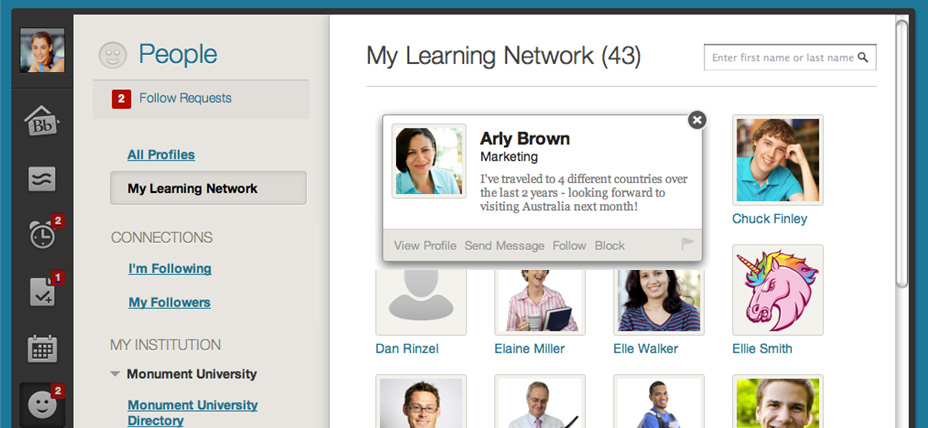
Learning network dashboard in Blackboard Learn (Source)
Here’s how Blackboard Learn compares with Moodle
Both Blackboard Learn and Moodle are LMS tools with quite the same features. But, when it comes to assessments, the test component in Blackboard Learn is highly comprehensive, automated, and customizable. It proves to be a bit more engaging and appealing than Moodle’s.
Platforms supported: Both Moodle and Blackboard Learn are web-based tools with a mobile app for both Android and iOS devices.
Typical customers: Both Moodle and Blackboard Learn are suitable for freelancers, small to midsize businesses, and large enterprises.
Customer support: Both offer customer support via email, phone, chat, and video tutorials.
Pricing: Both offer a free version for users. Moodle LMS is offered as a free open source software. Paid plans for Blackboard Learn starts at $9500 per year.
Click here for a side-by-side comparison of Blackboard Learn and Moodle.
2. Chamilo
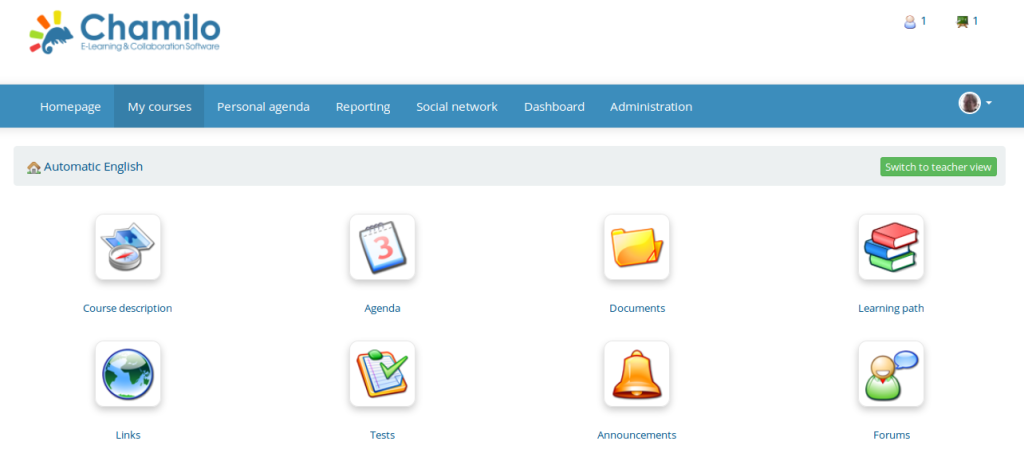
Chamilo is a cloud-based e-learning and collaboration platform that assists organizations with creating, publishing, and managing online training modules, assessments, surveys, and assignments. Its authoring tool helps teachers create customized eLearning courses with in-built templates and devise demos for learners. Businesses can personalize the software interface with their brand logos, monitor registrations, and compile available courses.
Chamilo’s video conferencing feature enables teachers to conduct virtual classes, track attendance, make assessments, track learner progress, and construct wikis to cooperate with trainers on document creation and editing. The software has a reporting feature that offers insights into student performance, time spent on courses, progress scores, messages, and ongoing sessions.
Here’s how Chamilo compares with Moodle
Both Chamilo and Moodle are open-source learning management systems, offering integration with multiple apps. However, Chamilo offers better collaboration and communication tools, focusing on real-time interactions.
Platforms supported: Both Chamilo and Moodle are web-based tools. Moodle has a mobile app for both Android and iOS devices, while Chamilo does not.
Typical customers: Both are suitable for freelancers, small to midsize businesses, and large enterprises.
Customer support: Both offer phone, email, 24/7 live rep, and chat support. Chamilo also provides a knowledge base and video tutorials, while Moodle only provides video tutorials.
Pricing: Both Moodle and Chamilo are free tools.
Click here for a side-by-side comparison between Chamilo and Moodle.
3. Forma LMS
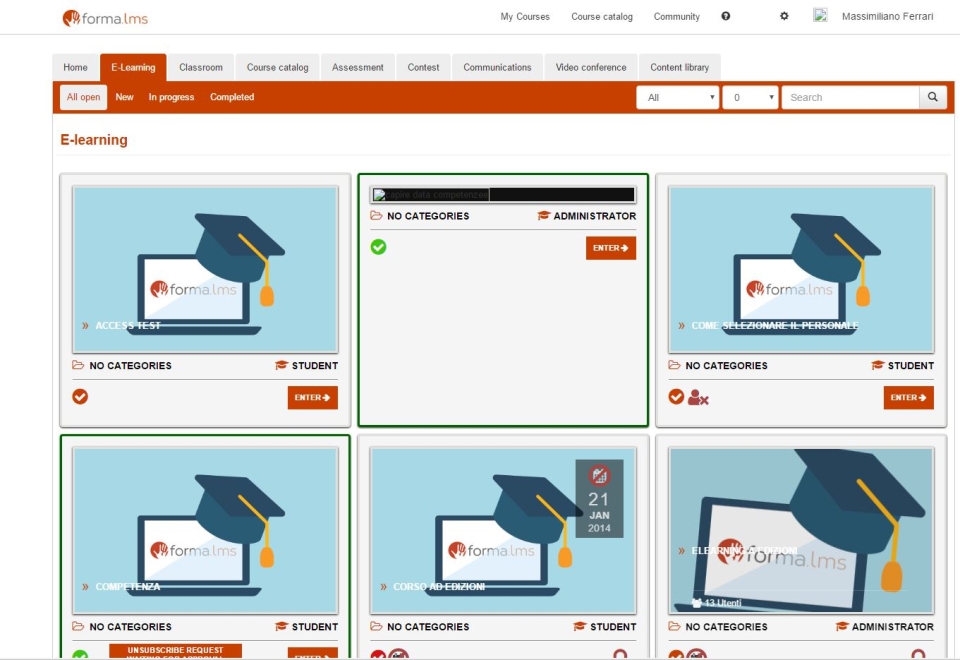
Forma LMS is an open-source learning management system (LMS) designed for corporate training requirements. It enables businesses to provide internal training to their employees, partners, dealers, and sellers, with a dedicated course for each department. You can also use Forma LMS as a platform to sell your custom courses to customers.
Forma LMS comes with a responsive layout which makes it more accessible and easier to monitor. The software comprises a variety of training resources such as shareable content object reference model (SCORM) multimedia, HTML pages, and embedded videos. You can access its assessments with in-built grading and scoring features. It enables instructors to integrate with their existing video conferencing tools and create webinars. Forma LMS allows teams to create certificates in PDF format using customizable graphic templates.
Here’s how Forma LMS compares with Moodle
Both Forma LMS and Moodle offer a variety of elements to create custom online learning courses. But, Forma LMS also provides eCommerce integration which allows you to sell and promote your off-the-shelf courses.
Platforms supported: Both are web-based tools. Moodle offers a mobile app for both Android and iOS devices, which Forma LMS does not.
Typical customers: Both can be used by freelancers, small to midsize businesses, and large enterprises.
Customer support: Both offer email and chat support. Moodle also offers phone and 24/7 live rep support. Both provide video tutorials, while Forma LMS also comes with a knowledge base.
Pricing: Both offer a free trial version for users. Moodle LMS is offered as a free open source software. Pricing for Forma LMS plans can be found on their website.
Click here for a side-by-side comparison of Forma LMS and Moodle.
4. TalentLMS
TalentLMS is an LMS platform designed for developing, deploying, and managing custom training programs for different business units. The software comes with a drag-and-drop feature in which you can add different types of media, including videos, presentations, and docs, to build your courses from scratch. You can organize online or in-person training programs, invite registrations, and send automated reminders for upcoming training programs.
TalentLMS tool allows you to work around your brand language by customizing the LMS using logos, domain, and theme. It also has a reporting feature to track training statuses in real-time. You can generate custom reports with dynamic dashboards and training infographics.
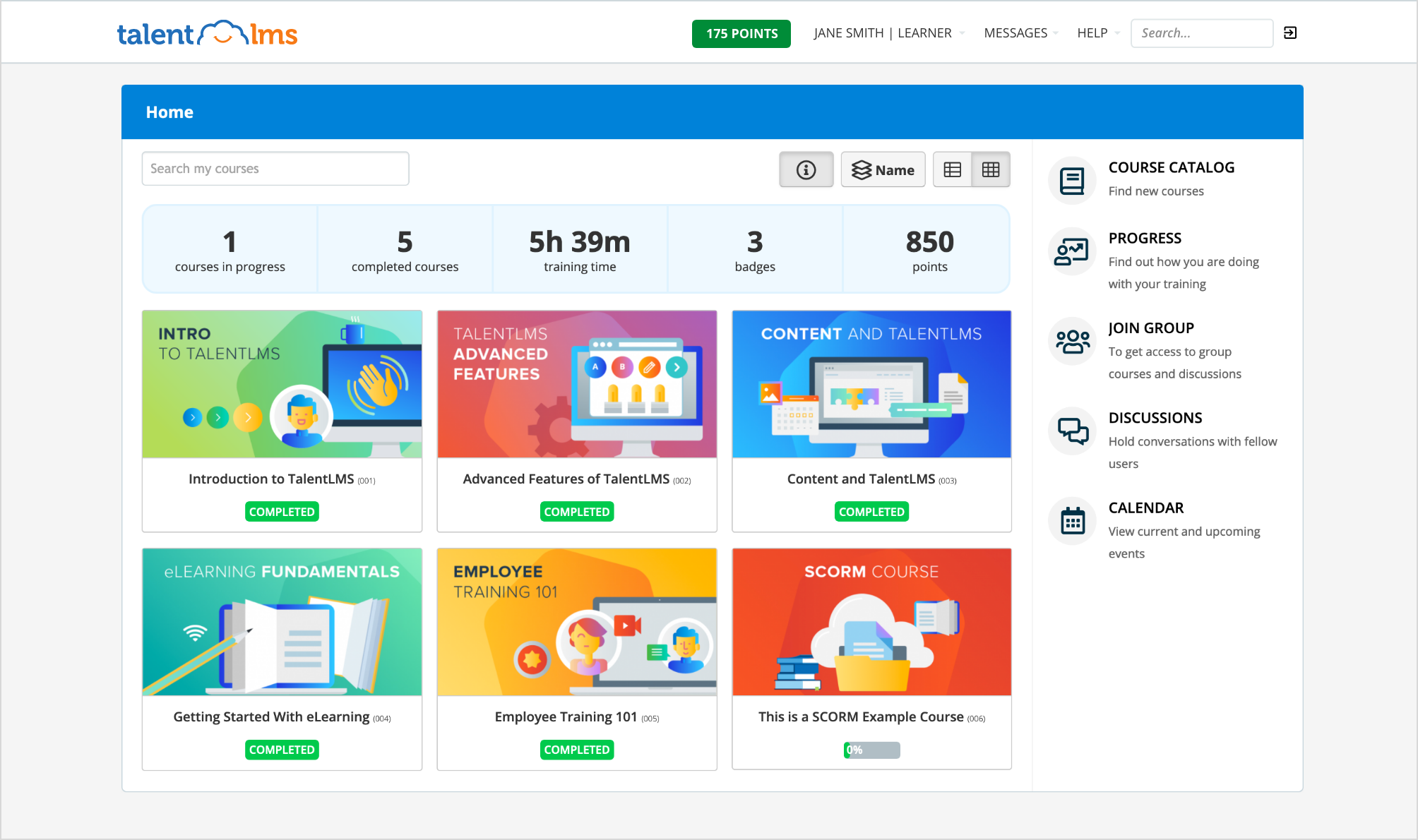
Here’s how TalentLMS compares with Moodle
TalentLMS comes with eCommerce capabilities, including plugins for WordPress and Shopify, among others that make it easier for you to promote and publish your training content online.
Platforms supported: Both are web-based tools. Both offer a mobile app for iOS and Android devices
Typical customers: Both are suitable for freelancers, small to midsize businesses, and large enterprises.
Customer support: Both offer support via email and chat. Moodle also offers phone support. Both the tools provide video tutorials, while TalentLMS also comes with a knowledge base.
Pricing: Both offer a free version for users. Moodle offers a free account, while TalentLMS paid plans start at $59 per month for up to 40 users.
Click here for a side-by-side comparison between TalentLMS and Moodle.
Assess all options to select the best Moodle alternative
An LMS tool also works as a knowledge management system for businesses of all sizes and higher education institutions, enabling them to gather, organize, share, and analyze training strategy and resources. You should assess all available options before selecting the right Moodle alternative for your business.
If your LMS requirements are more related to posting course material for your subjects or employees and less to online discussions or other advanced tools, Blackboard Learn can be a good option. However, since it does not support eCommerce, it may not be the right pick for businesses looking to offer courses online or collect payments for training.
If you want to invest in an easy-to-use LMS that enables you to connect and collaborate with students, you can go with Chamilo. It allows you to create an interactive learning environment with collaborative, multilingual tools.
If you are a corporate employee, looking for an LMS tool to support your corporate training requirements such as internal employee training, you should consider Forma LMS.
If you need an advanced LMS with reporting and analytics, e-commerce, and other features, TalentLMS can be the right tool for you. Since TalentLMS is a web-based tool, it is ideal for companies that look forward to expanding their training capabilities both internally and externally.
Want more options?
Check out Moodle's comparisons page to find other learning management system (LMS) that can be suitable for Moodle alternatives.
Methodology
At GetApp, we objectively select and rank products based on a methodology developed by our research team. Some vendors pay us when they receive web traffic, but this has no influence on our methodology.
Products featured in this article were identified in user reviews as other products considered at the same time as Moodle. In this article we highlighted the products with the highest number of other products considered mentions. To be included in this list, alternative products had to provide the following core learning management system (LMS) features: Assessment management, Course authoring, Course management, and Learner portal.
Disclaimer: We conducted this analysis based on reviews and ratings data as of December 13, 2021. In order to present the most up-to-date information, the product cards below show real-time ratings. Please note that this means the ratings value in the product card may not reflect the ratings value at the time of analysis.
With expertise in marketing and content strategy, Barkha’s work has been featured in Medium and educational websites. When not working, she can be found re-watching “The Office” or “Brooklyn Nine-Nine.”
mentioned in this article



More on Learning Management Systems



Apr 09, 2021


Mar 18, 2021

Dec 04, 2020