

GetApp offers objective, independent research and verified user reviews. We may earn a referral fee when you visit a vendor through our links.
Our commitment
Independent research methodology
Our researchers use a mix of verified reviews, independent research, and objective methodologies to bring you selection and ranking information you can trust. While we may earn a referral fee when you visit a provider through our links or speak to an advisor, this has no influence on our research or methodology.
Verified user reviews
GetApp maintains a proprietary database of millions of in-depth, verified user reviews across thousands of products in hundreds of software categories. Our data scientists apply advanced modeling techniques to identify key insights about products based on those reviews. We may also share aggregated ratings and select excerpts from those reviews throughout our site.
Our human moderators verify that reviewers are real people and that reviews are authentic. They use leading tech to analyze text quality and to detect plagiarism and generative AI.
How GetApp ensures transparency
GetApp lists all providers across its website—not just those that pay us—so that users can make informed purchase decisions. GetApp is free for users. Software providers pay us for sponsored profiles to receive web traffic and sales opportunities. Sponsored profiles include a link-out icon that takes users to the provider’s website.
Say Yes to No-Code Tools With These 5 Steps To Get You Started
Wouldn’t it be amazing if you could build your own apps without knowing how to code? Well, you can with no-code tools, and this article will show you how in 5 easy steps.


Have you ever thought about all the tools and software your business uses and realized that those applications are missing important features that could improve your workflow? You’re not alone.
In our recent Business Tools Survey [*], we found that 55% of respondents were only somewhat satisfied with their project management software, and 7% were dissatisfied with their tools altogether. The top reason they gave for their dissatisfaction was that their software was missing necessary features.
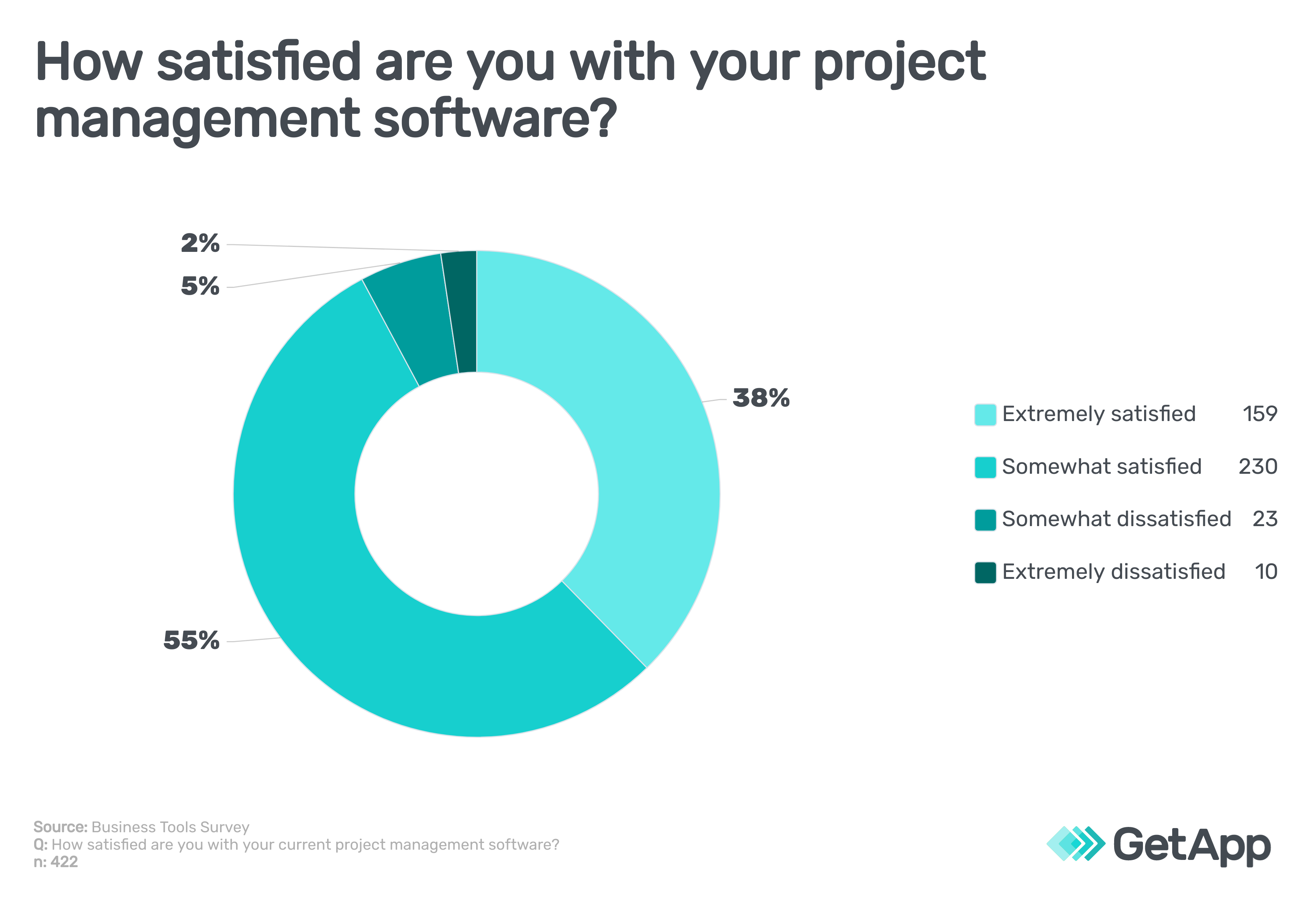
Now imagine if you could take that dissatisfaction and turn it into an opportunity to build and adjust your own work tools, all while using the right platform for your business. Many companies have already taken that step.
As recently as a decade ago, building your own software and apps may have seemed like a fantasy. But now, it is a reality. In fact, our recent Marketing Technology survey [**] found that almost 60% of startups and SMBs are already using low-code or no-code software. Moreover, Gartner forecasts that by 2025, 70% of new applications developed by enterprises will use low-code or no-code technologies, up from less than 25% in 2020 [1].
In this article, we’ll look at what no-code tools are, steps to get you started, and tips that will help you build your own business apps.
What are no-code tools?
No-code tools allow users to build new applications using precoded building blocks and a graphical user interface. The term “no-code” is a bit of a misnomer, as no-code tools use plenty of code, it’s just hidden behind a more user-friendly interface.
If you’ve ever designed a web page using a WYSIWYG (what you see is what you get) website builder, you’ll be familiar with the concept. While you’re positioning text, choosing a font, adding images, and more, the software is writing all the HTML for you. You don’t have to look behind the curtain unless you want to.
You may have also heard the term “low-code” tools.
These tools allow users to build applications using a no-code interface, but low-code tools also give users the option to open the hood and script with code if needed. If your organization has a team of developers with limited resources and a diverse level of expertise, low-code tools could offer a good balance of ease of use and versatility.
Five steps for getting started with no-code tools
No-code tools are designed to allow people without coding skills to build apps, but that doesn’t mean that they’re easy to use right away. Follow these steps to get started on the right foot and get the most out of your no-code platform.
1. Gauge interest and gather ideas. The most powerful tool in the world is useless if it goes unused, so gather interest before you invest in a no-code tool. Consult your employees and your IT staff to gauge feasibility. Also, ask team leads to document ideas they have for apps to build with a no-code platform. These ideas can be as simple as an internal website or a database of contacts.
2. Pick the right no-code platform for your team. No-code tools are not all built the same. They can range from spreadsheets, forms, drag-and-drop interfaces, and more. It’s worth trying out a few different tools to see what works for your team. But if you’re not sure where to start, our directory of more than 50 no-code development tools allows you to personalize your search based on your industry/organization type, business size, software integrations, and more.
Additional resources
New to software demos? Use our 5-point checklist to get the most out of your demonstrations.
3. Designate super users and schedule training sessions. Vendors want their customers to use their software successfully, so most will offer some type of new user training, whether it’s a hands-on walkthrough, a series of videos, or an online resource library. Designate super users from across your organization to go through this training so that they can help answer questions and train others.
4. Start off by building simple applications. Before trying to build something complex such as a new social media network, start off by using your new no-code tool to build simple apps first such as a basic website, a small database, or a short survey. These projects can also be used as tutorials to help others learn how to use the new tool.
5. Set up a community of practice. One way to maximize the benefits of no-code tools is to create a community of practice among employees. A community of practice is a group of people that have a shared focus and collaborate regularly to increase their understanding and expertise on the topic/practice. Doing this can empower and incentivize employees to use no-code tools creatively while also preventing duplication, ensuring compliance with business standards, and increasing communication around the tools.
Use no-code tools in a way that works for your business
Just because your email marketing software is easy to use doesn’t mean that you should give all your employees free rein to launch their own campaigns. In the same way, you shouldn’t let employees develop their own apps using no-code tools without some guidance and oversight. Here are a few tips to keep your organization on the right path while using no-code application development tools.
Focus on hosting and deployment requirements before zeroing in on specific app features. In other words, ask yourself, “Which team will be responsible for this app and how will we roll it out for use by other teams?” before you start building something.
Outline a governance process to ensure that no-code developed apps are being used properly, unused and unneeded apps are removed, and that data security is maintained.
Schedule periodic no-code development workshops to teach non-technical employees more about the tools, surface new ideas, and allow them to use no-code development tools in a sandbox environment. These workshops should encourage creativity and innovation.
Establish an internal proposal system to let employees pitch their app ideas. Promising ideas should be given the resources needed (time, development assistance, management support, etc.) to be built out into working prototypes.
To prevent chaos, establish an internal proposal system to let employees pitch their app ideas. Promising ideas should be given the resources needed (time, development assistance, management support, etc.) to be built out into working prototypes, while encouraging a community of practice.
Explore more no-code tools
Want to browse more no-code app development tools? Check out our directory of more than 50 no-code development software options.
Methodology
*GetApp conducted the Hybrid Work survey in May 2021 of 488 small-business employees and 503 small-business decision-makers to learn more about the preferences, benefits, challenges, and opportunities with a hybrid work model. Respondents were screened for employment status and business size.
**GetApp conducted the Global HR Survey (HR in the New Era) in January 2021 of 922 U.S. workers to learn more about their experience and preferences at work. Respondents were screened for employment status and business size.
Sources
As a seven-time award winner in the Maryland, Delaware, D.C. and Suburban Newspapers of America editorial contests, Andrew’s work has been featured in the Baltimore Sun and PSFK. He lives in Austin with his wife, son, and their rescue dog, Piper.
More on IT Management


Aug 08, 2024



Sep 18, 2024

May 29, 2024