GetApp offers objective, independent research and verified user reviews. We may earn a referral fee when you visit a vendor through our links.
Our commitment
Independent research methodology
Our researchers use a mix of verified reviews, independent research, and objective methodologies to bring you selection and ranking information you can trust. While we may earn a referral fee when you visit a provider through our links or speak to an advisor, this has no influence on our research or methodology.
Verified user reviews
GetApp maintains a proprietary database of millions of in-depth, verified user reviews across thousands of products in hundreds of software categories. Our data scientists apply advanced modeling techniques to identify key insights about products based on those reviews. We may also share aggregated ratings and select excerpts from those reviews throughout our site.
Our human moderators verify that reviewers are real people and that reviews are authentic. They use leading tech to analyze text quality and to detect plagiarism and generative AI.
How GetApp ensures transparency
GetApp lists all providers across its website—not just those that pay us—so that users can make informed purchase decisions. GetApp is free for users. Software providers pay us for sponsored profiles to receive web traffic and sales opportunities. Sponsored profiles include a link-out icon that takes users to the provider’s website.
How To Determine the Right Service Desk Staffing Model for Your Business
Understand the basics of service desk staffing, and use our calculator to estimate the number of service desk agents you need for query or incident management.

Is your small business information technology (IT) team overburdened with system malfunctions, hardware breakdowns, and forgotten passwords? Chances are, your in-house IT manager juggles tons of new requests daily. This an expensive in-house employee to bog down with repetitive tasks, but productivity and job satisfaction typically suffer for overburdened IT workers.
For small businesses, IT help desks are a critical outsourced business infrastructure for tackling IT challenges. Instead of a single support person, your employees get access to an around-the-clock, expert IT team who can quickly problem-solve basic requests and larger-scale issues.
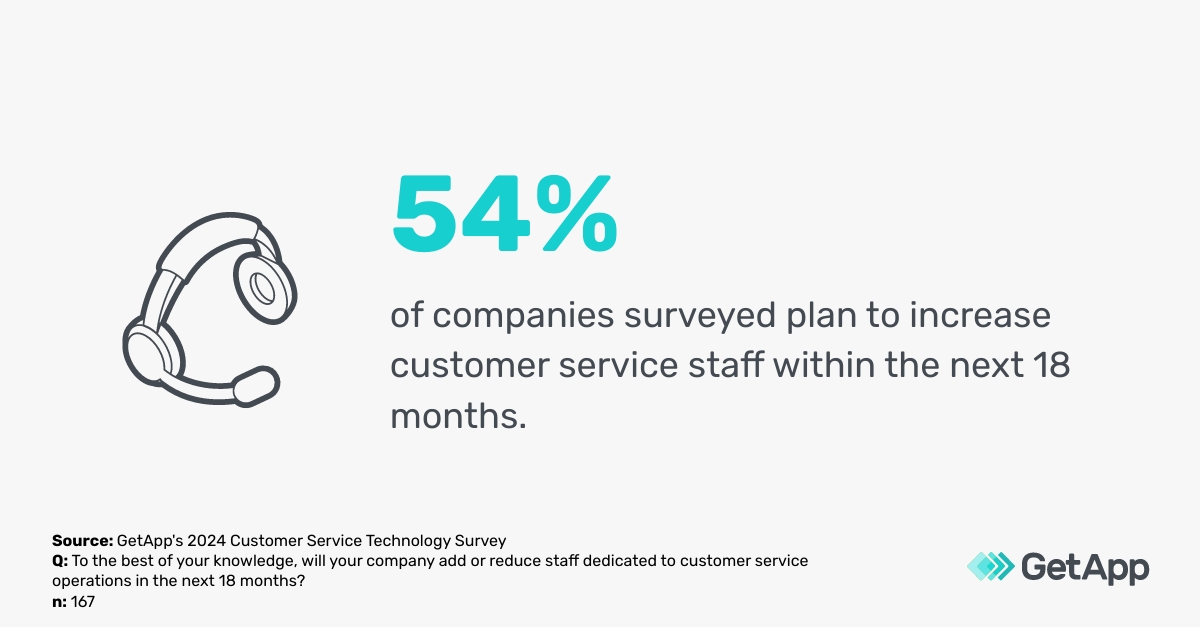
An IT service desk improves employee productivity, reduces overall IT costs, improves security, supports scalability, and offers access to specialized IT expertise. According to GetApp’s 2024 Customer Service Technology Survey,* 54% of U.S. of companies plan to increase customer service staff within the next 18 months, only 7% will decrease their staff, highlighting the need for more proactive, expert support.
What is an IT service desk?
An IT service desk typically assists internal employees with basic tech troubleshooting like software updates, new hardware, password resets, accessibility issues, and more. Instead of hiring in-house IT workers and burdening them with tiny, repetitive tasks, an outsourced IT service desk can be an option for adequately supporting your staff.
Especially for small businesses, it can be expensive to hire specialized IT workers in-house. They can be costly to hire and retain, but inevitably, they'll handle large volumes of requests every day, potentially overburdening their workload.
As a solution, IT service desks are full of experienced IT professionals with a wide range of knowledge from simple troubleshooting to more complex management, and they come at a more affordable, accessible cost for your small business. According to Gartner, a company spends roughly $162 per user with an in-house employee but only $20.5 for an agent-handled issue. [1]
What are help desk staffing models?
Different service desk staffing models fit different needs, depending on your company size, budget, number of locations, hours of operation, and complexity of your business needs. However, two popular options are an in-house service desk and an outsourced IT support desk.
Other popular breakdowns are a tiered generalist model or a tiered specialist model. Generalists support basic requests and escalate only when needed, and tiered specialists receive immediately routed specialized requests. According to GetApp's 2024 Customer Service Technology Survey, when it comes to answering phone requests specifically, U.S. businesses all have their own models:
61% handle phone calls in-house
14% outsource all customer service phone calls to a third-party or call center
25% of businesses use a combination of in-house and outsourced resources
Service desk staffing models: Your FAQs answered
Look at a few of the questions you might be wondering if you're looking to outsource your IT support to a service desk.
1. When should you invest in a service desk?
Most likely, when your business was just getting off the ground, one tech-savvy internal employee did the job. However, improving security as your business scales is more critical and the volume of troubleshooting requests will increase. An IT help desk provides scalable, on-demand resources. It’s also around this same time you may feel the need to have a ticketing system for tracking and monitoring the status of all requests.
When your IT manager is overburdened, customers need better service, and when you want to minimize IT distractions, it may be time to outsource to a helpdesk.
2. Should you have an in-house service team or consider outsourcing?
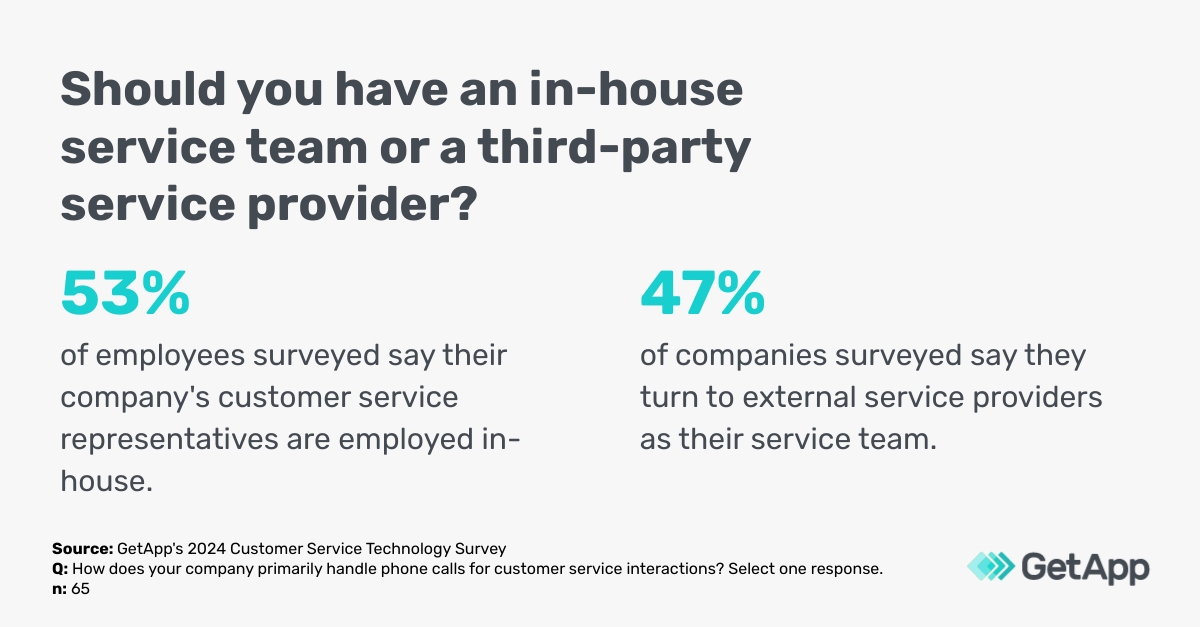
The answer is not entirely cut and dry, with 53% of U.S. employees saying their company's customer service representatives are employed in-house and 47% turning to external outsourced resources. While outsourcing helps avoid the hassle of hiring agents and managing their daily workflows, it gives you less control over your IT support in general. Key deciding factors include ticket volume, productivity requirements, and budget.
3. How should you organize or model your service desk team?
Most businesses adopt one of two models.
Tiered Generalist Model: Calls are answered by "generalists," and if the agent is unable to solve them, they're escalated to a specialist.
Tiered Specialist Model: Calls are immediately routed to "specialists" trained in specific IT challenges, resulting in fewer escalations but requiring more budget for their expertise.
According to research, 53% of U.S. survey respondents capitalize on CRM software to support customer service phone calls, 52% use help desk software, 48% utilize live chat software, 33% leverage telephony software, 50% pay for call center software, and 30% purchase custom-built software. These distributed models offer different support than traditional in-house staffing, especially when matching the skills and experience required. [2]
Getting service desk staffing right: How large a team do you need?
The trickiest thing is making sure you have the right volume of call agents to handle requests. If your service desk is understaffed, we'll start to have a pile-up of tickets past their due dates, affecting employee productivity and customer satisfaction. With too many agents, you'll quickly overextend your budget. Consider variables like number of requests, urgency, and expected turnaround time, and take a look at this quick overview of how to determine your IT service desk staffing ratio.
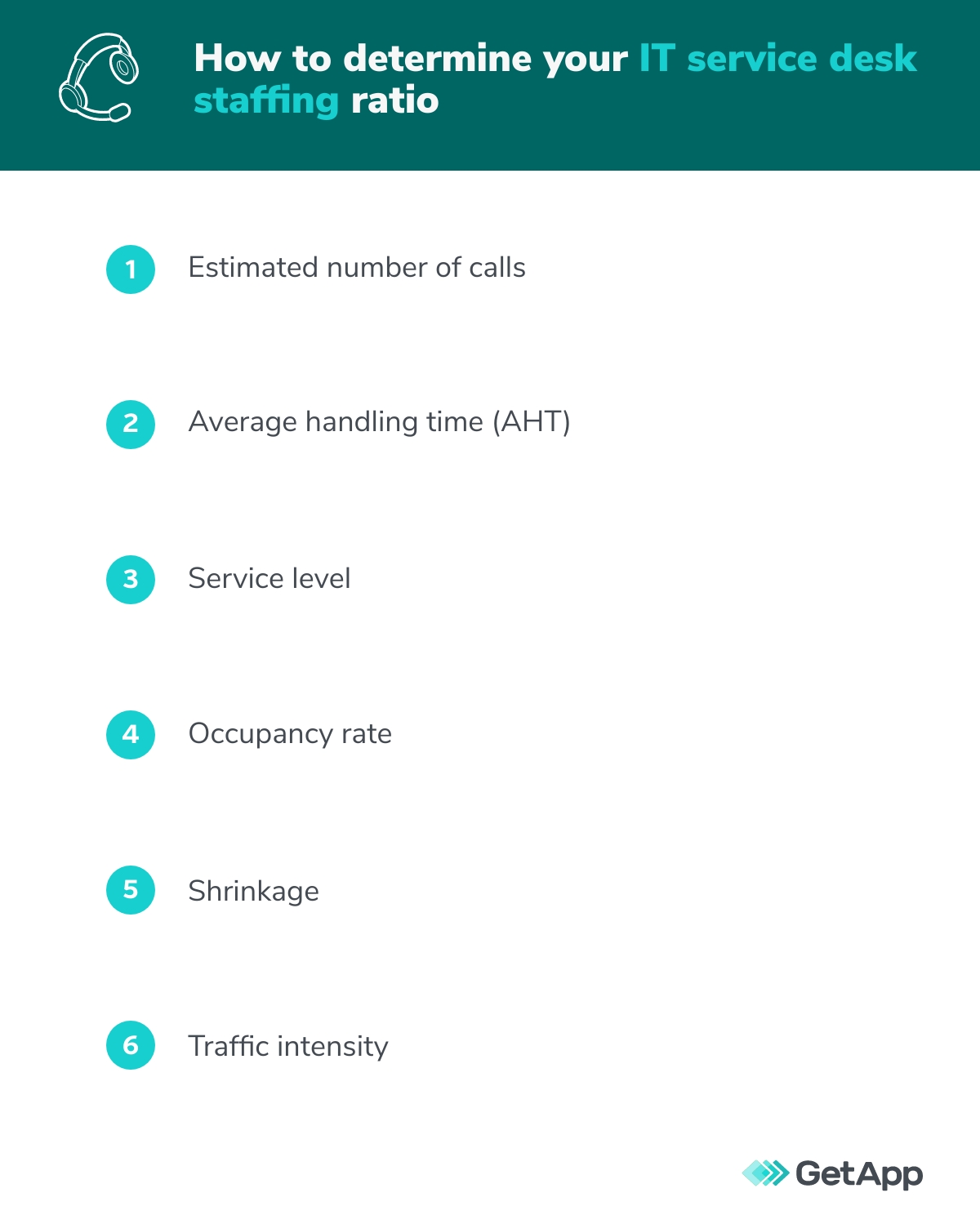
1. Estimated number of calls
This is the number of calls your staff members receive in a given time, and they can be as complex as a system malfunction or as simple as a password reset. Measure the estimated call volume rather than your number of employees.
One way to measure potential call volume is to tailor your IT service desk support based on business user personas instead of the traditional "one size fits all" approach. [3] Create personal and curated support that fits distinct user profiles within the business, leading to higher satisfaction and resolution management.
2. Average handling time (AHT)
This is the average duration of a customer call, meaning how long it takes to solve a problem. It includes total talk time, hold time during the call, and wrap-up time for the IT desk agent.
AHT = (Total talk time + Total hold time + Total wrap-up time) / Total number of calls handled
3. Service level
While the industry standard is to answer 80% of all calls within 20 seconds, maybe you want to answer 60% of calls within 45 seconds. [4] Set reasonable service level expectations so your agents can adequately serve employees and customers.
4. Occupancy rate
Occupancy rate is the percentage of time IT desk agents are actively on calls compared to their total logged-in time. This measures how busy IT workers are, and you want to limit the occupancy rate to 85% to 90%. Otherwise, you risk service quality suffering, and IT workers trying to end calls before an issue is adequately resolved.
5. Shrinkage
Shrinkage measures the percentage of time service agents are unavailable to answer calls during break times, their lunch hour, and any training or company meetings. The higher their time to work "shrinks," the more agents you need to handle calls.
The industry standard is to keep shrinkage to 30% to 35% to reduce agent burnout and prevent understaffing.
6. Traffic intensity
Traffic intensity is also known as call hours, which measures the time it would take your team to handle every call if they arrived one after the other.
How to use GetApp's service desk staffing calculator to determine your IT service desk staffing ratio
GetApp's unique service desk staffing calculator helps make all of these inputs easier than ever to understand based on the Erlang C formula. Whether you want to build an in-house team or outsource the process, make a copy of this template and enter your valuables for variables 1 through 4.
Next, enter your shrinkage level and work through the rest of the fields in green. The calculator will provide an estimated number of service agents you'll need after factoring in break time, time spent in training, and other variables.
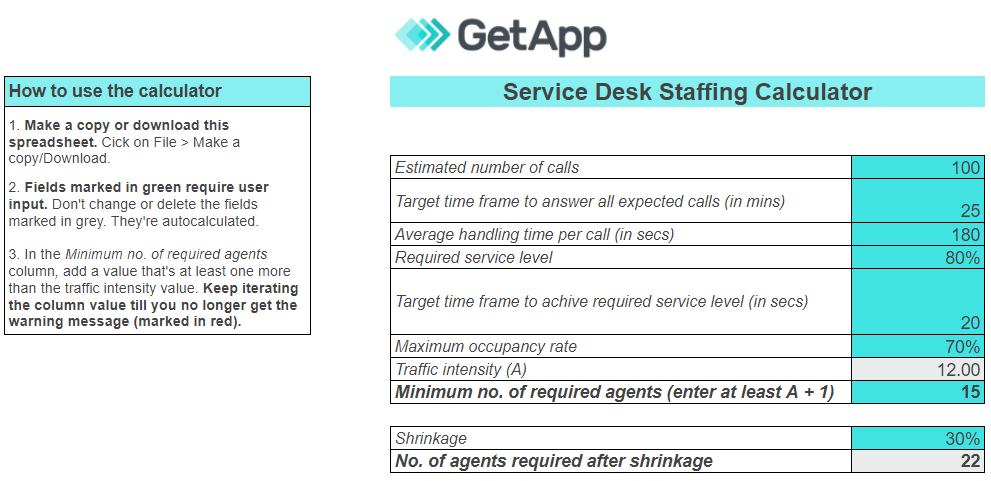
This handy, easy-to-use calculator for your service desk staffing ratio is an excellent way to start measuring how much support you need. However, remember that it doesn't factor in everything. Variables like abandoned or lost calls and queries answered over chat, email, or social media aren't factored in. You quickly realize that even small adjustments in average handling time or number of queries could skyrocket your number of required agents, so play around with different inputs.
Use software to make the most of your service desk
As customers demand more sophisticated help desk support, and employees are increasingly busy as your business grows, service desk staffing software helps automate and streamline all your processes. Especially as artificial intelligence (AI) becomes more advanced, 61% of U.S. respondents believe introducing AI into customer service has created a positive customer service experience. 35% of U.S. respondents that utilize customer service software with AI capabilities said it increased their staffing levels, bringing in more specialized, targeted support.
Research shows a simple three-step plan involving initial data analysis, optimizing practices, and leveraging intelligent automation is one of the best ways to resolve as many incidents as quickly as possible. [5] Consider investing in software as a cost-effective and productive way to make the most of your service desk, leverage the latest in AI, and bring in more specialized support.
To explore all the options for your business, check out the differences between help desk support, live chat, telephony, and a comprehensive call center. To learn more about help desk software for your business, check out the below resources:
Survey methodology
*GetApp's 2024 Customer Service Technology Survey was conducted online in May 2024 among 2,307 respondents in the U.S. (n=199), Canada (n=200), Brazil (n=188), Mexico (n=184), the U.K. (n=194), France (n=196), Italy (n=183), Germany (n=187), Spain (n=191), Australia (n=193), India (n=200), and Japan (n=192). The goal of the study was to explore how emerging call center technologies enable brands to deliver exceptional customer experiences. Respondents were screened to be full-time employees at organizations with 1 to 2,499 employees. They must be involved in customer service operations, use or buy customer service software, and handle customer service phone calls in-house or externally.
Sources
IT Key Metrics Data 2024: End-User Services Measures — IT Service Desk Analysis, Gartner
Transform IT Support by Developing Collaborative Support Hub Roles and Competencies, Gartner
Tailor Your IT Service Desk Support Based on Business User Personas, Gartner
What Are the Industry Standards for Call Centre Metrics?, Call Centre Helper
Improve Your Service Desk Performance With This Three-Step Plan, Gartner
Katherine McDermott
More on Help Desk

Aug 28, 2024

Nov 29, 2023


Mar 29, 2023