

GetApp offers objective, independent research and verified user reviews. We may earn a referral fee when you visit a vendor through our links.
Our commitment
Independent research methodology
Our researchers use a mix of verified reviews, independent research, and objective methodologies to bring you selection and ranking information you can trust. While we may earn a referral fee when you visit a provider through our links or speak to an advisor, this has no influence on our research or methodology.
Verified user reviews
GetApp maintains a proprietary database of millions of in-depth, verified user reviews across thousands of products in hundreds of software categories. Our data scientists apply advanced modeling techniques to identify key insights about products based on those reviews. We may also share aggregated ratings and select excerpts from those reviews throughout our site.
Our human moderators verify that reviewers are real people and that reviews are authentic. They use leading tech to analyze text quality and to detect plagiarism and generative AI.
How GetApp ensures transparency
GetApp lists all providers across its website—not just those that pay us—so that users can make informed purchase decisions. GetApp is free for users. Software providers pay us for sponsored profiles to receive web traffic and sales opportunities. Sponsored profiles include a link-out icon that takes users to the provider’s website.
What Is Load Testing? A 101 Guide For Small Business Owners
Everything you need to know about load testing to get your business ready for unexpected customer or technical load.


Load testing, as its name suggests, is a process of simulating significant loads on your business's digital platforms such as websites, apps, and servers to identify performance bottlenecks so they can be fixed before your business faces actual stress situations.
Small business leaders new to this practice and planning to perform it for the first time must clearly understand their system’s performance criteria, the expected user load, and the right metrics for accurate test result analysis.
Aleksei Pichukov [1], a software engineer at Raiffeisen Bank International AG says load testing can temporarily lead to system disruption or server downtime, but planning, precautions, and proper understanding lead to a seamless operation.

“The load you can simulate may differ and depend on the application type you have, and the business needs you want to achieve.”
—Aleksei Pichukov, Software engineer at RBI AG
What is load performance testing?
Load testing, aka load performance testing, checks a website or application's ability to manage high-traffic load. Quality assurance analysts use load testing software to simulate virtual users and traffic to mimic real-world conditions. They work with network engineers, system admins, and web developers to maintain the website or app's speed, stability, and responsiveness under heavy load. They watch for issues like slow page loads, server crashes, and transactional errors, and fix them together.
The following are some load testing objectives Pichukov says that analysts usually keep in check:
To enhance the website or application's operating capacity, i.e. its ability to handle tasks and transactions effectively so the application can support business growth and handle increased user demand.
To verify the current infrastructure—including servers, databases, and networks—that can support the website or application, ensuring that the investment in technology is sound and capable.
To assess the website’s strength under extreme user load, crucial for maintaining user experience during peak usage.
To identify the maximum number of users that can simultaneously access the application, which is vital to avoid performance issues or crashes during high-traffic periods.
To evaluate the website/application's scalability, or its capacity to grow and handle more load, which is necessary for strategic planning and resource management.
To expand user access to the application, aiming to ensure that a growing user base does not negatively impact application performance and user satisfaction.
Why is load testing important? And does your business app or website need it?
We asked Pichukov if load testing is necessary, especially for small business owners or startups who might not be familiar with this process. A lot of them haven't done a load test but still make it far. So, what makes load testing important?
He replies that any form of testing can significantly improve the quality of your application or service. Load testing, in particular, provides an overview of the overall state of the application/service and can reveal any weak spots. However, it is up to the business to prioritize these findings and answer the question, "Why am I doing this?”
Pichukov shares an example
If the business is developing a fitness or workout application, for example, load testing may not be a high priority, as the app can still track activities even if it goes offline. In such cases, performance tests to assess how the application handles long use of GPS or how battery levels are affected by the application would be more relevant.
On the other hand, if the application is a frontend for a messenger service or an eCommerce website, load testing is essential before going live. By simulating various loads and stress levels, developers can identify performance bottlenecks and performance issues, ensuring a seamless user experience. Investing time and resources in load testing can save the business from costly mistakes and reputational damage due to poor performance or downtime.
In summary, while load testing is an essential aspect of software development, its importance varies depending on the specific application or service being developed. Businesses must weigh the costs and benefits of load testing and prioritize it based on their unique needs and goals. But which type of load testing should you perform?
8 types of load testing you can perform on your website or app
Pichukov says these can also be referred to as different aspects of load testing, strategies, or techniques to perform the entire load test operation. Businesses sometimes perform all of them to ensure they don’t miss out on anything.
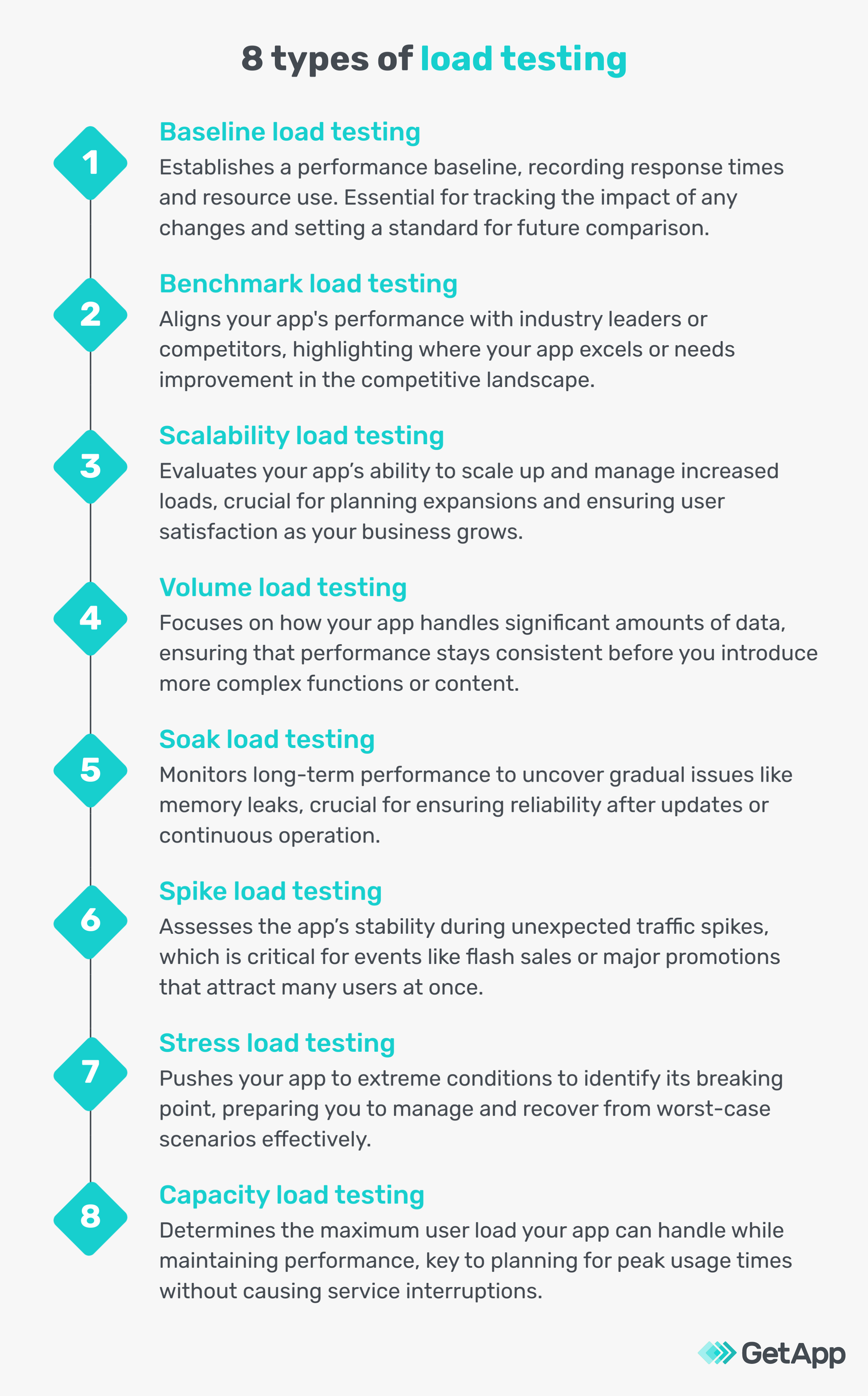
Now that you have a better understanding of what load testing is and what types there are, your efforts won’t benefit your business if you don’t know how to track and measure them. The following are the performance metrics QA analysts follow when conducting a load test on a website or application.
9 load testing metrics to measure your load test results
Pichukov says load testing metrics for mobile apps may vary because they do not always rely on backend servers. However, the metrics we have should be enough to gauge the capabilities of a site to handle unexpected loads.
1. Error rate
This metric counts errors like "page not found" over a time frame, like a day. A high rate suggests server issues. QA analysts use performance testing and monitoring tools to see errors as a part of all activities. They set up simulations or real-life test scenarios with these tools to mimic actual customer behavior. This approach helps get an accurate view of the app's performance and identify areas for improvement.
2. Response time
This tracks how quickly an app reacts, like the speed of loading a product page. Measured in seconds, it's vital for a good user experience. Analysts use application performance management (APM) tools to pinpoint delays, like slow page loads. To improve this, they optimize backend activities, like refining database queries and using content delivery networks (CDNs). Upgrading to faster servers also helps reduce response times, enhancing overall app performance.
3. Throughput
This metric measures how many tasks your app handles at once, like the number of purchases processed per second. It's key for smooth operations. Analysts use web performance and analytics tools to track this in real time. These tools show if the app keeps up with demand. If it's lagging, boosting server power or optimizing app code can improve how much work the app can handle.
4. Concurrent users
This counts multiple users on an app at the same time, like shoppers on an online store during a sale. Real-time monitoring feature of application performance management (APM) tools tracks this in real-time. They use dashboards to show live user numbers. To test, QA analysts simulate busy periods using load testing tools, creating scenarios like a big sale day. This checks if the website or app can handle heavy traffic without problems.
5. Peak response time
This finds the slowest click-to-result time in a test. It points out where the app gets bogged down. Like if a checkout process takes too long during a flash sale. Watching this closely helps. Making the code cleaner and the system stronger can make these slow moments better.
6. Average load time
This is the usual time it takes for a page or feature to show up after you click. It matters a lot because people hate waiting. For example, if a product image takes forever to load, customers might leave. Tools measure this across different situations to find an average. To make it faster, you can make the way your site sends out stuff more direct and make sure pictures aren't too big.
7. CPU utilization
This metric tells you how hard the server's brain is working, as a percent. Like when an online store gets lots of visitors, and the server has to work overtime. If it's too high, things might freeze. Keeping track of tests shows where the problems are. You can make things better by getting stronger servers or cleaning up the app's code.
8. Memory usage
This metric checks how much brain space the app uses, including RAM. If it's used a lot, your app could get slow. Think of a shopping cart on a website taking too long to update. Tools that keep an eye on memory help avoid these jams. You can fix it by organizing the app's memory needs better.
9. Network utilization
This is all about how much data your app is sending and getting, and if the internet line can handle it. It's shown in mbps. For an online shop, it's similar to how many people can browse without slowing down. Network monitoring tools tell if you need a bigger data line. To do better, you can make data move in a simpler way or get a bigger internet plan.
Benefits of load testing
Load testing identifies scalable limits by uncovering the exact points where your system starts to struggle. This is more than just knowing it can handle "a lot" of traffic; you find out the specific user number or data volume where performance dips, which is invaluable for strategic scaling.
It helps optimize cost efficiency by pinpointing the exact capacity your system can handle for effective resource allocation. This prevents overspending on server capacity you don't need, or conversely, underinvesting and facing performance issues during peak times.
Advanced load testing can mimic very specific user behaviors and traffic scenarios, giving insights into how real-world events (like a sale or marketing campaign) will impact your system. This allows for fine-tuning that directly improves user experience.
While load testing measures a range of technical aspects to enhance web and app performance, it's not without its risks.
Risks of load testing
Creating a test environment that accurately represents real-world conditions can be challenging. If the environment or test parameters are off, the results might lead to false confidence or unnecessary alarms.
Load testing can inadvertently impact the live environment, especially if not properly isolated. If the testing environment shares resources with the production system, there's a risk of overloading the real system, leading to potential downtime or performance issues for actual users.
Load testing typically focuses on how systems perform under peak loads at a given point in time. It may not fully reveal gradual performance issues that develop over time, such as slow memory leaks or database bloat, which can eventually lead to critical failures.
Don’t let your excitement make you overspend on load testing
Pichukov shares that small businesses often get overly enthusiastic about load testing, seeing it as a way to match industry leaders in user experience. However, it's crucial to align load-testing investments with your budget.
Pouring more money into testing doesn't always lead to better insights. Instead, strategically use your funds to enhance hardware and technology based on load test results.
Here are some essential tips he shared for small business leaders new to load testing or planning:
Load testing doesn't require extensive resources. A single manual tester can bring significant advantages over having no testing. Small businesses don't need a vast team to automate tests for every scenario. Start simple, and remember that even modest testing efforts can yield substantial benefits.
Balancing budget and user experience in testing is key. Early investments in testing can greatly boost user experience. Yet, be cautious with further spending. Agencies might offer little more than your in-house team, but if you start with open-source testing tools, they can provide valuable insights and help organize the testing process without a hefty price tag.
Understanding the testing process internally is invaluable, even if you later switch to an agency or paid solutions. This knowledge can lead to significant cost savings down the line. Familiarizing your in-house team with the testing process pays off, regardless of future changes in your testing strategy.
If you want to load-test mobile apps, it's best to focus on essential testing types such as usability, functionality, and compatibility testing before diving into extensive load testing. As your app matures and prepares for growth, load testing becomes crucial to understand its behavior under various loads. Adopting a phased approach to testing, beginning with fundamental tests and gradually incorporating load testing, offers a cost-effective strategy for evolving applications.
For the numerous tools we’ve recommended looking into, download and utilize GetApp's free vendor comparison template by entering your details below. It brings a sense of confidence knowing the software vendors you've invested in are the best for your business.
Sources
Aleksei Pichukov, LinkedIn
Bhavya Aggarwal
More on IT Management


Aug 08, 2024



Sep 18, 2024

May 29, 2024