

GetApp offers objective, independent research and verified user reviews. We may earn a referral fee when you visit a vendor through our links.
Our commitment
Independent research methodology
Our researchers use a mix of verified reviews, independent research, and objective methodologies to bring you selection and ranking information you can trust. While we may earn a referral fee when you visit a provider through our links or speak to an advisor, this has no influence on our research or methodology.
Verified user reviews
GetApp maintains a proprietary database of millions of in-depth, verified user reviews across thousands of products in hundreds of software categories. Our data scientists apply advanced modeling techniques to identify key insights about products based on those reviews. We may also share aggregated ratings and select excerpts from those reviews throughout our site.
Our human moderators verify that reviewers are real people and that reviews are authentic. They use leading tech to analyze text quality and to detect plagiarism and generative AI.
How GetApp ensures transparency
GetApp lists all providers across its website—not just those that pay us—so that users can make informed purchase decisions. GetApp is free for users. Software providers pay us for sponsored profiles to receive web traffic and sales opportunities. Sponsored profiles include a link-out icon that takes users to the provider’s website.
3 Top-Rated Help Desk and Ticketing Apps for Customer Service Operators
Want to narrow down the best help desk and ticketing apps for customer service operators? We've done the work for you using real user ratings and reviews.
Every customer-focused organization would agree: It's a top priority to resolve customer issues quickly while ensuring the utmost satisfaction.
But, that's not as simple as it sounds.
As your business grows, tracking and responding to customer requests in a timely manner gets more complex; you must respond as thoroughly and thoughtfully as possible without letting requests get backed up.
Dedicated help desk and ticketing software is a great starting point to making sure your customer service help desk stays under control, while maintaining the personal touch your customers expect.
In this article, we'll look at three of the top-rated help desk and ticketing apps that customer service operators are using to resolve customer queries and improve customer satisfaction. We'll see what real users have to say and examine the types of users that should consider each of these apps.
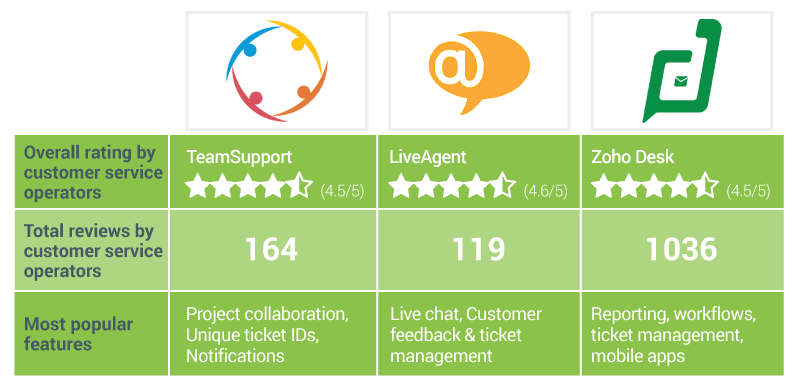
Please note: The feedback given in each of the "Common user feedback trends" sections are the opinions of GetApp's reviewers, and do not represent the opinion of GetApp. Read more about our methodology at the bottom of this article.
1. TeamSupport: B2B customer support
TeamSupport is cloud-based customer management and help desk software that was specifically designed with B2B customer support in mind.
The core features of TeamSupport include:
Customer management: Track and view customer information, view details related to customer issues, and access a company and contact database.
Ticket management: Provides visibility into customer tickets, lets users set ticket reminders to avoid missing any tasks, and offers customized automation and ticket routing.
Collaboration: Teams can use the internal social network, Water Cooler, to collaborate regardless of location on specific tickets, customer issues, or products. Users can also chat with other team members using the in-app online chat functionality.
Customer self-service: Customers can find answers to questions and resolve issues using the tool's knowledge base, community forums, etc. Companies can use ticket-deflection functionality to reduce the flow of incoming tickets.
Visual support tools: Integrated screen sharing and video recording functionality allows customers to share videos of the exact issue they are experiencing. Likewise, customer support agents can share videos with customers to help resolve issues.
TeamSupport offers mobile apps for Android and iOS that allow customer service agents to access tickets and service requests directly from their mobile devices.

Ticket management feature in TeamSupport where users can view open and closed tickets, customer details, and more (Source: GetApp)
Common user feedback trends
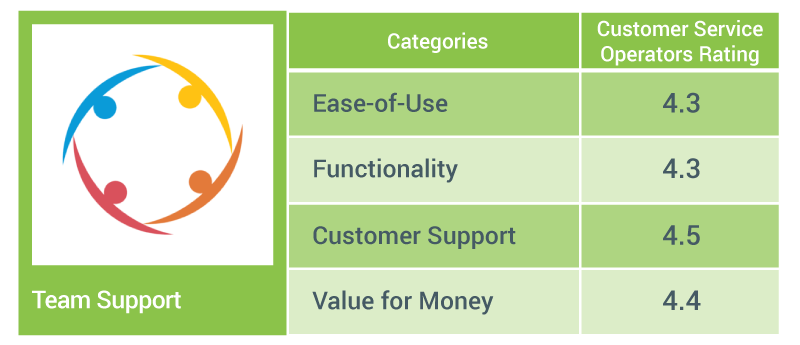
Based on analysis of user reviews on GetApp from customer service operators, here's an overview of the areas of TeamSupport they like best, as well as those they feel could use improvement.
What users like
Seamless collaboration: Many GetApp users appreciate the tool's collaboration features, which allow multiple stakeholders to collaborate on a single issue.
Helpful notifications: Users find the tool's notification functions helpful, because they feel as though they're always up to date, making it less likely that an issue will slip through the cracks.
Unique ticket IDs: A majority of users say it's easy for them to track current and past projects using the tool's unique ticket ID functionality.
Fast and responsive customer support: Users find TeamSupport's customer support staff to be fast and responsive in solving their issues. A lot of GetApp users also say the webinars on the vendor's website are informative and a good source for gaining familiarity with the application during the initial roll out.
User-friendly interface: A majority of GetApp users say that the tool offers a user-friendly interface, which helped them get onboard. In addition, they feel the tool is easy to set up and learn.
User recommended improvements
Reduce clutter on the home page: Some users feel that the application's home page layout is cluttered, making it confusing and difficult for users to find the right information.
Who should consider TeamSupport?
B2B organizations looking for a good all-around support and ticketing app should check out TeamSupport.
2. LiveAgent: Multichannel support with seamless customer communication
LiveAgent is a help desk solution that offers both cloud-based and on-premise options. It offers multichannel support, including live chat, phone, email, and social, and it is supported in 39 languages.
The software's key features include:
Ticket management: Process customer interactions, including emails, and transform them into tickets, routing them to the right support agent.
Live chat: A built-in online chat feature lets users offer real-time support. Proactively engage website visitors by sending chat invitations. View chat history, online website visitors, and use offline mode after hours or when the chat queue gets too long.
Multichannel communications: Agents can make and receive phone calls and video chats directly from their desktops. They can also connect with customers on Facebook and Twitter.
Reporting and analytics: Lets users generate reports on agent performance, time spent on tickets, customer satisfaction ratings, service level agreement (SLA) compliance, etc.
Online and offline customer support portal: Provide 24/7 customer support. Offer offline customer support portal with knowledge base articles, forum posts, and customer feedback forms, so you can continue to provide support when agents are not online.
Gamification: Allow customer service reps to earn badges and level achievements to reward exceptional performance and encourage friendly competition.
Security: The tool uses two-factor authentication, and communication between the browser and LiveAgent is encrypted, including chats and emails.
LiveAgent offers mobile apps for Android and iOS devices, allowing customer service agents to access and solve tickets as well as interact with customers from mobile devices.
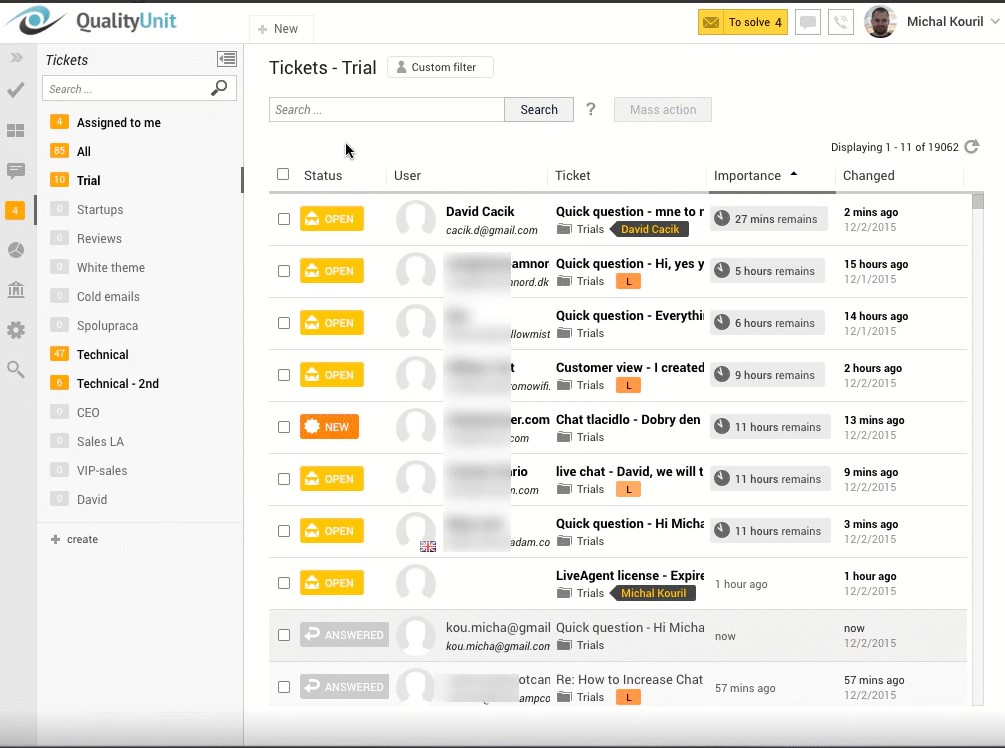
Ticket management view in LiveAgent (Source: GetApp)
Common user feedback trends
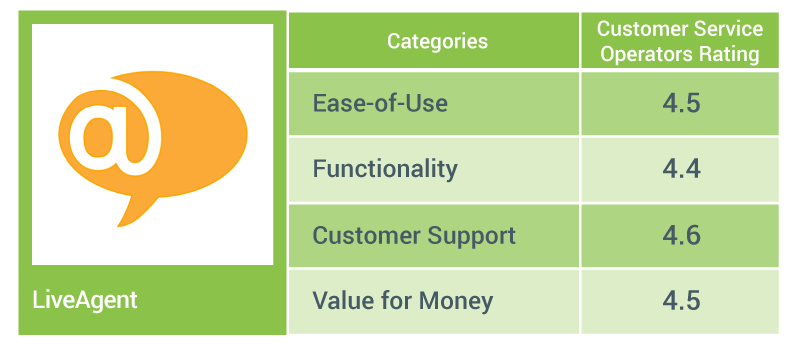
Based on analysis of user reviews on GetApp from customer service operators, here's an overview of the areas of LiveAgent they like best, as well as those they feel could use improvement.
What users like
Useful multichannel ticket management: Users say the tool's social media linking capability is one of its best features because it helps them manage feedback and customer inquiries directly over social media channels. They also like the fact that there is no extra charge for this feature.
Seamless live chat communications: A majority of GetApp users find the live chat feature to be especially helpful. They say the real-time chat features facilitate constant, seamless communication between agents and customers.
User-friendly and easy to customize: GetApp users feel that LiveAgent's interface is easy to use and navigate, and they say it's easy to customize it to their needs.
Excellent customer support: Most GetApp reviewers find LiveAgent's technical support team to be responsive, prompt, and readily available for quick resolutions.
Efficient customer interaction tracking: Users find LiveAgent useful when it comes to managing customer feedback and escalations. They say the tool not only allows them to provide timely customer support, but also helps them keep track of customer complaints.
Competitive pricing: In general, users find LiveAgent to be affordable and a good value for their money.
User recommended improvements
Offer more integration options: Some users say they'd like to see LiveAgent offer more integrations with third-party applications and PBX systems.
Improve the ticket search function on mobile apps: Some GetApp users mention that the ticket search on the mobile app could be improved and should support messages in HTML format.
Add autocorrect option to chat: Many users mention that LiveAgent's chat functionality doesn't have an autocorrect feature, which is something they'd find useful.
Who should consider LiveAgent?
LiveAgent is a good option for those businesses who are looking to offer multichannel customer support over all mediums including email, chat, phone, social media, etc. LiveAgent touts itself as a tool for small and midsize businesses, and reviewers point out the competitive pricing.
3. Zoho Desk: Strong social media integration and mobile capabilities
Zoho Desk is cloud-based help desk software that claims to be the industry's first "context-aware" help desk tool. This means it contextualizes tickets by including the customer's interaction history and details, which saves agents time in understanding the issue.
It also assigns due dates and ticket resolution times to each ticket, sends alerts about missed deadlines, and can even reroute the request to another agent.
The software's key features include:
Multichannel ticket management: Capture customer service requests through multiple channels such as email, phone, social media, chat, self-service help center, community forums, and web forms.
Phone and instant messaging support: Agents can make phone calls to customers from the platform. It offers built-in features such as interactive voice response (IVR), call forwarding, voice messages, and missed call notifications. Agents can also send instant messages to customers.
Self-service portals: Helps create and store a knowledge base and repository of frequently asked questions (FAQs). Users can organize FAQs into various categories based on topic.
Social media support: Automatically fetches all social media posts, messages, and @mentions from customers on social media networks such as Facebook, Twitter, and others. Set up automatic notifications about social media activity, and convert Twitter and Facebook conversations into support tickets.
Reporting and insights: Createcustom reports. Time-based reports give an overview of initial response time, average response time, and average resolution time. Scorecards monitor agent performance based on parameters such as customer satisfaction levels, average response time, ticket traffic, and skill set.
Zoho Desk offers iOS and Android mobile apps that allow agents to access and answer tickets from their mobile devices. There's also a mobile feed that displays recent updates to tickets. In addition, agents can collaborate with team members to seek help on specific tickets from their mobile devices.
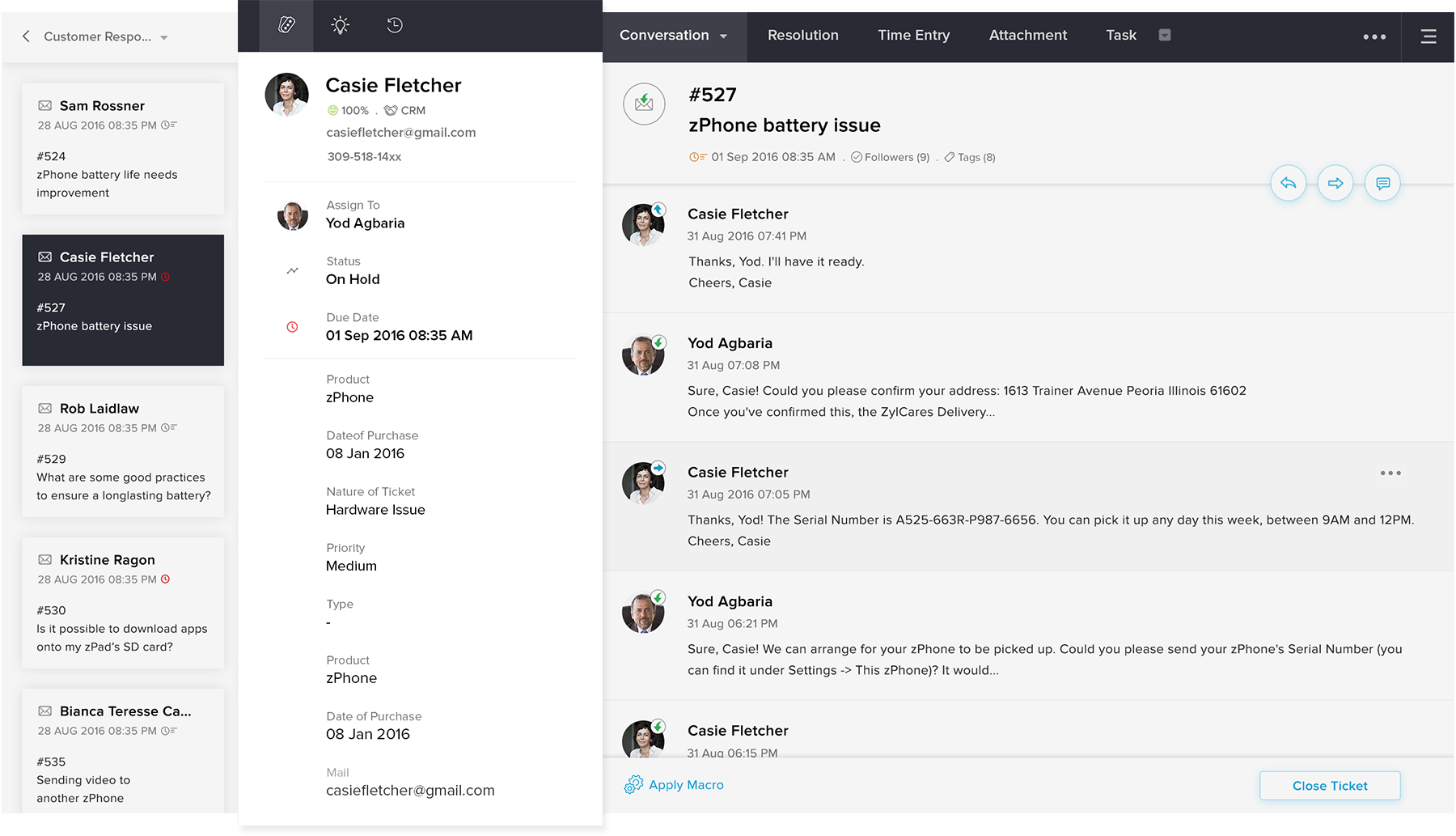
Customer history and details in Zoho Desk (Source: Zoho.com)
Common user feedback trends
Based on analysis of user reviews on GetApp from customer service operators, here's an overview of the areas of Zoho Desk they like best, as well as those they feel could use improvement.
What users like
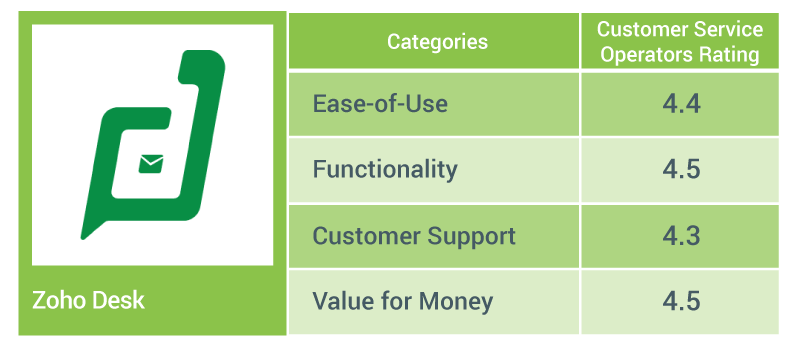
Easy to use and intuitive: A majority of GetApp users find Zoho Desk to be user-friendly with an intuitive interface. They feel that the tool can handle multiple business areas and is handy for IT support staff.
Affordable pricing: In general, users say they find Zoho Desk to be a powerful, flexible, and feature-rich product available for a reasonable price.
Helpful multichannel ticket management: GetApp users say that the multichannel ticket management functionality is helpful, especially the way the tool integrates with social media channels.
Responsive customer support: Most users mention that the customer support at Zoho Desk is responsive and helpful.
Seamless integrations with other Zoho apps: GetApp users like that Zoho Desk offers integrations with other Zoho products such as CRM, Email, Chat, etc., as well as with third-party apps such as Dropbox.
Useful workflow automations: Most users find the workflow automation functionality useful for assigning specific tasks to specialized engineers.
Well-designed mobile apps: GetApp reviewers say that Zoho Desk's mobile apps work well, enabling them to easily access tickets, emails, and more on their mobile devices.
Insightful reports: Many GetApp users note that the reporting functionality is easily customizable. They say the tool generates insightful reports that help them stay within their SLAs, and that it gives both management and employees visibility into team performance and time-consuming tasks.
Customizable customer portal: Users mention that the customer portal is easy to use, and some say the tool's community forum together with the knowledge management feature makes it one of the top help desk apps for ISVs (independent software vendors).
User recommended improvements
Improve the training tutorials: GetApp users mention that the training tutorial videos are not much help to beginners who are just learning the software.
Offer options for integration besides Zapier: As Zoho Desk uses Zapier to integrate with third-party apps, some users say that it is bit expensive if you are only using one "Zap," but it could be justified if you use it for multiple integrations.
Who should consider Zoho Desk?
Zoho Desk, although fit for any business or industry, is most frequently used by businesses in IT solutions, eCommerce, consumer durables, education, manufacturing, energy, governance, and nonprofit activities, according to GetApp user data.
In addition, if you are already using other Zoho products, you should consider Zoho Desk, since you can easily integrate it with your existing software stack.
Next steps for choosing help desk and ticketing software
If you want to explore other help desk and ticketing apps or want to read more about these tools and their benefits, here are some additional GetApp resources you may find helpful:
Compare even more products and read more user reviews on GetApp's help desk and ticketing software category page .
See a side-by-side comparison of the help desk and ticketing software solutions featured in this article on our comparison page.
Use our help desk and ticketing software scorecard to identify the most suitable apps for your company based on your pricing and feature requirements.
Methodology
The solutions highlighted in this article are the help desk and ticketing software systems that have the highest average overall user rating from customer support agents at the time of writing. For this article, we evaluated 339 help desk and ticketing software systems and approximately 10,834 user reviews on GetApp's website, exclusively from customer service operators.
Here's an overview of our method for choosing this list of top-rated apps:
We analyzed reviews from customer service operators and shortlisted those products that had 4+ out of five stars with a minimum of 80 user reviews.
From that list, we considered only those, which are listed on GetApp.
The "common user feedback" sections include "what users like" and "user recommended improvements" for each product, based on feedback from users who left reviews.
The "who should consider this software" section is a summary of analysis conducted on the general comments from software users. This section highlights the most popular features of the software product and recommends who should consider buying that product and why.
More on Help Desk



Aug 28, 2024

Nov 29, 2023


Mar 29, 2023