GetApp offers objective, independent research and verified user reviews. We may earn a referral fee when you visit a vendor through our links.
Our commitment
Independent research methodology
Our researchers use a mix of verified reviews, independent research, and objective methodologies to bring you selection and ranking information you can trust. While we may earn a referral fee when you visit a provider through our links or speak to an advisor, this has no influence on our research or methodology.
Verified user reviews
GetApp maintains a proprietary database of millions of in-depth, verified user reviews across thousands of products in hundreds of software categories. Our data scientists apply advanced modeling techniques to identify key insights about products based on those reviews. We may also share aggregated ratings and select excerpts from those reviews throughout our site.
Our human moderators verify that reviewers are real people and that reviews are authentic. They use leading tech to analyze text quality and to detect plagiarism and generative AI.
How GetApp ensures transparency
GetApp lists all providers across its website—not just those that pay us—so that users can make informed purchase decisions. GetApp is free for users. Software providers pay us for sponsored profiles to receive web traffic and sales opportunities. Sponsored profiles include a link-out icon that takes users to the provider’s website.
4 Top-Rated Affordable Case Management Software
Find an affordable case management solution to simplify case handling.


Handling multiple cases isn’t easy for an attorney. From organizing case documents and managing case-related contacts to remembering client invoice codes, attorneys have to remember varied legal details. With a case management solution, you can simplify many such processes, enabling you to focus on client needs and case preparation.
This article lists four top-rated affordable case management software solutions based on verified user reviews and pricing found on vendor websites. Per our research, we’ve considered products with base plans priced less than $60 per month as affordable software and arranged them in ascending order of their prices.
The products here range from dedicated case management software to legal practice management and legal billing software with case management functionalities. Regardless of the category, all products offer the core features of case management software: case notes, client management, and document management.
What is a base software plan?
A base plan is the most affordable pricing tier offered by a software provider. Besides having the lowest price, base plans provide access to all core software features. However, they may have limitations compared to higher-tier plans in terms of the available functionality, storage capacity, number of user seats, support options, etc.
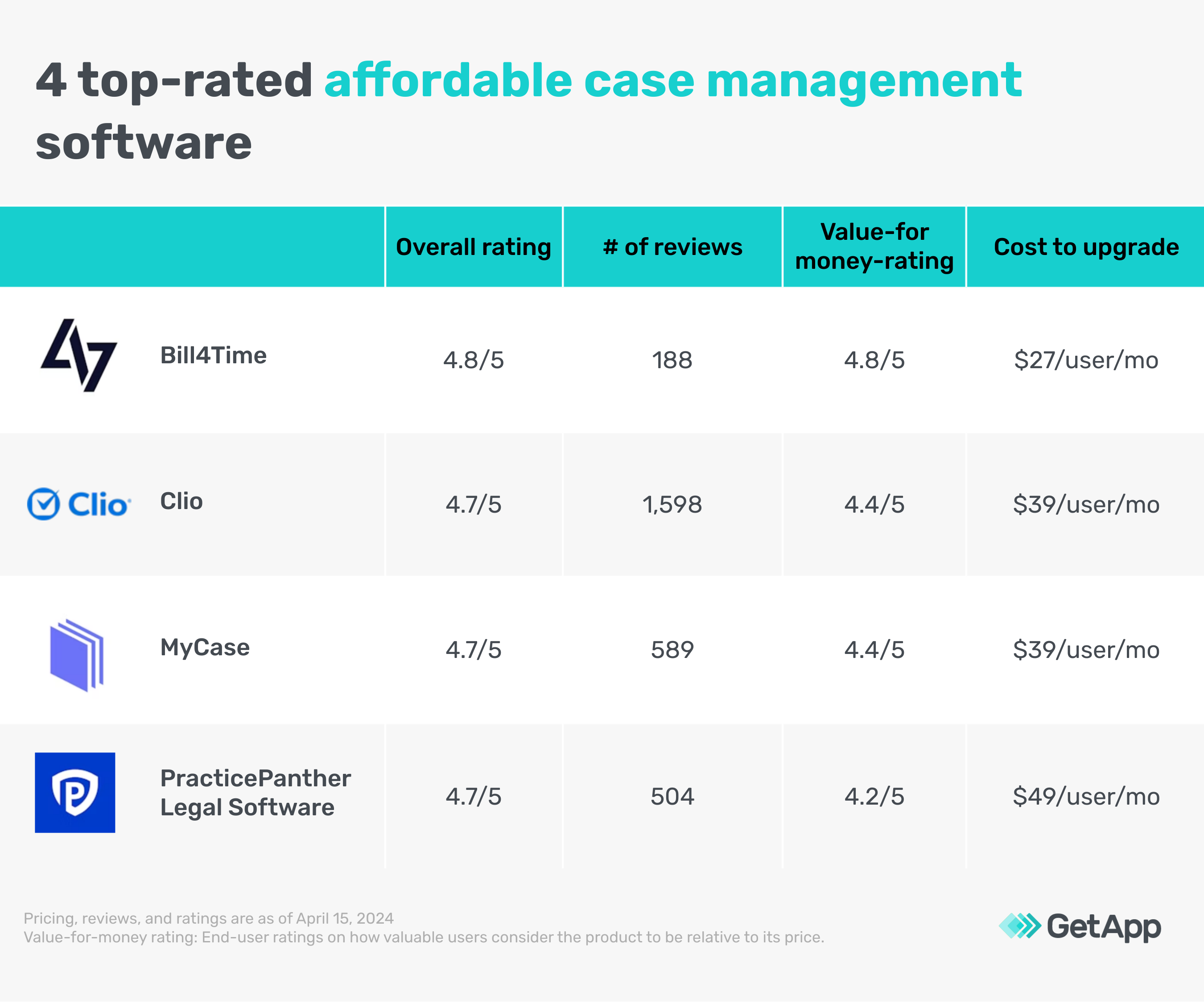
We selected products for this article based on their average ratings between April 2022 - April 2024, which may differ from their current overall average ratings.
1. Bill4Time
Bill4Time is a legal billing and practice management solution with built-in case management functionality. It provides a project-based approach to handling case and client data and comes with a centralized dashboard to store documents and client information. This is a customizable dashboard that can be adjusted to reflect specific information, such as attorneys assigned to a case, outstanding bills for past cases, and overall firm expenses on particular cases or clients.
Bill4Time’s base plan gives you access to a client portal that can be used to manage client information, send messages to give updates, and share case-related documents. Built-in invoicing and payment processing features help accept payments from clients. Upgrading to the legal pro plan provides you with a contingency billing option, that can help when your payment depends on the court’s final verdict. You also get uniform task-based management system (UTBMS) codes [1] to create detailed client billing invoices. Additionally, you get a retainer replenishment system where you can set a minimum trust balance agreed upon by you and your client.
Base plan features*:
Payment processing: Allows clients to make payments towards their invoices using the payment methods accepted by the service provider. When an invoice is generated through Bill4Time, it includes a "Pay Now" button or link that allows clients to submit payments online. Clients can choose their preferred payment method and complete the transaction securely.
Client portal: Allows clients to access a portal to oversee case details, such as timelines, tasks, and milestones, keeping them informed about their case’s progress. The portal enhances team communication and facilitates effective collaboration, allowing users to ask questions and provide feedback within the portal.
Reporting: Allows users to track and report on firm expenses incurred during a case. Expense reports may include details, such as expense category, amount, date, and client/case association. Users can generate expense reports to analyze spending patterns, reconcile expenses with invoices, and assess case profitability.
Starting price: $27 per user per month
Cost to upgrade: $45 per user per month
Billing cycle: Annual
Customer support options FAQ, help desk, and email support
Who should consider Bill4Time?
Bill4Time is ideal for legal professionals and law firms working on diverse legal cases for various industries. In its legal pro plan, the software offers UTBMS code and LEDES reporting [2] to track specific legal activities, such as research, drafting, and court appearances. The integration of UTBMS codes ensures accurate categorization of billable time and expenses, aligning with industry standards and client requirements.
2. Clio
Clio is a legal case management software solution that helps law firms track, manage, and organize documents, client invoices, billable hours, and client contact information. You can set access permissions in the software to protect sensitive case details and communicate with clients and co-counsels through a built-in online portal. The software also helps track case progress by setting case statuses between open, pending and closed.
With Clio’s base plan, you get a single dashboard to manage calendars, documents, and tasks in one place, unlimited document storage, and the ability to prepare and send up to three documents to clients for e-signatures. Upgrading to an advanced plan provides enhanced business insights, such as the ability to visualize and quantify the income each attorney brings to the firm. You can also assign budgets to individual cases and track operational costs.
Base plan features*:
Task management: Assign tasks and groups of tasks to individual team members and attorneys. You can also set reminders for recurring tasks, such as updating case-related documents after court sessions, and automate approvals if required.
Firm dashboard: Track productivity and revenue at both the firm and individual level with an easy-to-use dashboard. See how many billable hours your firm has captured, billed, and collected in one central dashboard.
Custom stage creation: Create custom case progress stages and use Kanban-style visual boards to easily track progress, prevent bottlenecks, and quickly take action on matters that need attention.
Starting price: $39 per user per month
Cost to upgrade: $69 per user per month
Billing cycle: Annual
Customer support options FAQ, live chat, and email support
Who should consider Clio?
Legal firms or attorneys working on multiple cases can leverage Clio’s centralized dashboard to manage their cases effectively. The software has a built-in timekeeper that starts recording time with just one click. This feature helps track accurate billable hours for legal cases. The centralized dashboard also showcases multiple accounts and invoices for bulk payments.
Pro tip
Check for the expense tracking feature as it helps law firms bill clients for reimbursable expenses incurred during the course of a case. These may include court fees, travel expenses, expert witness fees, and other miscellaneous costs.
3. MyCase
MyCase is another case management solution that centralizes all your case details and documents in one location. The software offers a built-in client portal to send invoices and event details, real-time updates on cases, and documents for easier information sharing. You can also color-code calendar entries based on the event type, and filter the calendar to only show the type of event you want to see, at that time. A centralized case dashboard provides an overview of pending tasks associated with a case and the latest status updates for a legal professional and also lets you filter cases by stage, practice area, and lead attorney.
The base plan for MyCase includes case and contact management, a client portal for communication, and unlimited document storage. Upgrading to an advanced plan gives you unlimited two-way texting through the client portal, automated event reminders, and premium reporting, including case revenue and fee allocation reports.
Base plan features*:
Trust ledger and reconciliation: Display all transactions for trust accounts and tie them to the appropriate receivable. You can also track trust balance per case and per client.
Conflict check tracking: Track and flag potential conflicts performed by you and/or your firm. For instance, if the name of an individual or company you enter in the built-in search bar has been previously associated with any matters within MyCase, the conflict check shows any matching results related to the person searched.
Legal calendering: Share a firm-wide calendar linking case information to events, and see the statute of limitations (SOL) deadlines, as well as due dates for case-related tasks. You can also create event triggers and tie them to particular cases and jurisdictions.
Starting price: $39 per user per month
Cost to upgrade: $79 per user per month
Billing cycle: Annual
Customer support options FAQ, help desk, and email support
Who should consider MyCase?
MyCase is particularly well-suited for boutique law firms that specialize in niche areas of law, such as environment, property, and immigration. These firms often handle complex cases that require meticulous organization and attention to detail. MyCase's customizable features allow them to tailor the software to their specific practice areas, ensuring that workflows align with the unique needs of their clients and cases.
Pro tip
Ensure there’s a calendaring feature in the software since users can view their schedules at a glance, avoid scheduling conflicts, and allocate resources effectively to ensure that all necessary case-related activities are completed on time.
4. PracticePanther Legal Software
PracticePanther is a law practice management platform similar to Bill4Time and features case management functionality. The software helps you handle and prepare cases through a centralized dashboard and reduces administrative tasks, such as invoicing, expense management, and new client onboarding, through automation that auto-populates client information from custom intake forms.
PracticePanther’s base plan provides you with an internal chat feature for team members, real-time notifications on case-related updates, and built-in payment processing functionality. The advanced plan gives you custom security roles to allow or block access to any part of the software for each person in your team, along with automated payment reminders and recurring payment plans for clients.
Base plan features*:
Document templates: Access a template repository containing retainer agreements, general client agreements, and contracts. You can add your company logo to showcase your firm’s brand on the documents before sharing them with clients.
Task and event workflows: Create a template of tasks and events and apply them to any future matter in one click. Workflows allow you to create a list of pre-set tasks that you can reuse with any contact or matter. This can be particularly useful when you need multiple staff members to follow the same processes.
Daily agenda email: Add tasks for the week, month, or quarter, depending on your workflow, and get an automated daily email at 6 a.m. with your tasks and events for the day.
Starting price: $49 per user per month
Cost to upgrade: $69 per user per month
Billing cycle: Annual
Customer support options FAQ, help desk, and email support
Who should consider PracticePanther?
PracticePanther is ideal for law firms and attorneys that follow routine workflows for their tasks and want teams to follow identical case management processes. Its task and event workflow functionality ensures process consistency among team members and the daily agenda email ensures no attorney overlooks or misses crucial tasks.
Top 5 case management software features users rate as highly important
All the products listed in this article include the features mentioned below. To identify these, we asked users to rate, on a scale of “low importance” to “critical,” how important different features are for case management software. The features showcased are those that the highest percentage of reviewers rated as “highly important” or “critical” over the past two years (as of April 04, 2024).
| Feature name | Criticality rating (%) | Description |
|---|---|---|
| Case management | 97% | Offers a centralized repository where all relevant information related to a case or project is stored. This can include documents, emails, notes, tasks, deadlines, and communication history. |
| Client management | 94% | Provides a dedicated section or database for storing comprehensive client information. This may include contact details, demographic data, client history, preferences, and any other relevant information necessary to manage the case effectively. |
| Case notes | 90% | Facilitates communication and collaboration among team members involved in managing a case. Users can add comments, updates, and observations to case notes, allowing for seamless sharing of information and insights. |
| Document management | 84% | Offers a centralized repository where users can upload and store documents related to each case. This ensures that all relevant documents are stored in one location, making them easily accessible to authorized users whenever they are needed. |
| Billing and invoicing | 82% | Allows users to record billable hours, expenses, and other costs incurred while working on a case. This information serves as the basis for generating accurate invoices for clients. |
How much does case management software cost?
Case management software solutions can cost as low as $39 per user per month or up to $139+ per user per month, depending on various factors—features, number of attorneys, infrastructure requirements, business size/type, training availability, deployment options, integrations, and customization options. Most case management solutions typically include the following pricing plans:
Free trials: Range from seven to 30 days and give users access to either all or limited features of the software. These no-cost trial plans are ideal for businesses that wish to try out a tool before purchasing it.
Free versions: Offer perpetual access to limited software features. These free plans are ideal for small businesses or individuals on a budget.
Entry-level plans: Start at $39 per user per month and offer access to standard features. These are suitable for small businesses or teams with basic case management feature requirements, such as time tracking, billing and invoicing, and document management.
Mid-tier plans: Range from $69 to $109 per user per month and offer advanced features, such as multiple bank accounts, unlimited data storage, customizable templates, and advanced case reporting. These are suitable for businesses that have outgrown entry-level case management solutions but don’t require the full range of functionality offered by enterprise-level tools.
High-end plans: Cost more than $139 per user per month and offer a range of advanced features, including unlimited access to entry-level and mid-tier features, task automation, priority customer support, and integrations with third-party systems. These are suitable for large businesses with multiple team members and departments and extensive case management needs.
Hidden costs associated with case management software
Besides the software license, additional costs can include:
Training expenses: Initial training for new users and ongoing training for updates or new features can lead to additional costs.
Data migration costs: Migrating data from your existing system to the new tool may require expert assistance, adding to the software implementation cost.
Software upgrades: Additional costs may be incurred for software upgrades to access the latest case management features and security patches.
Frequently asked questions when selecting affordable case management software
Does your software provide legal calendaring and deadline management?
Assess the software's ability to manage legal calendars, court deadlines, statute of limitations, and other important dates. Look for the availability of features such as automated deadline calculations, court rules integration, and customizable reminders/alerts in the base plan.
What kind of automation do you provide with the base plan?
Evaluate the software's document automation and assembly capabilities that come with its base plan, including the availability of pre-built templates for common legal documents. Look for features that streamline document creation, assembly, and customization, as well as integration with word processing software.
Does the base plan offer any third-party research database integrations?
Consider if the software integrates with legal research databases and resources to streamline the research process. Look for features that allow users to access legal research materials directly within the software and capture research findings for use in cases.
Methodology
To be considered for this list, products had to:
Have at least 20 unique product reviews published on GetApp within the past two years, with an average rating of 3.0 or higher (as of April 15, 2024).
Include the core features of case management software: client notes, client management, and document management.
Meet our market definition for case management software: “Case management software coordinates documents, scheduling, conflicts, contacts, and reporting associated with legal cases. These applications enable an integrated solution to automate case management, client history tracking, and contracts as well as billing and accounting.”
For products that met the first three criteria, we assessed the monthly subscription price of the base plans and found the average price to be $60—we considered only products with publicly available pricing information. We then shortlisted products with a monthly base price lower than $60 for this article.
*Our research team identified these features from vendor websites (as of April 15, 2024) based on their analysis of what users find valuable in or expect from case management software. This list is not exhaustive. For additional features, refer to the vendor's website.
We select and rank products based on an objective methodology developed by our research team. While some vendors may pay us when they receive web traffic or leads, this has no influence on our methodology.
Note: Products evaluated for the pricing calculation were taken from GetApp’s case management software directory. The pricing ranges exclude freemium versions of the products. The features highlighted were identified based on their relevance and the percentage of products in the GetApp directory that offer them. Only products with publicly available pricing information, as of April 15, 2024, were considered for the pricing calculation.
Definitions
UTBMS codes: The UTBMS (Uniform Task-Based Management System) codes are a set of codes developed by the Legal Electronically Exchangeable Data (LEDES) Oversight Committee to standardize the classification of legal tasks and expenses. They are used primarily in legal billing and management to categorize various legal activities and expenses in a consistent manner.
LEDES reporting: LEDES (Legal Electronic Data Exchange Standard) reporting refers to the standardized format used for exchanging legal billing information electronically. The LEDES format was developed by the LEDES Oversight Committee to facilitate the electronic exchange of billing and invoicing data between law firms and their clients.