GetApp offers objective, independent research and verified user reviews. We may earn a referral fee when you visit a vendor through our links.
Our commitment
Independent research methodology
Our researchers use a mix of verified reviews, independent research, and objective methodologies to bring you selection and ranking information you can trust. While we may earn a referral fee when you visit a provider through our links or speak to an advisor, this has no influence on our research or methodology.
Verified user reviews
GetApp maintains a proprietary database of millions of in-depth, verified user reviews across thousands of products in hundreds of software categories. Our data scientists apply advanced modeling techniques to identify key insights about products based on those reviews. We may also share aggregated ratings and select excerpts from those reviews throughout our site.
Our human moderators verify that reviewers are real people and that reviews are authentic. They use leading tech to analyze text quality and to detect plagiarism and generative AI.
How GetApp ensures transparency
GetApp lists all providers across its website—not just those that pay us—so that users can make informed purchase decisions. GetApp is free for users. Software providers pay us for sponsored profiles to receive web traffic and sales opportunities. Sponsored profiles include a link-out icon that takes users to the provider’s website.
7 Top-Rated Affordable Graphic Design Software
Bring your visual ideas to life with graphic design software.


Graphic design involves conceptualizing visual assets and ensuring seamless integration of design elements, which requires both technical prowess and artistic flair. If you are a beginner or freelance graphic designer, leveraging tech and investing in budget-friendly graphic design software is a smart way to kick off your creative journey.
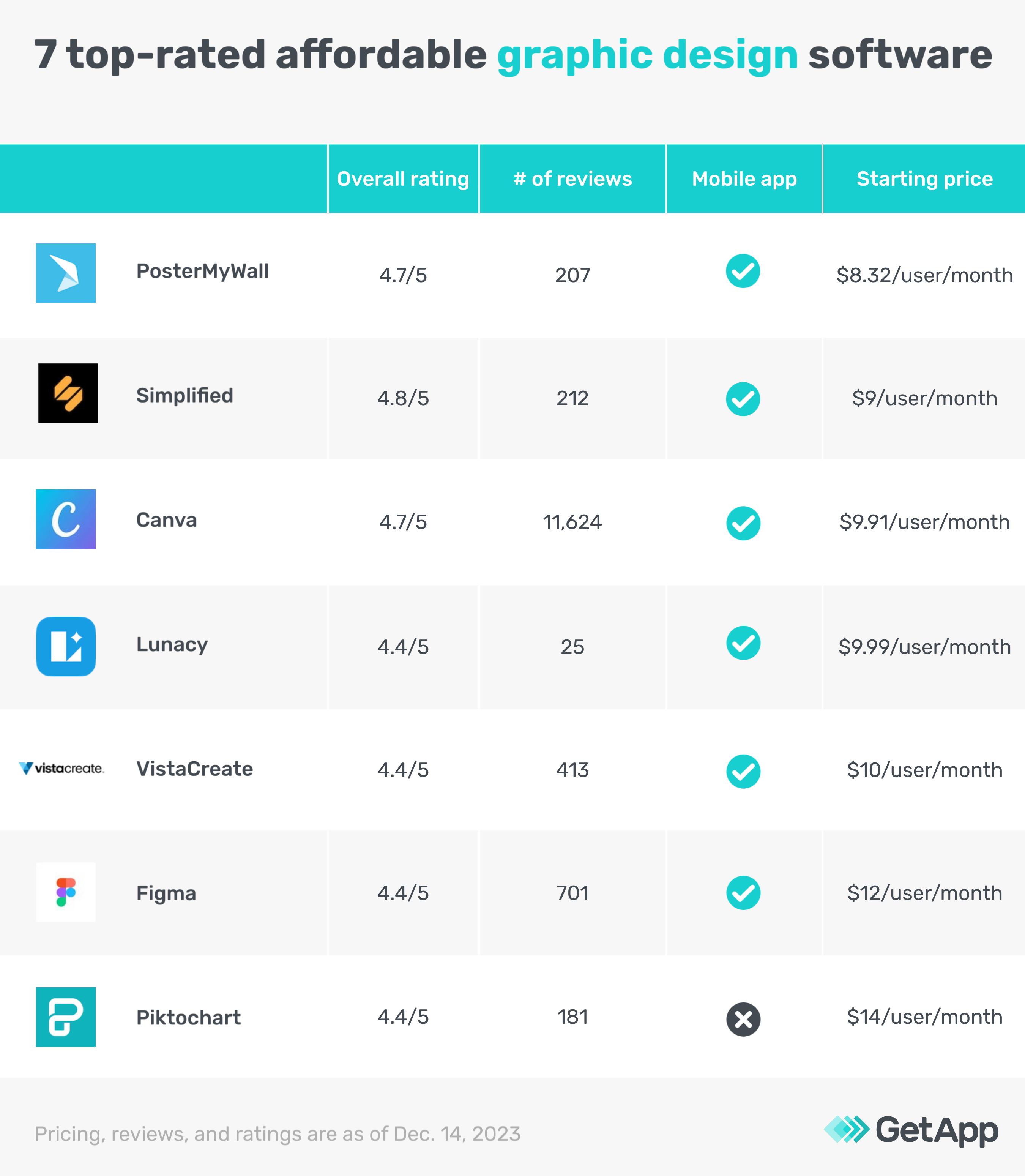
To make your search easy, we have highlighted the seven top-rated affordable graphic design software for graphic designers based on their pricing, as found on vendor websites and verified software reviews. Based on our research, we've considered products priced less than $38 per month as affordable software and have arranged them in ascending order. Read how we shortlisted these products at the end of this article.
The products mentioned in this article are either creative suites with graphic design functionality or standalone graphic design software. All products offer core graphic design software features, such as design templates and image editing.
1. PosterMyWall
PosterMyWall is a graphic design software solution that lets you create social media posts and promotional videos using customizable, ready-made templates. The software enables you to publish designs and schedule posts directly on social media. With PosterMyWall, you can collaborate with teammates and share designs, folders, and digital assets. Additionally, you can set up access control rights to define who can access the designs and assets.
Product features of interest*:
One-click resizing: Adjust and resize your designs for social media and third-party platforms with a single click. This feature helps eliminate the time it takes to resize your designs for various platforms manually.
Multilingual support: Create designs in multiple languages, such as French, Dutch, Italian, Portuguese, and more, to reach diverse audiences and create global content for maximum engagement with your audience.
Live preview for merchandise: Preview your designs to see how they will appear on merchandise, such as t-shirts and mugs.
Starting price: $8.32 per user, per month
Billing cycle: Annual
Customer support options: Chat, email, phone support, FAQ
Who should consider PosterMyWall?
Businesses and graphic design freelancers planning events, such as parties, concerts, or fundraisers, can use PosterMyWall to design merchandise, event posters, invitations, and promotional materials for various social media platforms.
Analysis performed December 2023**
Pro tip
A graphic design tool should be intuitive and easy to handle, even for beginners. When selecting new software, check how user-friendly it is and whether the vendor provides tutorials for new users.
2. Simplified
Simplified is an AI-powered marketing suite with graphic and logo design functionality. The software helps you design invitations, ads, social media posts, and videos. With a built-in design template library, you can start creating designs without having to start from scratch. The software lets you invite team members to edit and manage designs and tag and comment on design projects.
Product features of interest*:
Integrated publishing: Connect your social media accounts to Simplified, import your designs, and schedule posts to publish with a built-in content calendar. You can also plan out posts in advance.
Team folders: Create team folders that contain specific project designs for certain clients and provide access to individuals working on that project.
AI-powered design suggestions: Use AI algorithms to analyze design elements and get suggestions for improvements in color, contrast, and positioning of elements in your design.
Starting price: $9 per user, per month
Billing cycle: Annual
Customer support options: Chat, email, phone support, help desk, FAQ, knowledge base
Who should consider Simplified?
Individuals with limited photo editing and graphic design experience can create professional-looking designs with Simplified, as the program’s learning curve is not very steep. The software features intuitive interfaces and pre-designed templates that make the design process easy to navigate. The built-in AI abilities also help with design analysis. This allows users to create visually pleasing designs.
Analysis performed December 2023**
3. Canva
Canva is a graphic design platform with a drag-and-drop editor that enables you to design, create, customize, and share graphics such as brochures, flyers, logos, resumes, and social media assets. Canva has a template library with stock images, animations, music, and fonts to help you create professional designs. This software offers a built-in editing tool to turn imported PDFs into graphics you can share online.
Product features of interest*:
Format and size transformation: Convert your designs using AI into different formats and sizes for multi-channel campaigns. The feature also enables translating the text in your images into different languages, including English, German, French, Mandarin, Turkish, and Hebrew.
AI-powered image customization: Select and separate the objects from the images to resize, reposition, or crop while keeping the background. The feature allows customizing the text within images and adding stickers available in the templates library.
Image animation: Select from 14 premium animation styles that will add motion to different objects in your image. The feature allows downloading the edited image in GIF or video format.
Starting price: $9.91 per user, per month
Billing cycle: Annual
Customer support options: Chat, email, help desk, FAQ
Who should consider Canva?
Canva’s built-in AI features simplify image template search by creating suggestions based on your designs and prompt further editing for various platforms, such as Facebook, Instagram, X, and YouTube. This ability to understand your design needs ensures a consistent visual style and enhances branding. Additionally, the AI-powered translation feature helps target multilingual audiences, making the designs inclusive and accessible.
Analysis performed December 2023**
4. Lunacy
Lunacy is another AI-powered graphic design platform that lets you define elemental rules and constraints to create designs and graphics for websites, social media posts, products, and merchandise. The software features live web page editing from a built-in dashboard. You can customize the HTML codes for all visual elements on your website and update their look and feel on the website whenever needed.
Product features of interest*:
Image upscaling: Enlarge stock and custom images in your library and enhance their resolution using modern upscaling techniques powered by artificial intelligence. Such a feature helps create a larger image without compromising on quality.
Text generator: Generate captions and alt text for graphics that are part of your website or promotional material and make them SEO-friendly.
Offline mode: Use Lunacy without an internet connection and keep your designs intact. Once connected to the internet, the software auto-syncs and updates your work.
Starting price: $9.99 per month
Billing cycle: Monthly
Customer support options: Chat, email, phone support, FAQ
Who should consider Lunacy?
Lunacy offers auto layouts for different social media platforms, which help create flexible, responsive designs easily by defining design constraints and rules such as width and spacing limits. Graphic designers new to arranging graphics for a website can take advantage of such a feature.
Analysis performed December 2023**
Pro tip
Check for pre-programmed watermarks. Some tools add watermarks to your designs that you can remove only after purchasing a high-end plan. Ensure the plan you choose doesn't automatically add a watermark to your graphics.
5. VistaCreate
VistaCreate is a graphic design, image editing, and animation software solution that enables users to pick a template, customize it, and publish it on social media. The software has a library of templates for categories such as social media, video animations, covers, headers, website graphics, printable designs, and advertising materials. You can also remove backgrounds and isolate objects to make detailed images. It also allows you to edit videos and add sounds to them.
Product features of interest*:
Editor application programming interface (API) integration: Get editor access to create, modify, and manipulate designs and embed them directly into your website. Such an integration helps eliminate the process of transferring your designs from a third-party platform to your website.
AI-based design assistance: Incorporate AI-driven design suggestions in your graphics, providing your team with intelligent recommendations for layout, color schemes, and other design elements.
Social media scheduler: Plan your social media content with a built-in scheduler. Create custom designs for social media platforms with pre-made social media templates and schedule your posts to publish at the best time to get the maximum reach.
Starting price: $10 per month
Billing cycle: Annual
Customer support options: Chat, email, help desk, FAQ
Who should consider VistaCreate?
Design teams in startups can take advantage of VistaCreate and its editorial dashboard to embed designs directly into business websites. Such functionality helps preview how certain designs would look on specific sections and pages on your website. This can help create consistent brand-specific graphics and minimize website publication errors.
Analysis performed December 2023**
6. Figma
Figma is a collaborative graphic and user interface design tool with advanced vector graphics and web design, real-time design screening, and auto-layout features. Figma allows designers to create interactive prototypes by linking frames together. This helps in simulating user interactions and testing the flow of the design. Figma's auto-layout tool aids in manual resizing, stretching, and rearranging text and images to build responsive designs. This graphic design platform allows users to develop prototypes using hover, one-click, or button-press events and GIFs to add video components or animations.
Product features of interest*:
Vector editing: Use various shape tools to create basic geometric shapes or draw custom shapes. You can use a built-in canvas to create anchor points, and Figma will automatically connect these points to help build more complex designs and vector graphics. Modify the shape of your designs by adjusting anchor points, controlling curves, and refining the overall geometry of vector design elements.
Prototyping: Create interactive design prototypes by linking wireframes and adding transitions, enabling your team to simulate user interactions with your interface and test the user experience.
Version control: Work together in a multi-user, version-controlled design-sharing platform and get contextual feedback from stakeholders with commenting and annotation functionality.
Starting price: $12 per user, per month
Billing cycle: Annual
Customer support options: Email, help desk, FAQ
Who should consider Figma?
Figma comes in handy for UX/UI designers to create wireframes, prototypes, and high-fidelity designs. Its collaborative features make it well-suited for user experience and interface design teams that work with multiple versions of a design before releasing the final work.
Analysis performed December 2023**
Pro tip
Analyze your design requirements and list your must-have features. This can help you avoid paying for features you don't need or won't use, and ensure the tool you invest in aligns with your goals.
7. Piktochart
Piktochart is graphic design, photo editing, and data visualization software used to create infographics, presentations, social media graphics, posters, flyers, and reports. It lets you drag and drop your logo or a website screenshot to auto-extract your brand colors. This image editing and design tool also includes charts and maps to help you translate data into professional infographics. You can link it to any third-party database software to extract data for your infographics automatically.
Product features of interest*:
Generative design AI: Create infographics using text-based prompts with no design expertise. You can enter a topic, get an output from the tool, and then provide prompts to help the tool refine the design and provide a final output.
Data import and integration: Import data from Excel sheets into infographics and charts or directly upload CSV or Excel files to convert complex data into dynamic visuals.
Collaborative commenting: Allow your team to leave comments on specific design elements and improve collaboration and feedback processes between graphic designing teams.
Starting price: $14 per user, per month
Billing cycle: Annual
Customer support options: Email, help desk, FAQ
Who should consider Piktochart?
Marketers and designers working with a large volume of data that needs better visual representation can take advantage of Piktochart. Its ability to transfer data from third-party platforms and create easy-to-understand visualizations can help make sense of complicated data sets.
Analysis performed December 2023**
How much does graphic design software cost?
Graphic design software can cost as low as $6 per user, per month or up to $299+ per month, depending on various factors, including the design capabilities, number of users, templates, cloud storage, and priority support. Most graphic design solutions typically include the following pricing plans:
Free trial: No-cost trial plans range from a week to a month, giving users access to entry-level and advanced features. This is ideal for users wanting to try specific features before investing.
Free version: Most free graphic design software plans offer basic design features, such as graphic design editing, sharing, and a basic text-to-image generator. This is ideal for small business teams on a budget.
Entry-level: Plans start from $6 per user per month and offer limited features, including background, color and brightness adjustment, resizing, and masking.
Mid-tier: Ranges from $10 to $139 per user per month and offers advanced graphic design features such as an avatar generator and AI-enabled design assistance.
High-end: Plans can go up to $299 monthly and even higher, offering unlimited access to all entry and mid-tier graphic design features with priority support, add-ons, and integrations.
Hidden costs associated with graphic design software
Besides the software license, there may be additional costs associated with a graphic design app. These may include:
Data migration: Transitioning from an existing tool to the new graphic design software might require help from the software support team for an extra cost. Sometimes, vendors also charge extra for integrating systems to share data.
Training: Training employees to use the new graphic design tool for accurate results may require some additional fee.
Data storage and security: Storing the generated and edited graphics might require additional space and enhanced security features, increasing costs.
Common questions to ask when purchasing graphic design software
What features do I get with your basic plan?
Since basic or affordable plans usually include limited features, it's important to ask what is included. Another good idea is to get an idea of the must-have features that graphic designers use.
Does the software provide a wide range of fonts?
An ideal graphic design solution should have an extensive font library, including a mix of serif and sans-serif script fonts. It should also provide the option to install additional fonts from external libraries and sources.
Does the software provide language support?
Comprehensive language support ensures that the software can handle characters and glyphs from various languages, accommodating designs for international projects.
Methodology
For this article, we selected the top seven products that met the following criteria:
Each product should be a part of GetApp’s Category Leaders 2023 report for graphic design software.
We assessed all 15 products in the Category Leaders for their monthly pricing (as of Dec. 14, 2023) and considered the products with publicly available pricing information. Based on the assessment, the average price was calculated to be $38. Products with a monthly subscription price lower than $38 were then shortlisted to be included in this list and arranged in ascending order.
Include image editing and design templates as core features.
Meet our market definition for graphic design software: “Graphic design software provides users with computer-aided design tools, templates, and editing features to design, edit, and publish graphics or images.”
*Our research team identified these features from vendor websites (as of Dec. 12, 2023) based on their analysis of what users find valuable in or expect from video editing software. This list is not exhaustive. For additional features, refer to the vendor's website.
**We selected products for this article based on their average ratings as of December 2023; however, the article displays each product’s current average rating, which may differ if more reviews have been left since our analysis.
We select and rank products based on an objective methodology developed by our research team. While some vendors may pay us when they receive web traffic or leads, this has no influence on our methodology.
Products evaluated for the pricing calculation were taken from GetApp’s graphic design software directory. The pricing ranges exclude freemium versions of the products. The features highlighted were identified based on their relevance and the percentage of products in the GetApp directory that offer them.
mentioned in this article







More on Software Buying Tips

Mar 25, 2025


Feb 25, 2025

Sep 27, 2024

Oct 10, 2024