GetApp offers objective, independent research and verified user reviews. We may earn a referral fee when you visit a vendor through our links.
Our commitment
Independent research methodology
Our researchers use a mix of verified reviews, independent research, and objective methodologies to bring you selection and ranking information you can trust. While we may earn a referral fee when you visit a provider through our links or speak to an advisor, this has no influence on our research or methodology.
Verified user reviews
GetApp maintains a proprietary database of millions of in-depth, verified user reviews across thousands of products in hundreds of software categories. Our data scientists apply advanced modeling techniques to identify key insights about products based on those reviews. We may also share aggregated ratings and select excerpts from those reviews throughout our site.
Our human moderators verify that reviewers are real people and that reviews are authentic. They use leading tech to analyze text quality and to detect plagiarism and generative AI.
How GetApp ensures transparency
GetApp lists all providers across its website—not just those that pay us—so that users can make informed purchase decisions. GetApp is free for users. Software providers pay us for sponsored profiles to receive web traffic and sales opportunities. Sponsored profiles include a link-out icon that takes users to the provider’s website.
Demystifying the Tech Stack: The Developer’s Secret Weapon
If the term “tech stack” has you feeling less than tech savvy, this article is for you.


“Tech stack” is a term used frequently in the software development process. Perhaps you’ve heard developers say that adding certain features to your app isn’t possible with your current tech stack, or that your website is slow because of your tech stack.
It’s a simple concept, but one that can be mystifying at first, especially if you're new to building websites or mobile apps for your business. We’ll explain what a tech stack is, their importance, and how to choose the right one so you can build your new website or app with confidence.
What is a tech stack?
A tech or technology stack, also called a solution stack, is the set of technologies used to build and run software applications. It includes the web frameworks, programming languages, servers, operating systems, databases, etc., involved in developing and running a web or mobile app.
For instance, if you’ve built a web application (e.g., a website) using the programming language Python and hosted it on an Apache web server, then Python and Apache are the main elements of your website’s tech stack.
Quick reference: Definitions of common tech stack components
See below for definitions of some common components of a tech stack.
Programming language: A computer language that programmers or developers use to write codes that run an app (e.g., Java, C, C++, Python)
Web framework: A piece of software that helps developers create and run web applications
Database: Hardware and software tools that help organize and store data in a structured manner
Web servers: Hardware (computer systems) and software (server software) that help process web requests and display website or app content
Integrated development environment (IDE): A software application that provides all the needed resources for developers to build a program
Runtime environment: Software codes, libraries, and other files that support the running or working of program codes
Middleware: Software that connects applications with users’ operating systems
Operating system: A system software that manages a computer’s hardware and software components and helps them run smoothly. E.g., Microsoft Windows, Linux, macOS
Hypertext markup language (HTML): A system that is used to define the structure of the content on a web page
Cascading style sheets (CSS): A mechanism that helps enhance the presentation of content in an HTML framework
The two sides of a tech stack
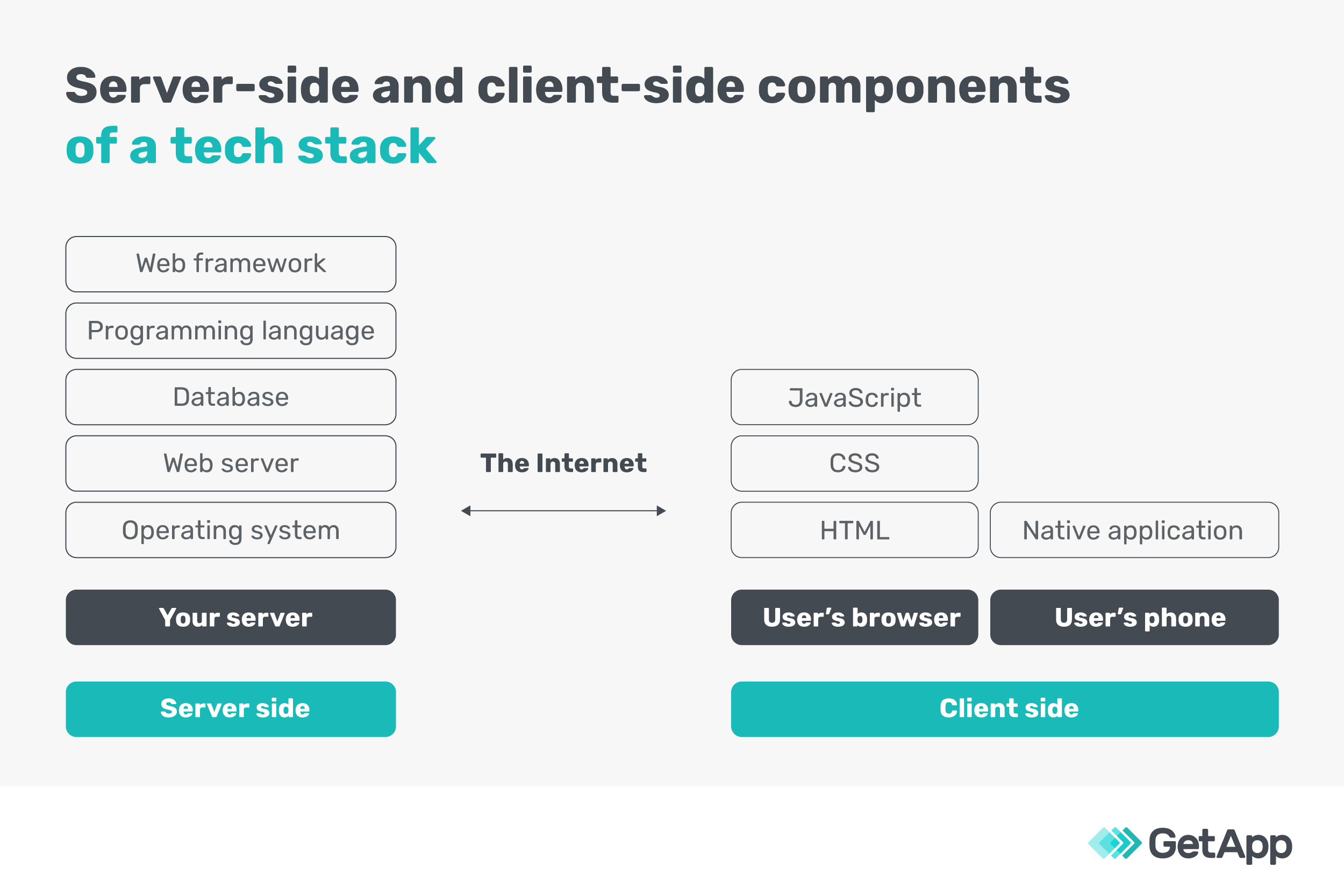
Every technology stack has two sides:
Client side (front end): This refers to the components customers directly interact with or view on their screens. HTML, CSS, and JavaScript are a few examples of front-end technologies. They help design your website’s structure, add formatting elements, and introduce interactive components (e.g., social media buttons, animation buttons), respectively.
Server side (back end): This consists of the technology components customers don’t interact with or see but are necessary for the client-side technologies to work. Programming languages such as PHP, web frameworks such as Django, and servers such as Apache are all a part of back-end development.
What’s the difference between a tech stack and a software stack?
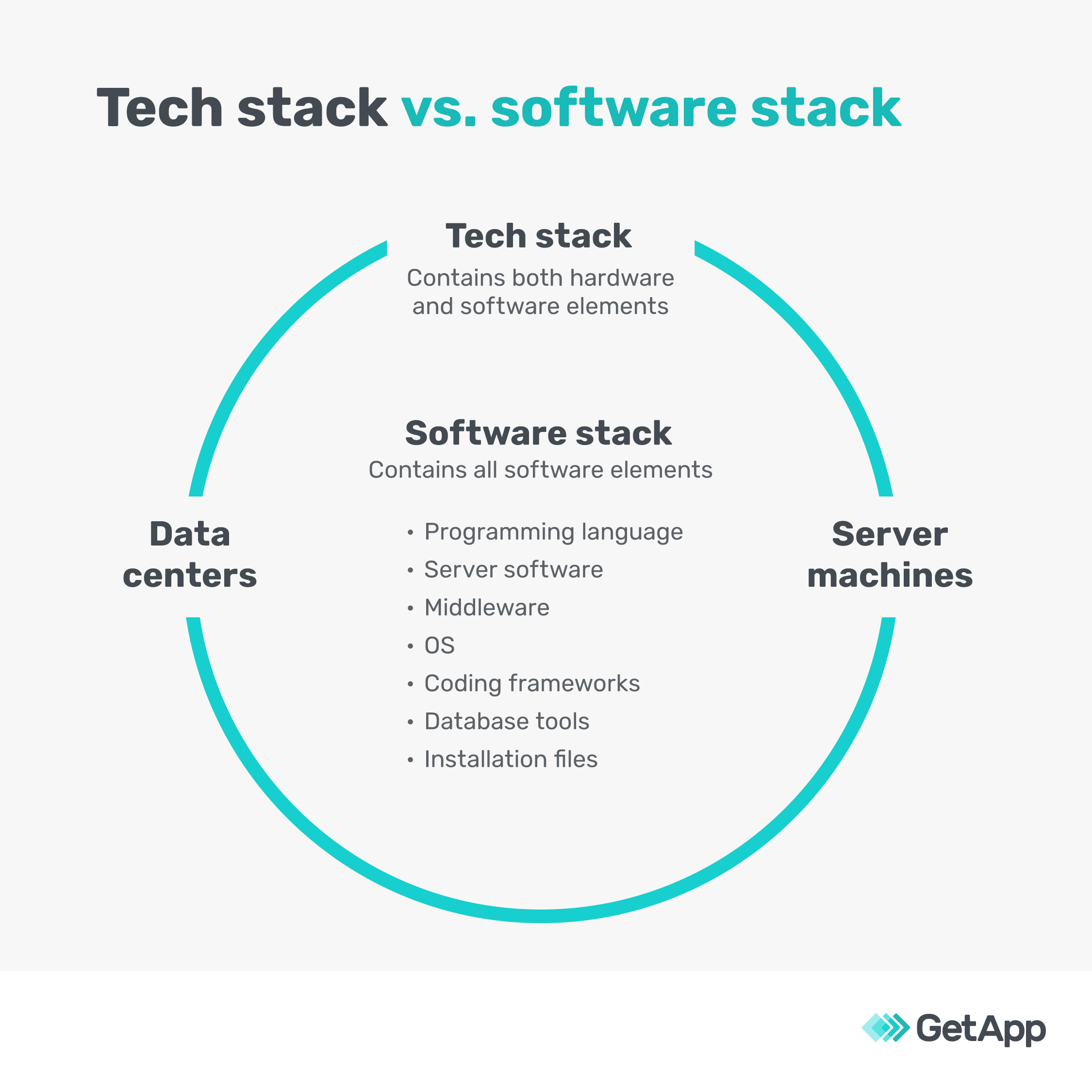
A software stack is a subset of a technology stack and includes only the software components used to build an application. Programming languages, coding frameworks, operating systems, middleware, web servers, and installable files form the software stack. Similar to a tech stack, a software stack has server- and client-side elements.
When you use cloud-based services to meet your application’s infrastructure needs, they also become a part of the software stack. In such cases, there is hardly any distinction between your tech stack and software stack.
Examples of common tech stacks
You don’t need to build your tech stack from scratch. Here are some popular ready-to-use stacks to save you time and effort.
1. LAMP
This stack includes the Linux operating system, Apache server, MySQL database, and PHP programming language. All the components are open source; thus, you can customize the stack easily. For instance, you can use Python instead of PHP and keep the other elements the same.
The LAMP stack is commonly used to build web applications that can handle dynamic content—i.e., web content that changes according to user characteristics such as in-session behavior, previous interaction data, and preferences.
2. MEAN
The MEAN stack has the MongoDB database, Express.js server, AngularJS framework, and Node.js runtime environment. It allows you to easily scale from a minimum viable product (MVP) to a full-scale product, given the same programming language (JavaScript) is used during all app development stages. It’s suitable for applications such as calendars, maps, workflow management systems, and news aggregation sites.
3. MERN
The primary difference between the MERN and MEAN stacks is that the former uses React instead of Angular as the web framework. This makes it slightly more difficult to work with but offers the benefit of high-quality applications and interactive user interfaces (UIs). Unlike Angular, which has a predefined framework, React allows developers to tweak the codes for creating customized UI elements.
Tech stacks used in popular applications
Here are the tech stacks of some popular web applications to help you understand the kind of output features and UI experiences you can expect from different tech stack combinations.
| Tech stack elements | Airbnb | Uber | |
|---|---|---|---|
| Programming language | Java, Ruby | Python, Java, Go | Python, Java, Go, Objective-C |
| Framework | Rails | Django, JavaScript MVC | Node.js, Apache Thrift |
| Database | MySQL, Hadoop, Amazon RDS | MySQL, HBase, Memcached, Hadoop, Redis | MySQL, MongoDB, Redis, PostgreSQL |
| Server | NGINX | NGINX | NGINX |
Why is your tech stack important?
Your app developer will repeatedly tell you that choosing the right tech stack is important. Here are some reasons why:
It determines your app’s scalability. Your tech stack is akin to the foundation and girders of a building. Just like they determine the strength of the building and what further modifications it can support, your tech stack decides whether you can add more features to your application, improve its speed, or reduce its size for easier download.
It influences your app’s integration capabilities. Your software should be able to integrate with other third-party applications to offer a full range of features. For instance, if you’re building a payroll management app, it should integrate with human resources (HR) apps. Java, C#, .NET, and NGINX and Apache web servers are some tech stack elements that support easy integration.
It affects how much your app will cost. Your tech stack choice influences your app development costs. The cost of tech tools and developer compensation directly translate into your app development expenses. For example, developing an app in PHP is less costly than building one in Java or Python, considering the lower developer salaries for PHP programmers.
How to choose the right tech stack
There is no standard way to choose a tech stack. Your choice will depend on your project’s needs, time to market, and security and scalability requirements. It will also vary based on whether you’re developing a web or mobile app.
Here are four things Gartner suggests considering when choosing a tech stack:
Resources and experience: Pick a stack your developers are familiar with, or for which you could easily hire developers. If you’re building a sales tech stack, for instance, prioritize resources for the necessary technology stack to help your partners effectively engage with customers. [1]
Use cases. Collaborate with your team and stakeholders to build a list of project requirements and use cases for each tech stack element you’re considering. Include your peers from IT, marketing, services, and finance as appropriate. [1]
Security. Establish a clear governance framework for your tech stack to maximize performance and minimize risk. Collaborate with IT to co-create governance policies and procedures that support the delivery of necessary processes and strategic objectives. [1]
Scaling and maintenance. One way to futureproof your stack is by using AI and automation. If you’re in sales, consider stacks that trigger multichannel, multitouch messaging cadences, or that analyze call recordings based on dispositions or outcomes. [2]
Despite evaluating the above factors and choosing the right tech stack, keep in mind that you may periodically have to modify or even rebuild your stack to keep up with changing consumer preferences (e.g., videos and dynamic content) or advancements in app development technology.
Tips for selecting your tech stack
Having a website and/or mobile app is an absolute necessity for your business. And if you're building one for the first time, it can feel overly complicated, technical, or beyond your grasp. Here are some tips to set you up for success:
Use tried-and-tested tech stacks: Instead of building a tech stack from scratch, look for ready-made stacks that match your project requirements, integration needs, and resource constraints.
Build an MVP first: Don’t try to build a full-fledged app or service in one go. First, build a prototype or an MVP that supports the most essential features. Test it with users and then decide on developing a full-function application.
Look to community forums: Forums such as GitHub and SourceForge can answer queries around any roadblocks you may face when using a ready-made tech stack. You can also seek freelance developers to build your web or mobile application at a low cost.
Prefer no-code tools for building apps?
Check out our app development software catalog.
Lauren Spiller
More on Tech 101


Nov 03, 2023
Dec 18, 2023

Oct 31, 2023