

GetApp offers objective, independent research and verified user reviews. We may earn a referral fee when you visit a vendor through our links.
Our commitment
Independent research methodology
Our researchers use a mix of verified reviews, independent research, and objective methodologies to bring you selection and ranking information you can trust. While we may earn a referral fee when you visit a provider through our links or speak to an advisor, this has no influence on our research or methodology.
Verified user reviews
GetApp maintains a proprietary database of millions of in-depth, verified user reviews across thousands of products in hundreds of software categories. Our data scientists apply advanced modeling techniques to identify key insights about products based on those reviews. We may also share aggregated ratings and select excerpts from those reviews throughout our site.
Our human moderators verify that reviewers are real people and that reviews are authentic. They use leading tech to analyze text quality and to detect plagiarism and generative AI.
How GetApp ensures transparency
GetApp lists all providers across its website—not just those that pay us—so that users can make informed purchase decisions. GetApp is free for users. Software providers pay us for sponsored profiles to receive web traffic and sales opportunities. Sponsored profiles include a link-out icon that takes users to the provider’s website.
What is Salesforce Essentials? Everything you need to know about the small business CRM
If you're a small business looking for a CRM that'll easily scale up, here's everything you need to know about Salesforce Essentials, Salesforce's small business CRM offering.
As a pseudo-synonym for CRM, Salesforce has long-been considered one of the industry leaders in the cloud CRM space. Created in 1999 by former Oracle executive Marc Benioff and co, Salesforce has grown into a behemoth of a company over the past 19 years, creating one of the most well known and respected brands in the software as a service (SaaS) space.
It’s popularity and powerful Lightning technology (Lightning is the latest upgrade to the Salesforce platform) mean that people generally associate Salesforce with big businesses. It’s true that Salesforce’s heavyweight clients include the likes of Adidas, Toyota, and Philips, but Salesforce is not just a CRM for Fortune 500s.
With the release of Salesforce Essentials, the company is aiming to get back to its roots in the small business CRM landscape, providing a version of its popular product tailored specifically for smaller businesses ranging between 1 and 45 people.
If you’re a small business looking for a CRM that’ll easily scale up, here’s everything you need to know about Salesforce Essentials.
*Salesforce Essentials offers both Sales Cloud Essentials for sales-focused activities, and Service Cloud Essentials for customer service teams. The focus of this piece will be Sales Cloud Essentials.
What is Salesforce Essentials?
It's a pared-down version of Salesforce
Salesforce Essentials is the youngest of the Salesforce family, which includes the Professional, Enterprise, and Unlimited editions. Sales Cloud Essentials keeps it simple with the most important CRM features that a small business needs.
Sales Cloud Essentials’ feature list includes CRM staples like:
Contact management
Opportunity tracking
Lead management
Customizable reports and dashboards
Mobile access on the Salesforce Mobile App
Upgrading to other Sales Cloud plans will get you more advanced features including forecasting, workflow automation, and custom app development, among others.
One thing Essentials does include is Salesforce’s Einstein artificial intelligence. The AI engine is built into the Salesforce platform so that it works automatically, without the need for configuration.
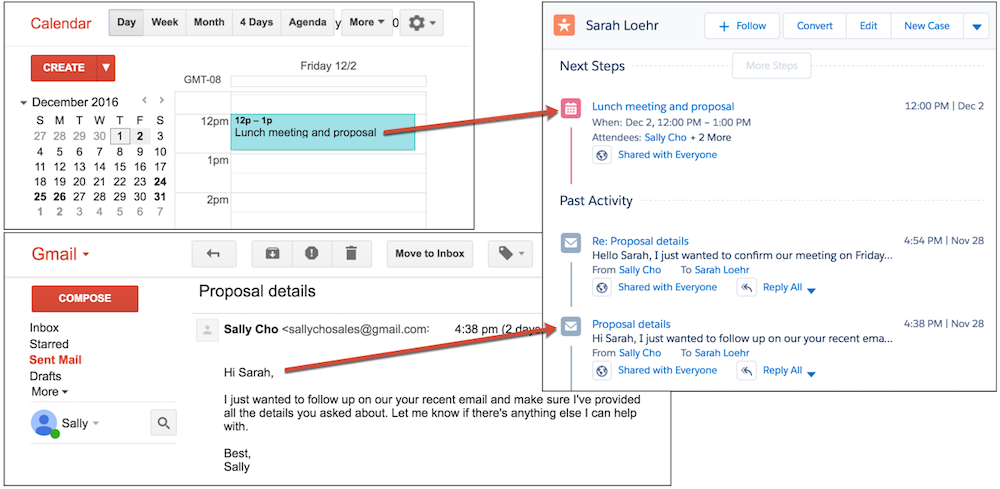
Einstein’s Activity Capture in Sales Cloud Essentials automates the data entry process so that emails and events get automatically populated into a contact’s communication history within Sales Cloud.
Activity Capture in Essentials takes your calendar and emails and automatically populates them into your customer's details.
It's priced for small businesses
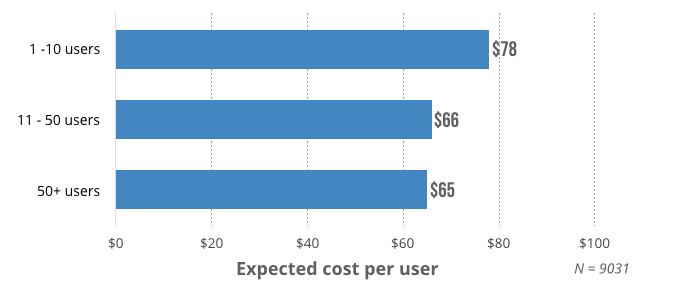
According to recent research from GetApp, small businesses are willing to spend anywhere between $73 and $81 per user per month on a CRM, depending on the size of their company. As the number of users grow, businesses expect the cost to go down, with small businesses hoping to spend around $65 per user per month once the number of users goes above ten.
Sales Cloud Essentials is well below that, priced at $25 per user per month, paid annually.
The kicker? Essentials only supports up to five users. If you’ve got more than that, you’ll have to hop up to the Professional plan, which costs $75 per user per month (still below budget for companies with more than ten people).
It offers extensive training resources
One of the biggest fears for a company implementing a new piece of software is low user adoption. According to research from CSO Insights, less than 40 percent of businesses have a CRM adoption rate of 90 percent. Employees that are resistant to change or simply overwhelmed by the bells and whistles of a new product may opt to avoid it altogether in favor of familiar but cumbersome spreadsheets.
One of the biggest benefits of Sales Cloud Essentials is its Trailhead training program. Meant to overcome user adoption barriers, Trailhead is Salesforce’s learning platform for getting up to speed with the software. Trailhead provides guided training materials with detailed explanations of every component in Essentials in order to help employees familiarize themselves with all of the terminology and features in Salesforce, but also things like the importance of having a CRM.
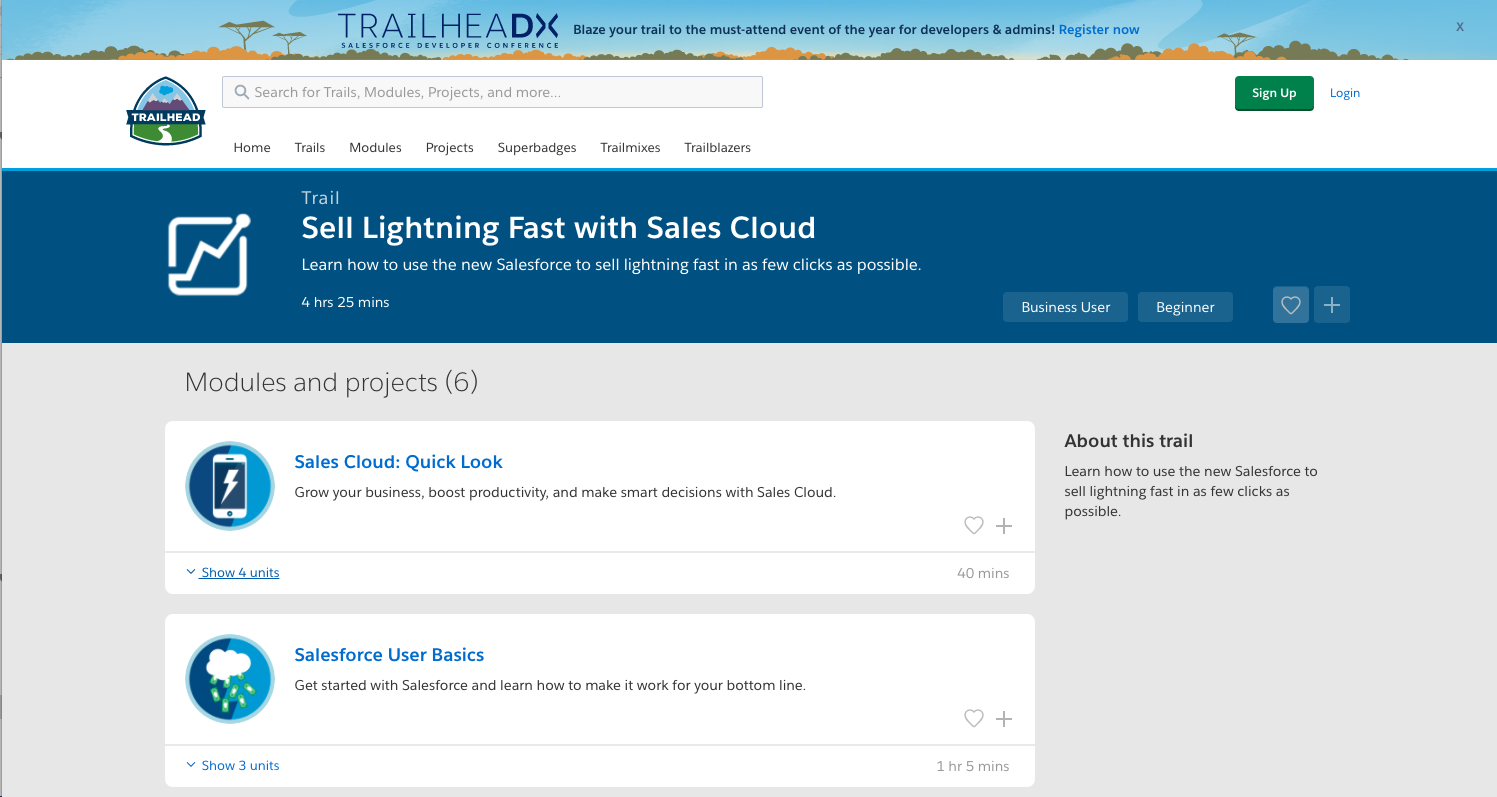
With set modules, learning objectives, projects, and quizzes, the courses are designed to be interactive. Salesforce has built a big community base around its training so that users can also reach out to each other for help, share tips, or recommend best practices.
It's designed to scale for quick growth
Salesforce has a lot of arguments working in its favor. Aside from it’s recognizable and reliable brand, it also offers a solution that’s affordable and accessible for small businesses. The biggest benefit of Salesforce Essentials, however, is probably it’s ability to scale.
Small business CRMs are great at getting SMBs off the ground, but there are sometimes difficulties scaling up as the number of users grows and the amount of information stored in the application increases. Salesforce Essentials is specifically built for that.
Because you can easily scale up from Salesforce Essentials to the Professional plan, you don’t have to worry about switching to a CRM that can handle as many users or as much data as Salesforce. It already has the infrastructure in place to help you make that transition. You can also add Service Cloud Essentials to expand into the customer service sphere with an additional five users for $25 per user per month.
Given the cost of training and implementation involved in adopting a CRM, especially during a period of high growth, it’s worth considering a CRM that can grow as quickly as your company.
Key questions to ask before making a CRM purchase
If you’re a small business looking for its first CRM, or are hoping to make the switch from a CRM that you’re currently using, ask yourself these key questions before taking the plunge:
Does it offer automation options that'll eliminate the need for manual data entry?
What's the pricing plan like? Will the price per user go down as my business grows?
Are there training materials available to make the onboarding process smoother?
Can the solution scale up as my business grows to support more users and advanced functionality?
Salesforce Essentials certainly aims to answer “yes” to all of the above questions.
But, there are other CRMs which might help you answer these questions too. It’s important to make sure that you assess and even trial various software options so that you don’t run into any issues during implementation and growth.
To get you started with CRM:
You can start a trial of Salesforce Essentials to test out the waters.
Check out GetApp's software catalogue for CRMs that offer a free trial .
Narrow down CRMs based on the features you need using GetApp's scorecard.
More on CRM


Apr 22, 2024

Jul 03, 2024

Mar 26, 2024

May 16, 2024

Mar 04, 2024