GetApp offers objective, independent research and verified user reviews. We may earn a referral fee when you visit a vendor through our links.
Our commitment
Independent research methodology
Our researchers use a mix of verified reviews, independent research, and objective methodologies to bring you selection and ranking information you can trust. While we may earn a referral fee when you visit a provider through our links or speak to an advisor, this has no influence on our research or methodology.
Verified user reviews
GetApp maintains a proprietary database of millions of in-depth, verified user reviews across thousands of products in hundreds of software categories. Our data scientists apply advanced modeling techniques to identify key insights about products based on those reviews. We may also share aggregated ratings and select excerpts from those reviews throughout our site.
Our human moderators verify that reviewers are real people and that reviews are authentic. They use leading tech to analyze text quality and to detect plagiarism and generative AI.
How GetApp ensures transparency
GetApp lists all providers across its website—not just those that pay us—so that users can make informed purchase decisions. GetApp is free for users. Software providers pay us for sponsored profiles to receive web traffic and sales opportunities. Sponsored profiles include a link-out icon that takes users to the provider’s website.
Without an out-of-the-box eCommerce solution tending to your every need, it's critical for online stores using open-source software such as WooCommerce to make the most out of the huge variety of feature-rich plugins available to boost their online stores.
Thanks to its flexibility in terms of customization, ability to integrate blogs for content marketing, and scalability, WooCommerce now powers over 39 percent of online stores. Even though the WooCommerce app is free, you'll need a variety of plugins to properly power your eCommerce store.
However, with almost 49,000 WordPress plugins at your fingertips, but no logical filtering system embedded in its directory (a search for WooCommerce, for example, returns 250 pages worth of plugins), giving your sales a boost with the aid of plugins may prove a little time consuming. How can you be sure that you're choosing the best ones?
Here we've selected three plugins that target key areas of your store such as shipping, user experience, and payment gateways to give your store the boost it deserves.
Booster for WooCommerce plugin
Booster is a WooCommerce plugin with a gargantuan catalog of over 50 features to help you add a boost to your eCommerce store. The plugin adds functionality for a huge variety of features, from prices and currency to cart and checkout, and so much more.
Key features:
Multiple currency controls, including automatic exchange rates and adjustment of prices and currencies by country.
Custom payment gateways.
Adjustable checkout fields and custom cart page info.
Customizable product listings for shop and category pages, e.g., products per page and "exclude categories" options.
Order and shipping support, e.g., multiple shipping method icons and order auto-complete.
How can it boost your sales?
The Booster plugin takes care of all of the finicky adjustments that are too small for stand-alone plugins, and also offers scalability for your store as it grows—you may not need some of the features now, but it's great to have them in this supercharged toolkit for the future.
This plugin will handle the backend functions that will make your online store user friendly, easy to navigate, and reliable, thereby providing the perfect conditions to convert consumers into loyal, returning customers.
Pricing: The Booster WooCommerce plugin is free. Yep, zero, zilch, absolutely nada for this gigantic toolkit. However, if you want even more functionality, upgrades to Booster Plus start at just $19.99—check out their handy Booster Free versus Booster Plus table for a side by side comparison of both products.

YITH WooCommerce Compare
YITH's WooCommerce Compare plugin creates comparison tables of products from your catalog to help customers easily size-up your products.
Key features:
"Compare" button for item pages, displaying a comparison table of products
Comparison widget enables customers to choose the items they wish to compare.
How can it boost your sales?
With the Compare plugin, the ease of comparing different products eliminates the need to visit multiple product pages, speeding up the customer's purchase journey and leading to a pleasant customer and user experience.
"An effective way of drawing customer attention to more products is to offer a tool that visually compares them - their images, prices, and features - as this offers customers the chance to save money, and also provides a chance for the retailer to upsell and cross-sell further products", says Andrea Presenti of YITH.
Using comparison tools can also offer long-term insight into customer purchase behavior and buying trends.
Pricing: The YITH WooCommerce Compare plugin is free, with the premium version offering further features such as the ability to share compare pages across social media, product slider creation, and comparison tables for specific products. A premium single site license costs $59.00, $99.00 for up to six sites, and $149.00 for up to thirty sites.

WooCommerce Advanced Free Shipping
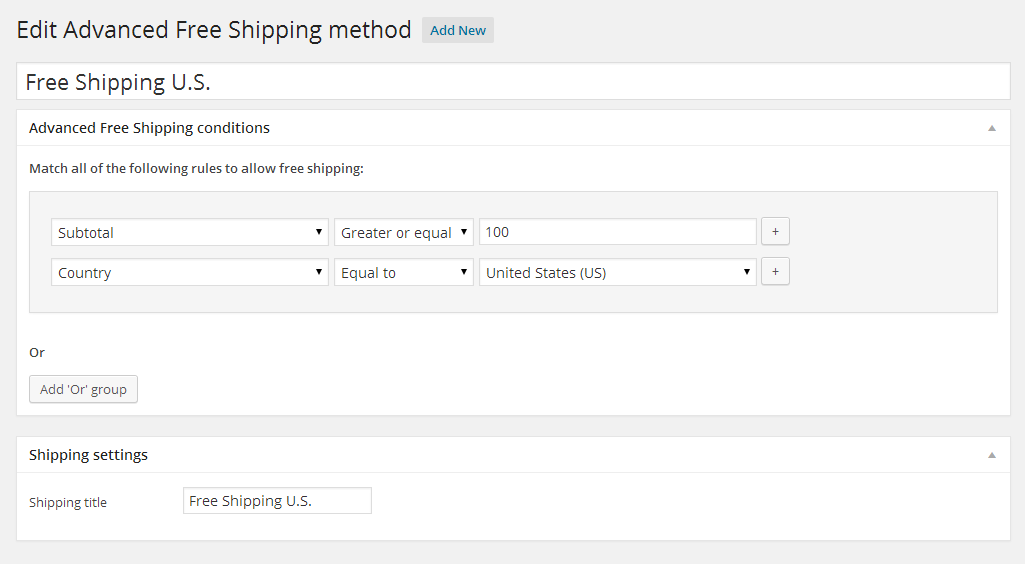
The WooCommerce Advanced Free Shipping plugin allows you to create custom shipping rates based on your own predefined conditions, providing you with complete flexibility over your own shipping costs.
Key features:
Add advanced free shipping conditions such as cart total, country, weight, coupons, and more.
Create multiple shipping records.
How can it boost your sales?
Not only does the flexibility of this WooCommerce plug-in ensure complete control over your own shipping costs, therefore protecting your margins, but offering free shipping conditions can also boost your sales, too. Let's take a look at some of the stats:
A no-brainer, really, but free shipping is incredibly popular with consumers—9 out of 10 consumers say that free shipping is their number one incentive to shop online more.
Shipping costs account for 58 percent of cart abandonments, so setting free shipping thresholds such as minimum spend can increase your order value.
When considering spend versus delivery time, consumers overwhelmingly value free shipping over shipping time—83 percent of consumers are ready to wait an extra two days for delivery if shipping is free.
Pricing: The plugin is free to download, and the premium version for a single end product is $17.00.
What next?
Erin McKeeby, general manager at SendinBlue, an email marketing solution that powers businesses of all sizes, advises that plugins for eCommerce stores should be compatible with email marketing platforms, due to the potential for added functionalities and benefits.
She says, "When choosing a plugin to support your store, pretend you're hiring a new employee! This tool will become a fixture in your store, and all the same things matter: experience, reliability, ability to get the job done, and affordability". Erin's top three tips for selecting the best plugins are:
Read user reviews, and check out the business so you'll be confident that they'll continue to "show up" month after month by updating the plugin regularly, and providing support and resources when you need help.
Make sure you understand the universe of features and which items are "must-haves" for your business.
Research pricing models carefully to understand if a tool is free forever, if you need a paid account to access key features, and if so, how and when you'll be charged.
Checkout a further range of eCommerce solutions on the market or take a look at the WordPress plugin directory for further WooCommerce plugins to boost your sales.
This post was written in conjunction with email marketing solution provider SendinBlue.

Bandita Awasthi