GetApp offers objective, independent research and verified user reviews. We may earn a referral fee when you visit a vendor through our links.
Our commitment
Independent research methodology
Our researchers use a mix of verified reviews, independent research, and objective methodologies to bring you selection and ranking information you can trust. While we may earn a referral fee when you visit a provider through our links or speak to an advisor, this has no influence on our research or methodology.
Verified user reviews
GetApp maintains a proprietary database of millions of in-depth, verified user reviews across thousands of products in hundreds of software categories. Our data scientists apply advanced modeling techniques to identify key insights about products based on those reviews. We may also share aggregated ratings and select excerpts from those reviews throughout our site.
Our human moderators verify that reviewers are real people and that reviews are authentic. They use leading tech to analyze text quality and to detect plagiarism and generative AI.
How GetApp ensures transparency
GetApp lists all providers across its website—not just those that pay us—so that users can make informed purchase decisions. GetApp is free for users. Software providers pay us for sponsored profiles to receive web traffic and sales opportunities. Sponsored profiles include a link-out icon that takes users to the provider’s website.
3 Call Center Automation Ideas to Boost Your Business
Call center automation is crucial to increasing your contact center’s overall customer experience and customer satisfaction.


According to Gartner, 72% of customers expect to receive excellent or good service from companies, but only 49% actually receive it (full content available to Gartner clients). How does your call center stack up?
Chances are that your call center might not be doing enough to meet or exceed customer expectations. From long customer wait times, customer journey inefficiency, and even finding the right agent to speak to can wreak havoc on your call center and even bring employee morale down. That's where call center software can come in handy when automating call center tasks.
As a call center manager, your main concern is running an efficient contact center to provide an exceptional customer experience. Call center automation is all about saving time and energy which is essential for call center efficiency.
Using artificial intelligence (AI) and call center automation helps your contact center eliminate repetitive, complicated tasks, enabling an actual human agent to work better to provide the customer service that your customers clearly expect to receive.
We’ll be going over the three important ways call center automation can help your contact center to improve customer experience and customer service.
Automated interactions
Workflow automation
Scheduling automation
Use automated interactions to improve customer support and reduce agent burnout
Automated interactions is a catch-all term which includes anything that helps automate the customer journey. Common types of automated interactions for contact centers are chatbots and interactive voice responses (IVR).
Chatbots are a computer program with a conversation interface that allows the chatbot software to hold a conversation with human users via textual (and auditory in some advanced cases such as Google Assistant) methods. Many come equipped with conversational AI that can help parse out key information from customers in order to either solve their problem or connect them with the right agent.
Typically, these programs can be set up as widgets on websites, messaging platforms, social media sites, and mobile apps.
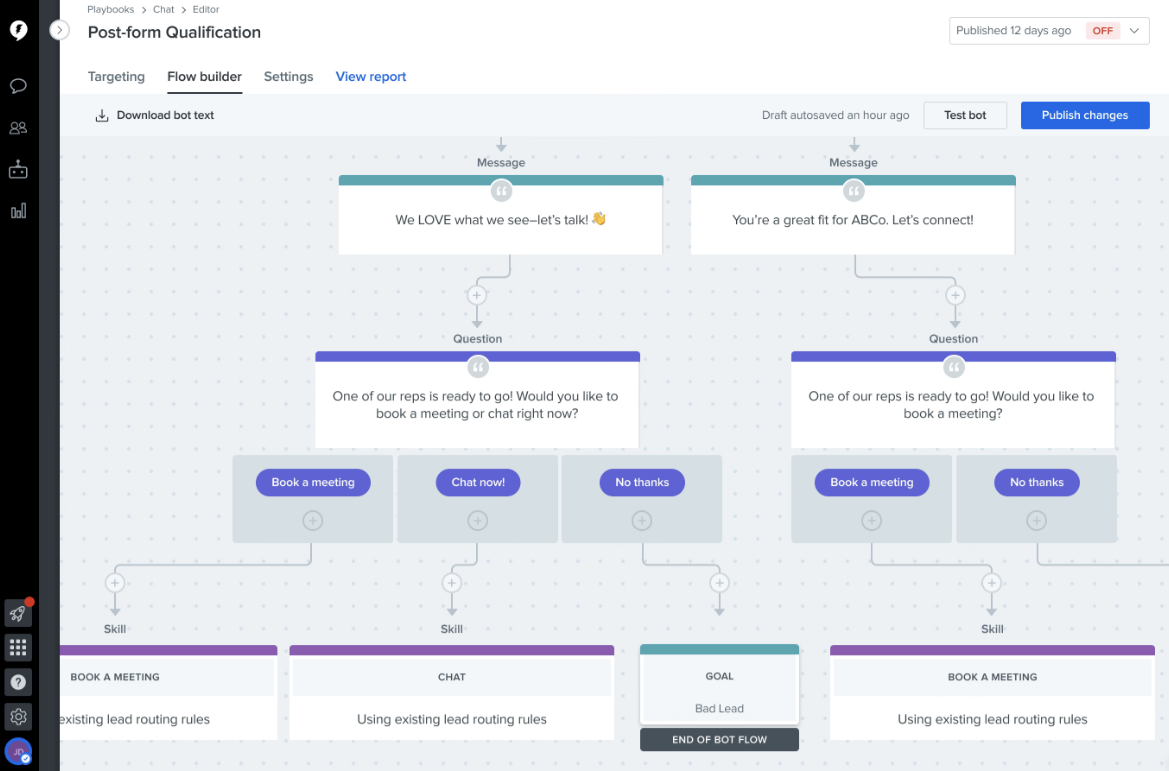
Drift’s chatbot AI programmer (Source)
IVR is an automated system that interacts with callers before routing them to the right agent or department based on the required expertise. IVR systems ask typical questions such as, what language a customer speaks, their name, their account numbers, and answer simple questions about their issue.
The end goal of using an automated interaction in your contact center is to provide your clients and customers with self-service tools so they can explore solutions on their own. This automated interaction leads to a better customer experience which leads to better customer satisfaction and greater customer retention.
Additionally, call center automation software like chatbots and IVRs help reduce the repetitive nature of a call center job. Since common, simple customer service queries are often taken care of automatically, an agent doesn’t need to answer the same question repeatedly, which can be draining and frustrating.
Once the chatbot or IVR determines that a customer needs to talk to an agent, the agent will have more context surrounding the problem and fewer back-and-forth questioning at the beginning of the call.
Want more information about IVR and chatbot software? Check out these category pages to compare different tools in order to find the best fit for your contact center.
Getting ready for call center automated interactions: To prepare your contact center for automated interactions, start by polling your staff to determine which tasks are most repetitive and can easily be answered. Build a FAQ based on those responses so you’re already prepared to build your chatbot and IVR’s automated responses.
Implement workflow automation to help prevent agent mistakes and improve customer experience
AI and contact center automation software are all about automating repetitive or data-rich tasks to free up the agent to complete tasks that need more nuance. That’s where call center automation software comes in. By automating agent workflows, you remove repetitive, mundane tasks that can lead to boredom, and potentially to more agent errors.
After all, the ultimate goal of workflow automation is to simplify your contact center agents’ routines so that they can focus on what really matters: customer service and support.
Workflow automation allows contact centers to set up automatic tasks that the AI handles once it knows what to do. For instance, you can set up the software to automatically send out an email to your customer once an agent is finished with a call. This means that your agent is able to move onto the next customer and efficiently answer more queries each day. After all, less wait time leads to better customer service.
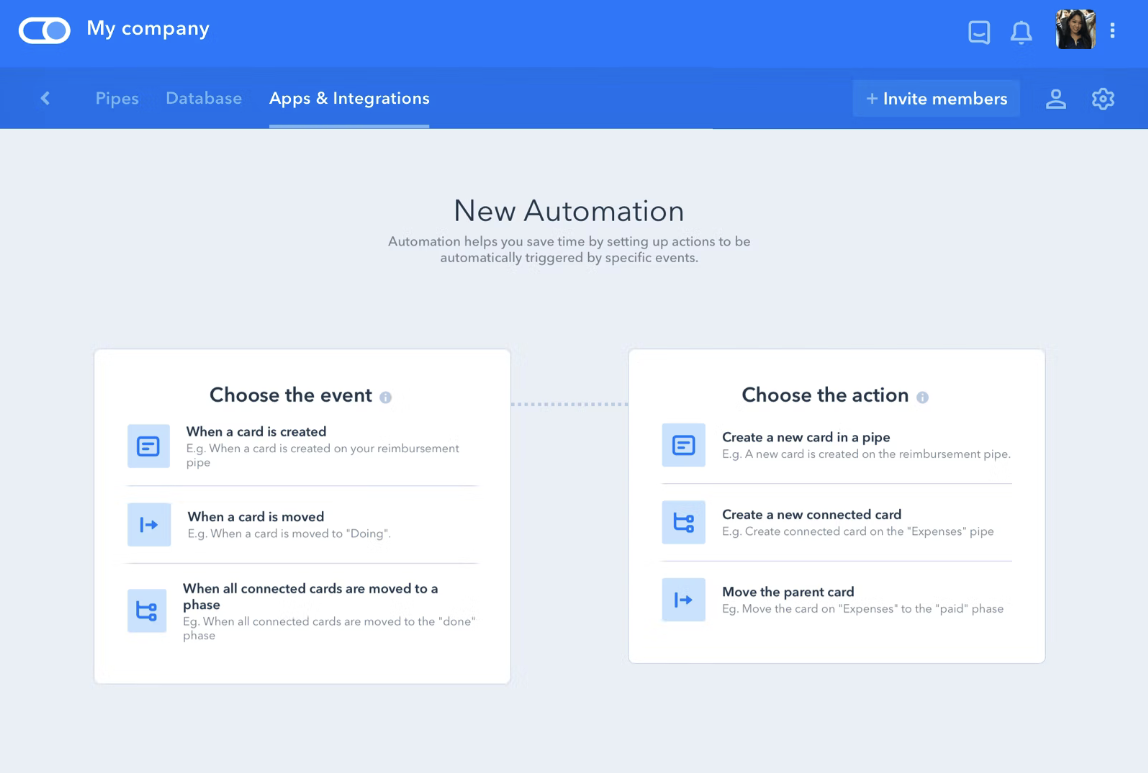
Pipefy’s workflow automation creation (Source)
When it comes down to it, your contact center is going to implement call center automation in order to improve ROI, enhance customer support, and boost customer experience. One of the best ways to do that is to simplify processes for a call center agent.
The more common, repetitive tasks that you can effectively take care of with workflow automation, the better an agent can be at focusing on what you really hired them for: providing an excellent customer experience.
If you’re looking for workflow automation options, check out our Category Leaders for workflow management software.
Getting ready for workflow automation: Start by tracking typical agent interactions. These might include managing internal interactions, inputting data, or sending follow-up emails. Next, determine which of these can be automated. Things like data input, sending emails, and switching between applications are easily automated and can save your agents hours a week.
Use scheduling automation to improve efficiency and remove busy work
A large part of managing a contact center is centered around scheduling. Contact center automation software with scheduling automation can help your management team make effective schedules quickly and efficiently.
AI can take the schedule of every agent to see when they’re free, on PTO, or have incoming calls in order to create the perfect schedule with no overlap or miscommunications.
Creating a comprehensive schedule that takes into account agent expertise and availability without intelligent automation is a needless waste of time for your contact center management team. Think about this: without automation, you need to pull up every agent’s schedule, put them side by side, analyze expertise, and ensure everyone is scheduled without gaps. It simply takes a lot of time.
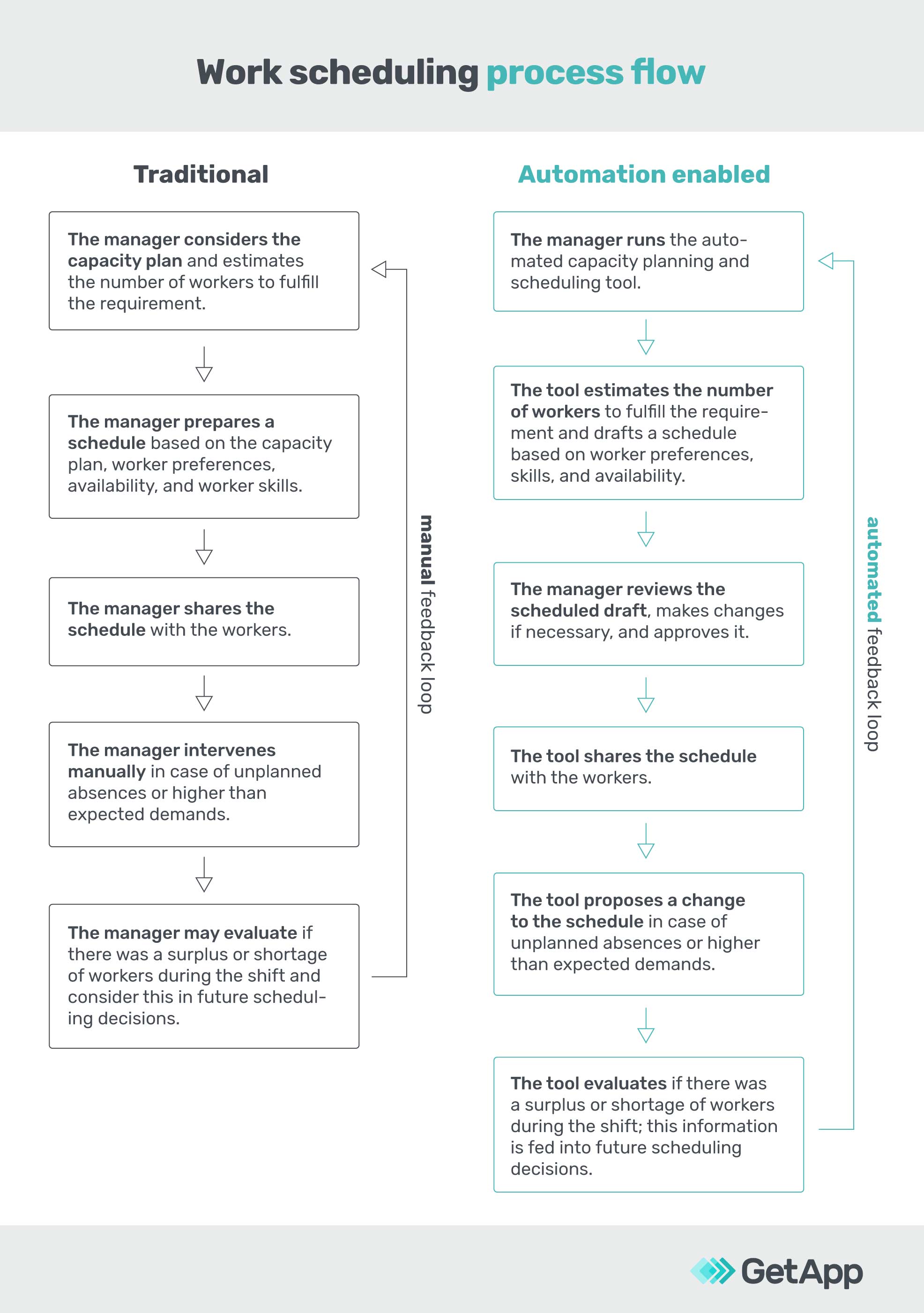
We’re like a broken record here, but call center automation is all about simplifying processes and saving time. In fact, a study recently found that automation saved a call center an average of six minutes per technician call. As much as we hate to use the cliche: time is money, and that’s a lot of time saved over the course of a week.
AI is particularly good at things like scheduling automation because all of the data is available, but it takes time for a human brain to process and complete compared to an AI which can create a schedule within seconds (and will likely make a better schedule).
Once your managers are freed up from scheduling, they can focus on more important tasks.
For more information about why scheduling automation is the right call for your contact center, we’ve got you covered with some great resources.
Scheduling Automation Saves Time and Money: Why It's a No-Brainer for Your Business
Scheduling Optimization Got You Down? AI for Scheduling is the Way to Go
Getting ready for scheduling automation: First, determine if you need scheduling automation. If you have 30 or fewer agents, your scheduling manager can likely finish a schedule within an hour which might not be worth the technology investment. However, once a schedule involves 30 or more agents, the level of complexity begins to grow and the time it takes to create the schedule grows as well. Plus, more agents means more potential for mistakes.
Call center automation is the next step for any successful contact center
Providing an exceptional customer experience interaction has never been more important to the success of a contact center. That’s why you should implement a call center automation tool as soon as possible.
Contact center automation should help enable your human agents to provide better customer service by eliminating repetitive, boring tasks, allowing them to succeed by optimizing their workflows, and ensuring they are scheduled to answer incoming calls based on their expertise.
For more resources about how to improve your call center and customer service, we’ve got you covered:
The Best Call Center Quality Monitoring Scorecard Is Surveying Customers
What is a Virtual Call Center? How Your Business Can Benefit From Going Virtual
What You Need to Know About Artificial Intelligence in Call Centers
More on Customer Service



Jun 18, 2024

Dec 08, 2023