

GetApp offers objective, independent research and verified user reviews. We may earn a referral fee when you visit a vendor through our links.
Our commitment
Independent research methodology
Our researchers use a mix of verified reviews, independent research, and objective methodologies to bring you selection and ranking information you can trust. While we may earn a referral fee when you visit a provider through our links or speak to an advisor, this has no influence on our research or methodology.
Verified user reviews
GetApp maintains a proprietary database of millions of in-depth, verified user reviews across thousands of products in hundreds of software categories. Our data scientists apply advanced modeling techniques to identify key insights about products based on those reviews. We may also share aggregated ratings and select excerpts from those reviews throughout our site.
Our human moderators verify that reviewers are real people and that reviews are authentic. They use leading tech to analyze text quality and to detect plagiarism and generative AI.
How GetApp ensures transparency
GetApp lists all providers across its website—not just those that pay us—so that users can make informed purchase decisions. GetApp is free for users. Software providers pay us for sponsored profiles to receive web traffic and sales opportunities. Sponsored profiles include a link-out icon that takes users to the provider’s website.
A Cloud Expert Shares 8 Data Backup Best Practices for SMBs
Backing up your data isn’t enough. Learn how to do it properly to serve you in times of crisis.


Small business information security managers know that backing up data is crucial, but cloud expert Lee Atchison [1] says simply recognizing its importance isn't enough. What matters is how you do it.
Do you back up data daily or weekly? How many copies do you keep, and where are they stored? Are they encrypted? Do you handle backups manually, or do you use verified backup software? Doing it right can save you from challenges such as losing customer trust, data breaches, or falling behind competitors.
"Your data isn't just something to be archived away. It's your way back to normalcy in a crisis, your roadmap to recovery. Back it up with the care and precision it demands."
—Lee Atchison, Cloud expert

Lee Atchison
Strategies to properly back up your data
GetApp’s 2022 Ransomware Impact Survey* highlights a finding that supports Atchison's view of data backup importance:
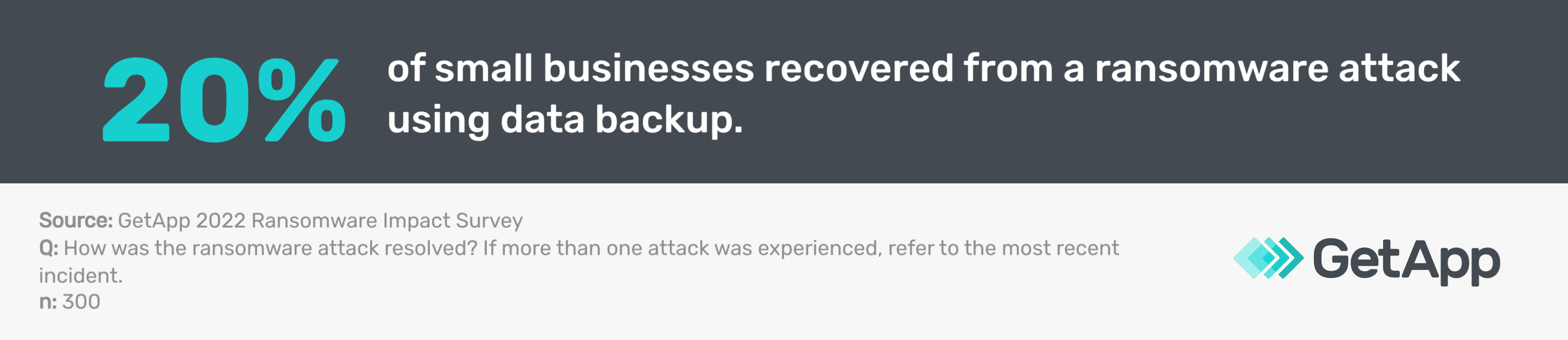
This is why Atchison makes it very clear that data is central to all businesses. Yet data can disappear or become corrupt when a disaster occurs. Follow these strategies to ensure your data is safe no matter what happens to your small business.
1. Have multiple redundant backups
You know how they say, "don't put all your eggs in one basket"? Well, Atchison's got some wisdom that falls along these lines, saying that having just one backup isn't enough. What if it fails? You need at least two, plus your live data. Consider using different cloud-based data backup services. It's like having spare keys to your house.
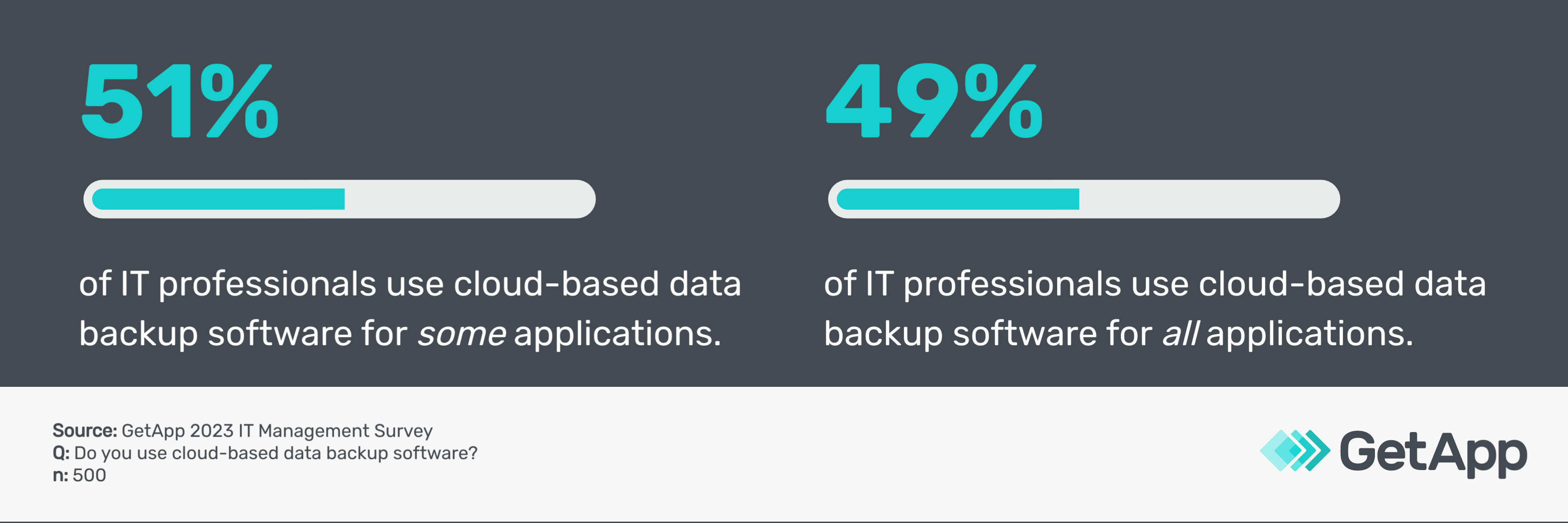
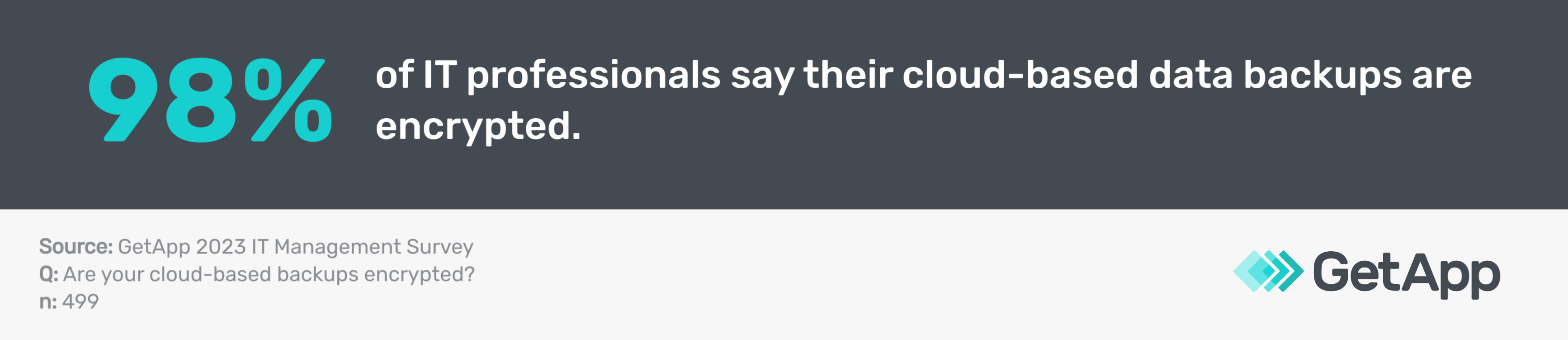
In another GetApp survey**, we found many IT professionals use cloud-based data backup solutions.
Tips to ace this step:
Assign a system or data administrator from your personnel to monitor backup statuses daily. By using the backup monitoring feature of your software, you can catch any data corruption or failure-related issues early.
Perform monthly test restores from each backup using your backup software to verify that they are functioning properly.
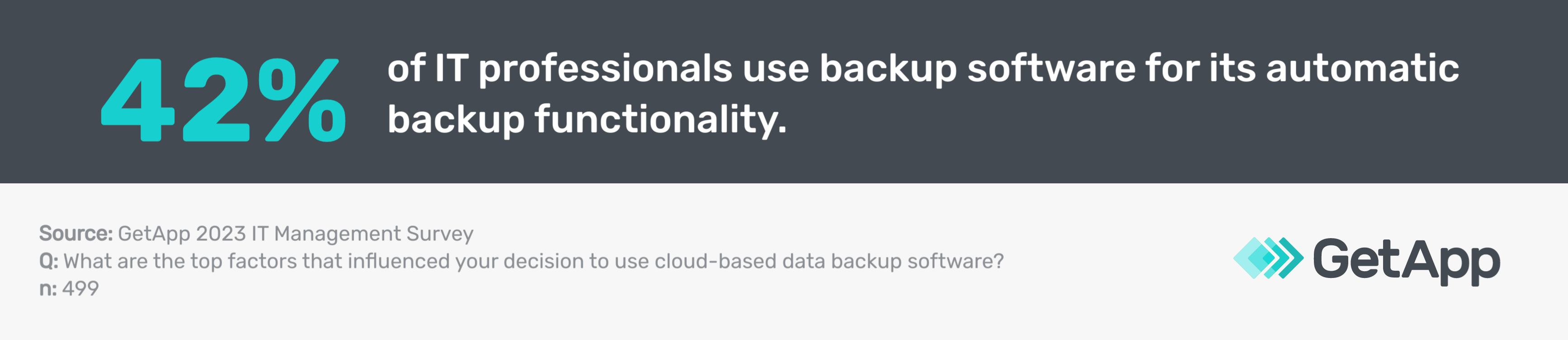
Chat with your cloud provider about setting up automatic redundant backups to ensure continuous protection.
2. Increase your backup frequency
Imagine losing an entire day's worth of sales. Atchison says that many small businesses only back up at night to avoid disruptions during working hours, but he suggests backing up as often as possible. Real-time continuous backups are the way to go if you're dealing with heavy transactional data, as they can capture every change as it happens. This ensures you have the most up-to-date information saved, safeguarding against sudden data loss or system failures.
For instance, think of a small online retail store. If the backups are only done at night, any system failure during the day could result in the loss of all the orders and customer interactions from that day. It's like leaving the shop door unlocked; anything could go missing.
Tips to ace this step:
Talk to your backup software provider about increasing backup frequency based on how often your data changes. This will help minimize data loss by ensuring the backup schedule aligns with your data's update rate. Fine-tune the settings in your backup software to achieve the right balance.
Implement incremental backups for efficiency. Instead of backing up everything every time, use incremental backups to save only the changes since the last backup. This method is more efficient and reduces the load on your backup system.
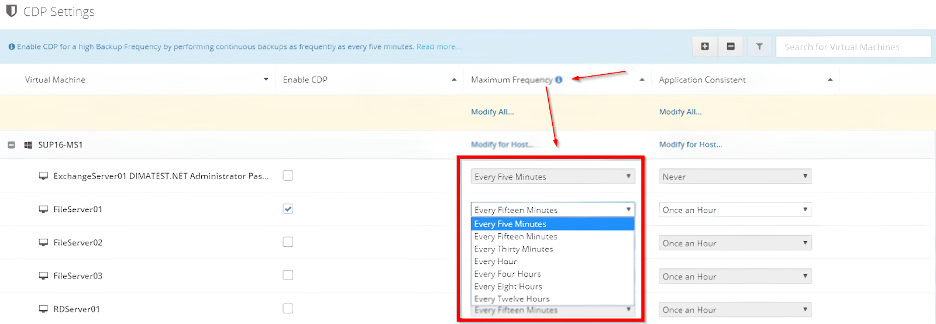
Fine-tune the backup frequency per your needs in VM Backup business continuity software (Source)
3. Prioritize business-critical data that changes
You know what's essential to your business. Atchison recommends focusing on what's critical and how often it changes. Your high-priority data, such as digital assets, intellectual properties, and newly-acquired customer details, needs more attention than less critical data that can be backed up less often.
Tips to ace this step:
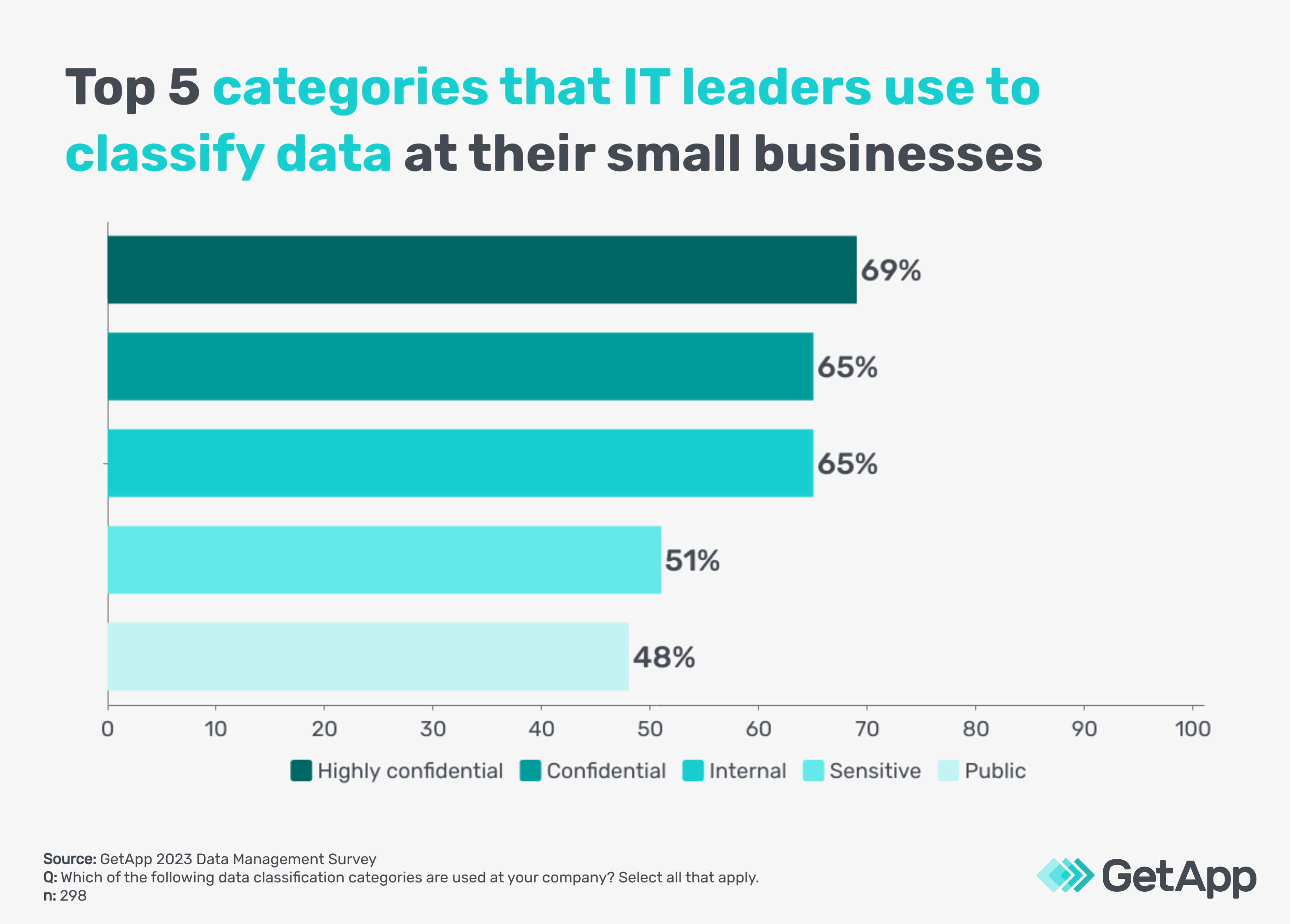
Make a list of your essential business systems and data using data classification and management tools to identify what needs protection. GetApp’s 2023 Data Management Survey*** finds that every surveyed IT leader utilizes a data classification system to identify and categorize different types of data according to sensitivity.
Have a sit-down with your stakeholders to classify data by priority to allocate resources efficiently through regular meetings and collaboration tools.
4. Follow the 3-2-1 rule
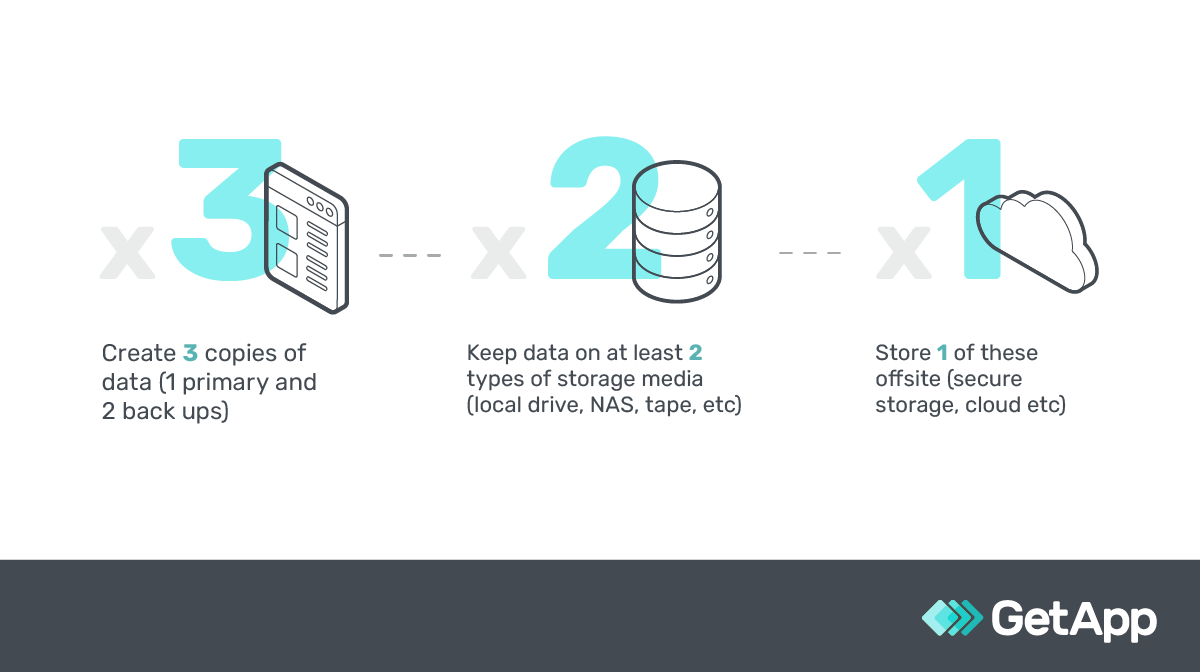
Here's an oldie but a goodie from Atchison—the 3-2-1 data backup strategy. Even though it's a bit older, the concept still works—three copies on two mediums with one offsite. Nowadays, this can mean using two cloud providers and keeping one backup copy in a different region.
Tips to ace this step:
Store one backup in a different geographic region, either in an external hard drive or a secure physical storage facility. This offline approach adds disaster resilience. If a regional catastrophe occurs, such as a natural disaster that affects local data centers, having a backup in another location ensures that your data remains safe.
Choose two leading cloud backup providers for redundancy. Compare their features and compliance to ensure they meet your business needs. Having backups with different providers adds an extra layer of security. Just ensure they have the necessary certifications to complete the job professionally.
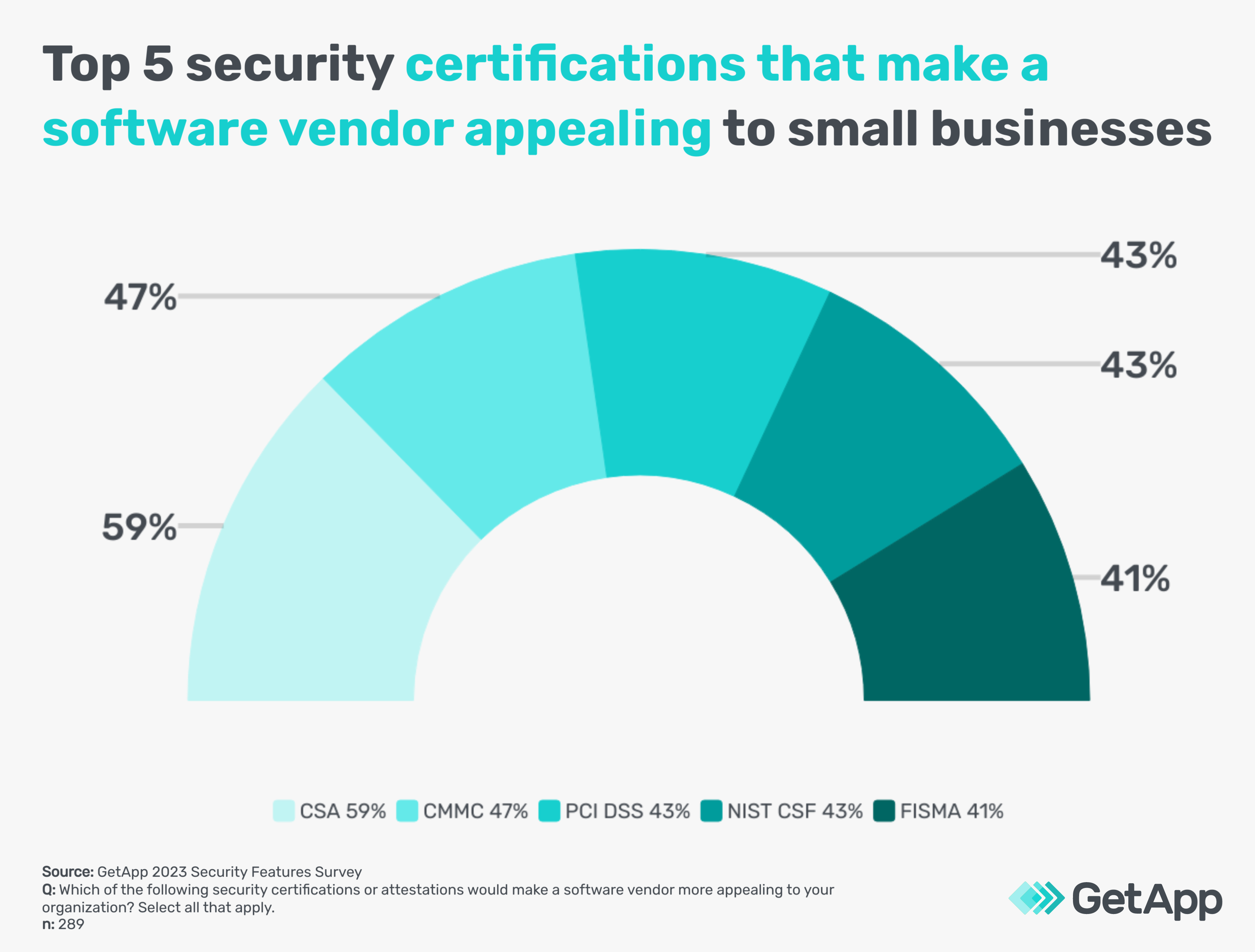
GetApp’s 2023 Security Features Survey**** highlights security certifications small businesses want their software vendors to own.
5. Automate disaster recovery
Disaster recovery is like having a fire drill for your data. Picture a small business, such as a local bakery, that relies on an online ordering system. If that system crashes without a recovery plan, they could lose all their orders for the day.
Atchison says having a solid plan in place, similar to having a fire escape plan in the bakery, is essential. Practicing “game day” drills ensures that the plan works when needed, and automating as much as possible can make recovery quicker and less stressful for your small business.
Tips to ace this step:
For clarity’s sake, detail all the steps needed if emergencies happen using a document management system. Think of it as a step-by-step guide to get your business back online.
Keep disaster recovery strategy plans offline and in the cloud environment for availability by saving copies in physical and cloud storage. These plans include all the actions needed to restore normal operations.
Schedule quarterly “game day” tests to practice your disaster recovery plan by simulating a disaster scenario. These tests could involve using disaster recovery simulation tools or learning management systems to mimic a system failure.
Look for ways to automate faster restoration of essential business functions and data for efficiency using business continuity tools. Akin to disaster recovery, these tools can help quickly restore your online ordering system, customer database, or other vital parts of your business, minimizing downtime.

Real-time updates of recovered devices from an ongoing disaster in Cove Data Protection disaster recovery software (Source)
6. Use backups only for recovery and not for retention
Backups are like snapshots of your data at a specific point in time; they're essential for recovering from a disaster, such as a system crash. But they aren't suitable for analyzing trends or keeping historical records.
Imagine a small-business owner who runs a coffee shop and maintains a daily sales log. If they rely only on backups, they might have detailed records for the last few days or weeks but not an ongoing history.
Atchison suggests using data analysis software to log every data change, such as keeping a detailed diary of each sale, customer preference, seasonal trend, etc. That way, the coffee shop owner can analyze trends, such as when pumpkin spice lattes are most popular. The backups are there if the system crashes, but the ledger provides a rich, ongoing record.
Tips to ace this step:
Talk to your software backup provider about options for data analysis and retention tools. You want to ensure your backups are structured for quick recovery, not long-term analysis.
Explore time-series database options optimized for storing and analyzing time-stamped data. This provides both disaster recovery and rich historical insights.
7. Encrypt and protect backups
Security is no joking matter, especially with backup data. Atchison emphasizes that backups can be vulnerable targets, so encrypting them is wise. But remember, if it's too complex, you might find yourself locked out when you need access the most.
Tips to ace this step:
Consult your data backup service provider about encryption. Get guidance on the best encryption features available in your backup software. Encryption turns your data into a code only authorized users can read.
Set up security policies to restrict access to backup data storage space. Use your access management tools to define who can and can't access the backups.
Handle encryption keys with care to avoid lockouts using professional password management tools. Losing an encryption key is like misplacing a house key—without it, you can't get in.
8. Test recovery using backups
Lastly, Atchison emphasizes that testing your backups is like rehearsing for a big performance; you wouldn't want to discover a problem during the actual show. Regularly restoring from backups ensures you're prepared for any unexpected data loss.
Tips to ace this step:
Create a realistic test environment to simulate potential disasters. Utilize backup and recovery tools to mimic real-world scenarios, such as a server failure. This will allow you to identify and fix issues in advance.
Collaborate with your team to conduct end-to-end recovery tests. Assign specific roles and responsibilities and walk through the entire recovery process. Think of it as a team-building exercise where everyone learns their part in the recovery dance.
Continuously review and improve your backup plans. Regularly revise your disaster recovery documentation to incorporate lessons learned from testing and changes in your business. It's a living document that evolves with your business, always reflecting your current needs.
The right toolset can automate data backup and management
Data is indeed the lifeblood of your business, and it's natural to want to shield it with utmost care. But as Atchison says, there's a fine line between protection and obsession.
"After our consultations, business owners often become so engrossed in security that they lose sight of other priorities," says Atchison. "Times have changed. With generative artificial intelligence, you've got tools to automate those tedious tasks."
You don't have to spend all your time and energy on data backups. Embrace technology to make the backup process nearly effortless:
Backup software: Schedule automatic backups according to your needs, eliminating manual efforts.
Database monitoring tools: Employ AI algorithms to watch over databases, sending alerts for any unusual activities.
Data loss prevention software: Set policies to detect and block any unauthorized data transfers.
Business continuity software: Keep an eye on systems and activate redundant infrastructure during outages, reducing downtime.
Server backup software: Take whole-system backups, readying for quick restoration if needed.
Virtual machines: Utilize snapshots of systems that can be quickly restored in emergencies.
These intelligent tools also simplify data security, allowing you to focus on what matters in your business. So, how can you bring this automation into your workflow without much complexity?
Here's where GetApp’s automation guide comes in handy. Our resource can help you understand the steps to integrate automation into your operations. It's an effective starter to ensure your business and data stay managed without overloading you.
Sources
Lee Atchison, LinkedIn
Methodologies
* GetApp’s 2022 Ransomware Impact Survey was conducted in May 2022 among 300 U.S. business leaders that have experienced a ransomware attack to determine the broader impacts of ransomware attacks on businesses (i.e., repercussions beyond the ransom payment). All respondents were part of the response team or were made fully aware of the company's response.
** GetApp conducted the IT Management Survey in June 2023 among 500 respondents to learn more about IT management practices at U.S. businesses. All respondents were screened for IT positions within their company.
*** GetApp’s 2023 Data Management Survey was conducted in July 2023 among 298 respondents to learn more about data classification practices at U.S. businesses. All respondents were screened for leadership positions in IT with close involvement in data management and strategies at companies that use a data classification system.
**** GetApp conducted the Security Features Survey in January 2023 among 289 respondents to learn more about software security preferences among U.S. businesses. All respondents were screened for involvement in the software purchasing process at their company.
Bhavya Aggarwal
mentioned in this article


More on IT Management


Aug 08, 2024



Sep 18, 2024

May 29, 2024