

GetApp offers objective, independent research and verified user reviews. We may earn a referral fee when you visit a vendor through our links.
Our commitment
Independent research methodology
Our researchers use a mix of verified reviews, independent research, and objective methodologies to bring you selection and ranking information you can trust. While we may earn a referral fee when you visit a provider through our links or speak to an advisor, this has no influence on our research or methodology.
Verified user reviews
GetApp maintains a proprietary database of millions of in-depth, verified user reviews across thousands of products in hundreds of software categories. Our data scientists apply advanced modeling techniques to identify key insights about products based on those reviews. We may also share aggregated ratings and select excerpts from those reviews throughout our site.
Our human moderators verify that reviewers are real people and that reviews are authentic. They use leading tech to analyze text quality and to detect plagiarism and generative AI.
How GetApp ensures transparency
GetApp lists all providers across its website—not just those that pay us—so that users can make informed purchase decisions. GetApp is free for users. Software providers pay us for sponsored profiles to receive web traffic and sales opportunities. Sponsored profiles include a link-out icon that takes users to the provider’s website.
DDoS Versus DOS Attacks: What They Are and How They Are Different
Network-based cyberattacks often aim to disrupt operations, yet the tactics they employ vary greatly. Understand the differences to protect your digital business better.


GetApp’s 2022 Ransomware Impact Survey* reveals that 64% of small businesses have been hit by a Distributed Denial of Service (DDoS) attack, which knocked their websites completely offline. Due to political unrest, patriotic hacktivism, state-sponsored attacks, and spying, network attacks such as DOS and DDoS are becoming more common [1].
To uncover more about these two different network attacks and how they compare to each other, we talked to Jason Stockinger [2], the director of Global Information Security at Royal Caribbean Group. Stockinger believes that generative AI and affordable computing power have made it easier for cyber attackers to target small businesses with DOS and DDoS attacks. Yet awareness and preparation can still form the best protective shield.
“DOS is just a less impactful DDOS, yet they both have a few differences. SMBs who have a detailed knowledge of these network attacks, and who understand their websites’ metrics, like average visitors per hour or day, dwell time, and average clicks to complete a transaction can prepare better against DOS and DDoS attacks.”
—Jason Stockinger, Director of Global Information Security at RCG

Jason Stockinger
Following Stockinger's advice, learn every crucial difference between DOS and DDoS attacks that you should know as an IT professional to better protect your business from these network attacks.
3 main categories of network attacks and how they work
When it comes to network security, knowing the fundamentals can be a stepping stone toward better protection:
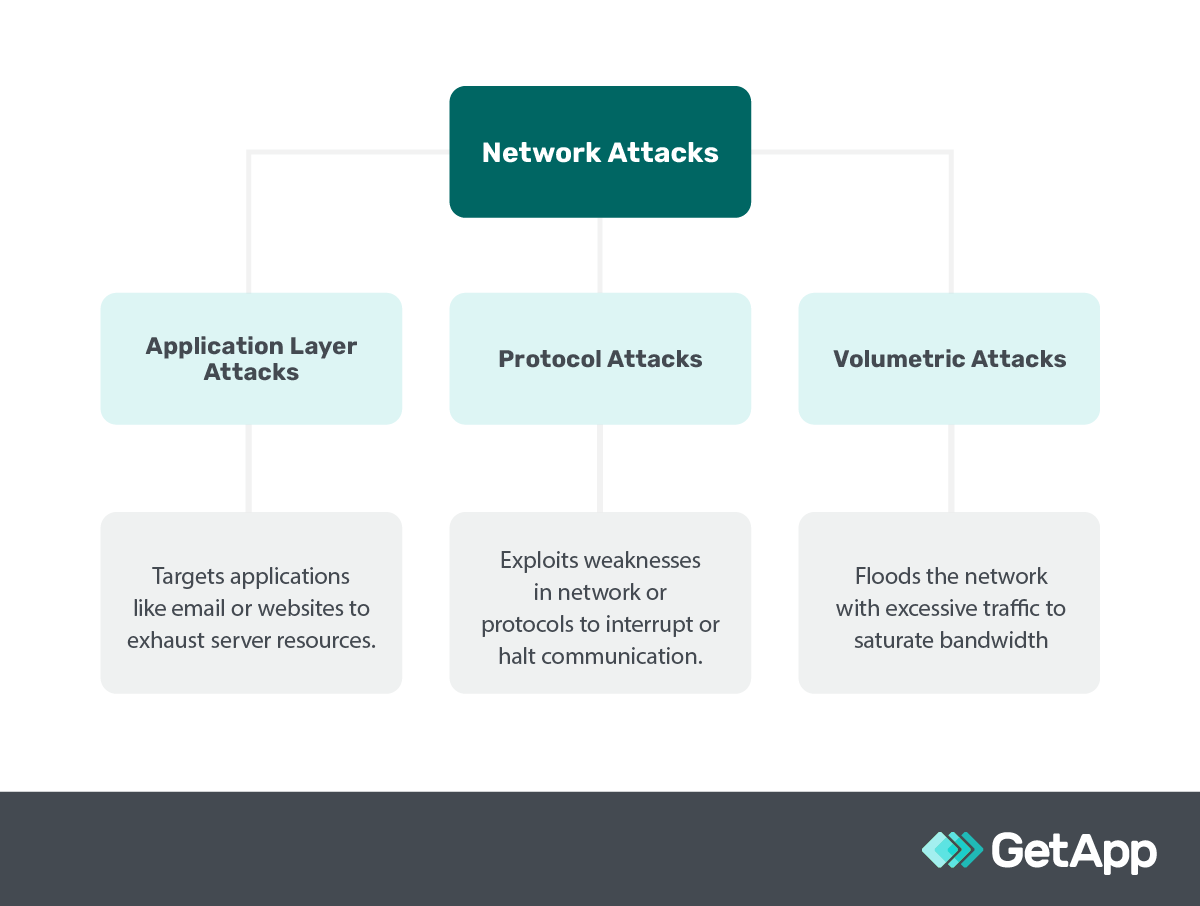
Stockinger describes application layer network attacks as the ability to target your website's backend-specific features (such as the search bar) and render it unresponsive even with normal visitor traffic. He advises using reputable website code and software to fend off these attacks.
Protocol attacks, as the name suggests, exploit vulnerabilities in network protocols. For instance, they could interrupt communications, jam your email system processes, and cause client emails to go undelivered. For this, Stockinger advises encrypting your data and using identity management software to shut all open-network ports off.
Volumetric attacks flood your network with excessive traffic; for instance, your website could become super slow, even preventing your customers from placing orders. Stockinger says general security measures like a captcha, "I'm not a robot" checks, or even challenging questions can prevent these bot attacks from infiltrating your online business network.
Now that you understand the broader network attack categories, you can better understand DOS and DDoS.
Understanding DOS and DDoS attacks
DOS, standing for Denial of Service, and DDoS, which extends to Distributed Denial of Service, are forms of network cyberattacks carried out by cybercriminals to mess up the normal traffic of a targeted server, service, or network—their goal is to get it crashed or unavailable.
Imagine opening your website analytics one morning and seeing an abnormally high number of visitors, so much so that your website can’t handle it and crashes. This flood of traffic uses up system resources such as bandwidth, memory, and processor power, making the website or service slow to a crawl or completely unavailable for legitimate users like your customers or employees trying to access the website.
What is the purpose of a DDoS attack and a DOS attack?
DDoS and DOS attacks are primarily aimed at making a website or service unavailable, which could be driven by various motives such as extorting money, harming a business's reputation, or simply causing chaos for competitive or ideological reasons. Gartner mentions political unrest and patriotic hacktivism as one of the main reasons today behind these network attacks on business and government websites [1].
The core difference between DOS and DDoS attacks boils down to the scale and source of the attack. Knowing the difference is crucial as a misidentification could lead to implementing ineffective security measures, leaving your business vulnerable. Let’s delve into both of them:
What is a denial of service attack (DOS)?
In a denial of service (DOS) attack, a cybercriminal uses a single internet connection to send a massive amount of traffic to a targeted system, overwhelming it in the process. This traffic often comes from a network of fake or compromised computers and devices that the DOS attacker has taken control of.
5 types of DOS attacks
While the main objective of DOS attacks is to inundate the target network with bogus bot traffic, there are several types of DOS attacks, each employing a unique approach to achieve this.
| DOS type | Definition | Attack category | Example |
|---|---|---|---|
| Ping of death | Sends malformed or oversized pings (a signal to check the presence of a computer on a network) to crash, freeze, or reboot the targeted system. | It’s a protocol attack, as it exploits the ICMP protocol to send invalid packets. | Imagine your business’s computer network gets flooded with an abnormal amount of digital hellos, causing the system to crash right when you're processing customer orders. |
| Teardrop attack | Sends fragmented packets (broken pieces of data) with overlapping offset fields (incorrect data arrangement) to crash the targeted system. | This is a protocol attack, as it exploits the TCP/IP protocol to send improperly assembled data packets. | Think of it like receiving a shipment of goods where the boxes don't fit together properly, causing confusion and halting the unpacking process in your warehouse. |
| Smurf attack | Exploits IP (Internet Protocol) and ICMP (Internet Control Message Protocol) by sending a spoofed ping to the broadcast address of a network. | It’s a protocol attack, as it misuses network protocols to amplify the attack traffic. | Picture someone sending out fake announcements under your business’s name to a large group, and when they all respond at once, your phone lines get jammed. |
| Flood attack | Overwhelms the targeted system by sending a deluge of traffic, often via TCP (Transmission Control Protocol) or UDP (User Datagram Protocol). | Here we have a volumetric attack, as it floods the network with traffic to exhaust bandwidth. | Imagine a sudden rush of customers in your store, way more than the capacity, making it impossible to attend to genuine customers. |
| TCP SYN Flood attack | Initiates a connection to the target system but never completes it, exhausting system resources like memory and processing power. | It’s a protocol attack, as it exploits the TCP handshake process to consume resources. | It's like having a bunch of people continuously ringing your shop's doorbell, keeping you from attending to actual customers waiting inside. |
What is a distributed denial of service attack (DDoS)?
DDoS is like a DOS attack but more intense. Instead of one source of traffic, a DDoS attack comes from many sources. This multiple-source assault is often coordinated using what’s known as a botnet—a group of hacked computers working together.
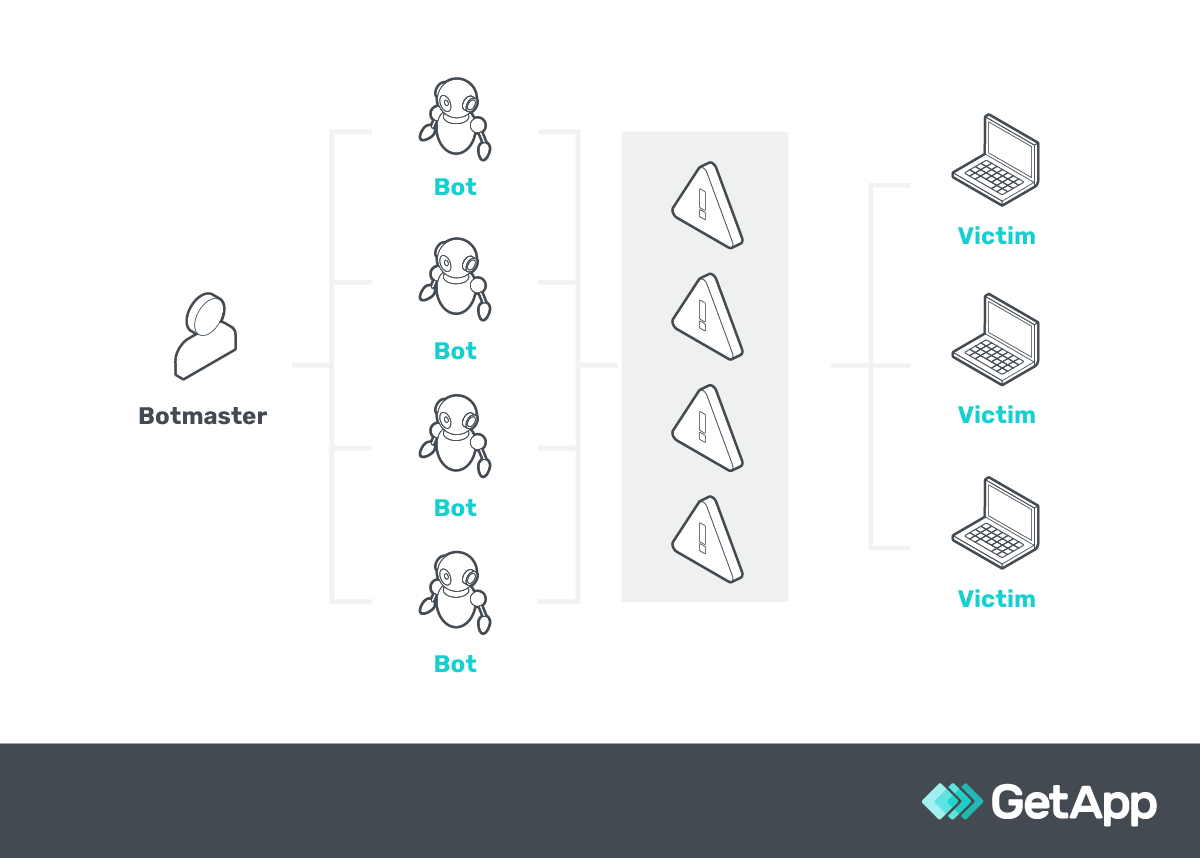
A diagram representing how a DDoS attacker aka botmaster targets a victim’s computer using bots
6 types of DDoS attacks
Similarly, DDoS attacks also have various techniques to utilize deceptive bot traffic from multiple devices and attack the target network.
| DDoS type | Definition | Attack category | Example |
|---|---|---|---|
| HTTP flood | Overwhelms the target server with HTTP requests (a common way web browsers communicate with web servers) but from multiple sources. | This is an application layer attack as it targets the application layer to exhaust resources. | Imagine your website getting overwhelmed with loads of page requests from all over, causing it to slow down or crash during a big promotion. |
| DNS amplification | Uses publicly accessible DNS servers such as Google's Public DNS to overwhelm the target system with DNS response traffic. | It's a volumetric attack as it generates high traffic volumes to exhaust network bandwidth. | It's like someone misguides a crowd to your store for a fake sale and the sudden influx of people overwhelms your staff and blocks genuine customers. |
| NTP amplification | Abuses the Network Time Protocol (a protocol to synchronize the clocks of computers over a network) to overwhelm the target system with amplified traffic. | Here we have a volumetric attack as it amplifies traffic to overwhelm network resources. | Imagine if someone tampers with all the clocks in your business, causing chaos and confusion and hindering your daily operations. |
| SSDP attack | Exploits the Simple Service Discovery Protocol (a protocol to discover network services and devices) to send an amplified amount of traffic to the target. | It's a volumetric attack as it generates high traffic volumes to exhaust network bandwidth. | Picture someone misusing a town's announcement system to direct a crowd to your small store, overwhelming the space and staff. |
| Botnet attack | Utilizes a network of compromised computers (botnet) to flood the target with traffic. | This is a volumetric attack as it utilizes multiple sources to generate high traffic volumes. | Imagine a scenario where a competitor directs a large crowd to your shop, creating chaos that prevents real customers from entering. |
| Zero-day DDoS | Exploits unknown vulnerabilities such as software bugs or unpatched systems in the target system, using multiple sources for the attack. | It's an application layer attack as it targets unknown vulnerabilities to disrupt services. | It’s like finding out you have a weak spot in your store's security because a mob exploits it and causes a ruckus in your store. |
Stockinger shares an intriguing story of a DDoS attack that caught a sweepstakes website off guard:
Case Study
DDoS attacks can create chaos, but timely security measures can be a game-changer
A sweepstakes website was hastily set up without proper authentication and authorization measures in place. This oversight left the door wide open for DDoS attackers who relentlessly sent a barrage of traffic from a similar source to the website. Before the business could catch wind of what was happening, the website was swamped and became unavailable to genuine visitors.
The solution Stockinger brought? A simple addition of a captcha and IP tracking cookies to the website. These measures helped fend off the bot attack, restoring the website's availability. However, this fix took three days, during which the business's reputation took a hit.
The unexpected downtime led some people to think the sweepstakes were rigged. When the website was back up, they had to relaunch the sweepstakes. This created confusion among some folks who believed they had entered the first time, only to find out their entries didn’t count and had to enter again in the relaunched sweepstakes.
This episode underscores the havoc DDoS attacks can wreak, and how crucial it is to have proper security measures in place right from the get-go.
Two important differences between DOS and DDoS attacks
Stockinger says DOS and DDoS might have thin lines of differences, but they do exist and are necessary for small-business owners to understand if they seek to deflect these network attacks.
1. DDoS attacks are faster than DOS attacks
DDoS attacks, due to their distributed nature, come from multiple sources or devices, such as PCs, laptops, or even smartphones, spread across different locations, often forming a collective called a botnet.
Unlike a DOS attack that originates from a single source of traffic such as a single computer or network, a DDoS attack floods the target network simultaneously using the power of all the sources.
This multi-pronged approach amplifies the speed and volume of the traffic directed at the target, causing disruption much quicker, making it a more potent threat and a preferred choice for hackers seeking rapid impact.
DDoS attack prevention tips to protect against its speed
Use DDoS protection software to slow down or halt a DDoS attack by monitoring, detecting, and managing the traffic coming to your network, allowing only legitimate traffic through. These systems have a feature for traffic filtering that helps in scrutinizing the incoming traffic and blocking abnormal requests, thus keeping the malicious network traffic at bay.
Implement rate limiting on your servers to reduce the speed of a DDoS attack, controlling the number of legitimate requests a user can make in a given timeframe, and preventing server overwhelm during an attack. Rate limiting is a technique that sets a cap on the number of requests a user can make. For instance, this will limit a user to making 10 search requests per minute on your eCommerce site to ensure the server remains responsive to all users.
2. DOS attacks can be blocked easily
The simplicity of DOS attacks, being that they originate from a single system, makes it straightforward to identify and block malicious traffic by using bot detection and mitigation software or by blocking the IP address from where the attack is originating.
On the other hand, DDoS attacks, with their distributed nature, bring malicious traffic from various sources, making it a complex task to filter out the harmful traffic from the legitimate ones.
The ability to easily block the traffic in DOS attacks, as opposed to DDoS attacks, makes DOS a less severe threat.
DDoS attack prevention tips to easily block malicious activity
Use web application firewall software with an IP blocking or blacklisting feature to block traffic from known malicious sources in a DOS attack. For instance, add the malicious IP address to the blacklist to automatically block all incoming traffic from that address.
Set up IP filtering with network security software. Set criteria to filter out IP addresses, like blocking all traffic from IPs making more than a certain number of requests in a short time on your eCommerce site.
In August 2023, GetApp ran its annual Data Security Survey** and discovered some of the most common security tools small business organizations use. Following are some of them that are highly useful in preventing network cyberattacks such as DOS and DDoS:
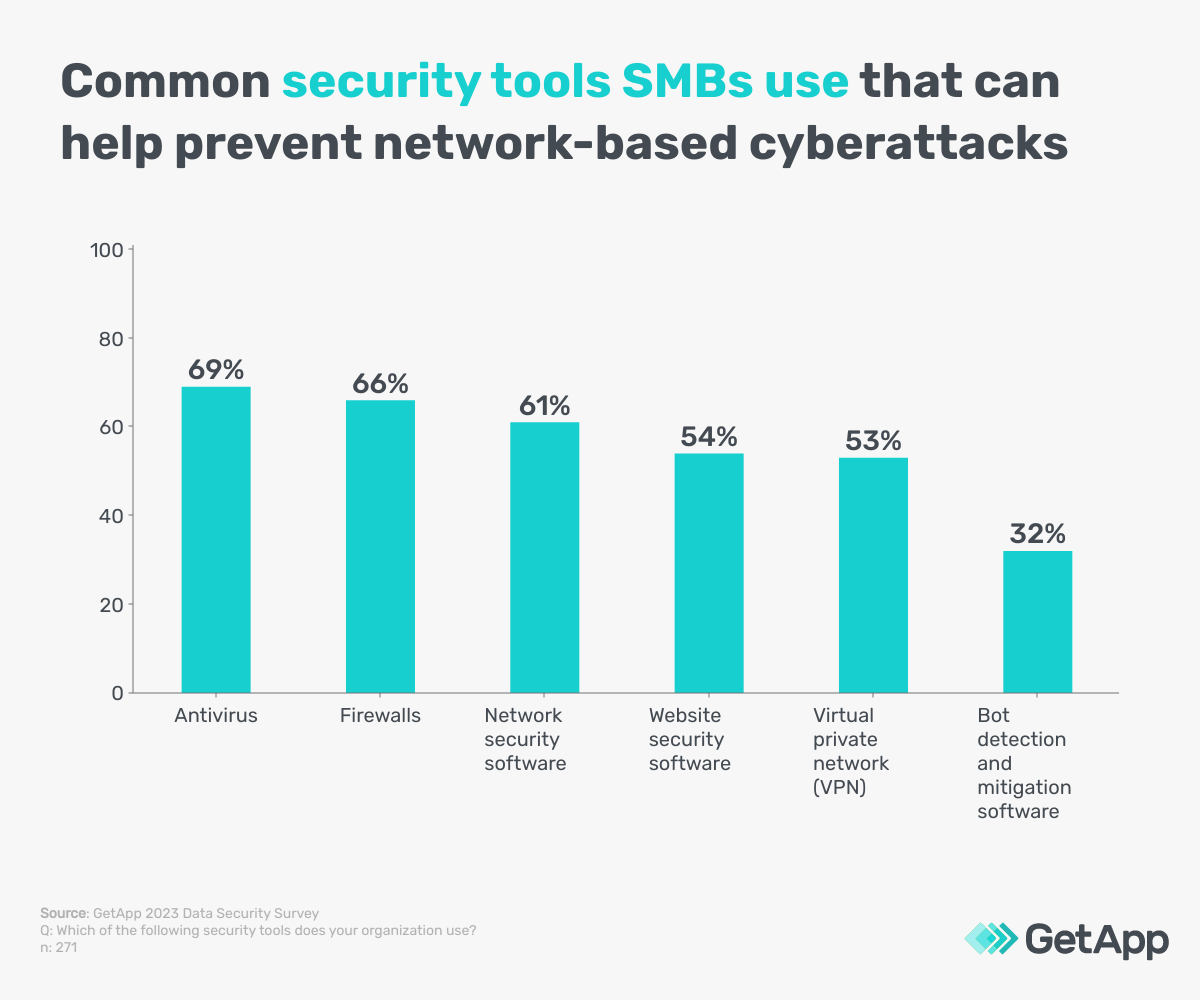
11 signs of a DDoS attack you can spot on your business website
Stockinger mentions that a DOS attack might sometimes be too mild to catch your attention, while a DDoS attack may show signs that seem too normal to worry about. It's essential to know the hints your online setup gives you to figure out whether it's a regular hiccup or a planned attack trying to harm your business.
1. Unexpectedly high traffic
If you notice a sudden spike in website visits that are way above your usual numbers, it might be a sign of a DDoS attack. You can use web analytics tools and set alerts to notify you when traffic spikes occur.
2. Slow network performance
Your network or website might become noticeably sluggish, taking much longer to load pages. Utilize the performance analysis dashboard in network monitoring tools to catch slowdowns quickly, and to analyze network performance in real time.
3. Unavailability of the website
If your website becomes hard to access or entirely unavailable, it could be under attack. Having website monitoring tools that send alerts when your site goes down can be a proactive step.
4. Unusual amount of spam
A sudden influx of spam emails or messages could be a precursor to an attack. You can use spam filters found in email platforms or dedicated anti-spam software to track and report increased spam activity.
5. Frequent disconnections
Users might get disconnected from the server frequently. Implement server monitoring tools and use their network analyzer to identify disconnection patterns, which could look like abrupt session terminations.
6. Increased number of requests
Your server receiving an abnormally high number of requests—where a request is essentially someone or something asking your server for a specific piece of information—can be a red flag.
7. Unusual activity in server logs
Keeping an eye on server logs through log management tools can help spot unusual increases in requests. Server logs, which record the activities on your server, might show unexpected or strange patterns, such as multiple failed login attempts or requests from a single IP.
8. Suspicious IP addresses
Seeing a large volume of traffic from suspicious or unfamiliar IP addresses is a warning sign. An endpoint protection tool can use its IP endpoint sub-feature to flag suspicious IP addresses.
9. Resource overload
System resources getting overloaded with an excess of requests can lead to crashes or system failures. Use your operating system’s built-in system monitoring tools to watch system resource usage and catch overloads early.
10. Changes in dwell time
Dwell time, the duration a user spends on your site before returning to search results might decrease if users leave your website quicker due to slow performance. Utilize your web analytics tools and monitor the “Average Session Duration” metric to observe dwell time trends. Any weird change in it might indicate the beginning of a DDoS attack.
11. Increase in clicks to complete a transaction
If users need more clicks to complete a transaction due to slow-loading pages or unresponsive buttons, it's a sign of trouble. Use heatmap software to catch increases in clicks per transaction and to analyze clicks.
Awareness is the key to spotting variations in seemingly similar network-based cyberattacks
Stockinger encourages small-business owners to keep themselves and their teams well-informed about cyberattacks and cyber security measures. Now that you're familiar with the distinct differences between DDoS and DOS attacks, broaden your understanding of cybersecurity with the resources shared ahead:
How to Prevent a DDoS Attack—6 Strategies for Small Businesses
Fighting Cybercrime: How To Calculate the Risk of Cybersecurity Threats
For the numerous tools we’ve recommended looking into, download and utilize GetApp's free vendor comparison template by entering your details below. It brings a sense of confidence knowing the software vendors you've invested in are the best for your business.
Sources
Jason Stockinger, LinkedIn
Methodology
*GetApp’s Ransomware Impact Survey was conducted in May 2022 among 300 business leaders at U.S. companies that have experienced a ransomware attack. All respondents were part of the response team or made fully aware of the company's response.
**GetApp's 2023 Data Security Survey was conducted in August 2023 among 872 respondents to learn more about data security practices at U.S. businesses. All respondents were screened for full-time employment at U.S. businesses. 362 respondents identified as IT management professionals and 271 identified as IT security managers.
Bhavya Aggarwal
More on IT Management


Aug 08, 2024



Sep 18, 2024

May 29, 2024