GetApp offers objective, independent research and verified user reviews. We may earn a referral fee when you visit a vendor through our links.
Our commitment
Independent research methodology
Our researchers use a mix of verified reviews, independent research, and objective methodologies to bring you selection and ranking information you can trust. While we may earn a referral fee when you visit a provider through our links or speak to an advisor, this has no influence on our research or methodology.
Verified user reviews
GetApp maintains a proprietary database of millions of in-depth, verified user reviews across thousands of products in hundreds of software categories. Our data scientists apply advanced modeling techniques to identify key insights about products based on those reviews. We may also share aggregated ratings and select excerpts from those reviews throughout our site.
Our human moderators verify that reviewers are real people and that reviews are authentic. They use leading tech to analyze text quality and to detect plagiarism and generative AI.
How GetApp ensures transparency
GetApp lists all providers across its website—not just those that pay us—so that users can make informed purchase decisions. GetApp is free for users. Software providers pay us for sponsored profiles to receive web traffic and sales opportunities. Sponsored profiles include a link-out icon that takes users to the provider’s website.
How Automated Lead Generation Boosts Your Sales Pipeline
Learn more about ways your sales team can automate its lead generation efforts with this comprehensive primer.


If you’re a newer sales manager looking for help with lead generation, you’re likely wondering what goes into automating it. Is it worth the investment in software? Can it be done manually?
Manual lead generation is an option, but the time it takes to research prospects and enter their data into spreadsheets can be prohibitive. If your budget allows, and your team is prepared to convert the extra leads, automated lead generation can boost your sales pipeline by allowing reps to focus on higher-value tasks such as nurturing a relationship with a potential lead.
To show what automating your lead generation efforts can do for your business, we’ll discuss the basics of automated lead generation, then walk you through some Gartner research-backed benefits and use cases of lead generation software. Then, we’ll cover the most important features and capabilities so you know what to look for in a lead generation automation tool.
What is automated lead generation?
Automated lead generation refers to systems and processes that help you get leads without sourcing them manually. It’s often associated with inbound lead generation, where leads contact you through your website, social media, or referrals. But you can also automate outbound lead generation through features that help your team initiate that contact such as email management.
Whether inbound or outbound, you’re going to need lead generation software to automate your lead generation process. The image below shows an example of one of these platforms.
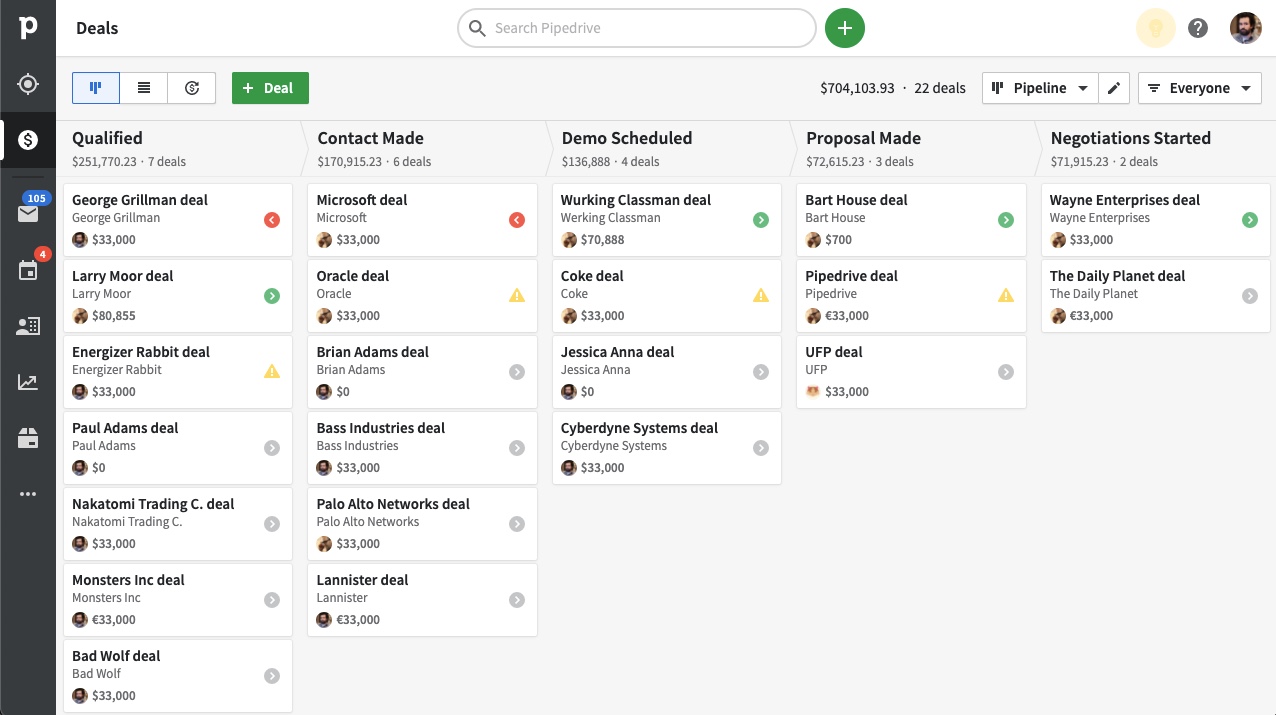
Pipeline view in lead generation tool Pipedrive
A lead generation tool helps your team target the right audience with the right message. Instead of contacting random people, you’ll have access to data about leads who have shown interest in your services through an online channel such as email, social media, and or a landing page.
What are some benefits and use cases of automated lead generation?
The most obvious benefit of any automation tool is the time it saves your team on tasks they’d otherwise perform manually. Lead generation tools pack the additional punch of arming you with data to optimize your lead generation strategy and maximize pipeline performance. Here’s what else you can expect when you automate lead generation, plus ways to leverage those benefits.
Improved cross-team alignment
Almost a third of reps surveyed by Gartner [1] named alignment between marketing and sales as a challenge impacting lead quality. Lead generation tools help achieve this alignment by ensuring both teams’ efforts are informed by the same data. One way to leverage this benefit is by tracking lead sources to identify which marketing campaigns are successful and which aren’t.
Increased ability to attract qualified leads
Another Gartner survey [2] identified organic web traffic as a top channel for inbound lead generation. Lead generation tools increase your ability to attract qualified leads to your website by collecting customer data. You can use this data to refine your target customer segments; then, you can create personas for these segments to tailor website messaging and content [3].
Enhanced user experience
Lead generation tools enhance user experience (UX) by meeting customers’ needs at any hour of the day or night. One way they do this is through chatbots, which Gartner [4] recommends using in addition to live chat with a sales rep. As an added bonus, chatbots often come with analytics capabilities that help you make data-driven decisions to improve UX even further.
Better insights from more reliable data
To build a stronger sales team, Gartner [5] recommends that new sales leaders familiarize themselves with metrics that gauge their reps’ performance. These include upsell numbers, feedback on quality, and average lead conversion time, which is shown in the image below.
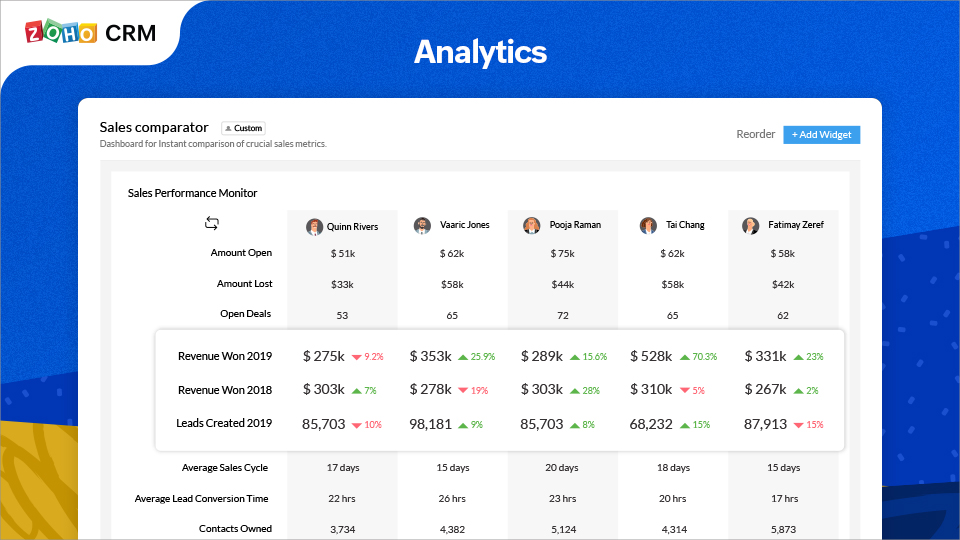
Analytics feature in Zoho CRM
By automating tasks such as data entry, lead generation tools reduce the potential for error while helping you measure and track your reporting metrics. This way, you can more confidently report on your sales data to stakeholders in ways that highlight your team’s progress.
What are some common features of lead generation software?
We’ve already touched on a few common features of lead generation software, such as source tracking, customer segmentation, chatbots, and reporting and analytics. Here are a few more features that you can expect to find in a lead generation tool:
Contact database: A contact database allows customer data to be accessible across teams. The image below shows an example of this feature within a lead generation tool.
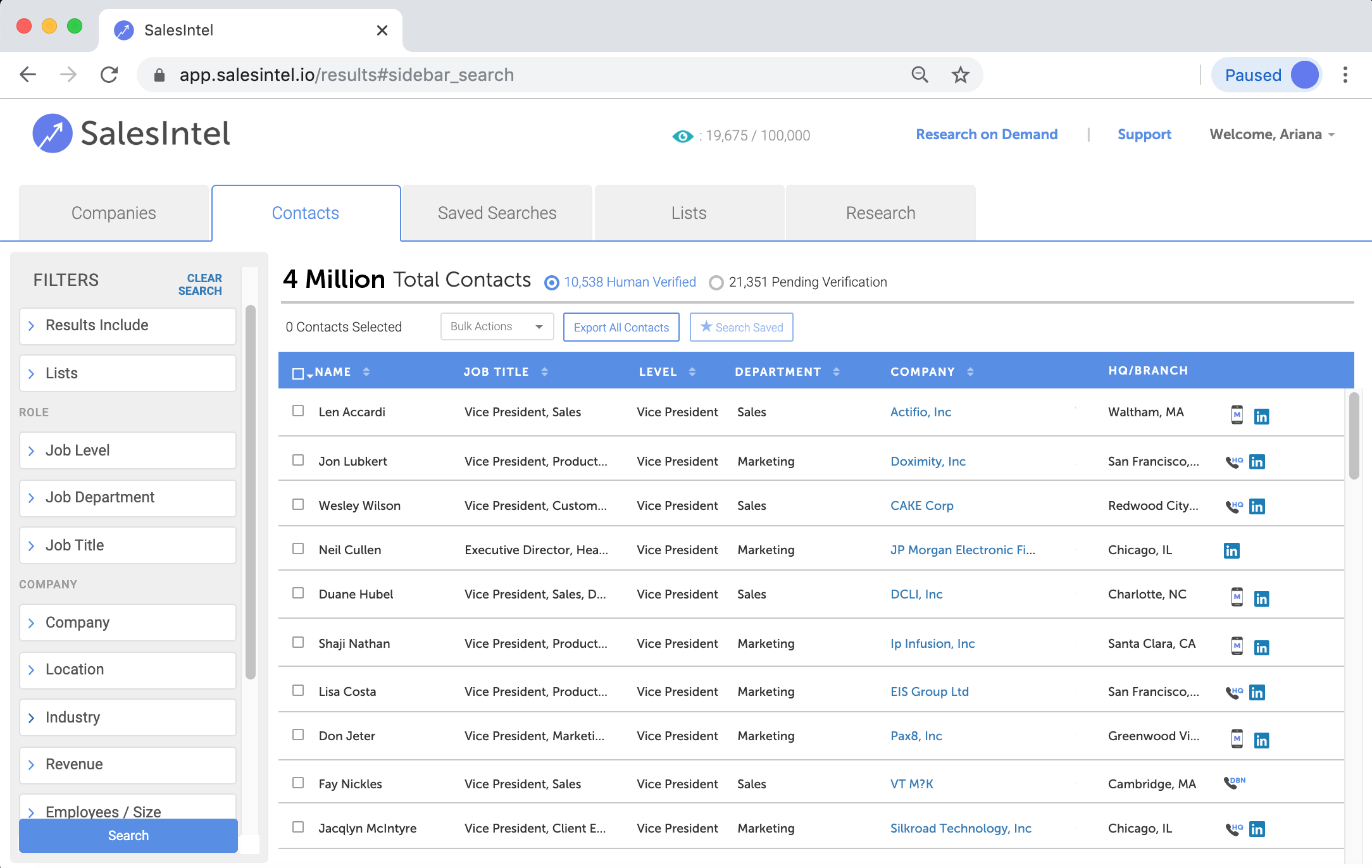
Contact database in lead generation tool SalesIntel
Lead capture: This feature allows you to automatically identify and save the contact information of a potential customer.
Data import/export: With this feature, you can import and export information and reports to and from your lead generation software.
Landing pages/web forms: These features allow you to capture new lead information through online forms, as shown in the image below.
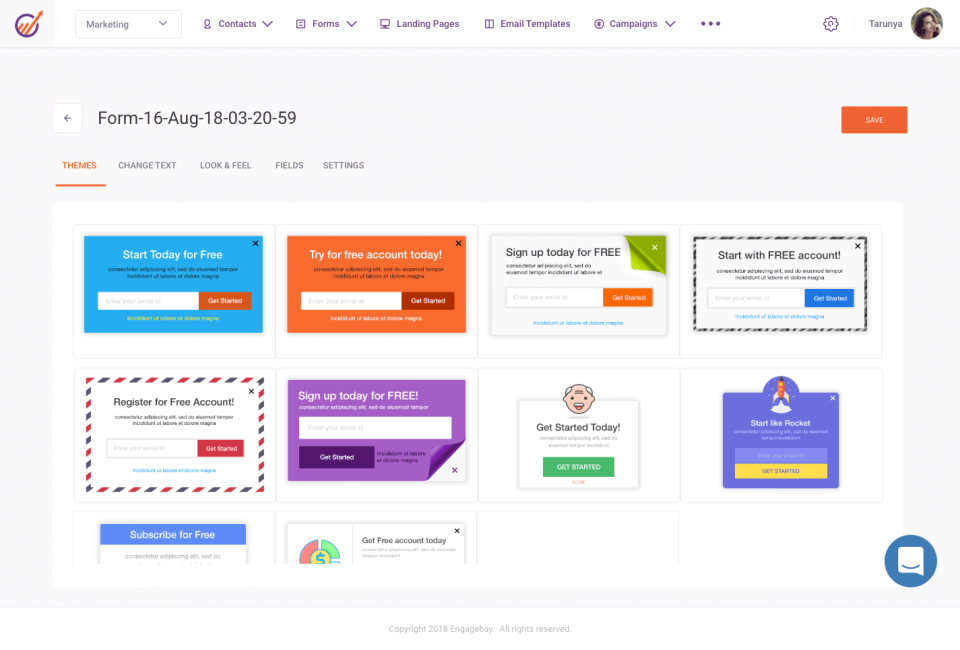
Web form creation feature in EngageBay
Lead qualification: A qualified lead is someone who is likely to buy based on behaviors such as need, budget, and trust in your brand. Your software’s lead qualification feature scores leads for you so they can move through the sales pipeline more quickly.
Prospecting tools: These features help you identify potential leads based on predefined criteria and add them to your sales pipeline.
What else should I look for in a lead generation tool?
Before you adopt a lead generation tool, make sure it offers these three capabilities:
It’s scalable. Lead generation is responsible for boosting sales, and as your sales grow, so will your business. Many lead generation tools charge on a per-user basis, meaning you can add seats as your sales team expands as well.
It can integrate with a CRM, or it offers its own CRM functionality. Your lead generation tool should work with your CRM or offer its own CRM functionality to help you capitalize on marketing campaigns and not let qualified leads slip through the cracks.
It offers reporting and analytics capabilities. Ensure that your lead generation tool not only gathers data, but also helps you analyze your target audience and what drives them to your business.
Prepare your sales team to automate lead generation efforts
Automated lead generation is the most effective way to boost your sales pipeline, and its benefits, such as improved cross-team alignment and better insights, are significant. But there are a few things you’ll need to have ready before investing in a lead generation tool:
A budget for new tech. Most lead generation software is priced on a per user, per month basis and can be divided into three tiers based on their starting price*: $9-$20, $21-$83, and $84 and up. These prices reflect base plans of most lead generation tools. Premium versions with additional features such as client license packages will be more expensive.
A training process that both familiarizes your team with your new software and incorporates the tool into your sales procedure. You may need to onboard reps in phases to minimize interruption to your workflow.
A way to manage the data that your lead generation tool will collect, since you’ll be bringing in a much higher volume of leads than you would generate manually. You’ll be at an advantage if you already have a CRM, but if you don’t, you’ll need to find a lead generation tool that has CRM functionalities.
For more information on lead generation, check out GetApp’s database of lead generation tools. Additionally, you might be interested in our collection of lead management and marketing automation software.
*The pricing included is for the entry-level/lowest-priced offering that was found on vendor websites on April 5, 2022. These ranges correspond to the 25th, 75th, and 100th percentiles of pricing information gathered from vendor websites of sample products.
Note: The screenshots of applications selected in this article are examples to show a feature in context and are not intended as endorsements or recommendations.
Sources
Top 3 Areas Where Sales Development Representatives Need Support From Marketing, Gartner
Tech CEOs Must Focus on Homepage Storytelling to Improve Lead Generation, Gartner
Ignition Guide to Refreshing Homepages for Lead Generation Effectiveness as a Tech CEO, Gartner
Improve Your Website’s Ability to Generate Inbound Leads by Focusing on Buyers’ Needs, Gartner
Lauren Spiller