GetApp offers objective, independent research and verified user reviews. We may earn a referral fee when you visit a vendor through our links.
Our commitment
Independent research methodology
Our researchers use a mix of verified reviews, independent research, and objective methodologies to bring you selection and ranking information you can trust. While we may earn a referral fee when you visit a provider through our links or speak to an advisor, this has no influence on our research or methodology.
Verified user reviews
GetApp maintains a proprietary database of millions of in-depth, verified user reviews across thousands of products in hundreds of software categories. Our data scientists apply advanced modeling techniques to identify key insights about products based on those reviews. We may also share aggregated ratings and select excerpts from those reviews throughout our site.
Our human moderators verify that reviewers are real people and that reviews are authentic. They use leading tech to analyze text quality and to detect plagiarism and generative AI.
How GetApp ensures transparency
GetApp lists all providers across its website—not just those that pay us—so that users can make informed purchase decisions. GetApp is free for users. Software providers pay us for sponsored profiles to receive web traffic and sales opportunities. Sponsored profiles include a link-out icon that takes users to the provider’s website.
5 Top-Rated Billing and Invoicing Software for Small Business
Check out the top billing and invoicing software catering to the needs of small businesses and their reviews from trusted users.


Creating invoices is a daily task for many businesses, whether they sell goods or provide services. To enhance the efficiency and accuracy of this process, accountants and payroll managers can consider investing in billing and invoicing software. These tools automate the creation and distribution of invoices, track sales, and capture customer data, simplifying operations across various industries.
To help you narrow the list of tools, this article highlights, in alphabetical order, the five top-rated small business billing and invoicing software based on user reviews. For each product, we include overall user ratings along with the highest-rated attribute, product benefits, review excerpts from industry professionals, and product pricing. Read how we selected these products at the bottom of the page.
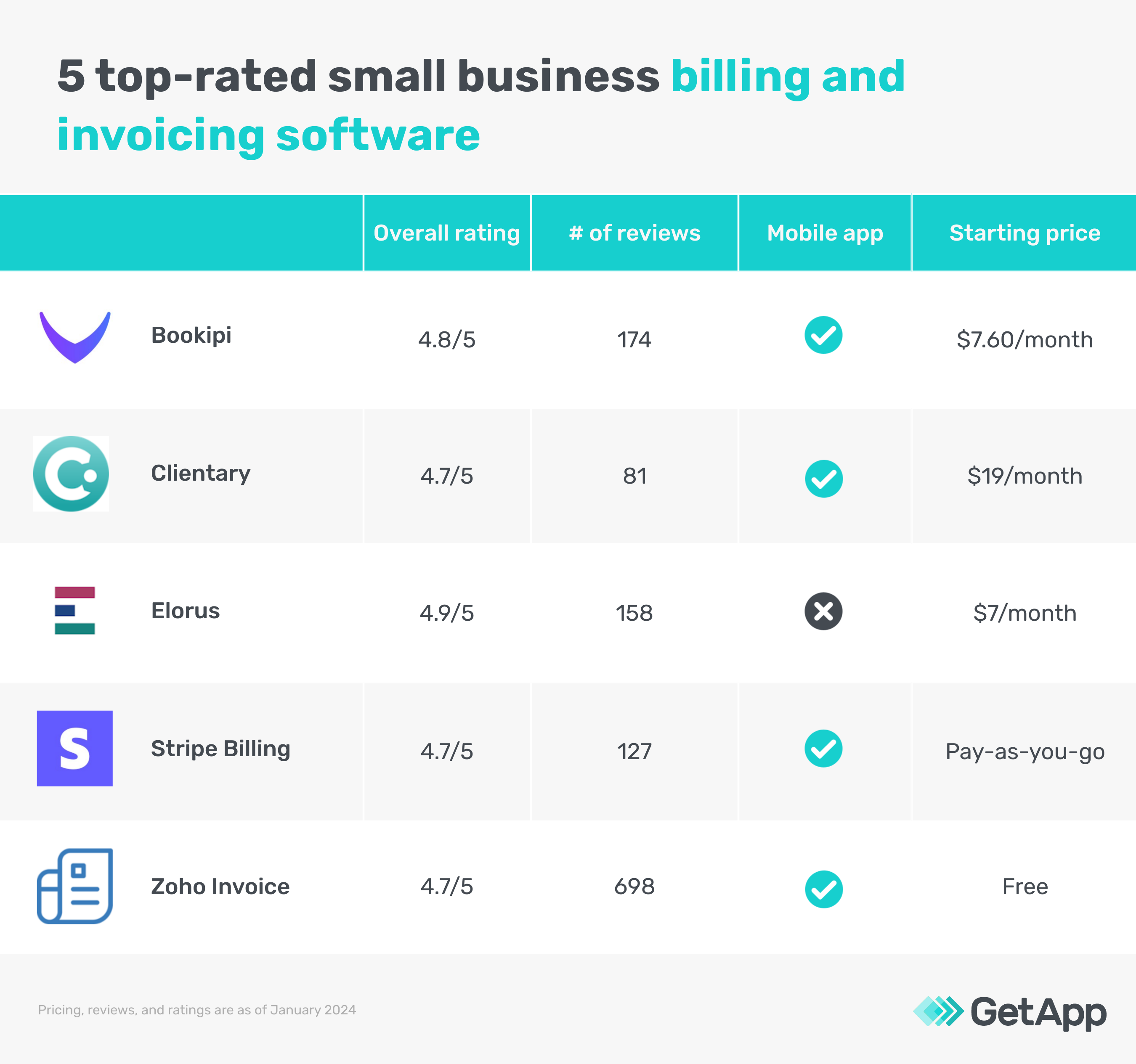
We selected products for this article based on their average ratings between January 2022 - January 2024, which may differ from their current overall average ratings.
1. Bookipi
Bookipi is billing and invoice software that allows users to create personalized invoices that include business branding elements such as colors and logos, customer details, invoice items, taxes, discounts, and payment instructions. The tool also supports signature capture, enabling business owners to obtain customer signatures directly on invoices. Bookipi provides various invoice templates suitable for different business types, such as freelance, consulting, and shipping, allowing users to get started quickly. Additionally, it features a dashboard that facilitates sales and expense tracking, making it easier for business owners to manage their financial activities efficiently.
Commonly discussed topics by Bookipi reviewers
Based on our analysis of Bookipi reviews on GetApp, the most commonly discussed topics are:
Valuable for small business operations: 100% of the users say the free plan of the tool helps businesses with limited budgets to optimize their processes and enhance their professional image.
Helpful customer support: 83.3% of users appreciate the customer support provided by the developers. They also say the system is easy to set up.
Efficient processes: 80.8% of users appreciate the tool for its customizable templates, easy-to-use interface, and ability to create professional invoices. They also like the convenience of adding pictures, tracking expenses, and maintaining records.
Review excerpts from small business users who have used Bookipi for billing and invoicing:
"Customizable templates: Bookipi offers a range of customizable templates that I use to create professional-looking invoices that reflect my brand." (Seon Thompson, Designer, 2022)
"Bookipi is a one-of-a-kind invoice creation software that helps startups like myself to run a micro-business or the giant corporations like Nike and others from anywhere and on any mobile or desktop device." (Jonathan Le Maitre, Photographer, 2023)
"It's Free and the customer support from the developer late at night trying to fix issues with the app in early development days was amazing." (Shane Hutton, Owner Operator, 2023)
"I started using bookeepi shortly after using opening my business and customers were requiring invoices and contracts, it has been a game changer for me and my husband with our business." (Yamile Salomon, Owner, 2023)
"The ease of use and the flexibility of a Hybrid service, online and mobile makes this the perfect tool for business owners, I’ve recommended it to hundreds of businesses in my network!" (David Oloruntuyi, Principal Facilitator, 2023)
Highest-rated attribute: Value-for-money - 4.8
Commonly reviewed by*: Professionals in construction, food and beverages, and arts and crafts, according to GetApp’s user reviews
Starting price: $7.60 per month (billed annually)
2. Clientary
Clientary is an invoicing and time-tracking tool that simplifies project and client management. It includes features for creating and monitoring invoices, managing customer relationships, and overseeing financial operations. The software has a time tracker that helps monitor work hours and project progress. Clientary offers customizable templates for invoices and proposals, allowing users to tailor them to match their brand identity. Additionally, the platform supports online payment processing, facilitating smoother and faster payment transactions for businesses.
Commonly discussed topics by Clientary reviewers
Based on our analysis of Clientary reviews on GetApp, the most commonly discussed topics are:
Enhanced client management: 100% of users appreciate the comprehensive client management capabilities of the tool. They say the tool helps manage client projects, including proposal and invoice management, time tracking, and payment processing.
Efficient project management: 96.9% of users say the tool simplifies the management of multiple projects, streamlines workflows, and enhances team connectivity. They also particularly appreciate the time tracking, invoicing, and client data management features.
Convenient invoices and time management: 87% of users appreciate the tool’s ability to customize invoices, track bills, and ensure timely payments. They also like the dashboard that tracks subscription billing and time spent working on tasks and projects.
Review excerpts from small business users who have used Clientary for billing and invoicing:
"I don't have the luxury of time in creating and designing forms both online and offline for my services, but Clientary offers me the option to do proposals online, and if they like it, invoicing can follow quickly." (Pirkko Alcantara, Business Development Manager, 2022)
"It helps me to generate all my invoices and also helps me to track them accurately so that my organisation gets the payments on time." (Aniket Goswami, Senior Sales Manager, 2023)
"The ability on multiple project payment management and on project budgeting and also time tracking through Clientary functions is more productive and cost effective." (Joyce Meresha, Architectural Designer, 2023)
"The project management feature there has made it easy to calculate estimates for projects, and it allows I and my team to get started with our projects very quickly." (Atokoose Kehinde, Manager, 2023)
"It is a good tool that supports in managing all operations and activities related to client effectively such as setting up billing management, crm and other tracking." (Asha Dayma, Software Consultant, 2023)
Highest-rated attribute: Functionality - 4.72
Commonly used by*: Professionals in information technology and services, airlines/aviation, and computer software, according to GetApp’s user reviews
Starting price: $19 per month (billed monthly)
3. Elorus
Elorus is a business management platform that helps with invoicing, time tracking, and expense management. It allows users to create and send customized invoices and accept payments. The tool also features an option for recurring invoices, automatically generating and sending them at set intervals. Additionally, Elorus enables users to track employee work hours and generate timesheets, providing insights into team performance and creating precise invoices for employee services. Moreover, this tool monitors all expenses and payments, offering valuable insights into the business's financial health.
Commonly discussed topics by Elorus reviewers
Based on our analysis of Elorus reviews on GetApp, the most commonly discussed topics are:
Responsive support services: 100% of users express satisfaction with Elorus's support services, highlighting the platform’s quick and precise responses. The support team's ability to provide assistance in the local language is also greatly appreciated.
Affordable option for startups: 80% of reviewers like the tool’s free plan as it helps sole proprietors and those starting out with a single client. They have also expressed willingness to invest in paid plans as their client base expands, indicating the tool's scalability and value for growing businesses.
Effective invoicing processes: 74.2% of users appreciate the platform's user-friendly interface, easy-to-use templates, and the speed of creating and issuing professional-looking invoices. They also particularly like quick integration with the government’s API, myData, which helps automate invoice uploads and currency conversions.
Review excerpts from small business users who have used Elorus for billing and invoicing:
"I liked the online invoicing (direct communication with official government authorities included) which helped me get rid of manual paper invoicing and mailing of hand-written invoices." (ATHANASIOS IOANNIDIS, Software Architect, Developer, 2023)
"Probably the best feature is the integration of Elorus invoices with myData (the Greek government's finance API), meaning you can save your invoice and it will automatically upload on myData (with currency converted to EUR) without having to do manual calculations & uploads." (Konstantinos Simiriotis, Software Engineer, 2023)
"The ease of integrating with the myData portal as well as using the templates for invoicing and storing customers really makes it a breeze to manage your business." (Thanos Stamatakis, Software Engineering, 2023)
"I like the most its ease of use, most of its features are so simple that you don't need to access the support pages to find out the way it works." (Markellos Vlassopoulos, Owner, 2022)
"Ease of use, covers most of the features that an average company would need, very fast assistance and in local language!" (John Skliris, Co-owner, 2023)
Highest-rated attribute: Customer support - 4.89
Commonly used by*: Professionals in information technology and services, computer software, and marketing and advertising, according to GetApp’s user reviews
Starting price: $7 per month (billed annually)
4. Stripe Billing
Stripe Billing facilitates the creation and automation of recurring payments, allowing businesses to charge customers on a regular schedule. Stripe Billing supports various pricing models, including fixed fees and usage-based charges, making it versatile for different business needs. The tool also integrates advanced features, including prorations, add-ons, and discounts, enhancing flexibility in billing operations. Additionally, Stripe Billing handles global payments by supporting multiple currencies and payment methods, which is ideal for businesses with an international customer base.
Commonly discussed topics by Stripe Billing reviewers
Based on our analysis of Stripe Billing reviews on GetApp, the most commonly discussed topics are:
Imperative for sales management: 80% of users highlight the tool’s necessity for any e-commerce store to optimize sales operations and drive business growth.
Efficient processes: 75% of users highlight the ease of use and efficiency of the tool, saying the tool is easy to integrate with accounting software, offers a user-friendly dashboard, and allows quick invoice customization.
Convenient payment processing: 66.7% of users appreciate the ability to process payments online, issue refunds, and integrate the system into their websites and applications.
Review excerpts from small business users who have used Stripe Billing for billing and invoicing:
"The best part is that Stripe's Checkout product will create a no-code checkout, absolving you from handwriting checkout flows for your customer, saving countless hours." (Andrew Wolf, CEO, 2023)
"My favourite part of Stripe Billing apart from the fact it is the most simple platform to navigate through is that you can search a guests name, amount they have paid, or through the traditional date method to find out when a transaction was deducted." (Megan Vohra, Operational Assistant, 2023)
"For me, the acceptance of credit cards is a valuable addition to my booking website and Stripe offers an integrated and seamless solution that has served me well for 2.5 years" (Amanda Kotenko, Owner, 2023)
"Stripe stands out of its competition, its helpful, the fact that subscription on stripe is very easy, you can invoice directly from the website, it integrates perfectly with cloud-based accounting softwares, the dashboard is simple enough to log into and transactions via the phone are convenient and you have alot of information about Stripe at your fingertips, very helpful." (Tisunge Mpakati, Technologist, 2023)
"From integrations with web platforms, the ease of use, creating invoices, and everything in between that's needed for a small business." (Mike Yap, Founder, 2022)
Read more about Stripe Billing.
Highest-rated attribute: Functionality - 4.84
Commonly used by*: Professionals in health, wellness and fitness, retail, and computer software, according to GetApp’s user reviews
Starting price: Pay as you go + 3% processing fee
5. Zoho Invoice
Zoho Invoice helps send invoices via SMS, email, and customer portal. It keeps track of the invoice status and allows clients and customers to choose from various options while making payments, including credit cards, bank transfers, cash, checks, or recurring payments. This tool also helps create and send quotes to customers which can later be converted into invoices. Besides, it comes with a customer portal wherein customers can view their invoices, check quotes, and make payments.
Commonly discussed topics by Zoho Invoice reviewers
Based on our analysis of Zoho Invoice reviews on GetApp, the most commonly discussed topics are:
Valuable free services: 94.6% of users find the free version meets their needs, particularly when starting a business, appreciating its ease of use and comprehensive offerings.
Efficient tool: 83.8% of users appreciate the tool for its user-friendly interface, customization options, and integration with other business tools. They also like its ability to store customer information, track time, and generate professional-looking invoices.
Multiple payment options: 70% of users appreciate the various tool's multiple payment options, including credit card, PayPal, and Stripe, which enhance client convenience.
Review excerpts from small business users who have used Zoho Invoice for billing and invoicing:
"I love that all of my customer information and unbilled projects are stored so that when I generate an invoice for a client, I can easily add any unbilled work with a single click." (Steven Severt, Owner & Principal Consultant, 2023)
"I love the fact that I can customize my invoices with my own branding and that it integrates seamlessly with my other business tools, like Square and PayPal." (Renie Spriggs, Travel Specialist, 2023)
"Creating invoices is straightforward, and the software allows you to customize your invoices with your own logo and branding." (Nimish Bangera, Owner, 2023)
"Zoho seamlessly integrates its iPhone app with its website so I can immediately create booking deposit invoices while I'm on the road—immediately capturing clients at that crucial moment when they are ready to on-board." (Jason Dahl, Audio Engineer, 2022)
"It enables us to monitor our clients' orders and set up recurring payments with reminders, which ultimately boosts our sales revenue." (Agnel Rosario, Digital Marketing Consultant, 2023)
Highest-rated attribute: Value-for-money - 4.86
Commonly used by*: Professionals in information technology and services, marketing and advertising, and computer software, according to GetApp’s user reviews
Starting price: Free
What features does billing and invoicing software offer?
Billing and invoicing software includes the core features:
Invoice creation: Create an invoice from scratch or use the customizable template to generate the invoice by adding client information, services or products sold, prices, and payment terms.
Invoice history: Track, retrieve, and review previous transactions and billing records to monitor payment statuses, analyze financial trends, and maintain accurate records for audits.
Online invoicing: Create, send, and manage invoices over the internet, enabling instant delivery of invoices to clients via email or through a secure online portal.
All products listed in this report include the key features mentioned above. Besides these core features, billing and invoicing software commonly tends to offer:
Contact database
Payment and invoice processing
Quotes and estimates
Reporting and statistics
Tax calculation
Time and expense tracking
Recurring invoices
Payment reminder
Unlimited invoices
How to choose the right billing and invoicing software for small business
Here are some factors to consider while you look for the best invoicing software for small business:
Look for a billing portal. A billing portal offers clients a secure, self-service platform to view, manage, and pay their invoices online. This convenience improves customer satisfaction by providing transparency and easy access to billing information. For businesses, it simplifies payment collections, reduces administrative workload, and accelerates cash flow. Furthermore, a billing portal enhances data security and compliance by centralizing financial transactions.
Evaluate transaction fees. Some invoice and billing software charge transaction fees on every payment. Every transaction fee deducted represents a reduction in net revenue, which can accumulate significantly over time, especially for businesses that process a high volume of transactions. Comparing this fee across different software options helps choose a solution that offers the best balance between cost and functionality.
Check multi-currency support. Multi-currency support feature in billing software allows invoices to be issued, processed, and paid in different currencies, comfortably accommodating global clients. It helps avoid exchange rate discrepancies and simplifies financial reporting by accurately reflecting foreign currency transactions. Additionally, multi-currency support enhances the customer experience by allowing clients to pay in their preferred currency.
Common questions to ask software vendors before purchasing small business billing and invoicing software
Consider asking your vendor the following questions so that you find the best invoice software:
What type of billing option does the tool support?
Different billing types, such as one-time payments, subscriptions, or usage-based billing, cater to various business models. Selecting invoice software that aligns with the business’s billing structure automates much of the billing process, reduces errors, and provides better customer service. Moreover, the right billing options help scale operations and adapt to market changes without switching software.
Does the tool have customizable invoice templates?
Invoice templates help create invoices quickly, but having the option to customize them according to business needs ensures that invoices reflect the brand's identity. Customization can include adding logos, adjusting layouts, and incorporating specific terms and conditions. This enhances the professional appearance of invoices and improves clarity and compliance with industry standards or legal requirements.
Does the tool accept online payments?
Online payment options allow customers to pay invoices conveniently and securely at the click of a button, leading to faster payment processing and improved cash flow for the business. Furthermore, integrating online payments reduces the administrative burden of manual payment tracking and reconciliation, enhancing efficiency and reducing the likelihood of errors in financial transactions.
Methodology
To be considered for this list, products had to:
Have at least 40 unique product reviews, for use cases related to billing and invoicing, published on GetApp between January 2022- January 2024.
Have at least 20 unique product reviews from software users in small businesses, during the same time period.
Offer the following core billing and invoicing features: invoice creation, invoice history, and online invoicing.
For products that met the first three criteria, we selected five products with the highest ratings to feature in this article.
*To determine which industries each product is “commonly used by,” we check if at least 2% of reviewers come from a particular industry, and only then classify the product as having customers from that industry. Small businesses are defined as those with fewer than 200 employees.
We use proprietary data science algorithms to identify common topics discussed in user reviews, along with user sentiment. Some text summarizing those proprietary insights was generated with assistance from artificial intelligence tools.
Review excerpts are passages extracted from longer reviews written by verified reviewers that pertain to the most commonly identified topics. We obtain these excerpts by applying an algorithm that considers factors including, but not limited to, length, sentiment, topic coverage, and thematic relevance. Excerpts represent user opinion and do not represent the views of, nor constitute, an endorsement by GetApp or its affiliates. Excerpts are not edited for clarity or grammar.
Editorial independence: We select and rank products based on an objective methodology developed by our research team. While some vendors may pay us when they receive web traffic or leads, this has no influence on our methodology.
mentioned in this article





More on Accounting & Finance