GetApp offers objective, independent research and verified user reviews. We may earn a referral fee when you visit a vendor through our links.
Our commitment
Independent research methodology
Our researchers use a mix of verified reviews, independent research, and objective methodologies to bring you selection and ranking information you can trust. While we may earn a referral fee when you visit a provider through our links or speak to an advisor, this has no influence on our research or methodology.
Verified user reviews
GetApp maintains a proprietary database of millions of in-depth, verified user reviews across thousands of products in hundreds of software categories. Our data scientists apply advanced modeling techniques to identify key insights about products based on those reviews. We may also share aggregated ratings and select excerpts from those reviews throughout our site.
Our human moderators verify that reviewers are real people and that reviews are authentic. They use leading tech to analyze text quality and to detect plagiarism and generative AI.
How GetApp ensures transparency
GetApp lists all providers across its website—not just those that pay us—so that users can make informed purchase decisions. GetApp is free for users. Software providers pay us for sponsored profiles to receive web traffic and sales opportunities. Sponsored profiles include a link-out icon that takes users to the provider’s website.
To Message or Meet? A Simple Guide
Too many meetings? Find out what situations require a meeting versus what could be an email (or message).


Making the most of your workday and managing your calendar might be the most important factor for productivity, especially after the surge in remote work. But if your day is filled with back-to-back meetings, you can end up spending more time discussing work instead of actually doing it.
According to our Small Business Comeback Survey (read more about our survey at the bottom of this page), video conferencing software has been one of the most commonly adopted tools during the pandemic. A full 62% of respondents say they started using this software in response to COVID-19 and plan to keep using it going forward.
Even though setting a meeting might feel like a productive step forward in any project, it’s important to consider if a meeting is right in the first place. Whether you're working virtually or in-person, let's take a look at a few common questions you can ask yourself to decide whether you should schedule a meeting or simply send an email.
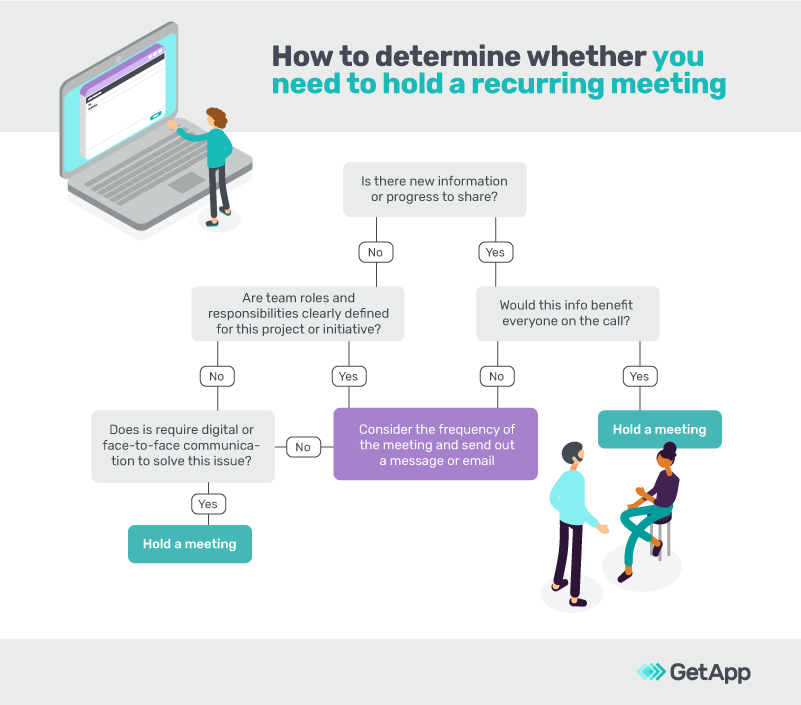
#1: "Does this need to be a recurring meeting or is a written status update sufficient?"
Check-ins are key to keeping up with team projects, obstacles, and shared goals. While such meetings are well-intentioned and generally useful, it’s important to consider their frequency—or whether they even need to take place at all.
While a status update can take the form of a standing meeting, simple collaboration software can help decide whether or not a meeting is needed. Try setting an automatic reminder for the day prior or first thing in the morning the day the meeting takes place to ask: “Is there any new progress or info to share? Any questions or concerns we should talk about?”
If there isn’t enough to share, feel free to push till next session and send a written recap. After doing an assessment, you may find that your weekly meeting is more helpful on a bi-weekly or even monthly cadence.
These are important considerations to make and ones that can even be made on a per-meeting basis.
#2: "Do all attendees have questions or updates to contribute?"
If you think about the true cost of a meeting, you're sacrificing productivity and time (which translates into money), so it's crucial to ensure that everyone on the invite truly needs to be there.
Let’s say you need to update a stakeholder with the status of a project. Instead of flagging down the team or getting everyone on a call, project management tools can show you, at a glance, where something is in the project’s lifecycle.
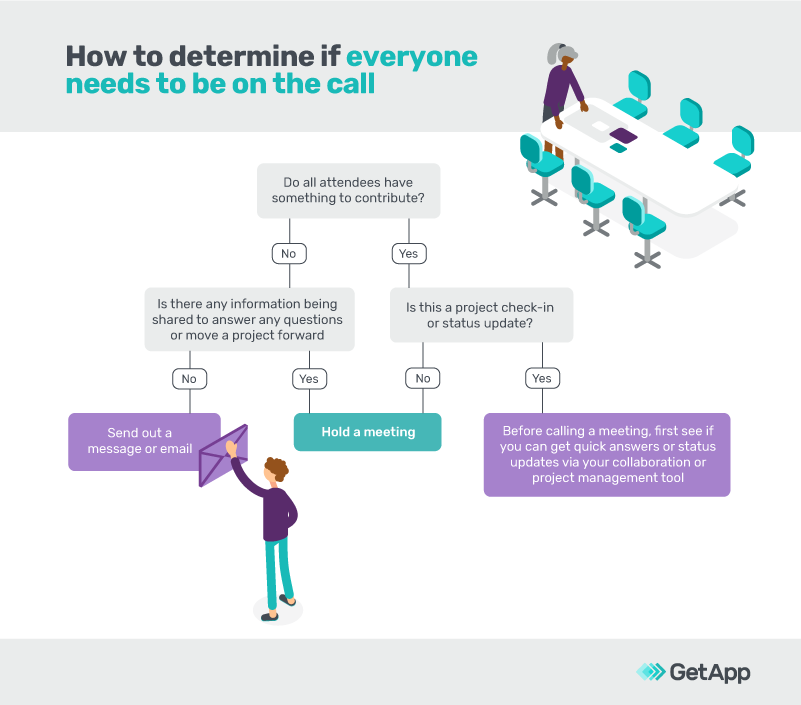
Limiting the amount of attendees can also lead to more productive and engaging meetings. In large settings, employees can often disengage or zone out—especially if they don’t have anything to contribute. When you conduct smaller meetings, attendees feel more accountable and more apt to engage.
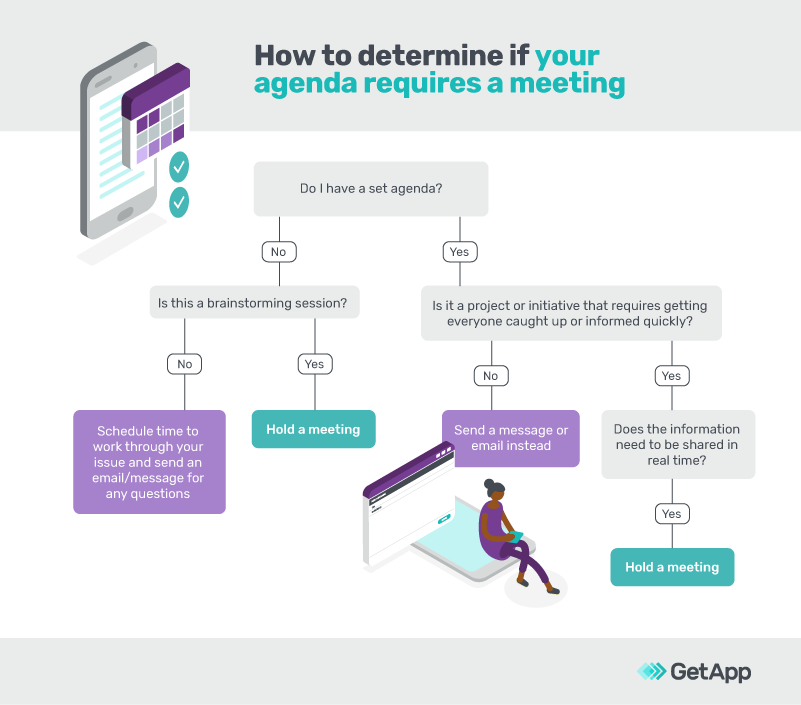
#3: "What’s my agenda, and do I need a discussion to make progress?"
If you’re stuck, you may be tempted to hold a meeting to help get things rolling—even if it may not be the best use of everyone’s time.
When it comes to advancing a project, discussing strategy, or addressing any concerns, entering a meeting with a tailored agenda keeps things structured and on track.
Tasks such as gathering feedback, deadline updates, etc. can be handled offline before, after, or without a meeting altogether.
Meetings will always be a necessity in the business world, but not all meetings are created equal. The next time you start drafting a meeting invite, stop and think: will you and others be more productive for it?
Methodology
GetApp conducted this survey in January 2021 of 527 to learn more about the decisions small businesses made in reaction to COVID-19. Respondents were screened for industry, job level, and business size.
More on Collaboration

May 31, 2024


Dec 12, 2023