GetApp offers objective, independent research and verified user reviews. We may earn a referral fee when you visit a vendor through our links.
Our commitment
Independent research methodology
Our researchers use a mix of verified reviews, independent research, and objective methodologies to bring you selection and ranking information you can trust. While we may earn a referral fee when you visit a provider through our links or speak to an advisor, this has no influence on our research or methodology.
Verified user reviews
GetApp maintains a proprietary database of millions of in-depth, verified user reviews across thousands of products in hundreds of software categories. Our data scientists apply advanced modeling techniques to identify key insights about products based on those reviews. We may also share aggregated ratings and select excerpts from those reviews throughout our site.
Our human moderators verify that reviewers are real people and that reviews are authentic. They use leading tech to analyze text quality and to detect plagiarism and generative AI.
How GetApp ensures transparency
GetApp lists all providers across its website—not just those that pay us—so that users can make informed purchase decisions. GetApp is free for users. Software providers pay us for sponsored profiles to receive web traffic and sales opportunities. Sponsored profiles include a link-out icon that takes users to the provider’s website.
How To Improve Communication Within a Team: 3 Tips You Won’t Regret Trying
Use these three tips to get rid of communication breakdowns on your team.


Can you recall a project where your team didn't communicate well? Do you remember how it felt, and how it affected the project?
If your experience is anything like mine, it was incredibly frustrating to have difficulty establishing trust or common goals on projects. And poor communication tends to cause project quality to suffer.
For managers in today's business landscape, these communication struggles are often exacerbated by distributed teams and remote work. Can you still communicate effectively with a 100% remote team? You can, and we’ll share more about how below.
The benefits of effective communication in the workplace
Whether remote or in-person, when your team communicates effectively, it improves engagement and morale, as team members feel heard and are more motivated.
Managers play a critical part in helping make employees productive and happy. They need to ensure higher-level strategy trickles down so employees have a clear line of sight to overall company goals. Otherwise, teams will become siloed, and run the risk of duplicating efforts.
According to Gartner, 75% of employees with high strategic alignment felt supported by their managers (full content available to clients). This underscores the importance of managers not only understanding strategy but also contextualizing it for their direct reports.
Here are three tips to help you do this.
1. Facilitate dialogue with your direct reports
Many times, communications or leadership teams expect managers to cascade information to their teams and direct reports. However, managers aren’t always equipped with the best tools for effective team communication.
Leadership and communications teams may send talking points to managers, but what if these points are overly simplified and lack any context for employees, let alone a connection to their daily roles?
A manager’s real strength is being able to contextualize information, goals, and tasks for their reports. Rather than focusing on generic talking points, use talking points as a starting place. From there, focus on open communication with your reports.
For example, you can schedule meetings to add detail to broader strategy information, such as communicating how a change in strategic direction will directly affect your team’s day-to-day.
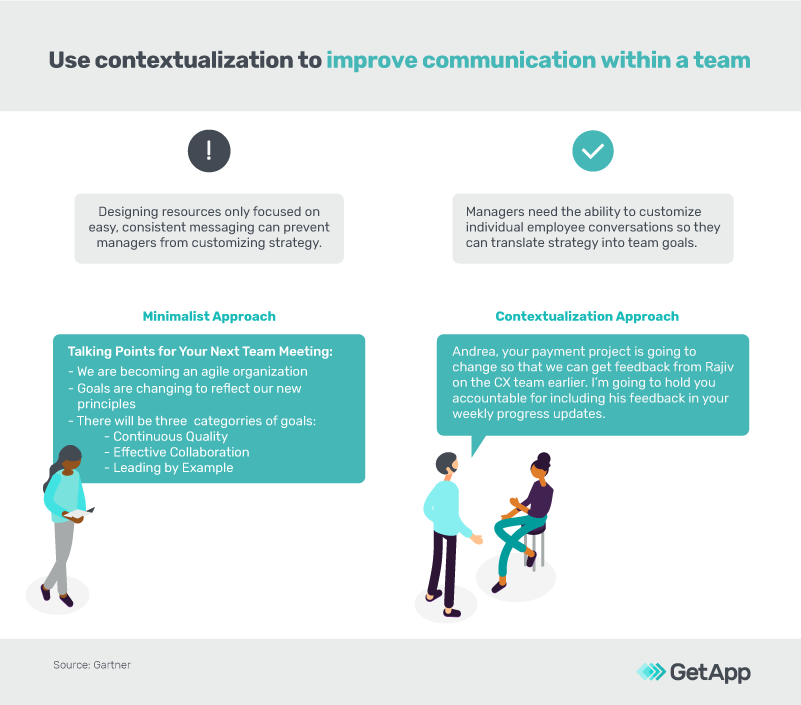
Managers should contextualize information for direct reports, rather than simply using generic talking points (Source; full content available to clients)
Key takeaway
If your team is 100% remote, you can still have effective meetings. You can still participate in active listening on a video call using a communication tool or chat software if team members feel more comfortable with written communication.
Every person is different, so when you open up a dialogue ensure you’re offering team members more than one option for communicating.
2. Identify and escalate barriers
Although leadership sets metrics, they aren’t always aware of barriers preventing employees from achieving those metrics. Managers are in an ideal spot to not only understand what those barriers are but escalate them to leadership if needed.
One way to do this is through tiered daily huddles. Let's look at an example from Cleveland Clinic (via Gartner; full content available to clients).
The clinic wanted to reduce patient falls (metric), so they began asking questions in daily huddles to get insight from employees. If a patient fell, during the huddles managers would find out why. Was standard procedure not followed? If so, the employee should work on that. If procedure was followed, was there a more systemic issue that needed to be escalated?
As a result, the clinic experienced a 15% reduction in falls. Even if your company doesn’t work in healthcare, the takeaway here is that honest, frequent communication is invaluable when it comes to both overall success (correcting systemic issues that could lead to huge failures) and ensuring employees feel appreciated and are set up for success (including the help they need to manage day-to-day responsibilities).
Key takeaway
To improve communication within your team, set up regular, recurring huddles where employees can bring up issues. Maintain an open door policy, even if it's a virtual door. For instance, you could set up routine office hours and encourage team members to “drop in” to a video call and chat.
3. Use BICEPS to break down communication barriers
According to Paloma Medina, there are six core values that might ring true for you and your direct reports right now.
These values—which can be easily remembered with the handy acronym BICEPS—are the perfect complement to our first two tips. While those tips are about what to do, BICEPS is about how to do it.
Let's break down these core needs:
| Belonging | A feeling of closeness with a particular group. |
|---|---|
| Improvement | Progress toward an important goal, improving things for other people, or personal growth. |
| Choice | Having flexibility, autonomy, and the ability to make decisions. |
| Equality | Access to resources (money, time, space, etc.) and information is fair/equitable. |
| Predictability | You have certainty about resources (money, time, space, etc.), and goals and strategy are consistent without changing too quickly or too often. |
| Significance/status | You hold a title that honors your work, and you feel recognized. |
Medina says the secret to effective management is being able to understand which of these values is motivating you and/or your reports at any given point in time. Thus, active listening is an essential component of team communication.
Here’s an example of BICEPS in action: Say your direct report keeps having to move desks, but one of that individual's needs is predictability. While you may not be able to give your report the desk of their dreams, you can still offer predictability in another way. Give them a familiar, necessary project to work on until the dust settles and they feel more consistently productive again.
Key takeaway
To better help your team discover each other’s core needs, use collaboration software to run a BICEPS-centered learning exercise. Miro or Mural are examples of software tools that enable group exercises or workshops.
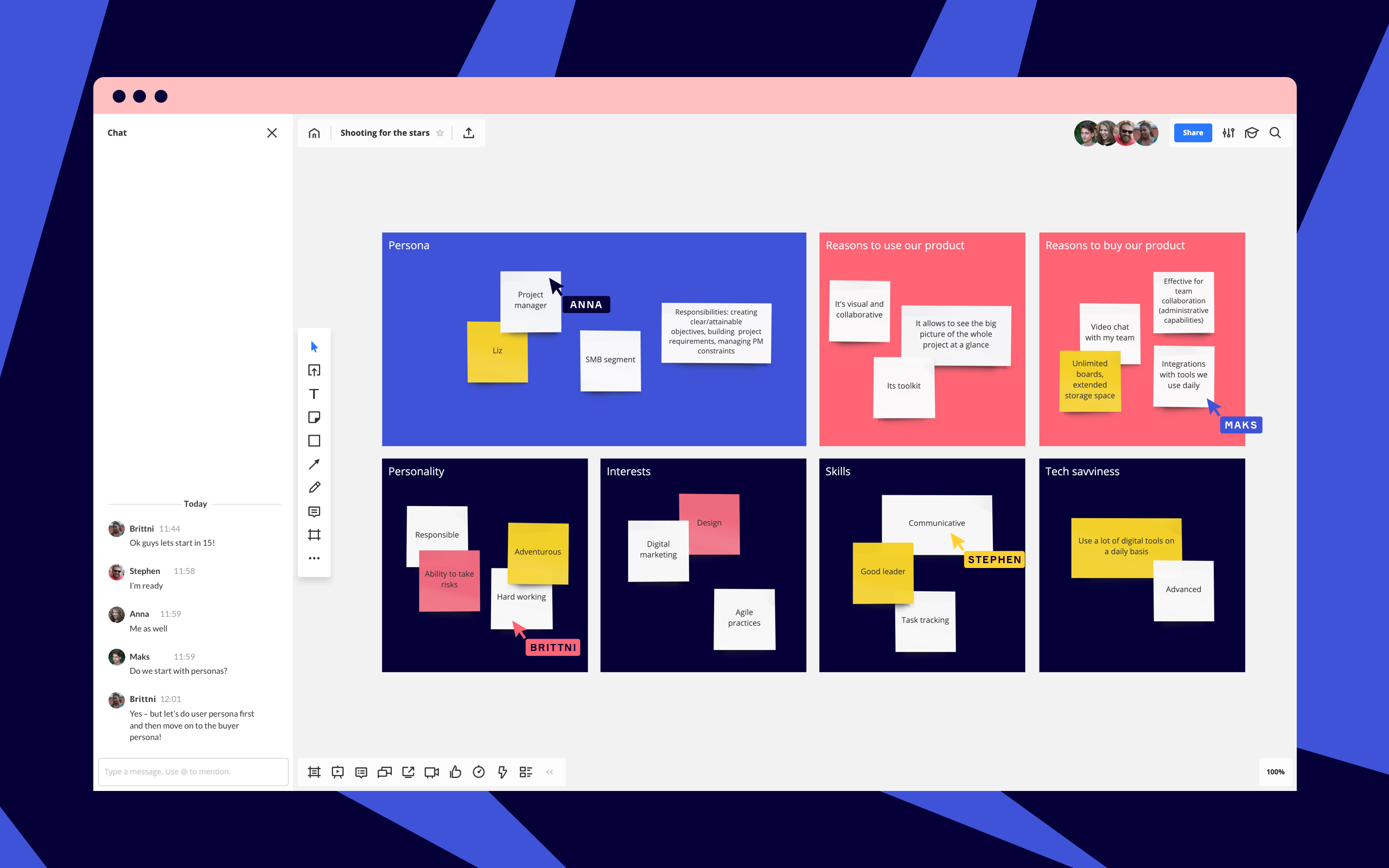
Get the right tools to help your team communicate effectively
These three tips can help your team communicate more effectively and ensure everyone in your organization is on the same page when it comes to an effective communication strategy.
But it doesn't stop there. Certain software tools can help you improve collaboration, and execute your communication strategy. Here’s a list of tools to get you started.
For each category, we’ve linked our buyers guide for that software and our Category Leaders (a list of top products recommended by real users).
Collaboration Software allows virtual teams to collaborate online. Common features include knowledge base searching, workflows, and task management.
Instant Messaging and Chat Software allows your team members to communicate in real-time. Common features include text chat, video chat, voice, and screen sharing.
Communication Software allows for communication and collaboration between team members. Common features include instant messaging, audio and video conferencing, screen sharing, and file sharing.
Note:
The applications selected in this article are examples to show a feature in context and are not intended as endorsements or recommendations. They have been obtained from sources believed to be reliable at the time of publication.
Amanda Kennedy


More on Collaboration

May 31, 2024


Dec 12, 2023