GetApp offers objective, independent research and verified user reviews. We may earn a referral fee when you visit a vendor through our links.
Our commitment
Independent research methodology
Our researchers use a mix of verified reviews, independent research, and objective methodologies to bring you selection and ranking information you can trust. While we may earn a referral fee when you visit a provider through our links or speak to an advisor, this has no influence on our research or methodology.
Verified user reviews
GetApp maintains a proprietary database of millions of in-depth, verified user reviews across thousands of products in hundreds of software categories. Our data scientists apply advanced modeling techniques to identify key insights about products based on those reviews. We may also share aggregated ratings and select excerpts from those reviews throughout our site.
Our human moderators verify that reviewers are real people and that reviews are authentic. They use leading tech to analyze text quality and to detect plagiarism and generative AI.
How GetApp ensures transparency
GetApp lists all providers across its website—not just those that pay us—so that users can make informed purchase decisions. GetApp is free for users. Software providers pay us for sponsored profiles to receive web traffic and sales opportunities. Sponsored profiles include a link-out icon that takes users to the provider’s website.
5 Employee Tracking Apps for iPhone
What are the best employee tracking apps for iPhone that allow you to monitor staff activity and track time worked?
Sales staff shirking off? Field service workers pulling a fast one? Employees snoozing in the storeroom? As much as you trust your staff, as a small-business owner or manager, these thoughts can pop into your head from time to time. Thankfully, it's dead easy to keep tabs on what your workers are doing wherever you are by making use of employee tracking apps for iPhone.
The issue of employee surveillance can be a tricky one. After all, it goes without saying that employees don't like to feel as if they're being spied on. But by using software for time tracking, employee scheduling, and location tracking, you can make sure that your staff are doing the right thing in the right place at the right time.
You could even take things a step further and start monitoring the conversations of your workforce. In fact, 50 percent of business owners have said that they either monitor staff conversations, or would like that option. Business chat apps such as HipChat, Slack, and Yammer all have options that allow you to monitor internal messaging to some degree.
The privacy issues that come into play when doing this are even more prickly. But even if you're not ready to go that far, you can still use employee tracking apps for good. Studies have shown that more than half of employees who used GPS tracking apps had a good experience. The key is to make sure your team trusts you.
Here, we've shared some of the best employee tracking apps for iPhone to track employees' time, monitor their whereabouts, and make sure that they stick to their schedules.
5 employee tracking apps for iPhone
VeriClock
VeriClock is a web-based timekeeping app that allows employees to clock in and out of work using their mobile devices. Managers can confirm employee hours via real-time status updates and see how they clocked in or out. You can even tell where they were when they clocked in and out using their GPS coordinates or IP addresses.

VeriClock for iPhone boasts two separate feature sets- one for employees and a second for supervisors. Staff members can clock in and out, leave detailed reports for admins, and track custom fields like mileage when clocking in or out.
As a supervisor, you can see real-time data of time worked by employees. You can also get GPS location data on where staff have been versus where they are now. You can even set up alerts for things like overtime, no-shows, job costings, and user error.
Price
VeriClock charges a monthly account fee of $10, then $5 per active user per month. Optional add-ons will cost extra; you can calculate the cost for your own small business on VeriClock's website.
Hubstaff
If you work with remote teams, then you know how hard it can be to keep tabs on what everyone's doing. Hubstaff is a time tracking tool that combines screenshots, activity levels, and in-depth reports to help virtual teams keep tabs on work for client projects. As a remote team manager, you'll gain a stronger sense of how much time is spent per project and how much work employees are doing.

Hubstaff is a top-rated employee tracking app for iPhone on the App Store. It allows employees to easily log their time down to the second through GPS tracking - including time spent driving.
Managers can see exactly when team members leave and track the time they spend at each destination. Hubstaff also displays work logs so that as a manager, you can quickly see why someone was late to a job site, or why they logged more time on specific days.
Price
Hubstaff's Solo Lite plan is free for one user. Its Basic plan costs $5 per month for far more features, including employee payments and 24/7 support.
And its Premium plan costs $9 per month for all features on the Basic plan plus automatic payroll, attendance scheduling, idle time control, and project budgets.
Deputy
Every sheriff needs a deputy, and if you're gunning for time thieves in your company, Deputy is a useful app to have by your side. It automates the process of tracking time and attendance. It also allows you to schedule employees with ease. Since they can clock in from wherever they are, Deputy removes the need for manual time tracking tools.

The Deputy iPhone app allows you to track your team by seeing who's on shift right now and quickly replacing folks who call in sick. There's even an Apple Watch version of Deputy that lets you see which employees are on shift at a given time.
Price
Deputy's Starter plan costs $2 per user per month when billed annually. Its Premium plan costs just $3 per user per month (also when billed annually). It includes all features in the Starter plan, plus time and attendance tracking with location capture and biometric facial recognition.
And Deputy's Enterprise plan includes everything in Premium plus customizable roles, permissions, reporting, and more. This plan costs $6 per user per month.
When I Work
Need help managing your staff schedule to see when each employee should be on the clock? When I Work has an attendance module to help you ensure that employees clock in when they're supposed to.

If an employee forgets to clock in, an actionable alert is sent to them. As a manager, you can also set up alerts to tell you when you're close to paying overtime.
When I Work is one of the prettiest employee tracking apps for iPhone. It gives you a clear view of who's working, and allows people to clock in. It also has features for tracking time, managing payroll, and creating schedules. Once all that is set in stone, you can notify everyone by text and email.
Price
When I Work Scheduler is free for teams of up to 75 employees. You can contact them for a price quote if your team exceeds that number.
Housecall Pro
Managing a field service operation can be a pain in the toolbox, especially if you have a bunch of technicians working for you. Luckily, Housecall Pro is designed to manage the entire business management process of a home or field services company.
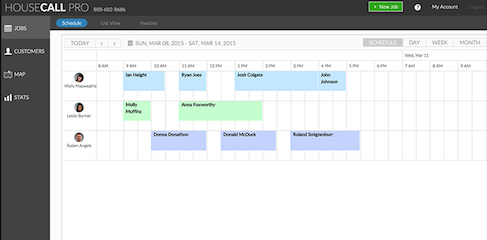
The Housecall Pro iPhone app boasts scheduling and dispatch features that let you assign jobs to technicians in a few clicks. It contains GPS functionality that lets you schedule urgent work orders depending on a technician's proximity to a customer. It even has live maps that show you where your workers are.
Price
Housecall Pro's Simple plan costs $39 per month for one user when billed annually. This plan's features include dashboards with business stats, real-time dispatching, Google Calendar integration, and more.
That said, Housecall's tracking features are available on its Modern and Advanced plans, which respectively cost $109 and $199 per month when billed annually. Employee tracking is only available on Housecall Pro's Advanced plan, which also supports unlimited users.
Ready to get started?
For a complete list of iPhone apps for monitoring employees, check out the top iPhone time tracking and expense apps in GetApp's software category page.
More on Accounting & Finance