GetApp offers objective, independent research and verified user reviews. We may earn a referral fee when you visit a vendor through our links.
Our commitment
Independent research methodology
Our researchers use a mix of verified reviews, independent research, and objective methodologies to bring you selection and ranking information you can trust. While we may earn a referral fee when you visit a provider through our links or speak to an advisor, this has no influence on our research or methodology.
Verified user reviews
GetApp maintains a proprietary database of millions of in-depth, verified user reviews across thousands of products in hundreds of software categories. Our data scientists apply advanced modeling techniques to identify key insights about products based on those reviews. We may also share aggregated ratings and select excerpts from those reviews throughout our site.
Our human moderators verify that reviewers are real people and that reviews are authentic. They use leading tech to analyze text quality and to detect plagiarism and generative AI.
How GetApp ensures transparency
GetApp lists all providers across its website—not just those that pay us—so that users can make informed purchase decisions. GetApp is free for users. Software providers pay us for sponsored profiles to receive web traffic and sales opportunities. Sponsored profiles include a link-out icon that takes users to the provider’s website.
5 Top-Rated Free Live Chat Software
Connect with customers in real time using these free live chat solutions.


Have you ever found yourself on a website, pondering a question, and suddenly, a chat window pops up with some relatable question? This is how businesses redefine customer interactions via live chat software that welcomes customers or website visitors with a personalized and instant conversational experience. With live chat support, businesses can foster a sense of connection and responsiveness to build customer loyalty.
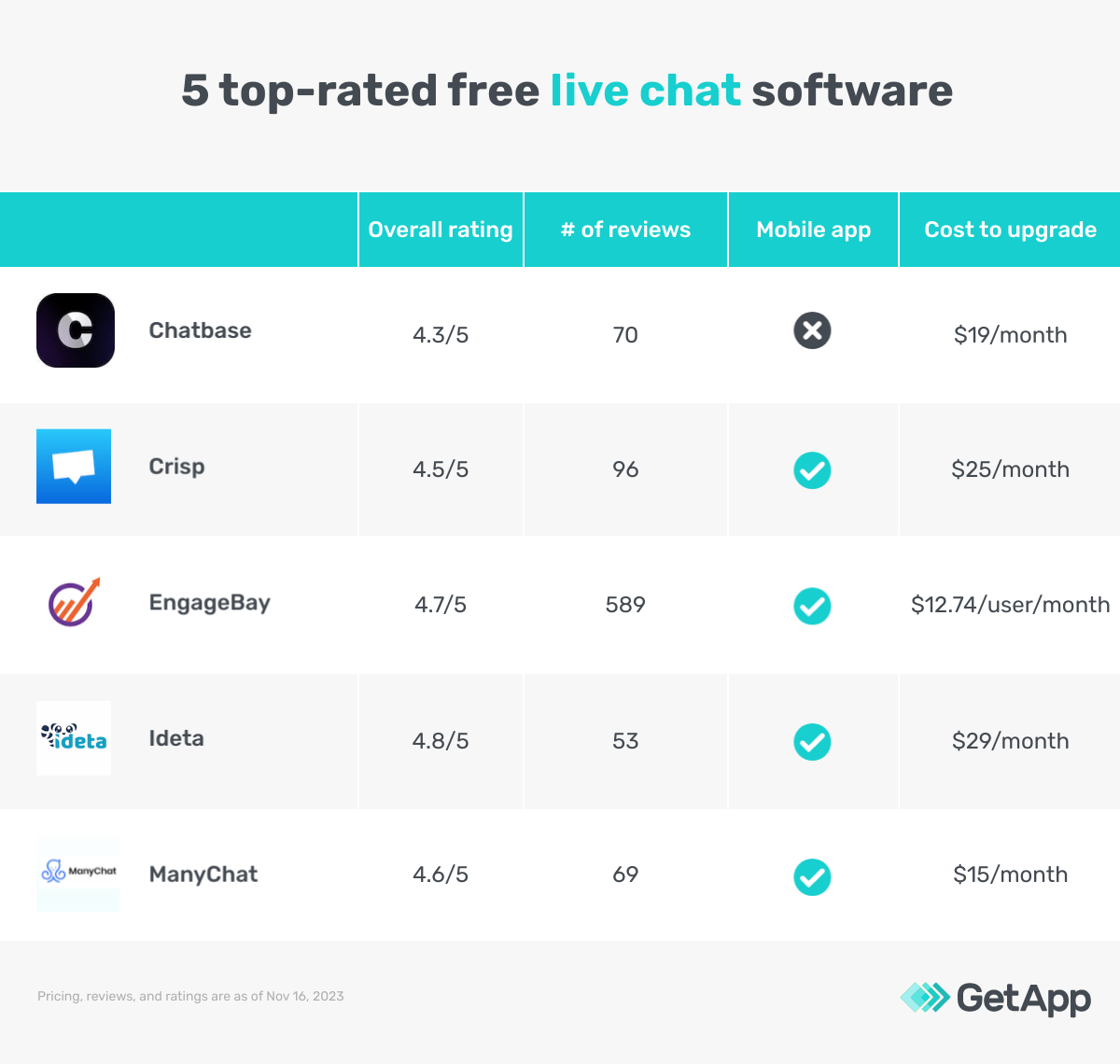
Finding the right live chat tool for your business from a vast market pool can be daunting, but you can always try them for free before buying. The article highlights five top free live chat software listed alphabetically based on verified user reviews. Read more about our methodology at the bottom of this article.
The tools listed in the article are dedicated live chat solutions offering either AI-enabled or agent-based live chats to address customer queries on the business website and social media.
What is free software?
Free software refers to software that users can access and use without incurring any costs. To meet this criterion, a software solution should grant users free access to either all or some of its features. Software requiring payment after a specific time frame does not qualify as free software.
1. Chatbase
Chatbase’s live conversational AI chatbot allows asking questions and generating answers. You can also embed the AI chatbot into your business website as a widget and allow visitors to ask questions related to your product or service. The tool crawls the website data and then trains the AI algorithm to better understand visitor queries and give relevant live chat support. Plus, the chatbot widget can be customized for its appearance and icon to match the brand voice and style.
The free version of Chatbase offers a single chatbot with a limit of up to 400,000 characters and ten links to train on. You can embed the chatbot on multiple websites and view conversation history. Upgrading to a paid software plan provides up to ten chatbots, an increased character limit, and unlimited links to train on. You can also capture leads, remove the vendor branding from the website widget, and upgrade the chatbot from GPT 3.5 to GPT 4 [1].
Free features*:
Conversation history: View and analyze conversations between the website visitors and the chatbots. Use the data to gather insights, including the queries and responses, to identify patterns in conversation style or queries.
Custom widget appearance: Make the chatbot widget match the website colors, fonts, and other design elements for brand recognition.
Chatbot training links: Use website links to train the AI chatbot on different aspects of attending to user queries. These include document explaining, data insights, or link discovery.
Customer support options: Chat, FAQ, how-to guides, and online ticket system
Cost to upgrade: $19 per month
Billing cycle: Monthly
Who should consider Chatbase?
Customer support managers focusing on attending to customer queries via an integrated live chatbot into the business website can benefit from the free version of Chatbase. You can train the tool to address different customer queries by analyzing the conversation history between the chatbots and website visitors. The process assists the customer support team provide the most relevant solution to customer queries and reduce prolonged issues.
*Analysis performed November 2023
2. Crisp
Crisp live chat solution offers a shared inbox to centralize all your conversations from live chat to emails, messengers, and social media. You can also customize the live chat using the tool’s code-free editor to create workflows that lead to automated interactions with customers. The process allows routing conversations to the right support team member and condition messaging based on the customers’ choice. All the conversations are automatically transferred to the integrated CRM system used by your business.
Crisp’s free subscription plan offers access to up to two support team members. You also get a chat widget to embed into your business website via integration with unlimited customer conversations. Upgrading to a paid subscription plan allows up to 20 users, 50,000 contacts, chat triggers, analytics, and third-party application integration.
Free features*:
Contact form: Centralize answers from a customizable contact form embedded into the website to your shared inbox. The feature allows you to define form fields (name, email, and query) and customize the form’s appearance using colors, fonts, and other style options.
Push notifications: Get an alert every time a new message is received. The feature allows configuring when and how push notifications are triggered. This includes setting specific words, actions, or events that prompt a notification.
Track team activity: The analytics dashboard provides insights into customer support activity, including new queries, existing queries, response time, delayed activity, and other relevant data related to customer satisfaction.
Customer support options: FAQs, chat, how-to-guides, email, and call
Cost to upgrade: $25 per month
Billing cycle: Monthly
Who should consider Crisp?
Crisp's shared inbox is beneficial for customer support managers looking to centralize all customer conversations across channels, responding to inquiries efficiently and on time. The code-free editor allows customizing the chat, creating workflows for automated interactions with customers. Plus, the tool’s analytics dashboard offers insights into customer support activity for managers to monitor performance and maintain high levels of customer satisfaction.
*Analysis performed November 2023
Pro tip
Opt for a customization live chat solution that is designed to work with all customer service and relationship management systems (CRM) via direct integration or API-based connection. The process ensures that all your customer data is securely accessible across teams, and you do not have to spend on a third-party integration tool to connect systems.
3. EngageBay CRM
With EngageBay CRM’s live chat software solution, multiple support team members can collaborate on a single customer query to provide adequate resolution. They can invite other members to join the chat via email or share chat history. Using the tool’s 360-degree view for customers' actions, you can personalize the handling approach based on demographics (location, language, age, and gender) and journey on the business website. The tool also sends email notifications for every new website visitor and initiates a chat automatically.
EngageBay’s free live chat software plan lets you connect with up to 250 website visitors via chat. The plan also includes autoresponders, lead grabbers, and message sequences. Upgrading to a paid plan offers unlimited contacts along with customer analytics, A/B testing, and lead scoring.
Free features*:
Customer tracking: Monitor and record customer interactions. The feature allows creating and managing individual contacts and leads, including contact details, communication history, and other relevant information.
Feedback: Allow visitors to leave feedback after each chat. The feature allows creating a feedback form or letting customers give a star rating to their support experience via chat.
Chat shortcuts: Create shortcuts for frequently asked questions or responses. These shortcuts can be associated with specific words or actions. For example, ‘thank you’ expands to a full thank-you message, or ‘assign [teammate’s name]’ assigns a conversation or task to a specific team member.
Customer support options: Live chat, knowledge base, online best-practice guide, call, and email
Cost to upgrade: $12.74 per user per month
Billing cycle: Biennial
Who should consider EngageBay CRM?
The ability for multiple support team members to collaborate on a single live chat conversation benefits experienced support agents to train new team members in handling different types of customers and their unique requirements. The process saves some time for support managers to train the new support team members individually for efficient performance. Features, including customer monitoring, feedback, and 360-degree customer view, further enhance the team’s ability to understand customer needs better, closely monitor their conversation patterns, and provide adequate support.
*Analysis performed November 2023
4. Ideta
Ideta is a customer service suite with a live chat feature that lets you address customer queries on the website and social media pages via integration. Your support agents can assign conversations to themselves or reroute them to the next available agent. The tool allows saving the most common recipes and simply clicking on them to respond to the customers.
The free version of Ideta offers access to 100 conversations per month with one live chat window. Upgrade to its paid plan for up to 10,000 conversations or customize it based on your requirements. The paid plan offers unlimited chats and a custom live chat widget for personalized branding.
Free features*:
Conversation tracking: Track and store all the data shared between the customers and agents in the live chat. The details include name, email, phone number, query, and other rich media.
Pre-saved answers: Maintain a directory of commonly used replies to customer queries. These saved answers pop up in the live chat based on the conversations.
Chatbot: Connect a chatbot to the live chat and automate replies. The feature allows connecting the chatbot at the beginning of the conversation or in between, based on the agent’s queue.
Customer support options: Live chat, email, call, and user community
Cost to upgrade: $29 per month
Billing cycle: Monthly
Who should consider Ideta?
Ideta is worth considering for customer support managers looking to save time for agents to focus on handling critical customer issues and automate the common resolutions via chatbot or pre-saved replies. Plus, conversation tracking features further assist in identifying other common issues that haven't been captured so far to contribute to an enhanced automated responding system.
*Analysis performed November 2023
Pro tip
Look for proactive chat features, such as autoresponders or drip sequences that can support non-critical or common customer queries. This way, agents can focus on unique customer issues that need to be fully addressed.
5. ManyChat
As a live chat marketing platform, ManyChat allows you to set up sequences of messages and responses to website visitors. The sequences are triggered based on preset words or phrases. The tool can also be used for lead generation by collecting user information within the chat conversations. You can integrate ManyChat with messengers and social media platforms to send broadcast messages or campaigns to customers and prospects.
ManyChat’s free plan offers access to a single user to engage up to 1000 contacts, build unlimited chatbot flows, segment contact with ten tags, run two drip sequences, and generate triggers with up to three keywords. Upgrading to a paid plan offers unlimited access to all features along with analytics, custom branding, and A/B testing.
Free features*:
Drip sequences: User the drag-and-drop visual editor for creating chatbot flows. The feature allows designing sequences by arranging different message blocks to create a series of interactions.
Direct channel replies: Reply to comments and story mentions automatically on Instagram and Facebook. The feature also prompts users who attempt to message you with common topics or FAQs to start a conversation.
Contact segmentation: Assign tags to customers based on their conversations via chat. For example, you can tag users who have purchased products, show interest, or have subscribed to a service.
Customer support options: Chat, email, community, and video courses
Cost to upgrade: $15 per month
Billing cycle: Monthly
Who should consider ManyChat?
Customer support managers focusing on increasing sales for the business can benefit from ManyChat chat marketing software. The tool features, including lead generation, customer segmentation, and messenger integration, improve the support team’s ability to target and engage customers with the most relevant information.
*Analysis performed November 2023
What is the cost to upgrade from free live chat software to a paid one?
Live chat software upgrade can cost as low as $7.25 per month, or go all the way up to $399 per month, depending on various factors—number of users, live chat, and conversation, chat history duration, widget customization elements, along with priority support. Most live chat solutions typically include the following pricing plans:
Free trials: No-cost trial plans ranging from 7 to 30 days, giving users access to all or limited software features. These are ideal for businesses who wish to try out a tool before purchasing.
Free versions: Free software plans offer basic features and/or limited premium features. These are ideal for small businesses on a budget.
Entry-level plans: Start at $7.25 per month and offer limited live chat features such as chat history, chat widget customization, customer detail, and agent rating. These are a good option for small businesses or teams with basic customer support needs.
Mid-tier plans: Range from $12.5 to $99 per month and offer advanced features such as advanced widget designing, social media integration, chat automated builder, and an online ticket system. These are ideal for businesses that have outgrown basic live chat solutions.
High-end plans: May cost upward of $399 per month. In addition to basic and midrange features, these offer unlimited users, chats, and conversation history along with priority support. They are ideal for large enterprises with cross-functional support teams.
Hidden costs associated with live chat software
Besides the software license, there may be additional costs, including
Training expenses: Initial training for new users and ongoing training for updates or new features can lead to additional costs.
Data migration costs: Migrating data from the existing system to the new tool may require expert assistance, which can add to the software implementation cost.
Transaction and processing fees: Some software solutions charge fees based on the number of transactions or the volume of data processed.
Frequently asked questions when selecting free live chat software
It’s important to ask the right questions to find the best live chat software for your business. Some common questions include:
What are the free live chat capabilities of the software?
A free live chat software tool offers basic features, including automated conversations, conversation tracking, and contact segmentation to provide live chat support to customers. You must identify and match your live chat requirements with the offered free features. In some cases, the live chat tool may offer limited access to other features of the paid software plan, including social media integration, AI assistant, or auto-responders. However, you need to check if they are enough to meet your business objectives.
Does the software allow customizing the live chat system?
Live chat customization often includes branding elements, such as widget appearance, logo, and font, and chat customization, such as languages, pre-set messages, and auto-routing. You must first identify the customization requirements for your business and then look for a live chat tool that offers those features in its free plan.
Is there a limit on the number of chat agents or customers contacted in the free plan?
A free live chat software plan often limits the number of chat agents and contacts, starting from 1-3 agents and 10-100 contacts. The limitation may vary for different software vendors. You need to assess the allowed free limit on the number of users and contacts for your team size and customer network.
Methodology
To be considered for this list, products had to:
Have at least 20 unique product reviews published on GetApp within the past two years, with an average rating of 3.0 or higher. We selected the five products with the highest ratings to feature in this article.
Offer a free, stand-alone version of the software (not a trial version of the software where you must purchase a product after a limited amount of time).
Meet our live chat software definition: “Live Chat software helps organizations connect with their customers in real time. Live Chat applications can be used for customer support, lead generation, and customer engagement.”
*Our research team identified these free features from vendor websites (as of Nov 16, 2023) based on their analysis of what users find valuable in or expect from live chat software. This list is not exhaustive. For additional free features, refer to the vendor's website.
We select and rank products based on an objective methodology developed by our research team. While some vendors may pay us when they receive web traffic or leads, this has no influence on our methodology.
*To present the most up-to-date information, the product information below shows the latest real-time ratings, which may differ from the ratings values at the time this report's analysis was conducted, since new reviews may have been left in the meantime.
Products evaluated for the pricing calculation were taken from GetApp’s live chat software directory. The pricing ranges exclude freemium versions of the products. The features highlighted were identified based on their relevance and the percentage of products in the GetApp directory that offer them. Only products with publicly available pricing information, as of November 16, 2023, were considered for pricing calculation.
Sources
1. Definition: GPT-4 is a powerful large language model (LLM) with generative AI capabilities developed by OpenAI. GPT-4 uses a transformer model architecture to predict the next token (a part of a word). It was trained on large amounts of public and some private data, and the model was fine-tuned using reinforcement learning with human feedback (RLHF). The key new or improved capabilities in GPT-4 include the ability to support image and text inputs and support for longer forms of input and output.