GetApp offers objective, independent research and verified user reviews. We may earn a referral fee when you visit a vendor through our links.
Our commitment
Independent research methodology
Our researchers use a mix of verified reviews, independent research, and objective methodologies to bring you selection and ranking information you can trust. While we may earn a referral fee when you visit a provider through our links or speak to an advisor, this has no influence on our research or methodology.
Verified user reviews
GetApp maintains a proprietary database of millions of in-depth, verified user reviews across thousands of products in hundreds of software categories. Our data scientists apply advanced modeling techniques to identify key insights about products based on those reviews. We may also share aggregated ratings and select excerpts from those reviews throughout our site.
Our human moderators verify that reviewers are real people and that reviews are authentic. They use leading tech to analyze text quality and to detect plagiarism and generative AI.
How GetApp ensures transparency
GetApp lists all providers across its website—not just those that pay us—so that users can make informed purchase decisions. GetApp is free for users. Software providers pay us for sponsored profiles to receive web traffic and sales opportunities. Sponsored profiles include a link-out icon that takes users to the provider’s website.
Microsoft Project vs. Visio: Which Is Right for My Business?
If you’re wondering if Microsoft Project or Microsoft Visio is right for your business, you’ve come to the right place. Read on for details about the pricing, functionality, and integrations of both products.


Many tools let you manage your projects but Microsoft Project and Visio have maintained their status as industry standards in the world of project management software. With features that serve businesses of all sizes, it’s difficult to choose which one is right for your company.
If you’re wondering which of these two solutions is right for your business, we’ll help you differentiate between the two by providing pricing, features, user reviews, and integration options for both Microsoft Project and Visio so you can find the best fit.
Pricing
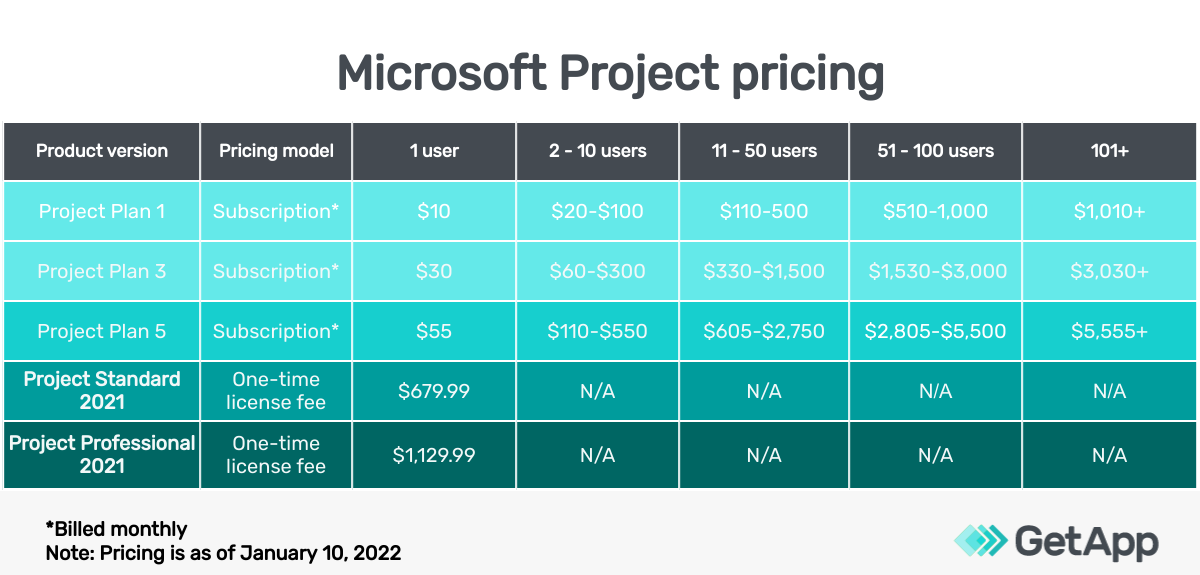
Microsoft Project offers three subscription-based plans namely Project Plan 1, Project Plan 3, and Project Plan 5 which are billed monthly and can be billed annually too.
Project Plan 1 costs $10 per user per month.
Project Plan 3 is priced at $30 per user per month.
Project Plan 5 costs $55 per user per month.
There are also two one-time license fee plans-
Project Standard 2021 costs $679.99.
Project Professional 2021 is valued at $1,129.99.
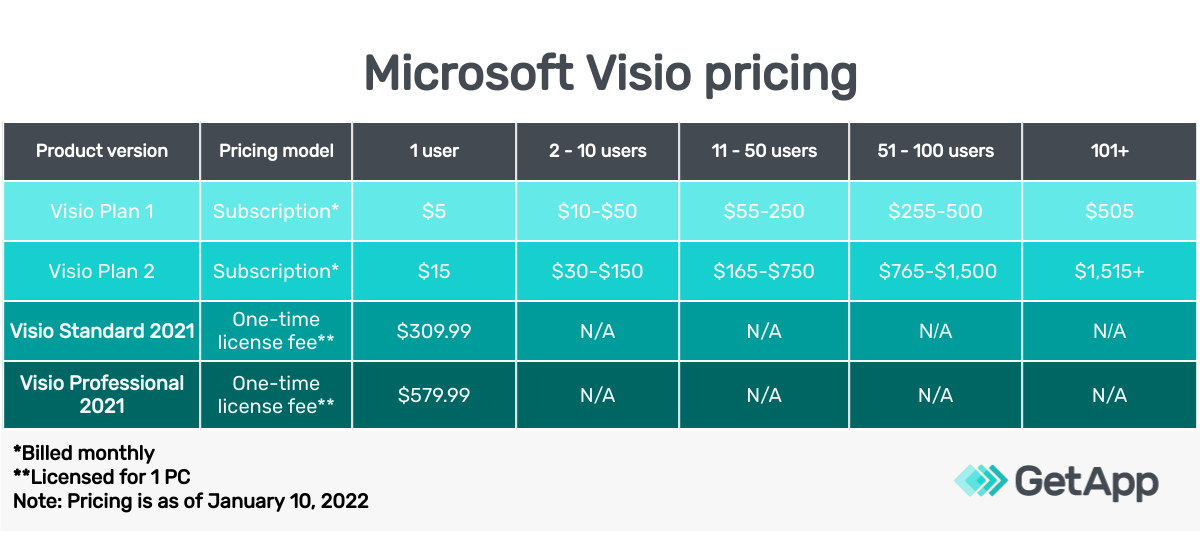
Comparatively, Microsoft Visio offers four versions of the software out of which two are subscription-based and the other two are offered as a one-time license fee. The subscription-based plans are:
Visio Plan 1 is priced at $5 per user per month.
Visio Plan 2 costs $15 per user per month.
For one-time license fee versions, there are two plans available:
Visio Standard 2021 is priced at $309.99.
Visio Professional 2021 costs $579.99.
Upon comparing the pricing plans of Microsoft Project and Visio, Visio plans are more affordable. Both the tools offer subscription-based and one-time license fee plans so you can choose whichever suits your business’s budget and needs.
| Takeaway: |
|---|
| Visio is less expensive than Projects and both tools offer flexibility. However, Projects has more versions (or plan choices) than Visio. Both offer 30-day free trials. |
Features
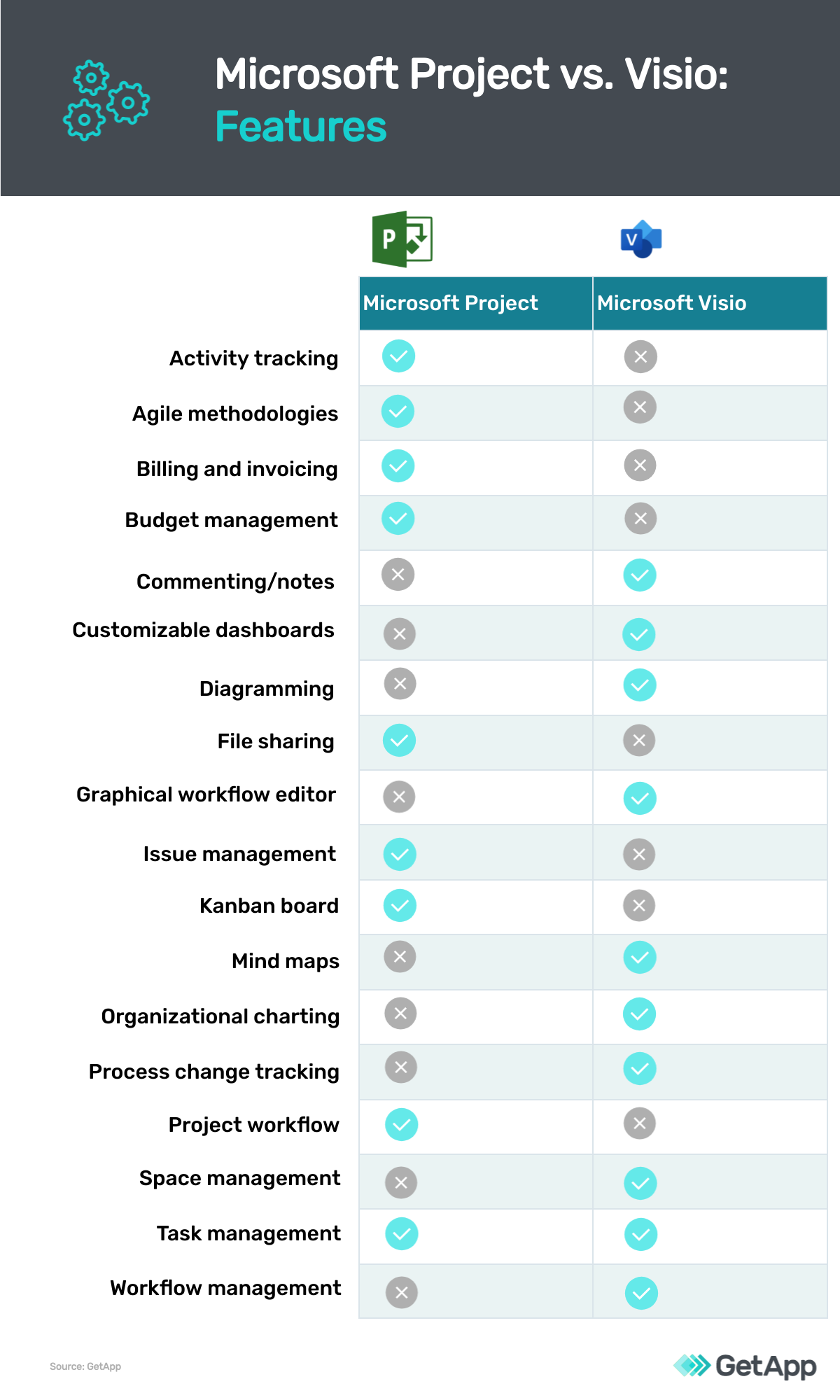
In Microsoft Project, the number of features increases with the hike in the pricing plan. Project Plan 1 offers tasks management features such as a centralized view, access to open projects, a Grid view, Timeline view, and Board view. You can also collaborate and communicate with your team members using Microsoft Teams.
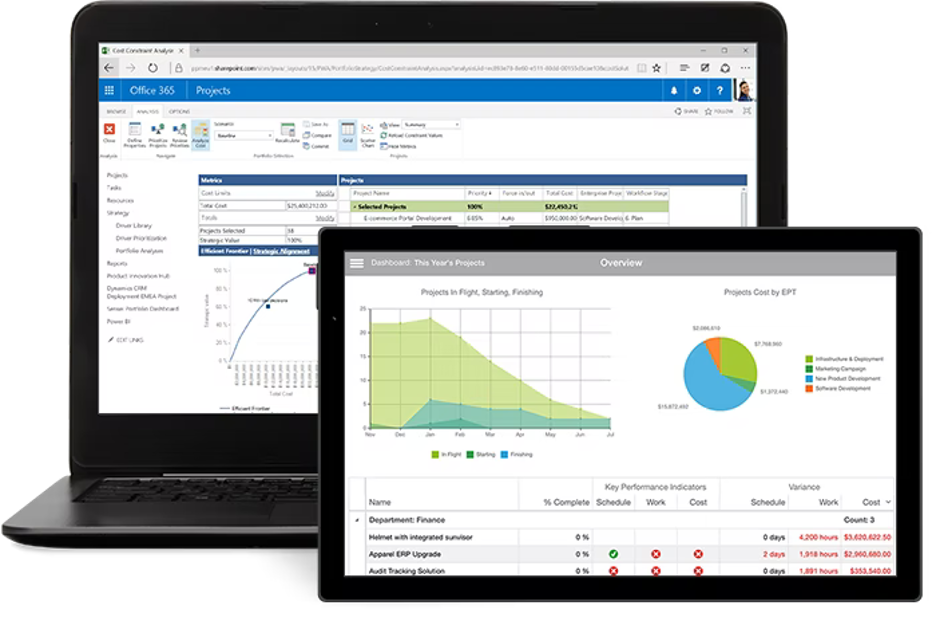
Evaluate and optimize the project portfolio to prioritize initiatives in Microsoft Project (Source)
In Project Plan 3, you can build roadmaps, define project teams, and request resources for the project. Project Plan 5 is more focused on enterprises with features such as portfolio selection to determine the best path to follow, demand selection to capture and evaluate project ideas, enterprise resource planning, and management.
Microsoft Visio is similar to Microsoft Project in that the more expensive version unlocks more features. With Visio Plan 1, users have access to all the basics: They can build and save diagrams to OneDrive, co-author and edit diagrams, leverage layout features, and create flowcharts and timelines.
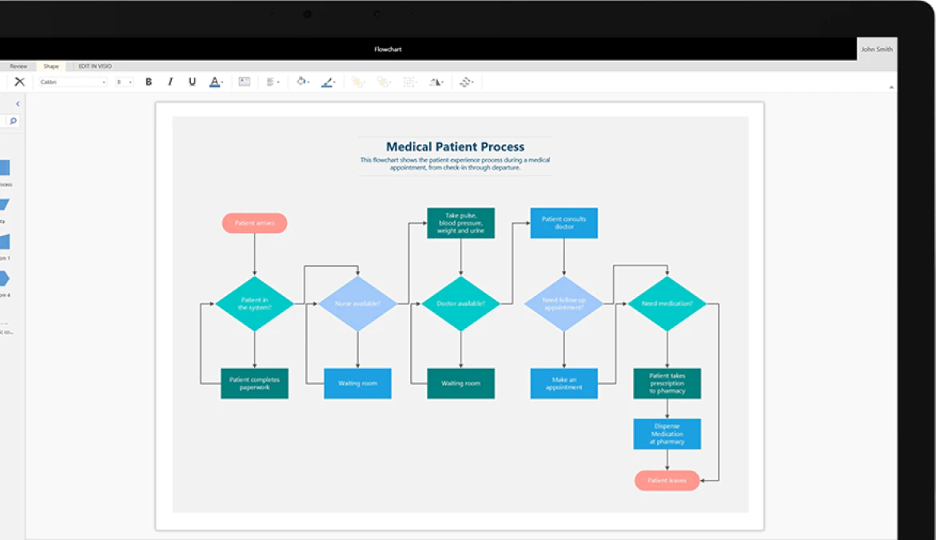
Flowchart creation in Visio (Source)
But with Visio Plan 2, you get support for rulers, layers, and grids on canvas, leverage ShapeSheet to describe visual relationships between elements, use the drawing explorer to alter objects, visualize the organizational structure, use mind maps, and create high-fidelity mockups.
| Takeaway: |
|---|
| Microsoft Project is more focused on helping businesses plan projects and collaborate while Visio offers features that help visualize business’s processes. |
User reviews
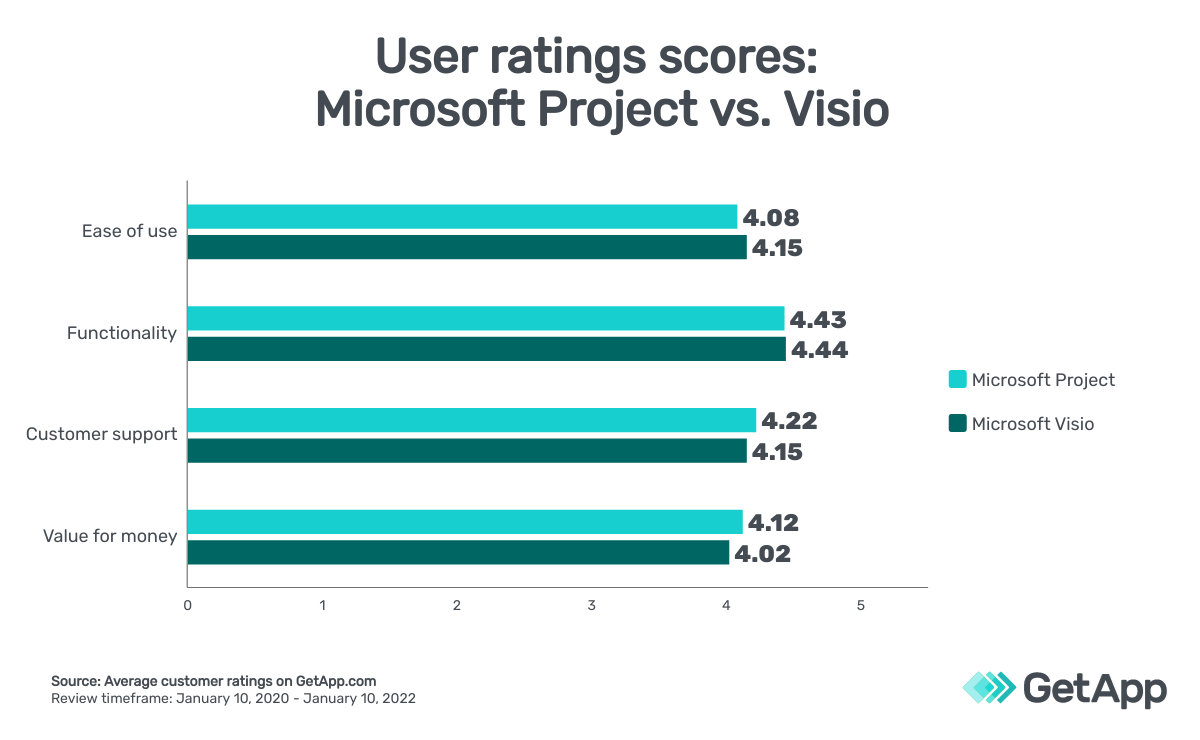
When it comes to user ratings regarding Microsoft Project and Visio, the two products rank similarly. Based on the average score from user reviews on GetApp.com as of January 10, 2022:
Microsoft Project has an overall rating of 4.4 with 89% positive reviews.
Microsoft Visio has an overall rating of 4.5 with 94% positive reviews.
After considering user reviews for both products in different categories, Visio scores higher in some categories, and in others, Microsoft Project takes over. Users of these products have specified that the average customer support of Microsoft Project is slightly better than Visio. As for recommendations, customers are more likely to recommend Visio than Projects (you can find our methodology at the bottom of this page).
| Takeaway: |
|---|
| Users rated Microsoft Visio higher than Microsoft Project for ease of use, and functionality while Microsoft Project was rated higher than Visio for customer support, and value for money. |
Integrations
As far as integrations go, Microsoft Project supports more applications than Visio does. Project integrates with more than 60 apps, including estimating software, quality management software (QMS), and business intelligence tools.
While Visio works well with some of Microsoft tools, diagram modeling software, and collaboration tools, it’s significantly less integration-friendly than Microsoft Project. There are fewer than 10 systems listed on GetApp with which Visio integrates.
| Takeaway: |
|---|
| Microsoft Project integrates with many more tools than Visio, including all the major Microsoft family tools. |
Microsoft Project vs. Visio: Which project management tool is right for your business?
Project management software is crucial for your business and above all, it should meet your business needs. Microsoft Project and Visio are created with different goals in mind and it’s up to you as to which goal better suits your business.
If you’re looking for a tool that will allow you to plan your projects, manage tasks, and keep track of your deadlines, then Microsoft Project should be the preferred choice.
On the other hand, if you’re searching for a tool that helps you create design models and business workflows, then you are better off with Visio.
Final takeaway: Microsoft Project is a holistic work management tool, while Visio is a more focused diagram creation tool mostly used for designing business workflows.
Ready to learn more about your options?
Methodology
The ratings mentioned in this article were obtained from GetApp.com on January 10, 2022. The applications selected in this article are examples to show a feature in context and are not intended as endorsements or recommendations. They have been obtained from sources believed to be reliable at the time of publication.
Kritika Tyagi
mentioned in this article



More on Project Management


May 30, 2024

Jun 11, 2024

May 28, 2024