GetApp offers objective, independent research and verified user reviews. We may earn a referral fee when you visit a vendor through our links.
Our commitment
Independent research methodology
Our researchers use a mix of verified reviews, independent research, and objective methodologies to bring you selection and ranking information you can trust. While we may earn a referral fee when you visit a provider through our links or speak to an advisor, this has no influence on our research or methodology.
Verified user reviews
GetApp maintains a proprietary database of millions of in-depth, verified user reviews across thousands of products in hundreds of software categories. Our data scientists apply advanced modeling techniques to identify key insights about products based on those reviews. We may also share aggregated ratings and select excerpts from those reviews throughout our site.
Our human moderators verify that reviewers are real people and that reviews are authentic. They use leading tech to analyze text quality and to detect plagiarism and generative AI.
How GetApp ensures transparency
GetApp lists all providers across its website—not just those that pay us—so that users can make informed purchase decisions. GetApp is free for users. Software providers pay us for sponsored profiles to receive web traffic and sales opportunities. Sponsored profiles include a link-out icon that takes users to the provider’s website.
7 Mobile Construction Management Apps Users Love
Check out seven construction management mobile apps that users rate the highest for managing construction operations on the go.


Behind every successful construction project, there is a construction manager expertly navigating complex schedules, dispersed teams, and unpredictable site conditions. However, managing these challenges away from the desktop can be daunting, potentially leading to costly delays.
A mobile construction management app can be the solution, offering real-time access to project information, facilitating on-the-go decision-making, and ultimately driving project success. But how do you choose the right mobile app to ensure it meets your specific construction needs and requirements?
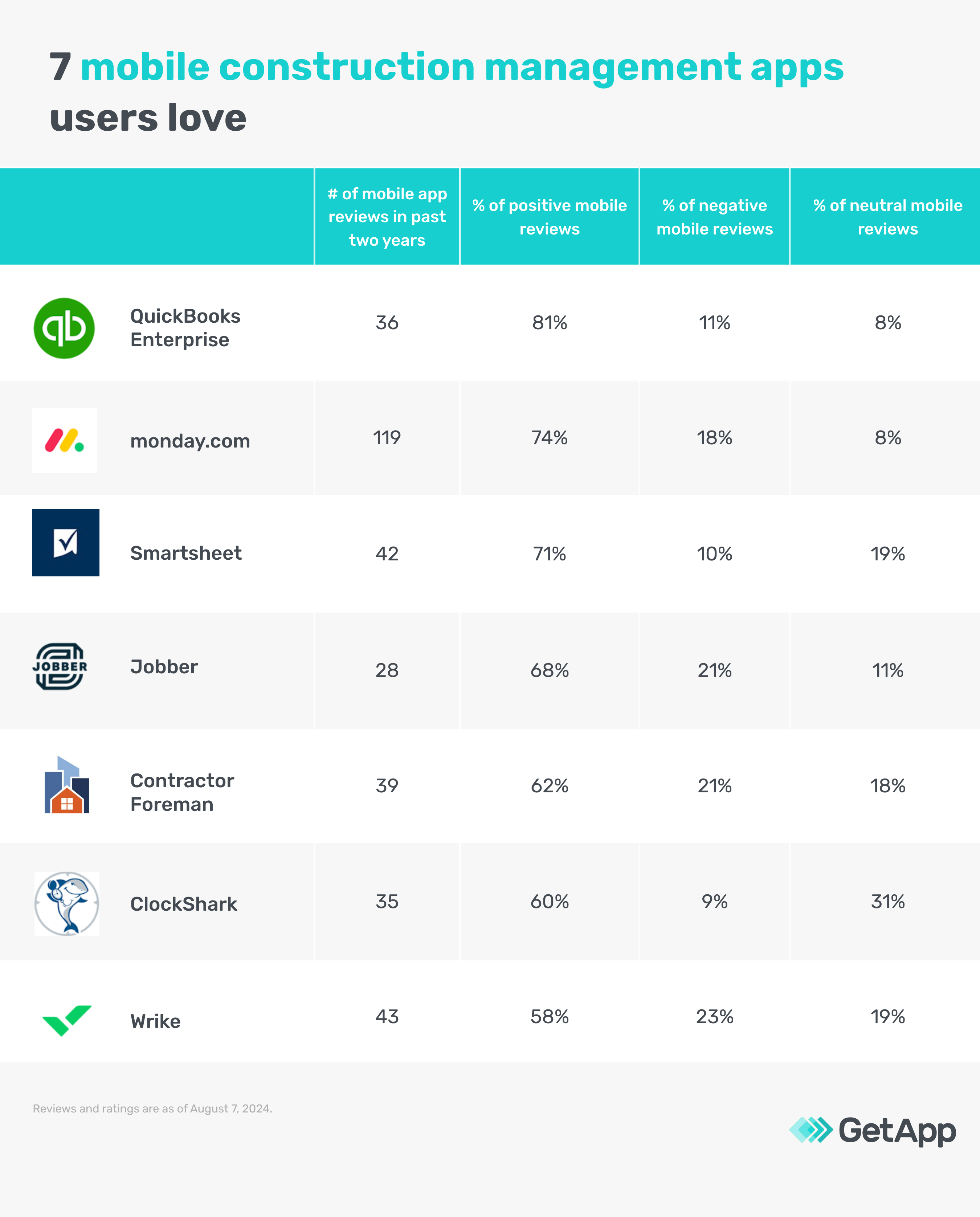
To help you pick the right mobile construction management apps, we looked at 2M+ unique user reviews to see what users had to say and highlighted the top seven mobile construction management apps based on this sentiment analysis and arranged them in order of percentage of positive reviews. Read how we selected these at the bottom of the page.
The listed tools fall under two categories—dedicated construction management apps and other solutions (business management, project management, work management, and field service) with construction management capabilities. Common features across all products include project management, real-time updates, and collaboration.
1. QuickBooks Enterprise
QuickBooks Enterprise is an online business management solution that allows construction managers to snap, track, and sort expenses even when away from their desktops. You can use the app to capture business expenses and create professional looking quotes for clients. Additionally, you can switch a quote to be an invoice, track outstanding invoices, and set automated reminders for clients with unpaid invoices. QuickBooks’ mobile app comes with a dashboard that offers a summary of your business health, including profit and loss, assets, and liabilities on your mobile phones.
Customer support: Chat, online FAQs, and phone
Mobile app price: Available with the paid plan, starting at $1,922 per year
Billing cycle: Annual
Who should consider the QuickBooks Enterprise mobile app?
QuickBooks Enterprise is a viable solution for construction managers who need to manage expenses and invoicing on the go. Users can use the app’s capabilities to capture receipts for equipment rentals, materials, labors, and other costs directly from the job site. Additionally, they can monitor project budgets and profitability in real time using the mobile dashboard, and understand the business’s performance in real time. With mobile invoicing capabilities, the QuickBooks app also allows users to customize invoices, estimates, and sales receipts with a look that matches their brand.
Review excerpt from a user of QuickBooks Enterprise’s mobile app:
“It has been the best site and app I have ever used and i will continue using quickbooks for the fututre of my business How easy and straight forward it is to get everything done in such a timely and inexpensive way there are no features I think are missing in my opinion its up to date for all needs!”
Read more about QuickBooks Enterprise.
2. monday.com
monday.com is a project management tool with ready-made construction schedule templates in its mobile app to help you manage multiple construction projects simultaneously. You can use these templates to create a construction project schedule, general contractor construction schedule, and construction timeline. The app allows you to view project information in columns, boards, and timelines. You can map timelines with relevant milestones, task owners, and dependencies. Additionally, you can share these with clients and coworkers in real time with custom permissions.
Customer support: Chat, email, and phone
Mobile app price: Available with free and paid plans; paid plans starting at $9 per user, per month
Billing cycle: Annual
Who should consider the monday.com mobile app?
Construction managers and field supervisors looking to organize and track their project timelines should consider monday.com’s app. With construction schedule templates in place, the app offers users visual representations of project schedules, tasks, and dependencies. This helps them monitor task completion rates, identify potential bottlenecks, and adjust plans proactively to ensure successful project completion.
Review excerpt from a user of monday.com’s mobile app:
"Overall I'm fully satisfied with this software and I will recommend to my colleagues I used only for Task Management and its really easy Till now, several time I used this app and didn't find any missing thing."
Pro tip
Choose a mobile app that can scale with your organization’s growth while remaining cost-efficient. The app should effectively manage increasing amounts of data, users, and project complexities without sacrificing performance or user experience.
3. Smartsheet
Smartsheet is an online work management platform that empowers construction teams to improve visibility into important information, boost collaboration across teams, and enhance overall efficiency. The software offers a mobile app with an offline forms feature that allows you to mark forms as available for offline use. You can use this feature to fill out and submit forms even when there is no internet. The submitted forms are automatically synced to the Smartsheet platform once the connection has been restored.
Customer support: Help center, online inquiry form, and phone
Mobile app price: Available with the paid plan, starting at $9 per user, per month
Billing cycle: Annual
Who should consider the Smartsheet mobile app?
Construction professionals operating in environments with inconsistent internet connectivity should opt for Smartsheet’s mobile app. The software offers offline access, allowing users to capture real-time data, such as inspection reports and maintenance logs, even without stable internet connectivity. Field inspectors can use the app’s offline forms feature to complete inspection forms, progress updates, change order requests, safety inspections, and consumption records on-site.
Review excerpt from a user of Smartsheet’s mobile app:
“I like that it syncs with my Smartphone and ipad, However some of its most notable features include; Collaborative workspace, automated workflows, customizable templates and mobile accessibility, overall these features make smartsheet a versatile and powerful tool for project management, task tracking and team collaboration.”
4. Jobber
Jobber is a field service management tool that lets you schedule and dispatch your construction crews from the field or the office. You can use the software’s mobile app to schedule construction visits as soon as a new request comes in. It allows you to compare team members' schedules side by side via a calendar, view their daily visits on a map, and quickly assign jobs based on location and availability. You can also capture the time spent by team members on the construction site to ensure accurate job costing.
Customer support: Chat, email, and phone
Mobile app price: Available with the paid plan, starting at $49 per month
Billing cycle: Annual
Who should consider the Jobber mobile app?
Jobber’s mobile app is particularly beneficial for construction professionals who need a mobile solution to manage their workforce on the go. With scheduling capabilities, the app helps field service managers manage crew schedules, coordinate daily activities, optimize job assignments, and ensure timely job completion. It also offers a job forms feature that helps field service workers record important details while they inspect or assess a job site.
Review excerpt from a user of Jobber’s mobile app:
“Professional and everything you could need to run my business in one convenient fair priced app. Best all around app for business.“
Pro tip
Shortlist an app with an intuitive user interface that is easy to navigate, even for non-technical users. Look for an app that offers a clean layout, well-labeled icons, consistent use of elements, and simple menus, making it easy to access various functions and information quickly.
5. Contractor Foreman
Contractor Foreman is a construction management tool with a time card feature in its mobile app that allows you to record work hours, job site locations, and other relevant data directly from smartphones. The software offers four different types of time cards that help you track time for general labor, specific tasks, and multiple workers in a crew. You can also use this feature to track location history, automatic breaks, and any injuries on the job site.
Customer support: Email, knowledge base, and phone
Mobile app price: Available with the paid plan, starting at $49 per month
Billing cycle: Annual
Who should consider the Contractor Foreman mobile app?
Construction businesses looking for an app to track time can consider Contractor Foreman’s mobile app. Besides a time card feature for work hours and location tracking, the app offers clock-in/clock-out reminders, ensuring workers remember to clock in and out and eliminating time card errors. Additionally, it offers a running time notifications feature that automatically sends an email and text to your employees after a specified period of time to remind them that a time card is still active or running. This feature is designed to prevent accidental overtime and ensure accurate time tracking.
Review excerpt from a user of Contractor Foreman’s mobile app:
“Mobile use is nearly as robust as desktop, everything that you could really productively do on a mobile device is available at your fingertips.”
Read more about Contractor Foreman.
6. ClockShark
ClockShark is a field service and construction time tracking app that allows multiple crew members to clock in and out from a single mobile device. The mobile app offers a kiosk clock feature that lets multiple workers track their work hours, switch tasks, and even take breaks from a single smartphone or tablet. Despite a shared device, individual employees can use their own four-digit personal identification number (PIN) or facial recognition to clock in and out of their work hours.
Customer support: Chat, online request form, and phone
Mobile app price: Available with the paid plan, starting at $40 per month
Billing cycle: Monthly
Who should consider the ClockShark mobile app?
Construction businesses managing multiple workers on a single job site where workers may or may not have access to personal devices can look to ClockShark. With the ability to let multiple crew members clock-in and clock-out from a single device, the app simplifies time tracking for businesses. It is beneficial even when individual employees do not have smartphones or are working in remote locations with limited cellular coverage. Additionally, it enables facial recognition, eliminating the chances of buddy punching, where one employee clocks in or out for another employee.
Review excerpt from a user of ClockShark’s mobile app:
“The ClockShark mobile app is another added bonus. The integration with other software and the mobile app have further streamlined my workflow, making ClockShark an essential tool in my management toolkit.“
Pro tip
Shortlist an app with various collaboration features, such as real-time messaging, commenting and notes, file sharing, shared calendars, collaboration boards, and push notifications to ensure everyone involved in the project stays informed at all times.
7. Wrike
Wrike is an online project management platform with budgeting features that allows you to view, open, or close any project task or attached files—even while on the go. Wrike’s mobile app lets you check for deadlines and view project progress via dashboards and get a complete picture using Gantt charts and calendars. You can create and manage multiple dashboards tailored to specific teams, projects, and roles within the organization. Each dashboard highlights different sets of key performance indicators (KPIs) and metrics, catering to the unique needs of different individuals and projects.
Customer support: Knowledge base, online request form, and phone
Mobile app price: Available with the free and paid plans, paid plans starting at $9.80 per user, per month
Billing cycle: Annual
Who should consider the Wrike mobile app?
Field-based construction managers looking for an app to monitor project progress, task status, and resource allocation on-site can go for Wrike. The app offers features such as dashboards, calendars, and Gantt charts to provide an overview of tasks and deadlines. Additionally, it offers collaboration features, such as group discussions, real-time comments, task assignments, and team chat to foster effective teamwork on the go.
Review excerpt from a user of Wrike’s mobile app:
“I don't think I have any negative experiences with Wrike, as the feature set has met our needs, the mobile version is very good and speeds up productivity when not in the office, the product is affordable and offers many features different from similar software."
Features of interest
Here are some common features that you can expect in mobile solutions for construction management needs:*
| Feature | Description |
|---|---|
| Project management | Offers tools for planning, executing, and monitoring construction projects. This feature typically includes task assignment and tracking, scheduling with Gantt charts, resource allocation, and real-time progress monitoring. |
| Contractor management | Assign tasks, monitor progress, and review documentation and billing associated with each contractor. The feature typically includes tools for tracking contractor performance, managing contracts, and ensuring compliance with contract specifications and timelines. |
| Scheduling | Organize and manage project timelines with tools, such as Gantt charts and calendar views. You can create and assign tasks, set deadlines, and establish dependencies between project activities. Additionally, you can create project schedules to manage projects and enhance planning. |
| Equipment tracking | Monitor and manage construction machinery and tools. The feature usually includes real-time tracking of equipment location and usage, maintenance scheduling, and status updates. You can log and track equipment check-ins and check-outs and receive notifications for maintenance needs or repairs. |
| Reporting and statistics | Receive comprehensive insights into project performance through detailed reports. This feature includes customizable report generation for progress tracking, budget adherence, and resource utilization. You can access real-time statistics on various aspects, such as labor hours, material costs, and task completion rates. |
What are the benefits of mobile construction management apps over a desktop version?
Mobile apps have become increasingly popular because they offer several advantages over the desktop version. Here is why you should consider a mobile app for managing construction operations.
| Benefit | Description |
|---|---|
| Real-time access | As compared to the desktop version, mobile construction management apps allow construction managers to update and retrieve project information instantly, from anywhere, including job sites. This ensures that all team members, whether in the field or in office, have access to the latest project data, including task statuses, project schedules, important contracts, blueprints, and work hours. |
| Field data collection | Unlike the desktop version, mobile apps enable real-time data collection. Construction professionals can capture and update information, such as progress reports, photos, and notes immediately as the work progresses. This enhances accuracy and reduces delays caused by manual data entry. |
| Improved collaboration | Mobile construction apps facilitate real-time communication between managers, their teams, contractors, and construction workers. With features, such as shared calendars, instant messaging, and voice/video calls, the app enhances teamwork while reducing the likelihood of miscommunication. |
Frequently asked questions when selecting mobile construction management apps
Here are some common questions you can ask your vendors while looking for the best mobile construction management apps:
Does the app offer time tracking capabilities?
While evaluating the best construction management mobile apps, make sure that the app offers time tracking features to help users monitor and record the time spent by workers on various tasks and projects. A construction management mobile app usually offers features such as clock-in/clock-out functionality, location tracking, time logging, and timesheet management to ensure accurate labor records.
Does the app offer offline access?
Several mobile construction management apps allow users to continue working even without an internet connection. Construction managers can view and edit important project documents, schedules, and task lists to maintain productivity. Even construction workers can use these apps to update task statuses, log time, and make notes offline. These updates are synced to the central system when the connection is reestablished.
What are the document management features offered by the tool?
Document management features in mobile construction management apps simplify the storage, management, and sharing of project-related documents. The best construction management mobile app offers features, such as secure file storage, document sharing, version control, annotations, markups, search/filters, and real-time updates to enhance the organization, accessibility, and collaboration of project documentation.
Methodology
To be considered for this list, products had to:
Have at least 20 unique product reviews published within the past two years that mention mobile-specific capabilities (based on text analysis) with an average rating of 4.0 or higher as of August 7, 2024.
Meet our definition for construction management software: “Construction management software manages and coordinates construction projects for contractors & builders. This software offers tools such as document management, project tracking, and scheduling. It can additionally also help with the monitoring of product status, start and finish dates, budgets, and expenditures. Construction management software is related to construction accounting software, architectural drafting software, construction CRM software, and construction estimating software.”
Have the highest percentage of positive sentiment (versus neutral or negative sentiment). We calculated the sentiment score by identifying the positive and negative user sentiment specifically around mobile app usage.
*Mobile features of interest were identified from vendor websites. Our research team selected the features considering what we know users expect or find important in a mobile experience.
Review excerpts are passages extracted from longer reviews written by verified reviewers. We obtain these excerpts by applying an algorithm that considers factors including, but not limited to, length, topic coverage, and thematic relevance. Excerpts are evaluated for positive or negative sentiment and receive a sentiment score.
Excerpts represent user opinion and do not represent the views of, nor constitute, an endorsement by GetApp or its affiliates. Excerpts are not edited for clarity or grammar.
Editorial independence: We select and rank products based on an objective methodology developed by our research team. While some vendors may pay us when they receive web traffic or leads, this has no influence on our methodology.