GetApp offers objective, independent research and verified user reviews. We may earn a referral fee when you visit a vendor through our links.
Our commitment
Independent research methodology
Our researchers use a mix of verified reviews, independent research, and objective methodologies to bring you selection and ranking information you can trust. While we may earn a referral fee when you visit a provider through our links or speak to an advisor, this has no influence on our research or methodology.
Verified user reviews
GetApp maintains a proprietary database of millions of in-depth, verified user reviews across thousands of products in hundreds of software categories. Our data scientists apply advanced modeling techniques to identify key insights about products based on those reviews. We may also share aggregated ratings and select excerpts from those reviews throughout our site.
Our human moderators verify that reviewers are real people and that reviews are authentic. They use leading tech to analyze text quality and to detect plagiarism and generative AI.
How GetApp ensures transparency
GetApp lists all providers across its website—not just those that pay us—so that users can make informed purchase decisions. GetApp is free for users. Software providers pay us for sponsored profiles to receive web traffic and sales opportunities. Sponsored profiles include a link-out icon that takes users to the provider’s website.
5 Top-Rated Affordable Pest Control Software
Find an affordable pest control solution for your services business.


Bring an end to incessantly ringing customer calls, scattered technicians across the city, and paper-based appointments with pest control software. It enables operational excellence, tracking everything from customers to field technicians within a single centralized system.
This article lists five top-rated affordable pest control software solutions based on verified user reviews and pricing found on vendor websites. Per our research, we’ve considered products with base plans priced less than $49 per month as affordable software and arranged them in ascending order of their prices.
The software tools listed in this article fall under field service management software or home service software with pest control services or a pest control system focusing on customer relationship management and service quotes along with work order management, job scheduling, and mobile access.
What is a base software plan?
A base plan is the most affordable pricing tier offered by a software provider. Besides having the lowest price, base plans provide access to all core software features. However, they may have limitations compared to higher-tier plans in terms of the available functionality, storage capacity, number of user seats, support options, etc.
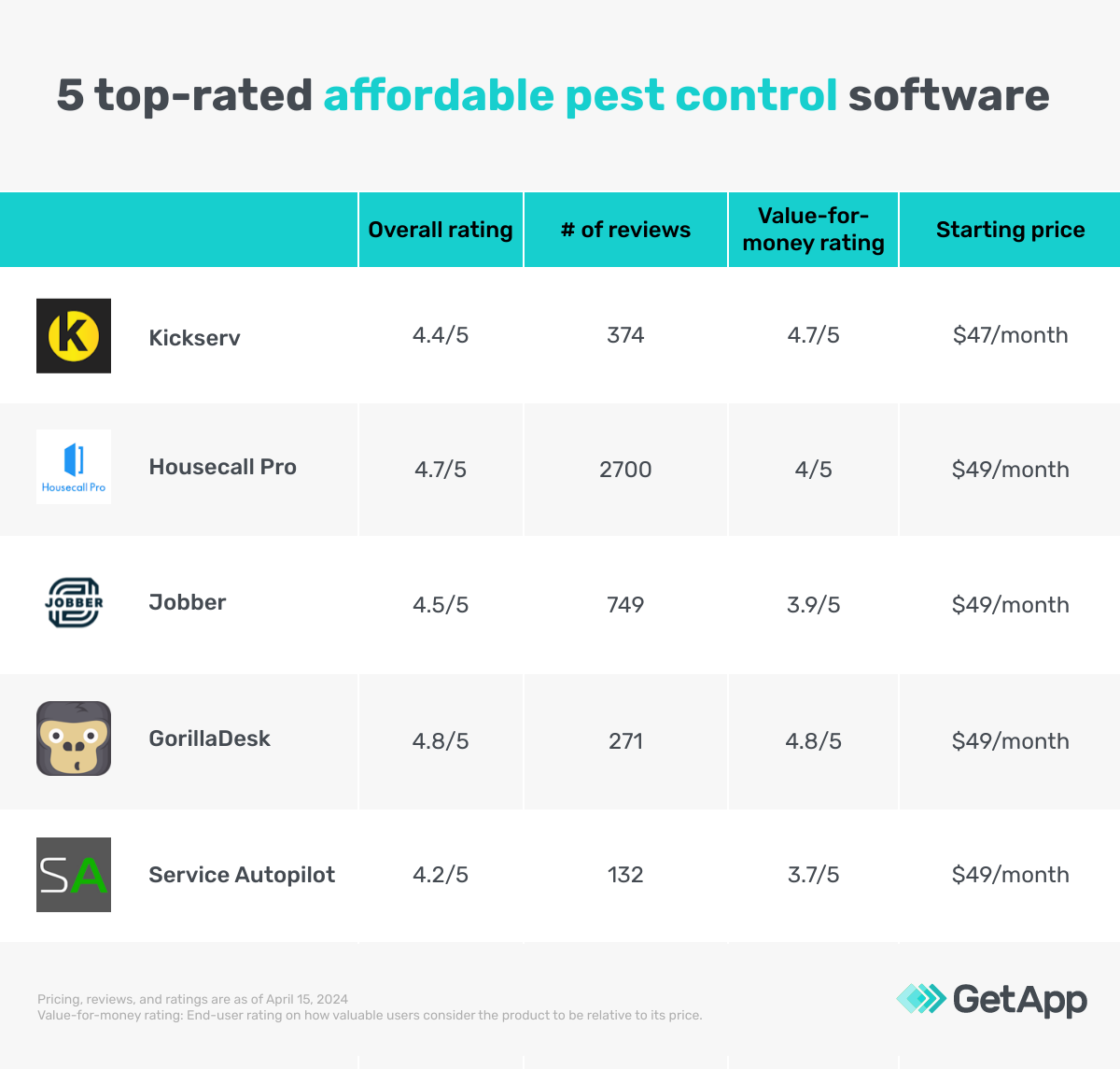
*We selected products for this article based on their average ratings between April 2022 - April 2024, which may differ from their current overall average ratings.
1. Kickserv
As a field service software, Kickserv allows capturing and storing customer information, service history, and preferences. It offers a customer center for customers to view previous jobs, conversations with the technician or the backend team, and invoices. Users can build and send estimates within the tool and share them with customers or stakeholders for signature approvals. The reporting capabilities of the tool allow generating reports on sales, revenue, technician performance, and customer satisfaction rates via reviews and ratings.
The base price plan for Kickserv allows access for up to five users with features, including estimates, invoices, workflows, smart search filters, and a mobile application. Switching to a higher price plan gives access to up to 20 users with additional features, such as embedded forms, automated reminders, time tracking, expense tracking, and GPS (Geo Positioning System).
Base plan features:*
Job tracking: Track time expenses, job changes, and technician’s location via the tool’s mobile application and get a centralized view of all the details over the computer system.
Customizable workflows: Design workflows specific to the pest control service types, For example, create separate workflows for initial inspection, follow-up treatments, or specific pest problems such as bugs or termites.
Integration: Connect Kickserv with other business tools, such as accounting, email marketing, queue management, and time tracking.
Starting price: $47 per month
Cost to upgrade: $95 per month
Billing cycle: Annual
Customer support options: Knowledge base, chat, blog, and FAQs
Who should consider Kickserv?
Pest control service businesses looking for a business management tool with a simple interface for teams with little to no technical knowledge can benefit from Kickserv. The tool offers straightforward scheduling, tracking, payments, and workflow requirements. Plus, its integration capabilities with other business tools make it a flexible solution for small businesses or team sizes to share and manage customer data.
2. Housecall Pro
A home service management solution, Housecall Pro offers call assistance agents to take calls when the team is away. The virtual agent can book jobs and share estimates directly onto the synced calendar. Users can select from weekday, weekend, or 24/7 non-emergency coverage to ensure customers are being attended to. The tool also sends a post-call message for every call it takes on the team members' behalf and will alert teams via SMS if something requires immediate attention.
The base price plan for Housecall Pro offers single-user access to features, including drag-and-drop scheduling, payment tracking, GPS tracking, and other relevant features. Upgrading to a higher price plan offers access up to and over 100 users with additional features such as advanced reporting, recurring service plans, and software integration.
Base plan features:*
Drag-and-drop scheduling: Integrate with Google Calendar to schedule jobs. The feature offers a drag-and-drop editor to move tasks on the calendar based on the change in date, time, and technician alignment.
In-app employee chat: Communicate with team members within the system using the chat window. The feature allows users to create individual or group chats based on the job requirements.
Review generation: Collect customer feedback on Google Business listing, website, and social media. The feature alerts when a new review is posted to approve or reply to the customer query.
Starting price: $49 per month
Cost to upgrade: $129 per month
Billing cycle: Annual
Customer support options: FAQs, chat, call, email, and online service tickets
Who should consider Housecall Pro?
This tool is beneficial for pest control service businesses looking to take customer calls 24/7 or when the team members are not available in the office. The virtual assistants ensure that the majority of the customer calls are attended to and queries are answered as soon as they are received. This helps build brand confidence among customers, eventually leading to customer loyalty and long-term relationships.
Pro tip
Look for a pest control software tool that automates all manual tasks associated with payments and collections such as invoicing and reminders. This ensures that customers make on-time payments, never miss a deadline for flexible payments, and have all past payment records.
3. Jobber
Jobber is a quoting software that lets you build personalized job quotes based on customers’ service requests and automate quote follow-ups to plan the service schedule. The quotes display details of the job along with images of the product or service or the on-site assessment. The admin or the technician is notified via in-app notifications when a customer views and approves a quote. Once the job is done, Jobber allows customers to pay the job cost upfront or or over time. However, the technician is paid as soon as the job is completed, regardless of the selected payment method.
Jobber’s base plan includes single-user access to quoting, scheduling, invoicing, and digital payment features. Upgrading to a higher-price plan offers access to up to five users and additional tool features, such as GPS tracking, routing, time and expense tracking, job forms, online bookings, and cost markups.
Base plan features:*
Quote design: Add brand logo, font, and color to the job quotes for a more personalized experience. The feature offers pre-built quote templates to select and customize for specific job requirements.
Optional line items: Allow customers to add multiple products and services to their request. The feature automatically updates the estimated job cost based on the selected products or services.
Referrals: Prompt customers to share booking links with others who need similar services, such as friends and family. The feature rewards customers for every successful booking made by a referral.
Starting price: $49 per month
Cost to upgrade: $129 per month
Billing cycle: Monthly
Customer support options: Chat, FAQs, help center, podcast, online training, call and email
Who should consider Jobber?
Pest control service providers looking to enhance the online service booking experience for customers can benefit from Jobber. The tool automates the quoting process from customized estimates with images to online payments on job completion. Personalized quotes, job details, and referral rewards enhance customer satisfaction and overall service experience. Flexible payment options further simplify the financial aspects for them, enabling service requests that are otherwise expensive with an upfront payment option.
4. GorillaDesk
As a pest control system, GorillaDesk manages appointment schedules, dispatching technicians, and tracking their progress in the field. The software keeps track of the inventory levels of pesticides and other chemicals used during pest control jobs. Technicians can attach notes and documents to update the in-office team on job-related updates, such as material requirements or additional services, from the field. The system also provides reports on material usage, service history, and revenue generation.
GorillaDesk’s base subscription plan allows taking up to 24 jobs at once and fleet tracking capabilities with a map view. Upgrading to a higher-price plan offers unlimited jobs and access to all location data for fleet management. The higher plans also offer a client portal, device tracking, late payment reminders, subscription billing, and online reviews management.
Base plan features:*
Material tracking: Access the list of common pest control materials. The feature allows adding, removing, or editing these materials to reflect the specific material the technicians utilize to complete a scheduled job.
Route tracking: Update the customer with an estimated time of arrival based on the technician’s location, job proximity, and traffic patterns. The feature automatically optimizes the routes for technicians within a specific date range based on these factors.
Fleet tracking: Track the technicians’ location on the map in real time to check which technician is closest to a new service call and can take up the job within the requested time.
Starting price: $49 per month
Cost to upgrade: $99 per month
Billing cycle: Monthly
Customer support options: Chat, call, knowledge base, blog, and online guide
Who should consider GorillaDesk?
Pest control service providers looking to reduce the administrative burden of managing field technicians can benefit from GorillaDesk. The tool automates scheduling, dispatching, and route optimization, saving the time and errors of manual data entry. It also helps minimize the travel time and cost associated with the technician traveling to the job location with route planning, optimization, and fleet tracking. Plus, the material tracking feature ensures sufficient stock and helps identify usage patterns for better cost control.
Pro tip
Consider a pest control tool that enables tracking the inventory items used for pest control services, such as chemicals and equipment. This ensures maintaining appropriate stocks at all times for consistent customer service.
5. Service Autopilot
Service Autopilot’s pest control software offers a built-in CRM system to manage customers and track leads. Users can create customer profiles to manage their contract information, wallet balance, jobs, and internal notes. Similar to client profiles, the tool offers a lead-tracking dashboard that captures contact information, assigns a revenue target for each customer, and tracks the lead source, such as online ads, referrals, or website forms.
The base subscription plan for Service Autopilot offers single-user access to dispatching, scheduling, payment integration, customer management, and lead tracking features. Upgrading to a higher subscription plan increases the user limit by five with additional capabilities such as automated workflows, route optimization, multi-location management, and smart maps.
Base plan features:*
Payment integration: Integrate a third-party payment platform to accept credit card payments directly within the system.
Instant invoices: Generate payment invoices automatically through a securely integrated payment portal after the completion of the online payment.
Expense tracking: Add expenses by specifying details, such as date, vendor, amount, category, and payment method. The feature offers pre-defined expense categories, such as chemicals, equipment, and supplies.
Starting price: $49 per month
Cost to upgrade: $199 per month
Billing cycle: Annual
Customer support options: Chat, call, FAQs, and blog
Who should consider Service Autopilot?
Pest control service providers looking to handle both operations and customer relationship management from a single system can benefit from Service Autopilot. The tool assists with the entire lifecycle of a pest control service request from scheduling and dispatch to follow-ups and feedback. The online payment integration system further enhances the process for customers to make the payment before or after the job at their convenience.
How much does pest control software cost?
A pest control tool can cost as low as $47 per month or up to $499+ per month, depending on various factors—features, number of users, locations, customer profiles, reporting dashboard, training availability, deployment options, and storage. Most pest control solutions typically include the following pricing plans:
Free trial: No-cost plans ranging from a week to a month, giving users access to all or limited software features. These are ideal for businesses that wish to try out a tool before purchasing it.
Free version: A free plan offers access to basic features, such as job scheduling and invoicing. These are ideal for small practices or solo physical therapists with a limited budget.
Entry-level: Starts at $47 per month and offers basic pest control features along with customer relationship management, a reporting dashboard, eSigning, and a client portal. These are ideal for small businesses and teams with basic pest control service needs.
Mid-tier: Range from $95 to $199 per month and offers features, such as workflow automation, multi-location access, and web forms These are ideal for small service providers who have outgrown basic pest control solutions and don’t require the full range of functionality offered by enterprise-level tools.
High-end: Advanced software plans go up to or over $499 per month and offer unlimited entry-level and mid-tier features with priority support. These advanced features are ideal for larger-scale pest control service providers and field service businesses.
Hidden costs associated with affordable pest control software
Besides the software license, additional costs include:
Data migration: Moving the existing customer data into the new software might require an additional service fee, depending on the volume and complexity of data.
Payment processing: Pest control tools that integrate with a third-party payment processor may incur extra costs.
Training and support: In-depth training for employees or field technicians or ongoing technical support might come at an extra cost.
Frequently asked questions when selecting affordable pest control software
Here are some questions to ask software providers before making a final purchase of the best pest control software:
Does the base plan offer mobile access for on-field technicians?
Some pest control software tools offer a mobile application for field technicians to update the job status, add notes, and request materials. The application can either be included in the base plan, as an add-on, or with the higher-priced premium plans.
Does the tool’s base plan allow the technician’s location tracking?
Some pest control software solutions offer access to the technician’s location via map only while some allow complete location data with real-time distance and time updates. Also, the tool limits the number of technicians tracked and the duration of the tracking history.
Does the base plan enable online payments?
Payment systems in most of the pest control software tools are built-in while some offer integration with third-party systems. This is a secure platform with multiple payment methods, such as credit cards, debit cards, bank transfers, and flexible payment. However, there may be additional costs associated with the online processing fee.
Methodology
To be considered for this list, products had to:
Have at least 20 unique product reviews published on GetApp within the past two years, with an average rating of 3.0 or higher (as of April 15, 2024).
Include the core features of pest control software: scheduling, mobile access, and work order management
Must meet our market definition for pest control software: “Pest control software provides a variety of features to help automate a pest control business, including customer management, job scheduling, routing, inventory management, and accounting.”
For products that met the first three criteria, we assessed the monthly subscription price of the base plans and found the average price to be $49—we considered only products with publicly available pricing information. We then shortlisted products with a monthly base price lower than $49 for this article.
*Our research team identified these features from vendor websites (as of April 15, 2024) based on their analysis of what users find valuable in or expect from pest control software. This list is not exhaustive. For additional features, refer to the vendor's website.
Products evaluated for the pricing calculation were taken from GetApp’s pest control software directory. The pricing ranges exclude freemium versions of the products. The features highlighted were identified based on their relevance and the percentage of products in the GetApp’s directory that offer them.
Editorial independence
We select and rank products based on an objective methodology developed by our research team. While some vendors may pay us when they receive web traffic or leads, this has no influence on our methodology.
mentioned in this article





More on Software Buying Tips

Mar 25, 2025


Feb 25, 2025

Sep 27, 2024

Oct 10, 2024