GetApp offers objective, independent research and verified user reviews. We may earn a referral fee when you visit a vendor through our links.
Our commitment
Independent research methodology
Our researchers use a mix of verified reviews, independent research, and objective methodologies to bring you selection and ranking information you can trust. While we may earn a referral fee when you visit a provider through our links or speak to an advisor, this has no influence on our research or methodology.
Verified user reviews
GetApp maintains a proprietary database of millions of in-depth, verified user reviews across thousands of products in hundreds of software categories. Our data scientists apply advanced modeling techniques to identify key insights about products based on those reviews. We may also share aggregated ratings and select excerpts from those reviews throughout our site.
Our human moderators verify that reviewers are real people and that reviews are authentic. They use leading tech to analyze text quality and to detect plagiarism and generative AI.
How GetApp ensures transparency
GetApp lists all providers across its website—not just those that pay us—so that users can make informed purchase decisions. GetApp is free for users. Software providers pay us for sponsored profiles to receive web traffic and sales opportunities. Sponsored profiles include a link-out icon that takes users to the provider’s website.
What to Look for in Occupational Therapy Software: 11 Features for Small Practices
Know what small and solo OT practices should test in a software and confirm in writing before they buy, with reviewer feedback on each feature.

TL;DR: What are the top features of occupational therapy software?
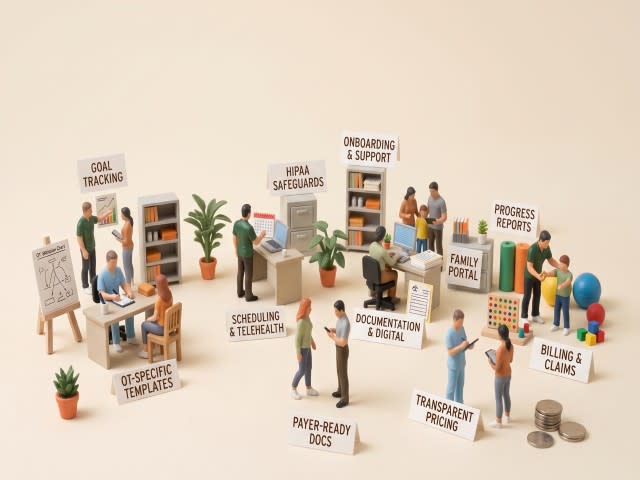
The top features of occupational therapy (OT) software fall into three categories: clinical documentation and progress tracking, billing and payer workflows, and practice operations such as scheduling, security, and communication.
For many solo and small practices, a good starting point is customizable OT documentation, measurable goals, progress reporting, and billing workflows that fit the payers (insurers) they work with.
What matters most is whether a feature takes a task off your week, not whether it appears on a feature list.
Your documentation isn't paperwork. It's the evidence that gets you paid and keeps families engaged. Notes, goals, progress reports, and claims form one chain, and OT-built software keeps it connected.
This guide is for solo and small OT practices (1–5 therapists), pediatric or outpatient, that are deciding how they can improve their current setup and what to look for in software.
GetApp's occupational therapy software category lists 73 products; some are OT-specific, and some are general practice management or applied behavior analysis (ABA) platforms. I pooled 6,200+ reviews across these products to find recurring themes and see what reviewers praise and complain about. These are reviewers working in OT and adjacent healthcare and therapy settings.
Top occupational therapy software features at a glance for 2027
| Feature | What it helps you do | What to look for |
|---|---|---|
| 1. OT-specific,customizable templates | Write evaluations, daily notes, and re-evaluations without rebuilding forms each time | Pediatric and adult OT templates you can edit, plus saved versions of your own forms |
| 2. Goal setting and tracking | Set measurable goals once and see progress build from each session | Goals that appear inside the note, with short- and long-term levels and a progress view over time |
| 3. Progress reports for families and payers | Turn tracked data into a report a parent or payer can read in a minute | A draft you can edit, plain-language wording for families, and the same data feeding both versions |
| 4. AI-assisted notes | Draft session notes faster after the session | A BAA that covers the AI feature, therapist review before signing, and clear rules on audio and data retention |
| 5. Payer-ready documentation | Keep the elements payers look for in every record | Required plan-of-care fields, signature and certification dates, and total treatment minutes captured by default |
| 6. Insurance billing and claims | Submit claims and chase denials without re-keying notes | Claim checks before submission, remittance posting, denial status next to the note, and a clear clearinghouse setup |
| 7. Health Insurance Portability and Accountability Act (HIPAA) safeguards | Protect client data and document your safeguards | A signed BAA, role-based access, audit logs, multi-factor login, encryption, and secure messaging |
| 8. Intake, scheduling, and telehealth | Move a family from referral to first session without retyping | Intake forms that fill the chart, reminders, and video that is built in or covered by a BAA |
| 9. Family portal | Share reports and messages securely | Guardian access with permissions, and reports that families can open without a new account for each document |
| 10. Import, onboarding, and support | Go live without losing weeks of charting time | Help importing existing notes, training materials, and a way to reach a person |
| 11. Transparent, per-clinician pricing | Budget as you add therapists | Published pricing, a list of add-on fees, and the notice period for price changes |
Is your current setup a problem? Where it may be breaking
Look for information you enter more than once: goals copied from an evaluation into session notes, progress updates rebuilt from notes, or claim details retyped from documentation. These are the workflows the features below can help connect.
| Workflow in the chain | What often goes wrong with manual setup | What the software should do |
|---|---|---|
| Evaluation and plan of care (your first assessment and treatment plan) | You write the evaluation in a Word file, then retype the goals into a separate plan of care. | Build the plan of care from the evaluation, so the goals you set at evaluation carry over without retyping. |
| Session notes (what you write after each visit) | Each note starts from a blank page or a copied old note, and the client’s goals aren’t in front of you while you write. | Show the client’s active goals at the top of each note, and let you save your own templates so you never start from blank. |
| Progress tracking (how the client is doing on each goal) | You record results in the note, then update a spreadsheet later to see the trend. | Record results once, in the note, and update the goal’s progress view automatically. |
| Progress reports (updates for parents and payers) | You rewrite the story by hand, once in plain language for the parent and again in clinical terms for the payer. | Draft both versions from the tracked goal data, with wording you can edit. |
| Claim submission (billing the insurer) | You write the session note in one place and build the claim in another. You retype the treatment minutes and billing codes by hand, so the claim can end up out of step with the note. | Fill the claim from the note automatically, using the session’s minutes, services, and billing codes, so the bill matches what you documented. |
| Denial follow-up (what happens when a payer rejects or denies a claim) | The rejection shows up in a billing portal or comes from an outside biller, and you hunt for the note that supports the claim. | Show each claim’s status next to the note it came from, so you can see what to fix or send as supporting evidence. |
| Secure sharing (getting reports to families) | Reports go out as email attachments or sit in a shared folder, where it’s hard to control who can open them. | Share reports through a family portal with guardian logins, covered by a BAA with the vendor. |
If two or more rows describe your week, the features below are worth looking into and testing. If none do, your current setup may be enough for now.
Read next: Occupational Therapy Software FAQ on GetApp answers related questions about compliance, billing, telehealth, pricing, and choosing a platform for small OT practices.
Each feature below explains what it is, what a good version of it looks like in software, and where you're likely to feel it. I also describe an exercise to run in a trial as you test that feature.
Key feature #1. OT-specific, customizable templates
An OT template is a pre-built form for the documents you write most: the evaluation, the daily note, the re-evaluation, and the discharge summary. The names two essential components of an OT evaluation: the occupational profile and the analysis of occupational performance. A useful evaluation template has a section for each, plus space for standardized assessment scores.
Software offers three levels: a fixed template library, an editable library, and a builder for creating forms from scratch. Software built for pediatric therapy often includes pediatric documentation, while general practice tools usually ship SOAP (subjective, objective, assessment, plan) notes written for any discipline. Either way, check the evaluation template in a demo. It should have a place for the occupational profile, the analysis of occupational performance, and standardized test scores.
Where you'll feel its need. Most if you see pediatric clients, because an evaluation typically records developmental history, parent concerns, and standardized test results that a generic SOAP note has no field for. Less if you write short follow-up notes in one consistent format.
Test this in a trial. Recreate a representative pediatric evaluation using a simulated or properly de-identified case, from the occupational profile through test scores and recommendations. Then write a follow-up daily note by reusing text from that evaluation. If you can't save the evaluation as your own reusable template, you'll rebuild it for every client.
What GetApp reviewers say about templates
Many reviewers mention notes and documentation, and some mention templates by name. Those who like their templates describe ready-made forms they can edit and quick phrases that speed up daily notes. The complaints are specific: therapists can't edit templates, and there are no ready-made templates for their discipline, such as treatment plans or speech therapy forms.
"The templates are annoying to make"
— DrChrono review on GetApp, April 2023
Keep exploring: If your practice is also considering discipline-agnostic tools, browse therapy software to compare broader practice options.
Key feature #2. Goal setting and tracking
Goal tracking turns the goals in a plan of care into data. A usable goal states a baseline, a target, and a timeframe, for example: writes first name legibly in 4 of 5 trials within 12 weeks, up from 1 of 5 today. In software, goals live in the plan of care, appear inside every session note where you record trial results, and roll up into a progress view. Goals are also part of the payer record: the Centers for Medicare & Medicaid Services (CMS) lists long-term goals in the minimum contents of a Medicare outpatient plan of care.
Where you'll feel its need. Most if you report to parents every few months, or to Medicare every 10 treatment days. Less in short episodes of care with one or two goals.
Test this in a trial. Set one goal with a baseline and a target, then record trial results in three notes. Revise the goal in a re-evaluation. The progress view and the next report should both reflect the revised goal without retyping. If you copy numbers between notes, the tool stores goals but doesn't track them.
What GetApp reviewers say about goal tracking
A few reviewers mention goals or progress by name, but when they do, they are specific. Praise goes to tools that pull saved goals into a new note and chart progress over time. The recurring complaint is carry-forward: updating a goal in a progress note or re-evaluation doesn't update the active goal, or progress recorded in daily notes has to be transferred by hand into the progress report.
"It will be nice to see the graph of client reaching the goal."
— Quenza review on GetApp, July 2022
Key feature #3. Progress reports for families and payers
A progress report summarizes where the client started, what changed, and what happens next. Payers and families read it differently. A payer wants measurable progress toward goals and a reason to continue care. A parent wants to know what the child can do now and what to practice at home. CMS says progress reports justify medical necessity and are due at least once every 10 treatment days for Medicare Part B outpatient therapy. In software, a report builder pulls goals, scores, and note text into an editable draft, and some tools add a family-friendly version.
Where you'll feel its need. Most if progress goes to parents and often to teachers and other providers, as in pediatric practice, or if you bill Medicare. Less if you rarely hand-written updates to anyone.
Test this in a trial. Take a sample client with three sessions of data and generate two documents: a payer progress report and a one-page update for a parent. The payer version should show goal numbers and a reason to continue. The parent version should read in plain language and include a home activity. If the tool produces only one version, you'll rewrite the second by hand every time.
What GetApp reviewers say about progress reports
Some reviewers mention reports, though the reviews don't always say whether they mean clinical or business reports. On the clinical side, reviewers like writing long evaluations and progress reports quickly and seeing progress as graphs. The complaints are about effort: calculating percentages by hand when completing progress notes and re-evaluations, and no way to carry the last daily note into the progress note.
Key features #4. AI-assisted notes
AI-assisted notes draft documentation from a session recording, dictation, or a few prompts. You review, edit, and sign, and the draft isn't the record until you do. GetApp's listings describe AI-assisted documentation for and secure AI-powered session transcription for . These are vendor descriptions, so confirm them in a demo.
If the AI feature creates, receives, maintains, or transmits electronic protected health information (ePHI) for your practice, confirm that the vendor’s BAA and any applicable subcontractor agreements cover that workflow. The treats a cloud vendor that stores or processes that information for you as a business associate.
Where you'll feel its need. Most if evening charting is your biggest problem and your sessions are conversational enough to transcribe. Less in play-based pediatric sessions, where much of what you do is movement and a transcript captures only what's said.
Test this in a trial. Use a simulated session or properly de-identified case in the trial. Time the process from session end to signed note, then compare it with your baseline. Check three things: whether the audio is deleted, whether you control the text before it saves, and whether the BAA names the AI feature.
What GetApp reviewers say about AI notes
A few reviewers mention AI, and the split is practical. Praise goes to drafts that make notes quicker and more accurate. The complaints are review time that eats the savings, AI that fills part of the note but not the interventions section, drafts written in the wrong voice, transcription that cuts off unpredictably, and AI priced as an add-on.
Key features #5. Payer-ready documentation
Payer-ready documentation means each record carries what a reviewer expects to see, without you having to remember it. For Medicare Part B outpatient therapy, CMS's lists three core items:
A plan of care with diagnoses, long-term goals, and the type, amount, frequency, and duration of services
A progress report at least once every 10 treatment days, signed and dated
Total timed-code minutes and total treatment minutes for each date of service
In software, this shows up as required fields in the plan of care, signature and date capture, a reminder when a progress report is due, and a minutes field on every note. Other payers set their own rules, so ask each one what it expects.
Where you'll feel its need. Most if you bill Medicare or any payer that audits records. Cash-pay practices still need complete plans of care, but payer-specific prompts matter less.
Test this in a trial. Start a new Medicare plan of care and leave out the frequency and duration. A tool built for payer documentation blocks the save or flags the gap. Then ask when it reminds you that a progress report is due, and whether it counts treatment days.
What GetApp reviewers say about payer-ready documentation
Reviewers rarely mention payer documentation requirements, so this feature rests on CMS guidance and not on review patterns. Ask vendors to show the required fields instead of relying on a feature label.
Key features #6. Insurance billing and claims
OT billing has rules the software has to know. For Medicare Part B outpatient therapy, CMS guidance says:
Therapy claims carry a discipline modifier, and OT claims use GO.
When an occupational therapy assistant provides more than 10% of a service, the claim also carries a CO modifier.
For timed treatment codes, Medicare uses total timed-code treatment minutes and its 8-minute rule to determine the number of billable 15-minute units.
Untimed services, such as evaluations, bill as one unit.
Good billing features apply these automatically. Units are calculated from documented minutes, modifiers are added, the claim is checked before submission, remittances post back to the claim, and denial status appears next to the note that supports it.
Where you'll feel its need. Most if you bill insurance yourself, or want to see why a claim was denied next to its supporting note. If an outside biller handles claims, the question becomes how cleanly your notes reach them.
Test this in a trial. Enter a session with 20 minutes of one timed treatment and 18 minutes of another. Under Medicare’s 8-minute rule, 38 timed-code minutes support three units. Then enter four timed treatments of 8 minutes each. The 32-minute total supports two units, not four. Check that the claim reflects the documented time and includes the applicable therapy modifier. Finally, ask where a rejection appears and how the remittance posts.
What GetApp reviewers say about billing
Some reviewers mention billing or insurance, and the praise is consistent: claims that generate from the note, built-in claim checks, and no double entry between documentation and billing. Reviewers who complain mostly point to setup and edge cases, such as confusing insurance setup, secondary claims, remittance posting, and insurers missing from the payer list.
"Your bills go through APEX EDI clearinghouse BUT the ERAS supposedly come back through Change Healthcare- two different clearinghouses- special fees with that, of course."
— SimplePractice review on GetApp
Key features #7. HIPAA safeguards
HIPAA safeguards start with a contract. says a covered entity that uses a cloud provider to store or process health information without a business associate agreement (BAA) is in violation of the HIPAA Rules. A vendor that holds only encrypted data is still a business associate.
In software, safeguards include the BAA, role-based access so an assistant sees only assigned clients, audit logs that record who opened which record, multi-factor login, encryption, and secure messaging. If you store ePHI in a cloud drive, confirm that the provider’s agreement covers that storage service and that your practice has a BAA when one is required.
HHS doesn't endorse specific products, so check your provider's own HIPAA documentation.
Where you'll feel its need. Most often, once you add a second therapist, an assistant, or any telehealth, portal, or AI feature, because each sends client data through another vendor. Whether HIPAA applies to your practice depends on whether you're a covered entity, so confirm that with a compliance advisor.
Test this in a trial. Before the trial, ask for the BAA and ask which features it covers: video, portal messages, billing, and AI. Then create a login for an assistant and try to open a client who isn't assigned to them. Ask to see the audit log entry for that attempt. These are questions to ask, not a legal test.
What GetApp reviewers say about HIPAA safeguards
Only a few reviewers mention HIPAA. Most cite it in one line as a reason they chose the tool, and few describe what the tool does to protect data, so a reviewer's "HIPAA compliant" isn't evidence on its own.
"Although I know that it's imperative for the system to log out after a period of pause for HIPPA [sic] reasons, however, I wish the system let you stay logged on for a bit longer"
— CentralReach review on GetApp
Key feature #8. Intake, scheduling, and telehealth
These are the front-door features: online intake forms, booking and reminders, and video. A good one passes a simple test: information entered once lands where you use it next. For intake, a parent's answers appear in the evaluation, not in a PDF you retype. Booking and reminders keep the schedule full. Video launches from the appointment without a separate app.
Where you'll feel its need. Most if you see pediatric clients, because parents complete long histories before the first visit, or if you offer remote visits. Less if a school or referral partner handles scheduling and paperwork.
Test this in a trial. Send an intake packet to your own phone and fill it in as a parent would. Then open the client's first evaluation and check whether the answers appear without retyping. If you offer telehealth, join a test session from a phone and a laptop.
What GetApp reviewers say about intake, scheduling, and telehealth
Many reviewers mention scheduling and booking, and some mention intake forms, reminders, and telehealth. Praise goes to forms that file automatically into the client record and reminders that keep the schedule full. The complaints are intake answers that don't carry into the first appointment chart, forms that can't be skipped or sent as one packet, text reminders or custom forms priced as extras, and video that freezes and needs a cache clear.
"I find it really frustrating that when I logon to my session with my therapist, that the audio is not working, or it is very high pitched or squeaky."
— Jane review on GetApp, April 2022
Related: If your trial points to a need beyond OT-specific tools, compare Therapy Notes software for documentation-focused options and Physical Therapy software for adjacent rehab workflows.
Key feature #9. Family portal
A family portal gives parents or guardians one login for reports, forms, appointments, and messages. For pediatric OT, family structure matters: several children under one parent login, parent contact details kept separate from each child's record, and different access for each guardian. Without those, the front desk builds workarounds.
Where you'll feel its need. Most if you treat siblings or children in shared-custody households. Less if you serve adults who prefer phone and paper, or if a school receives your reports directly.
Test this in a trial. Set up one family with two siblings and two guardians. Give one guardian access to reports and the other access to billing only. Log in as each on a phone and open a report. If you can't build that family, the portal wasn't designed for pediatrics.
What GetApp reviewers say about family portals
A few reviewers mention portals. Those who like them cite forms, e-signatures, and messaging in one place. The pediatric complaints are consistent: no clean way to separate parent details from the child's record, trouble linking siblings or family members, and no way to update both parents in a split household.
"I had more control over how to set everything up, i.e. documentation, the client portal, and automated processes."
— IntakeQ review on GetApp, November 2022
Key features #10. Import, onboarding, and support
Switching tools costs you weeks, so what the vendor does in those weeks matters: moving your existing client data in, training you and your staff, and answering questions quickly while you learn. Ask what the import includes, whether demographics only or notes and documents too.
Where you'll feel its need. Most if you carry years of notes in Word, add staff, or can't afford a slow month. Less if you're starting a new practice with no history to move.
Test this in a trial. Ask the vendor to demonstrate importing sample notes. Use synthetic or properly de-identified files, and don’t upload identifiable client information until you’ve confirmed the applicable agreements and safeguards. Ask the vendor to show how they come in. Then email support with a real question and note how long it takes to reach a person.
What GetApp reviewers say about onboarding and support
Many reviewers mention support and ease of use, and some mention setup or the learning curve. Those who mention the learning curve usually call it manageable with training and praise vendors that provide it. The complaints are slow responses, email-or-chat-only support, and phone support that books out for weeks.
"Customer service is not great. All they do is send you a link to a guide."
— IntakeQ review on GetApp, August 2024
Key feature #11. Transparent, per-clinician pricing
OT software usually prices per clinician per month, in tiers, so cost grows with your practice. The real total includes add-ons. Some vendors charge separately for billing, telehealth, custom forms, text reminders, or AI notes, and some publish prices while others ask you to call. I'm not quoting an average cost, because it changes by vendor and plan.
Where you'll feel its need. Most if you plan to add therapists or need features that sit in higher tiers. Less if you're a solo clinician choosing between plans with a small price gap.
Test this in a trial. Ask each vendor for a one-page quote for three scenarios: you alone today, you plus two therapists, and you plus two therapists with billing, telehealth, and AI notes switched on. Ask how much notice you get before a price change.
What GetApp reviewers say about pricing
Some reviewers mention price, and a few describe increases as their practice grew. The most consistent complaint is add-ons, such as text reminders, custom intake forms, and AI features, charged on top of the plan.
"If you're a growing business, Healthie gets expensive quickly."
— Healthie review on GetApp, July 2021
Which OT software features matter most for my type of practice?
The right priorities depend on how your practice runs. The table below reflects my judgment on where to focus first, based on the feature numbers above. It isn't a rule, so adjust it to your caseload and payers.
| Practice type | Prioritize first | Can wait or verify later |
|---|---|---|
| Solo, cash-pay | Customizable templates and AI-assisted notes, because your biggest cost is your own charting time. Intake and scheduling, to keep admin work low. Transparent per-clinician pricing, so costs stay predictable as you grow. | Insurance billing and payer-ready documentation, until you start billing insurance |
| Solo or small, bills insurance | Payer-ready documentation and insurance billing, because the record has to support every claim. Goal tracking and progress reports, which are your evidence for continued care. | Family portal, unless parents ask for online access |
| Pediatric practice | Goal tracking and family-friendly progress reports, so parents can see change. Family portal with guardian-level access, for siblings and shared custody. Pediatric templates and intake forms, for long parent histories. | AI-assisted notes, if recording makes families uncomfortable or most of your sessions are play-based |
| Small group (2-5 therapists) | HIPAA access controls and audit logs, because more people see client data. Pricing at your size and with two more therapists. Import, onboarding, and support, because you have several people to train. Shared goals across therapists. | Scheduling features beyond booking and reminders |
| School-based or contract OT | First confirm whether the school or agency requires its own documentation system. If you use your own tool: templates, goal tracking, and progress reports. | Billing, unless you also bill insurance |
For every practice type, verify two things: a signed BAA that covers each feature touching client data, and the pricing terms in writing.
What should I ask about pricing, support, and setup before buying OT software?
Use this list to compare vendors on the same terms. Get answers in writing, and tick each item as you confirm it.
Pricing
Per-clinician price at your size and again with two more therapists
Which add-ons cost extra: billing, telehealth, intake forms, AI notes
Setup, data import, or training fees
Clearinghouse or remittance fees
Notice period for price changes, plus contract and cancellation terms
What you lose if you move to a lower plan
Support
Support channels included in your plan (phone, chat, email) and their hours
How long it took to reach a person during your trial
Whether billing and clearinghouse questions go to the vendor or a third party
Training materials, such as videos, guides, or a live onboarding session
Implementation
Typical go-live timeline for a practice your size
How existing notes and client data come in, and what format they need
Whether you can run the old and new systems side by side for a few weeks
A signed BAA before any real client information goes in
Who builds your templates and goal banks, you or the vendor
Your trial note times compared with your two-week after-hours baseline
When should an OT practice move from templates to software?
Templates can work while you're a single therapist with a small caseload and a BAA-covered place to store files. Use the criteria below, after you've worked through the checklists above.
Start testing software if two or more of these are true:
Evening charting happens most weeks, and your two-week baseline shows it.
A progress report means copying from notes and a spreadsheet by hand.
Denials or billing follow-up take real time, and you can't trace them to a note quickly.
You're adding a therapist and need separate logins, permissions, and shared goals.
You're not sure where your client notes are stored or whether a BAA covers that storage.
Stay on templates for now if none of these apply and you can show a signed BAA for wherever your notes live.
Fix this regardless of software: client notes stored with a cloud provider that has no BAA. a covered entity that uses a cloud provider to store health information without a BAA is in violation of the HIPAA Rules.
Frequently asked questions about top features of occupational therapy software
Q. What are the most important features in occupational therapy software?
For a small OT practice, start with editable OT templates, goals linked to session notes, progress reports, and billing workflows that fit your payers. Also check security, intake, scheduling, and pricing as your practice grows. The right mix depends on your caseload, payer requirements, and where you spend the most time on repeat work.
Q. What’s the difference between OT-specific software and a general practice management tool?
OT-specific software may include OT evaluation templates, goal tracking, and therapy billing workflows. A general practice management tool may cover scheduling, notes, and billing across disciplines, but require you to build more of the OT workflow yourself. Compare the actual features in a demo; category labels alone won’t tell you what the product supports.
Q. What should I ask in an OT software demo?
Ask the vendor to build one of your evaluation templates, carry a goal through a plan of care, three session notes, and a progress report, then create a claim from a note. Also ask to see user permissions, data import steps, support options, and a written quote that includes the features and add-ons you need.
Q. Is there free occupational therapy software?
Some products offer a free plan or trial, but check what each option includes before you use it. Confirm whether features such as billing, custom forms, or reminders cost extra, and whether the provider offers the agreements and safeguards your practice needs before storing electronic protected health information.
Q. What do reviewers complain about most?
In the GetApp reviews examined for this article, recurring complaints include templates that are hard to edit, goals that don’t carry into progress reports, slow support, and add-ons that raise the total cost. The review sample includes feedback from OT and adjacent healthcare and therapy settings, so it may not reflect OT users alone.
Q. How can OT software help reduce documentation time?
Software can reduce repeat entry when templates, goals, session notes, progress reports, and claims use the same information. To see whether it saves time in your practice, track after-hours charting for two weeks. Then time the same workflow in a demo or trial using a simulated or properly de-identified case.
Q. What should OT practices check when evaluating Medicare billing?
For Medicare Part B outpatient therapy, check whether the software supports the GO discipline modifier, calculates timed-code units using Medicare’s 8-minute rule, and applies the CO modifier when an occupational therapy assistant furnishes more than 10% of a service. Test a sample claim and check that its minutes match the documentation.
Q. Do I need a BAA with my OT software vendor?
If a cloud provider creates, receives, maintains, or transmits electronic protected health information for a covered entity, HHS says the covered entity needs a business associate agreement (BAA) with that provider. Ask which services and subcontractors the agreement covers, including any AI, telehealth, or portal features you plan to use.
Q. Can I use an AI scribe for OT notes?
An AI scribe can draft a note from a session, but you should review and sign it before it becomes part of the record. Before using one with client information, confirm how it handles audio and transcripts, whether the vendor’s BAA covers that workflow, and whether you can edit the draft before it saves.
Q. How much does OT practice software cost?
Pricing varies by vendor, plan, and number of clinicians. Some features, such as billing, telehealth, reminders, custom forms, or AI notes, may cost extra. Ask for a written quote for your current team size and a likely future size, with the add-ons you need included.
Measure one workflow before you switch
Choose the workflow that creates the most rework in your practice. In each demo or trial, use the same de-identified case and ask the vendor to complete that task from start to finish. Note what still has to be re-entered and whether the final result meets your needs.
For example, if after-hours notes are the problem, test whether a session note can carry a goal result into a progress report without you typing the same information twice. Compare that workflow across tools before weighing extra features.
For a closer look at goal tracking across notes and reports, read How OT Practices Track Patient Goals and Progress (and the Software That Helps).
Amita Jain