GetApp offers objective, independent research and verified user reviews. We may earn a referral fee when you visit a vendor through our links.
Our commitment
Independent research methodology
Our researchers use a mix of verified reviews, independent research, and objective methodologies to bring you selection and ranking information you can trust. While we may earn a referral fee when you visit a provider through our links or speak to an advisor, this has no influence on our research or methodology.
Verified user reviews
GetApp maintains a proprietary database of millions of in-depth, verified user reviews across thousands of products in hundreds of software categories. Our data scientists apply advanced modeling techniques to identify key insights about products based on those reviews. We may also share aggregated ratings and select excerpts from those reviews throughout our site.
Our human moderators verify that reviewers are real people and that reviews are authentic. They use leading tech to analyze text quality and to detect plagiarism and generative AI.
How GetApp ensures transparency
GetApp lists all providers across its website—not just those that pay us—so that users can make informed purchase decisions. GetApp is free for users. Software providers pay us for sponsored profiles to receive web traffic and sales opportunities. Sponsored profiles include a link-out icon that takes users to the provider’s website.
Best ERP Software for the Pharmaceutical Industry
Trying to find the best ERP software for your pharmaceutical business, but don’t know where to start? Don’t worry! We’ve selected the best options for you.


The pharmaceutical industry is heavily regulated with frequent changes in regulatory requirements. That makes managing a pharma business like yours extremely challenging. You have to comply with applicable laws and guidelines besides managing daily business operations, which already consume a lot of time.
So how do you find a way around? Using enterprise resource planning (ERP) software can help.
Be it pharmaceutical manufacturing or distribution, your business stands to gain a lot from using ERP software. It can automate routine processes including accounting and tax preparation, inventory tracking, logistics, and supply chain management to help save your valuable time.
What’s more? You’ll be managing all processes using a single tool, which will offer greater transparency.
It’s up to you to decide which ERP tool is most suited to your needs, but to provide a picture of the top options, we’ve created a list of the best ERP software tools for pharmaceutical companies like yours.
Why do we call them “best”? All of these tools feature in GetApp’s Category Leaders reports (an annual ranking of top software tools) for accounting, inventory management, and supply chain management. They have user ratings higher than 4 (out of 5) and 10+ user reviews on GetApp. Read the full selection methodology at the bottom of the article.
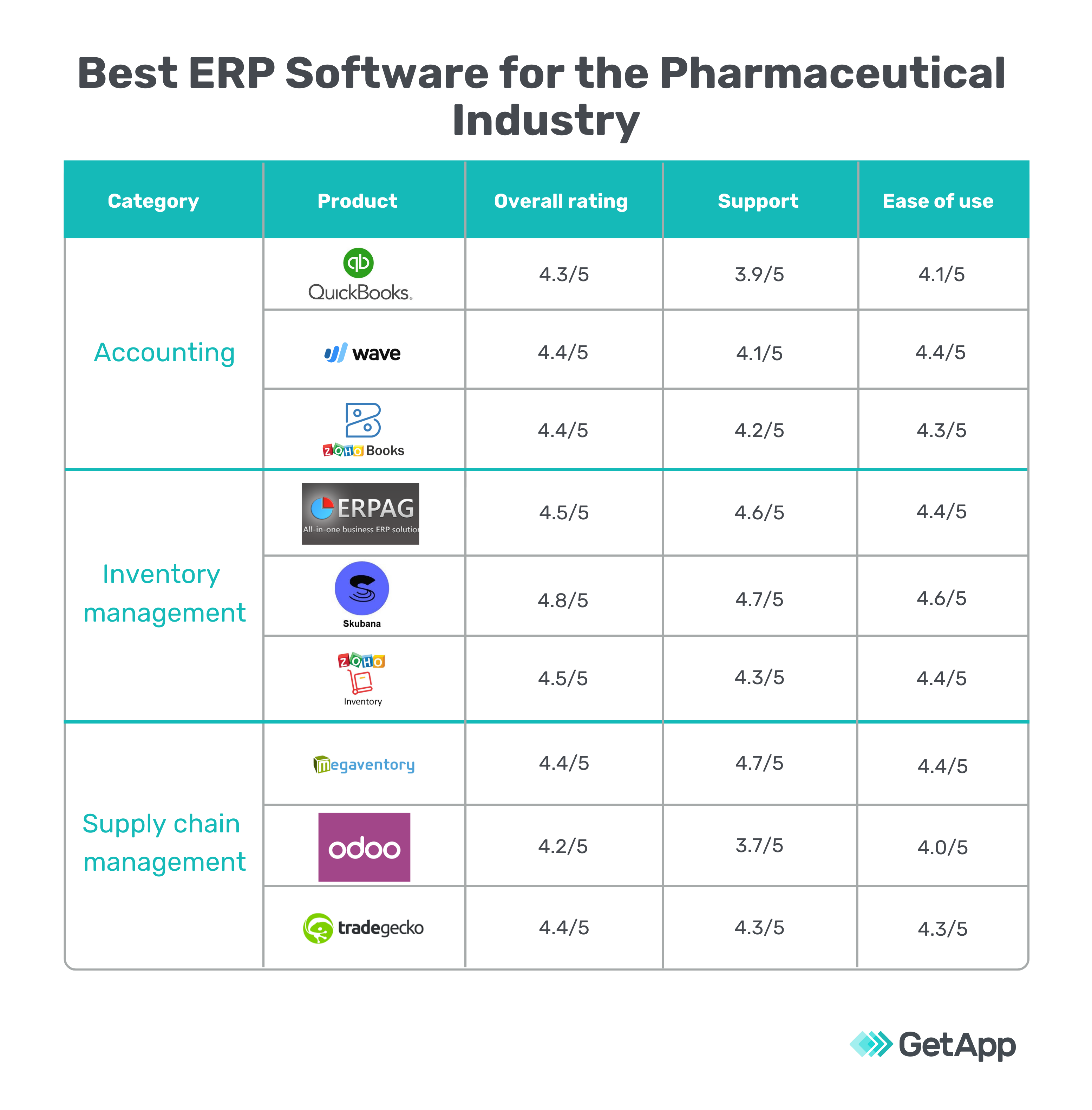
Accounting tools - Manage your financial records and transactions
Accounting software can provide many benefits to your pharma business. It can help track bills and invoices as well as record costs and expenses. Its reporting feature informs you about the profitability of individual products or business units, so you can make informed decisions.
Here are some ways you can use accounting software for your pharma business:
Create and send invoices to request payments from your customers.
Enter your suppliers’ bills into the system and process payments for them.
View your expenses and income in real time using dashboard reports and analytics.
Audit your financial reporting processes to ensure they are compliant with federal laws and regulations.
To help you find the right software to manage these functions, we’ve created a list of the three best accounting tools (listed alphabetically):
1. QuickBooks Online
User rating: 4.3/5
Number of reviews: 3,949+
QuickBooks Online is a cloud-based accounting tool.
It helps you manage payroll, process payments, and track inventory. You can capture and store digital copies of tax receipts, set up recurring payments, and sort financial transactions by date or recipient. The software also lets you create reports and export them in formats such as Excel and CSV.
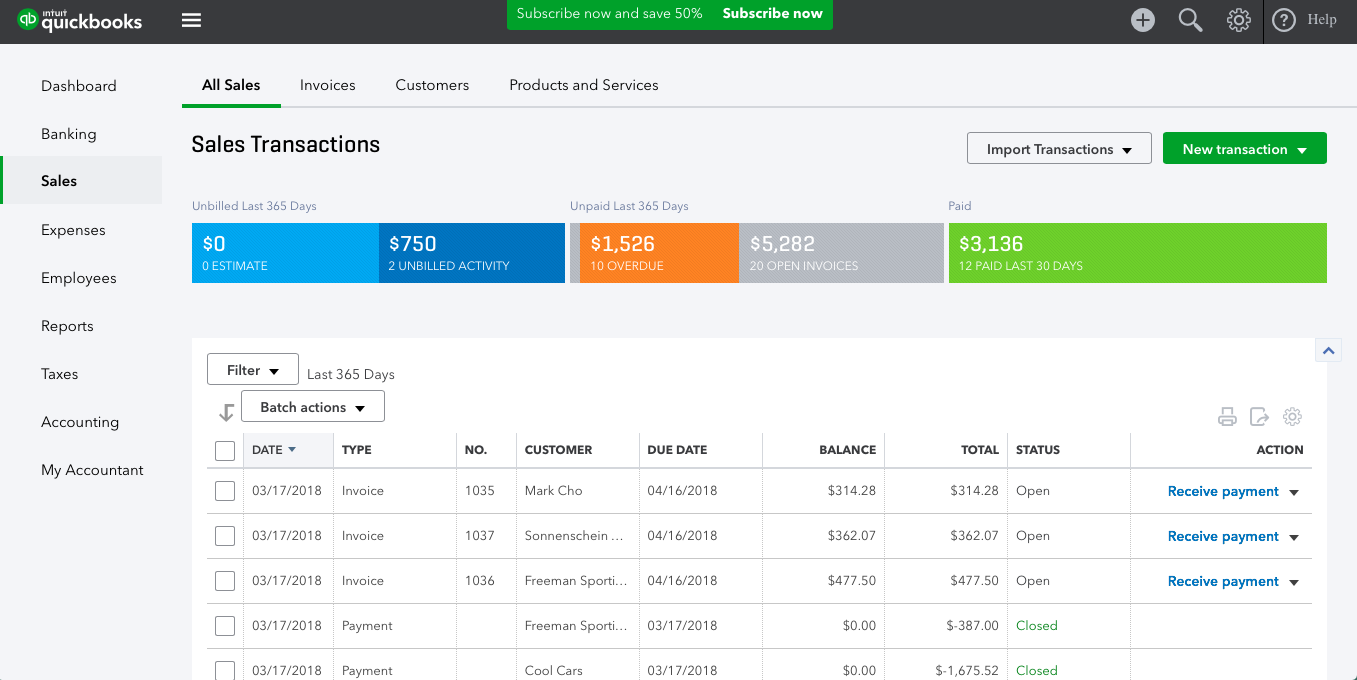
Summary of sales transactions in QuickBooks Online (Source)
Pricing info: The tool’s paid plan starts at $10 per user per month (billed monthly). A 30-day free trial is available with all plans.
Click here to read user reviews of QuickBooks.
2. Wave
User rating: 4.4/5
Number of reviews: 950+
Wave is cloud-based accounting software.
The tool lets you create invoices, track outstanding and due payments, scan receipts, run payroll, and set up recurring payments, among other tasks. Its bank reconciliation feature automatically matches your bank transactions against the figures recorded in the software, so you don’t have to reconcile your accounts manually.
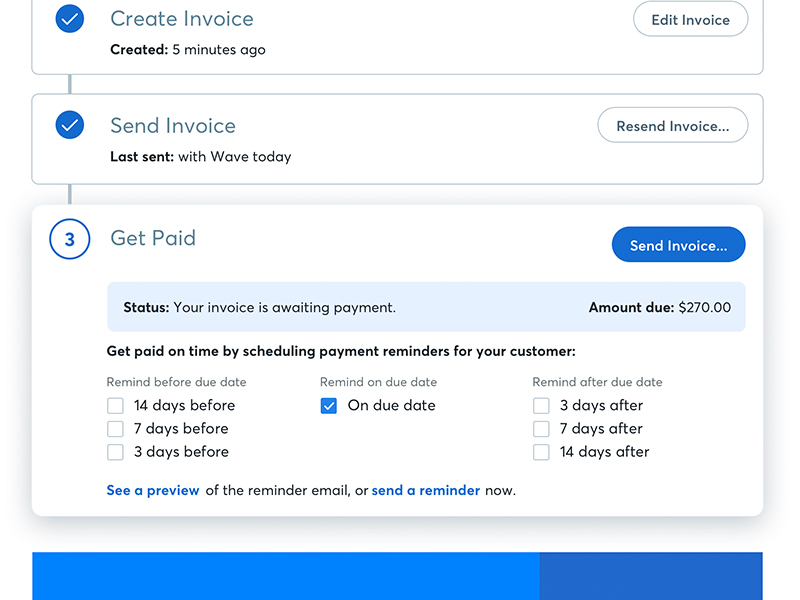
Pricing info: Wave is forever free. It has no setup or hidden charges, but you’ll need to pay a fee for credit card processing, bank payment/ACH processing, and payroll services.
Click here to read user reviews of Wave.
3. Zoho Books
User rating: 4.4/5
Number of reviews: 407+
Zoho Books is a cloud-based accounting solution that helps manage finances.
Its key features are contact management, billing and invoicing, expense management, sales and purchase order management, and payment processing. The tool can connect with your bank to fetch transactions and reconcile accounts in real time. It can also automate follow-up activities such as sending payment reminders or payment receipt acknowledgment emails to customers.
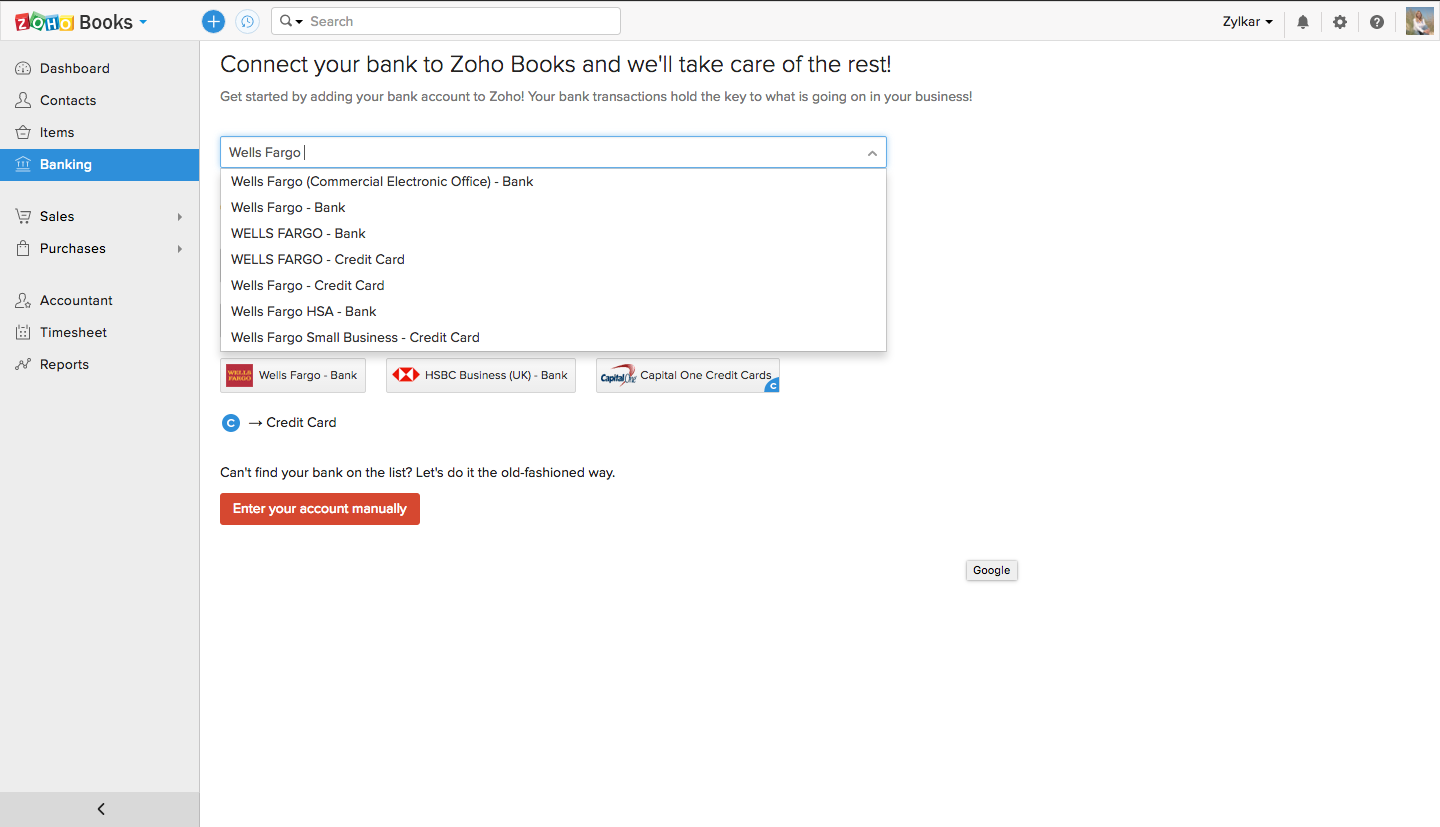
Connecting a bank account to Zoho Books (Source)
Pricing info: The tool’s Basic plan costs $9 per organization per month (billed monthly) or $90 per organization per year (billed annually). A 14-day free trial is available with the plan.
Click here to read user reviews of Zoho Books.
Inventory management tools - Track stock levels to reduce wastage
Inventory management software can help your pharma business in many ways. It can help estimate how much material you’ll need for production, track the status of items (medicines or medical equipment) already in production, and monitor stock levels to control wastage and ensure optimum usage.
Let’s see how you can best use inventory management software for your pharma business:
Track stock levels in real time to get a clear idea of how much inventory you have on hand.
Define a minimum stock level for different items, and receive alerts when your inventory falls below the defined level.
Set up automatic reordering for stocks that are running low.
Analyze inventory data to identify the most used or bestselling products.
To help you pick the right inventory management software, we’ve shortlisted the three best options (arranged alphabetically).
1. ERPAG
User rating: 4.5/5
Number of reviews: 193+
ERPAG is a cloud-based ERP system that supports inventory management.
Its inventory management features include barcode scanning, shipping management, sales order management, and point of sale (POS) management. The tool lets you easily import and export inventory details in a spreadsheet format. It also allows you to manage multiple warehouses that have items with different price ranges, currencies, or tax settings.
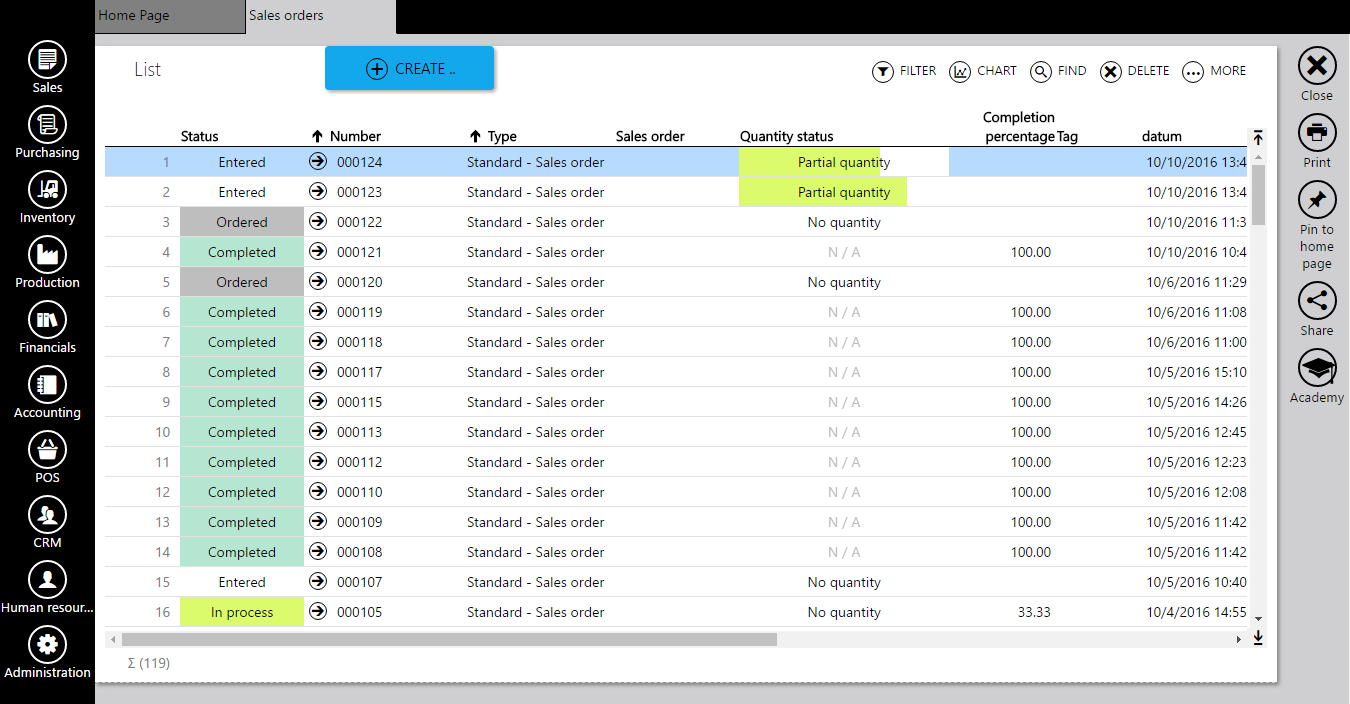
Pricing info: ERPAG’s Basic plan costs $49 per month for two user accounts (billed monthly). A 15-day trial plan, with limited features and storage, is also available.
Click here to read user reviews of ERPAG.
2. Skubana
User rating: 4.8/5
Number of reviews: 97+
Skubana is cloud-based inventory management software.
It can integrate with your sales channels to ensure real-time data sync with inventory updates every 15 minutes. It lets you manage multiple warehouses and track customer orders and shipments. Order fulfillment, inventory control and optimization, purchase order management, analytics, and business intelligence are some of its other key features.
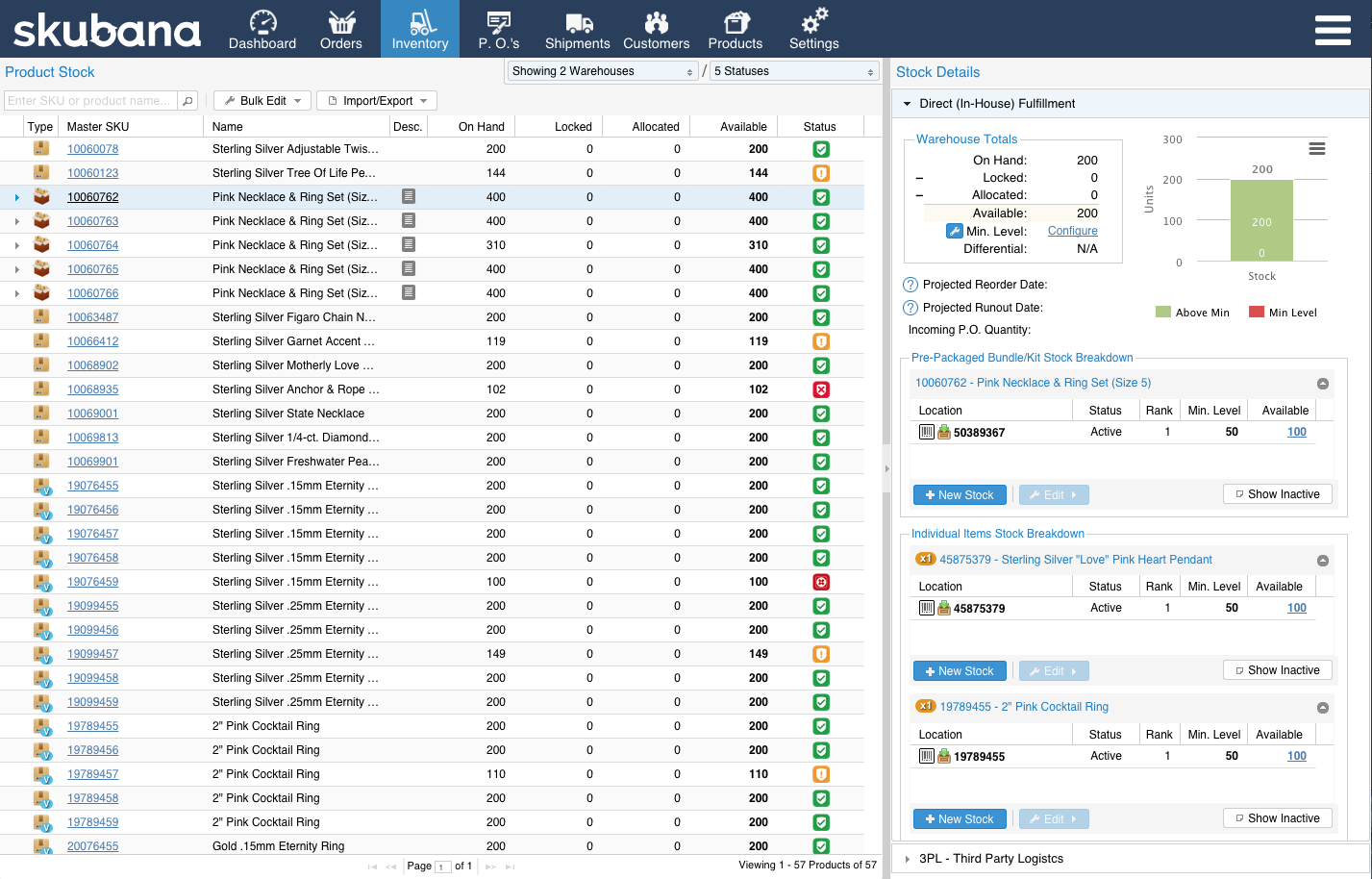
Pricing info: Skubana’s paid plan starts at $999 for up to 1,000 orders per month (billed monthly). A 14-day trial period is also available.
Click here to read user reviews of Skubana.
3. Zoho Inventory
User rating: 4.5/5
Number of reviews: 318+
Zoho Inventory is cloud-based inventory management software.
The tool’s key features include inventory optimization, warehouse management, lot traceability, and reporting. It can be integrated with online sales channels as well as other Zoho apps, such as Zoho Books and Zoho CRM, to automatically update inventory quantities. It offers built-in shipment estimating, item tracking, and delivery confirmation to let you ship products and track their delivery status.
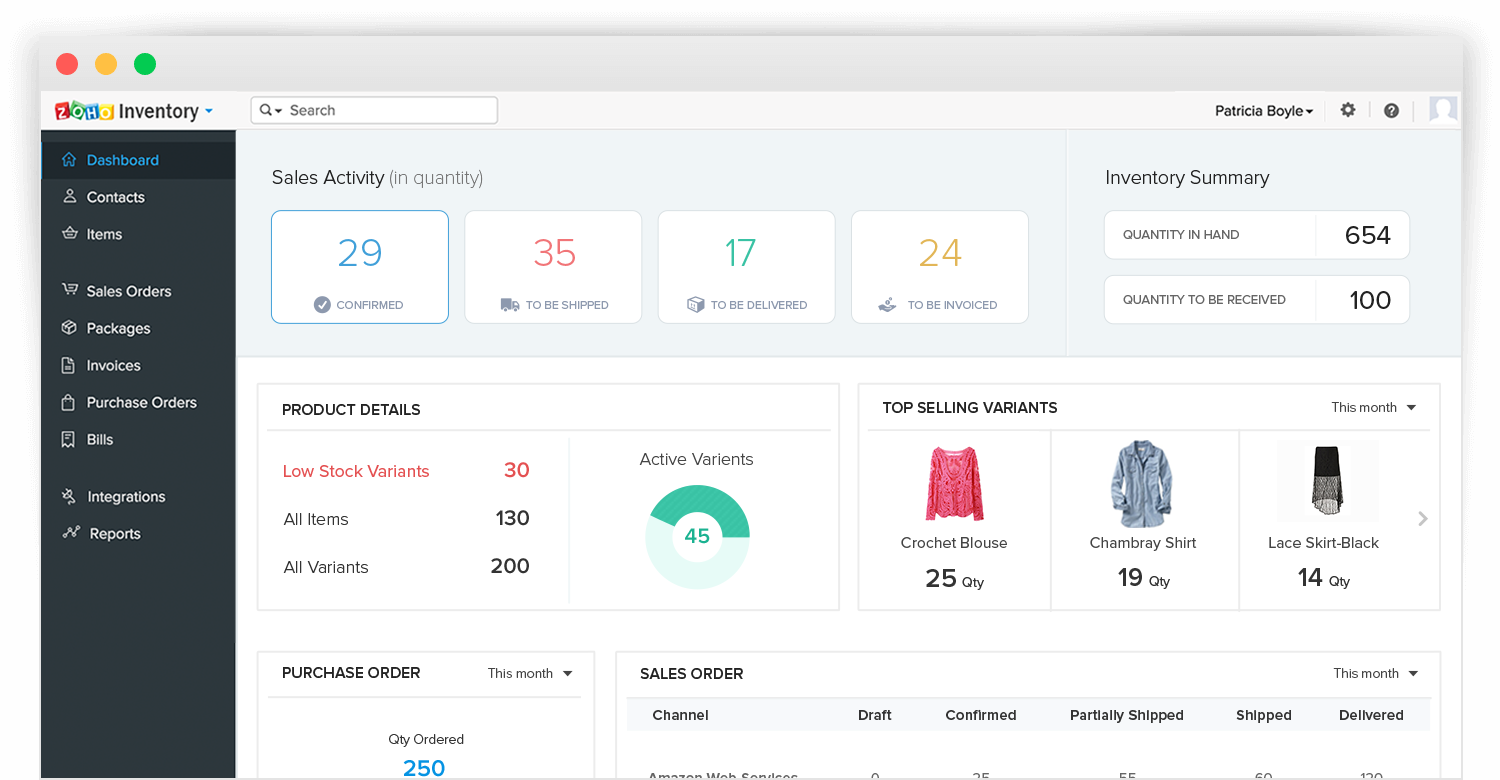
Sales activity and inventory summary in Zoho Inventory (Source)
Pricing info: The tool’s Basic plan costs $49 per organization per month (billed monthly) and supports 1,500 online orders and 150 shipments. A 14-day trial period is also available.
Click here to read user reviews of Zoho Inventory.
Supply chain management tools - Plan the production, shipment, and distribution of your products
Supply chain management software can help your pharma company perform demand planning and forecasting as well as manage relationships with suppliers. You can gauge customer demand for products and accordingly adjust procurement or production planning.
Let’s see how you can use supply chain management tools for your pharma business:
Track production, shipment, and distribution processes on a single platform.
Forecast product demand to plan production or procurement activities.
Create and track purchase orders, and schedule customer deliveries.
Monitor inventory levels to maintain sufficient stock.
To help you pick the right supply chain management software, we’ve shortlisted the three best options (arranged alphabetically).
1. Megaventory
User rating: 4.4/5
Number of reviews: 91+
Megaventory is cloud-based supply chain management and order fulfillment software.
It lets you create purchase orders, invoices, and sales and shipping quotes; monitor inventory levels in real time; track labor costs; and process returns for expired or unsalable items. Manufacturing management, supplier management, data import and export, reporting, and support for multiple currencies and exchange rates are some of its key features.
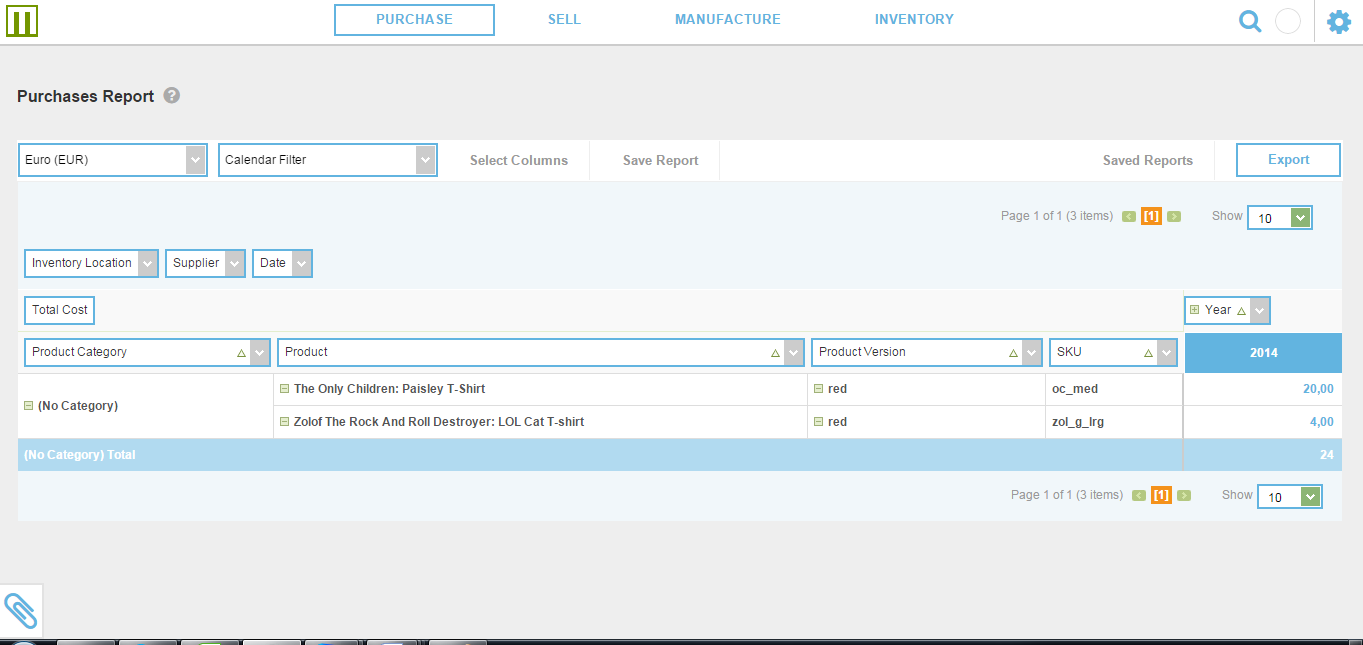
Purchase reports in Megaventory (Source)
Pricing info: Megaventory’s starter plan, named Pro, costs $135 per month (billed annually) or $150 per month (billed monthly) for five users. A 15-day trial period is also available.
Click here to read user reviews of Megaventory.
2. Odoo
User rating: 4.2/5
Number of reviews: 375+
Odoo is an open source ERP system that can be deployed on the cloud or on-premise.
The software offers supply chain management along with other business applications such as project management, customer relationship management (CRM), manufacturing, inventory management, and accounting. It lets you create purchase orders and invoices, automate inventory reordering, and generate reports to monitor your suppliers' performance (delayed deliveries, discounts offered, etc.).
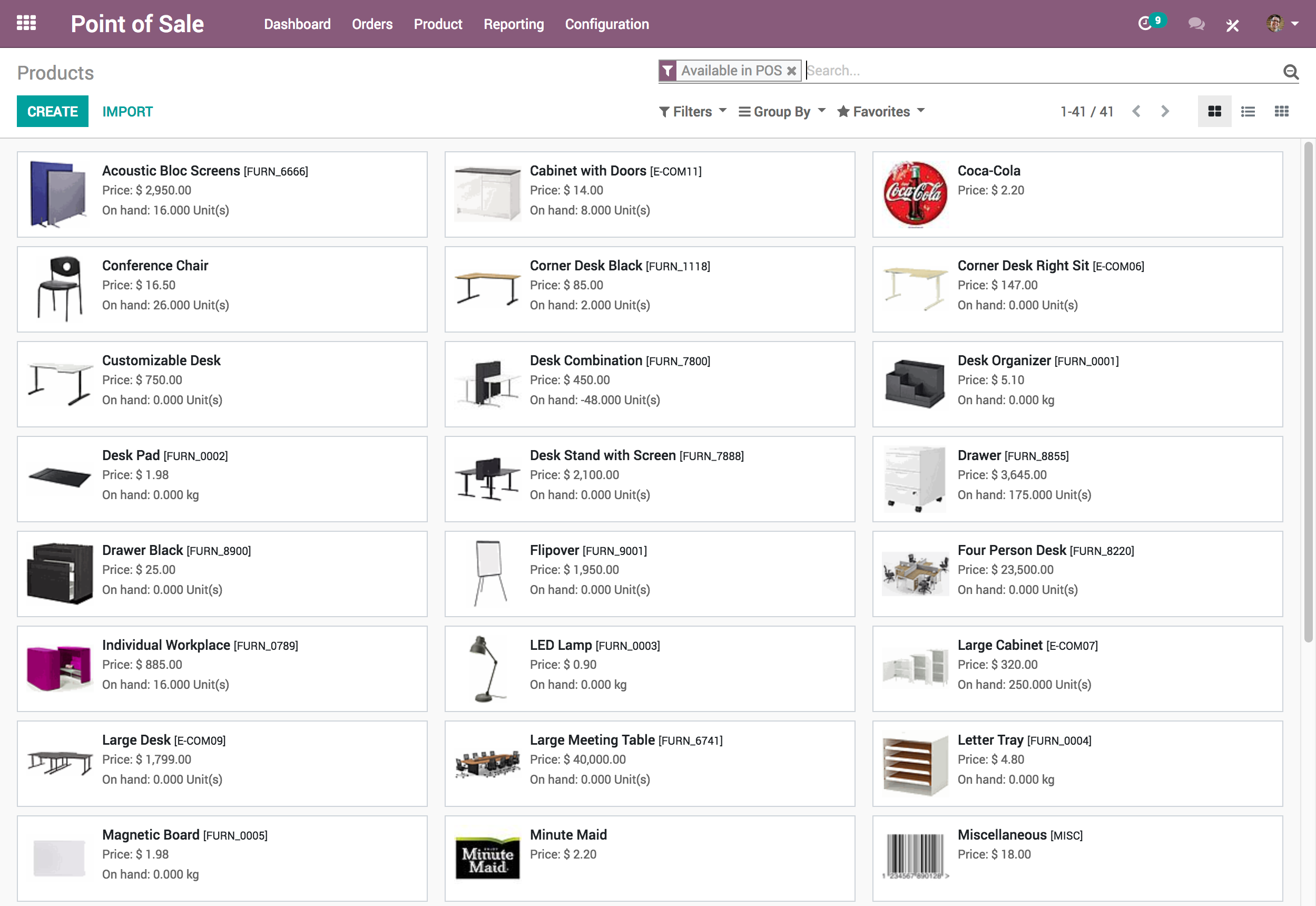
Pricing info: Odoo’s paid plan starts at $20 per user per month (billed annually) or $25 per user per month (billing monthly). It also offers a free plan (Odoo Community edition).
Click here to read user reviews of Odoo.
3. TradeGecko
User rating: 4.4/5
Number of reviews: 282+
TradeGecko is a cloud-based supply chain and order management tool.
Its key features include eCommerce and sales integration, supplier management, shipping management, and demand planning and forecasting. It supports multiple locations and currencies, so you can manage different products and warehouses using a centralized platform. It also lets you create and manage purchase orders, track inventory, and view detailed reports to track supply chain performance.
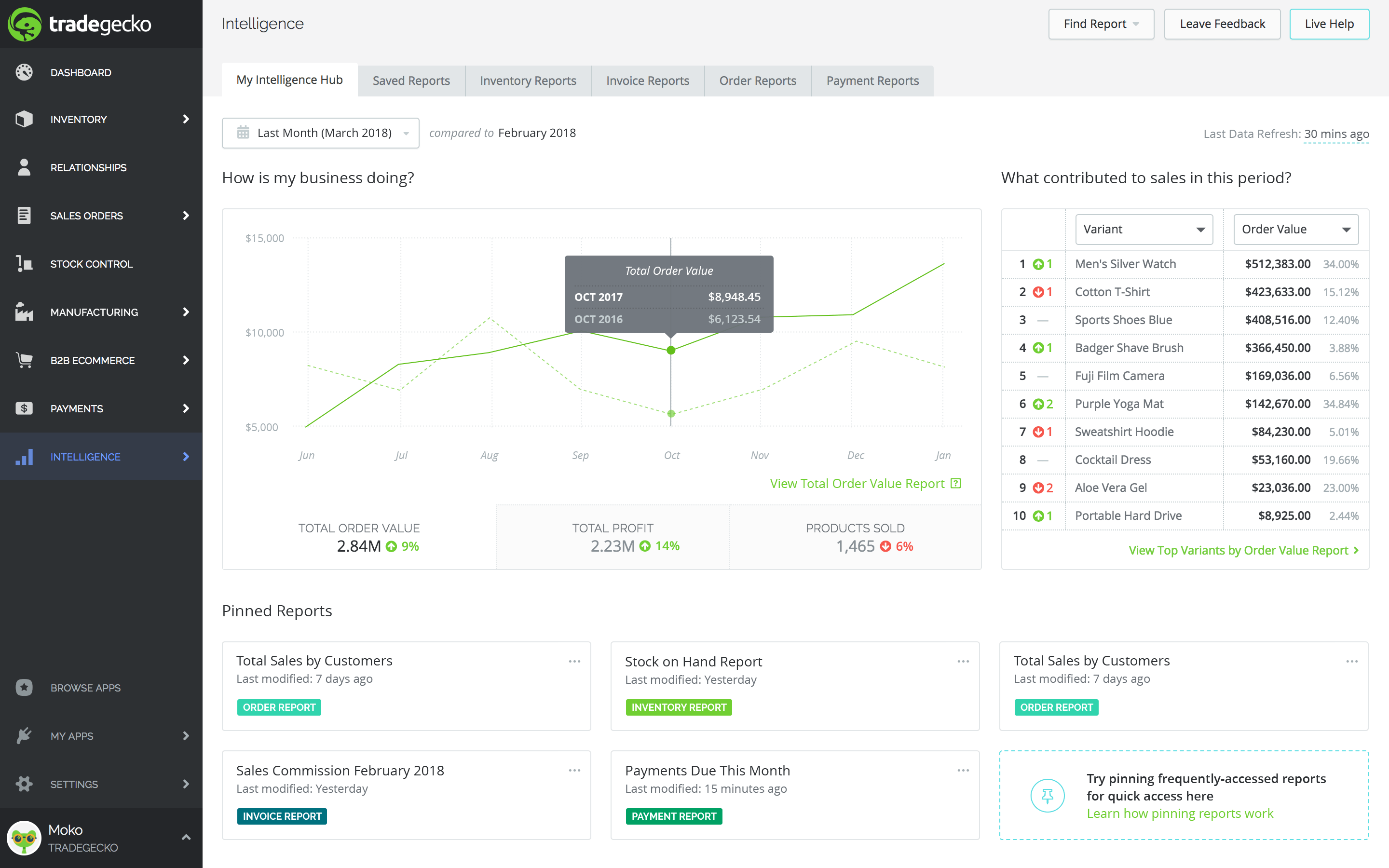
Business performance reporting in TradeGecko (Source)
Pricing info: The tool’s paid plan starts at $39 per user per month (billed annually). A 14-day free trial is available with all plans.
Click here to read user reviews of TradeGecko.
What’s next?
Before you finalize any of these tools, here are some things to ensure you make the right choice:
Take a demo: Schedule product demos to get an up-close view of the tool’s features and discuss any queries with the vendor. Prepare for the demo by researching the tool and jotting down any questions you come up with.
Check out related software: See if you would benefit from any related tools that complement your preferred ERP system. For example, business management software may come in handy.
Methodology
To identify the products listed in this article, we leveraged the GetApp 2020 Category Leaders for ERP report. For each category, we eliminated products that didn’t have at least half of the below-mentioned features:
For accounting: ACH payment processing, account reconciliation, automated billing, billing and invoicing, cash management, electronic payments, financial analysis, financial management, profit/loss statement, and sales tax management.
For inventory management: Barcode printing, barcode scanning, barcode support, inventory optimization, inventory tracking, inventory replenishment, invoice management, order management, and warehouse management.
For supply chain management: Purchase order management, shipping management, supplier management, demand planning, inventory tracking, eCommerce integration, eCommerce management, workflow management, and work order management.
From this list, we selected three products in each category with the highest ratings and maximum product reviews as on August 24, 2020.
Rahul Kumar