
App comparison
Add up to 4 apps below to see how they compare. You can also use the "Compare" buttons while browsing.
GetApp offers objective, independent research and verified user reviews. We may earn a referral fee when you visit a vendor through our links.
Our commitment
Independent research methodology
Our researchers use a mix of verified reviews, independent research, and objective methodologies to bring you selection and ranking information you can trust. While we may earn a referral fee when you visit a provider through our links or speak to an advisor, this has no influence on our research or methodology.
Verified user reviews
GetApp maintains a proprietary database of millions of in-depth, verified user reviews across thousands of products in hundreds of software categories. Our data scientists apply advanced modeling techniques to identify key insights about products based on those reviews. We may also share aggregated ratings and select excerpts from those reviews throughout our site.
Our human moderators verify that reviewers are real people and that reviews are authentic. They use leading tech to analyze text quality and to detect plagiarism and generative AI.
How GetApp ensures transparency
GetApp lists all providers across its website—not just those that pay us—so that users can make informed purchase decisions. GetApp is free for users. Software providers pay us for sponsored profiles to receive web traffic and sales opportunities. Sponsored profiles include a link-out icon that takes users to the provider’s website.

Visio
Based on GetApp‘s extensive, proprietary database of in-depth, verified user reviews
Diagramming, process modeling & data visualization
Table of Contents
Visio Review 2026: Pricing, Features & Alternatives

Written by

Edited by
Last updated: January 2025
Visio overview
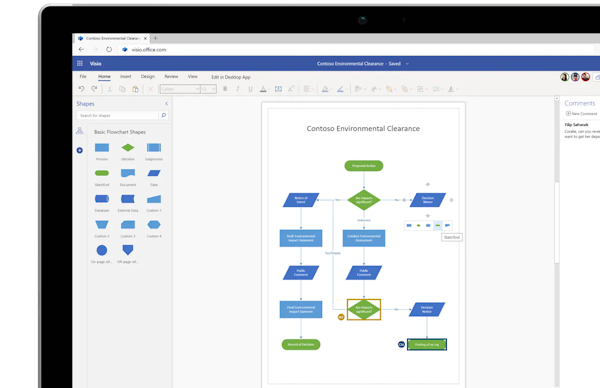
Visio is flowchart software with features to assist businesses in designing, diagramming, and visualizing workflows and processes within their firm. Based on an analysis of over 3,000 verified reviews on GetApp, Visio has received generally positive feedback, acquiring 4.5 stars out of 5 as an overall rating. [1]
According to reviewers, some of Visio’s top features include diagramming, process modeling and designing, data visualization, drag and drop, and a graphical workflow editor.
It is most commonly used for creating flowcharts (cited by 55% of reviewers), diagrams (cited by 48%), and managing workflows (cited by 36%).
Microsoft Visio can also integrate with many other Microsoft tools, such as its cloud storage platform OneDrive, and other tools within Microsoft 365, such as Microsoft Word and Excel.
User rating
4.2
/5
3.2K
Starting from
5
/user
Per month
Who is Visio best for?
Visio describes itself as a solution that lets teams collaborate “visually from anywhere at any time” and emphasizes its suitability for “teams everywhere”. [2] Our analysis of user reviews’ confirms this wide-ranging functionality, showing that it is routinely used by companies of almost all sizes. While Visio is most commonly used by smaller companies with under 200 employees, with 46% of reviewers working in firms of this size, many (35%) work in large enterprises, and in midsize companies (19%).
The system is used across various industries, but based on our analysis, Visio is most popular overall in IT and services, with 14% of reviewers working in the sector. It is followed by computer software (8%) and education management (4%). Visio can prove especially useful in these industries thanks to its ability to create visually informative flowcharts of complex processes and workflows supported by real-time data.
In the following sections, we’ll cover the key elements, pros, cons, and pricing plans users and reviewers have identified when using Visio to help you assess the platform’s suitability for your business.
Visio pros and cons based on reviews
To identify what users like and dislike about Visio, our data scientists apply advanced modeling techniques to our proprietary reviews data. We've sorted the resulting list of pros and cons based on the percentage of users who expressed positive sentiment toward the given topic in their reviews.



Effective workflow design
95% of reviewers feel positive about Visio’s capacity to build detailed workflow diagrams to simplify and visualize business processes, identify areas of improvement, and make it easier for stakeholders to communicate.
Versatile flowchart creation
95% of reviewers have a favorable impression of Visio's comprehensive library of shapes, templates, and drag-and-drop features to streamline the process of creating a broad range of flowcharts.
Professional presentation creation
94% of reviewers view Visio’s ability to integrate with MS Office programs such as Word, Excel, and PowerPoint as well as its design options for creating visually dynamic professional presentations and reports positively.
High pricing
69% of reviewers are negative about Visio’s pricing, with some commenting on its general expense of licensing costs for individual users and small businesses and its lack of accessibility compared to free or cheaper alternatives.
Unintuitive connectors
65% of reviewers feed back negatively about Visio’s connectors, which users report can be difficult to align and control effectively. This can cost users time when making adjustments.
Version compatibility issues
Over half (57%) of reviewers communicate dissatisfaction about compatibility between different versions of Visio. This is due to difficulties in opening and editing existing files, which can lead to lost time and potential data loss.
Visio’s key features rated by users
We analyzed Visio reviews to determine which features users rate the most critical. We have listed the key elements reviewers highlighted below in order of their importance to users:
Diagramming
Reviewers give positive feedback about Visio’s diagramming capability, especially the design options and templates provided. This is also supported by a user interface that is relatively easy to adapt to and the ability to customize diagram templates as needed. The platform’s ability to connect to other Microsoft software such as Word and PowerPoint also helps make this process more straightforward for users when exporting diagrams. 99% of Visio users rated this feature as important or highly important.
Process modeling and designing:
Users comment positively on Visio’s available tools for designing detailed process models and designs that communicate workflows and business processes. These include pre-built templates and customization options to enhance flexibility. This receives good feedback from reviewers, who note that these tools assist with improving collaboration and simplifying complex work processes. 96% of Visio users rated this feature as important or highly important.
Drag-and-drop interface:
Visio’s drag-and-drop features are positively regarded by users, with reviewers commenting on their intuitiveness when editing designs and placing new elements such as shapes and other graphics within diagrams. This, in turn, can help improve the speed and efficiency of creating and optimizing designs and can be used with relatively little training by new users. 93% of Visio users rated this feature as important or highly important.
Graphical workflow editor:
Reviewers of Visio speak favorably about the graphical workflow editing tools provided, which can help users create visual graphics that simplify the communication of complicated processes and workflows. Users have various stencils and templates they can use to complete these planning tasks, and the system also has compliance with standards such as data manipulation language (DML) and Business Process Modeling Notation (BPMN). 89% of Visio users rated this feature as important or highly important.
Data visualization:
Users provide positive feedback on Visio’s ability to present complex data in simplified visual formats such as charts and diagrams. Some of the positive benefits of these features noted in reviews are improved organizational communication, collaboration, and decision-making, as ideas and processes are easier to convey amongst staff. 89% of Visio users rated this feature as important or highly important.
Data import/export:
Reviewers highlight the importance of Visio’s ability to easily import data from external sources and with tools like Microsoft Access and Excel, and link this with designs and diagrams created in the platform. There is also positive feedback on the ability to export creations in various formats. 88% of Visio users rated this feature as important or highly important.
To get a clearer picture of how individual users found Visio's functionality and features, scroll down for a selection of review snippets.
Ilich R.
Visiting Lecturer

Ozgur B.
IT Consultant
Ozgur B.
IT Consultant
Visio pricing plans
Visio offers users a number of different pricing plans. Firstly, it can be accessed via subscription plans that are priced per user per month. Users can either opt to pay for the platform independently or buy a subscription to Microsoft 365, which bundles Visio together with other Microsoft workplace software. Alternatively, users can opt to buy a permanent one-time license for Visio’s Standard and Professional versions for a set fee per individual user. [2]
There are two plans available when choosing a monthly subscription. Plan 1 is available for $5 per user per month and comes with all the features found in Visio’s 365 version but expands on aspects such as the number of graphic design elements and templates available.
Plan 2 offers more enterprise tools and costs $15 per user per month. It in turn provides more customizations for diagrams and workflows and allows more advanced templates and file types (such as AutoCAD) to be used.
Both of Visio’s subscription plans offer users a 30-day free trial initially.
Our analysis of reviewer sentiment indicates that users feel mixed to negative about the available pricing plans. Of the 480 reviews that referenced the platform’s pricing, only 31% were positive.
User feedback notes Visio’s pricing upsides, such as the value it offers in terms of features and functionality. The online subscription option is highlighted as being more affordable than the downloadable one-time license edition, while still offering the necessary components for businesses. Discounts are also provided for students, which can make the software more accessible for those studying.
On the other hand, users are critical of the high costs to smaller businesses and the additional unplanned expenses that can accrue from the purchase of additional licenses. Mac users also speak negatively about the lack of a dedicated Mac version, meaning they can only access downloadable versions of Visio via virtual machines, which can sometimes increase overall costs.
In the review snippets below, see more about what Visio users said about its pricing options.

Reza R.
IT Manager

Belmin K.
ICT Specialist & Consultant
Alexander B.
Presse
What do reviewers think about Visio’s ease of use?
Most Visio users give positive feedback about its ease of use. In total, 72% of the nearly 300 reviews we received on this topic are positive. These comments highlight favorable aspects of Visio such as its usability and user interface, as well as features that help simplify creating flowcharts and diagrams.
Some examples of the elements that make Visio easy to use that users highlight include:
- Customizable features that make collaborative work simpler
- The flexibility of using Visio on both desktop and online versions
- The availability of online support for new users
Users also highlight some pain points that can cause difficulty when using Visio. Firstly, some comment on the expense of necessary additional licenses for the software. Some users also feel that the user interface could use modernization to keep up with options offered by competitors. There are also negative comments from Mac users who struggle with the lack of compatibility options given to users of different operating systems.
To learn more about the usability of Visio, read through some of our review snippets below.
Ashley M.
servicio post venta
Ahmad F.
Chief Marketing Officer
Raju K.
System Engineer
Visio integrations
As part of Microsoft’s suite of business software applications, Visio has many possible integrations that users can access within Office 365. Additionally, depending on the version used, it can also connect with other tools such as Power BI.
Based on an analysis of reviews referring to Visio’s integration options, we have listed the most mentioned products that can connect with the platform:

Users often connect Visio with the other software included with Microsoft 365. This is particularly useful for firms when they need to import data, create presentations, and share diagrams with other users.


 Microsoft Azure
 Microsoft Teams
 Microsoft Power BI
Review our selected review snippets below for more details on possible Visio integration options.
Ozgur B.
IT Consultant

Muhammad M.
Database administrate, web master
Joshua L.
Transporatation Engineer
Visio customer support and training resources
Support options
Microsoft provides a dedicated help and learning page for Visio users. This offers a number of practical tools users can use for support when facing issues, such as community forums and self-help content. [3] Additionally, users with Microsoft 365 accounts with admin permissions can access customer support by phone, email and web chat via the platform’s admin center. [4]
While there is a positive assessment of the support provided overall, with 67% of reviews talking favorably about customer support options from Visio, smaller business users highlight concerns. The lack of more immediate support options through phone or live chat is one example, with some indicating they are directed to search for solutions online instead.
Training options
On Visio’s help and learning page, users can access an education portal, self-help articles, and training courses on the software. This includes video and written instructional content that provides step-by-step instructions on the key features used in Visio.
These tools can help newcomers to the software better understand its key features and user interface. They also provide details on how to best use system elements such as shapes and connectors, diagrams, and page formatting, as well as how to use Visio effectively with other tools such as Power BI.
Reviews of Visio indicate favorable user sentiment of the training features available, with 72% of reviews on this topic coming back positive. However, feedback from users also highlights issues with the time and effort it takes to fully master the platform and get the most from its features.
To find out more about what users think of Visio’s customer support and training options, scroll down for a selection of review snippets:
Omolayo A.
Business Consultant

Reine A.
Ingenieur IoT
Rex B.
Coordinator
Visio’s security offerings
As part of Microsoft 365, Visio enjoys many of the same preset security protections found within the suite. [5] This includes secure authentication methods and information rights management (IRM) settings for Enterprise Plan and one-time purchase downloadable versions of the software.
All Visio users can benefit from security elements such as:
- Regular security updates
- Multi-factor authentication
- Secure sharing of files
The security features provided are well regarded by users, with some users commending Visio’s security provisions speaking positively of these tools. Users cite the secure sharing features, general Microsoft platform security, and regular updates as the reason for this confidence.
However, some negative feedback on Visio’s security features centers on its incompatibility with Mac systems, making the system more difficult to manage from a safety perspective.
To learn more details about the security features in Visio, we’ve highlighted a selection of user review snippets below.
Zeghoudi S.
Assistance programing
Nabil Z.
Sr. Technical Computing Manager
Sriram C.
Associate Professor
Is Visio a good fit for your business?
Based on analysis of over 3,000 user reviews, the feedback from Visio indicates it is a flowchart solution that is well-suited for many types of businesses. It receives a high overall score of 4.5 out of 5 from its users and is favored in companies both big and small and working across a multitude of sectors. It also receives competitive ratings for usability and its ability to integrate with other software.
If you are planning to potentially use Visio in your company, the decision needs to take into consideration factors such as your organization’s specific budget, goals, and the resources you can allocate. To make the assessment of these characteristics a little easier, we’ve compiled some of the most important need-to-know details about the platform in the highlighted points below:
- Features and functionality: Visio possesses a number of essential flowchart software features, according to our analysis of verified reviews. Some of the most valuable examples as highlighted by users are diagramming (rated 4.5 out of 5), drag-and-drop item placing (4.4), the ability to design and map out process models (4.4), and data visualization assets (4.4).
- Customer support: There are a wide variety of support assets that users can access to help resolve issues or train staff members on Visio’s available tools and features. These include self-help guides, community forum support, and training assets. Additionally, for Microsoft 365 customers, there is dedicated customer support by phone and email for admin users. These provisions are well regarded overall, with 67% of reviews on customer support for Visio reflecting positive feedback.
- Value for money: Visio offers pricing that either ties in the software with a Microsoft 365 suite, or allows users to access it on a standalone basis from $5 per user per month. Alternatively, it can be purchased on a one-time downloadable basis. Despite these options, Visio does not score very highly in terms of its pricing amongst users, earning only 31% of positive feedback in reviews.
- Ease of use: Reviewers indicate favorability with Visio’s ease of use. 72% of reviews on this topic are positive in tone and highlight elements such as the platform’s usability, integration capacity with other Microsoft software, range of visual features to create effective diagrams and tools for collaborating with colleagues in particular.
Visio’s alternatives
We have analyzed comments from the 3,000 reviews we have received from users. On a review of the comments from those who have previously used Visio but have since switched to another flowchart system, we have listed the most common alternatives users highlighted and their benefits.

Users who switched to Lucidchart highlight its lower costs, general ease of use, and collaboration features. The user interface receives positive feedback, and users also prefer its Mac compatibility.

Previous Visio users who adopted draw.io made the change because its free version offered the functionality necessary for their needs. Users also prefer its availability online, eliminating the necessity to install the software on company hardware, and appreciating its simplicity and ease of use.

Users who moved to EdrawMax like its cross-platform support, Mac compatibility, and overall flexibility. They also speak positively of its extensive library of templates and symbols.

Those who selected LucidSpark over Visio appreciate its lower cost and advanced collaboration capabilities, as the system is cloud-based. Users who switched to LucidSpark also prefer its ability to integrate with other important tools, such as Jira.

Users who switched from Visio to Skore liked its simple process mapping and better analytical and visual functionality. It is also well regarded for its speed and ease of use and its ability to make the process more interactive compared to Visio.
Popular comparisons with Visio





Visio FAQs
What are the disadvantages of Visio?
YSome of the biggest disadvantages highlighted by verified Visio user reviews on Capterra are its cost, difficulty aligning visual features such as connectors, version compatibility issues, and the platform’s learning curve.
Is Visio being phased out?
Visio is not being phased out by Microsoft. The software remains part of the Microsoft 365 suite and is available as a standalone product. However, in February 2023 some elements of Visio, such as Visio Web Access (also known as Visio Services) and its web part for Sharepoint in 365 were discontinued. This removed the parts of the software that allowed users to render documents in a web browser without elements of Visio installed on a local computer. [6]
What is Visio good for?
According to verified reviewers on Capterra, some of Visio’s best features according to positive user ratings are diagramming, process modelling and design, its drag-and-drop interface, and its graphical workflow editor.
Is Visio a one-time purchase?
Visio can be purchased on a one-time license basis from Microsoft. This is available in two versions, Standard and Professional. Alternatively, the system can be accessed via a monthly subscription as a standalone product, or as part of Microsoft 365.
Did Microsoft get rid of Visio?
Microsoft still offers Visio. However, Visio Web Access (also known as Visio Services), the web-only version of the system, was discontinued in February 2023.
Why use Visio instead of PowerPoint?
Visio offers users more focused features to design detailed process models and workflow diagrams than PowerPoint. However, these tools can integrate together, allowing Visio users to import files into PowerPoint slides to create more intuitive process explainers.
Is Visio free with Office 365?
Visio is included with Microsoft 365 and also as a standalone product. The standalone versions include everything in Microsoft 365 but also include more advanced features such as mind maps, Power BI integration, and advanced process diagrams.
How long is a trial version of Visio?
Visio users can access a 30-day free trial of its paid Plan 1 and Plan 2 subscription packages initially. These allow users to access all features within their chosen plan for the entirety of the trial’s duration.

David’s research and analysis is informed by more than 150,000 authentic user reviews on GetApp and nearly 3,000 interactions between GetApp software advisors and software buyers.
His thought leadership work has been featured in TechRadar, Startups Magazine, and Raconteur.

Parul Sharma
Related categories
Related articles



Sources
- GetApp reviews data: GetApp reviews are collected from verified users for individual software products. For this report, we analyzed all our reviews of Visio software. Learn more about GetApp’s software research methodology.
- Compare Visio Options, Microsoft Visio
- Visio help & learning, Microsoft Visio
- Microsoft 365 Support, Microsoft
- Security features and settings, Microsoft
- Updates to Visio Web Access (also called "Visio Services"), Microsoft