GetApp offers objective, independent research and verified user reviews. We may earn a referral fee when you visit a vendor through our links.
Our commitment
Independent research methodology
Our researchers use a mix of verified reviews, independent research, and objective methodologies to bring you selection and ranking information you can trust. While we may earn a referral fee when you visit a provider through our links or speak to an advisor, this has no influence on our research or methodology.
Verified user reviews
GetApp maintains a proprietary database of millions of in-depth, verified user reviews across thousands of products in hundreds of software categories. Our data scientists apply advanced modeling techniques to identify key insights about products based on those reviews. We may also share aggregated ratings and select excerpts from those reviews throughout our site.
Our human moderators verify that reviewers are real people and that reviews are authentic. They use leading tech to analyze text quality and to detect plagiarism and generative AI.
How GetApp ensures transparency
GetApp lists all providers across its website—not just those that pay us—so that users can make informed purchase decisions. GetApp is free for users. Software providers pay us for sponsored profiles to receive web traffic and sales opportunities. Sponsored profiles include a link-out icon that takes users to the provider’s website.
7 Alternatives To Use Instead of Microsoft Project
Looking for a Microsoft Project replacement? Check out these seven alternatives based that your peers use.


These days, it's likely your team members are working remotely—whether a few days at a time, dependent on their role, or all remote all the time.
If this sounds like you and your team, then a project management system is essential to help you collaborate and ensure nothing falls through the cracks.
Microsoft Project is a popular choice for project management because of Microsoft’s reputation. However, there are a lot of other choices on the market with high ratings from users. To help you decide on a platform, we’ll discuss some options to use as a Microsoft Project replacement.
Quick note: While Microsoft has multiple offerings with “project” in the name, we're specifically talking about Project for the web here, commonly known as Microsoft Project.
The products we rounded up below are what your peers said they considered while making a project management software purchase. Feel free to use these products to create your shortlist.
(Products listed in alphabetical order; full selection methodology at the bottom of the page.)
Asana
Pricing: The first paid tier starts at $13.49 per user, per month; discounts available if paying annually.
Why Asana is a good Microsoft Project alternative
Asana offers similar views to Microsoft Project such as task list, board view, and timeline. If you’re looking to keep the same structure for project management organization, look closely at Asana.
Asana is a cloud-based project and task management software tool that allows teams to collaborate, communicate, and manage tasks and projects. It can help teams meet project deadlines while tracking task completion. Asana works for companies of any size, as well as remote teams.
Features include task management, reporting, automatic notifications, dashboards, document management, custom templates, and milestones. Storage capabilities have a 100MB limit per file. Asana's inbox feature receives automatic updates about relevant projects, conversations, and tasks.
Asana offers a Gantt chart view option. You can also organize your projects by boards, which function as sticky notes you can drag and drop to rearrange. You can even create rules for automation to simplify workflows and reduce errors.
Premium packages include forms, so your team can create intake forms for project requests. Asana comes with reporting and export options, as well as many integrations so you can connect your data across platforms.

Timeline view in Asana with Gantt chart (Source)
Basecamp
Pricing: $99 per month flat rate for businesses. There is a limited free option for personal use, but it lacks many features included in the paid version.
Why Basecamp is a good Microsoft Project alternative
Basecamp offers more real-time communication options than Microsoft Project, so it’s worth considering if that’s important to your team.
Basecamp is a web-based, real-time communication tool that helps teams stay on the same page. Basecamp provides a way for teams to keep track of priorities and action items with features including to-do-lists, calendaring, due dates, and file sharing.
Basecamp can be deployed by any organization in any industry that needs to manage a group, including nonprofits, startups, and client service firms; it can even be used by freelancers. Subscriptions are scalable, with tiers for varying amounts of storage and number of users.
A unique Basecamp feature is the ability to control when you receive notifications to better help with work-life balance.
Basecamp is also great for remote teams, as executives and managers can use dedicated tools to keep a pulse on projects. For example, managers can use the “Automatic Check-ins” tool to schedule recurring questions for their team to answer such as “What have you completed for the week?” or “What do you plan on working on this week?”
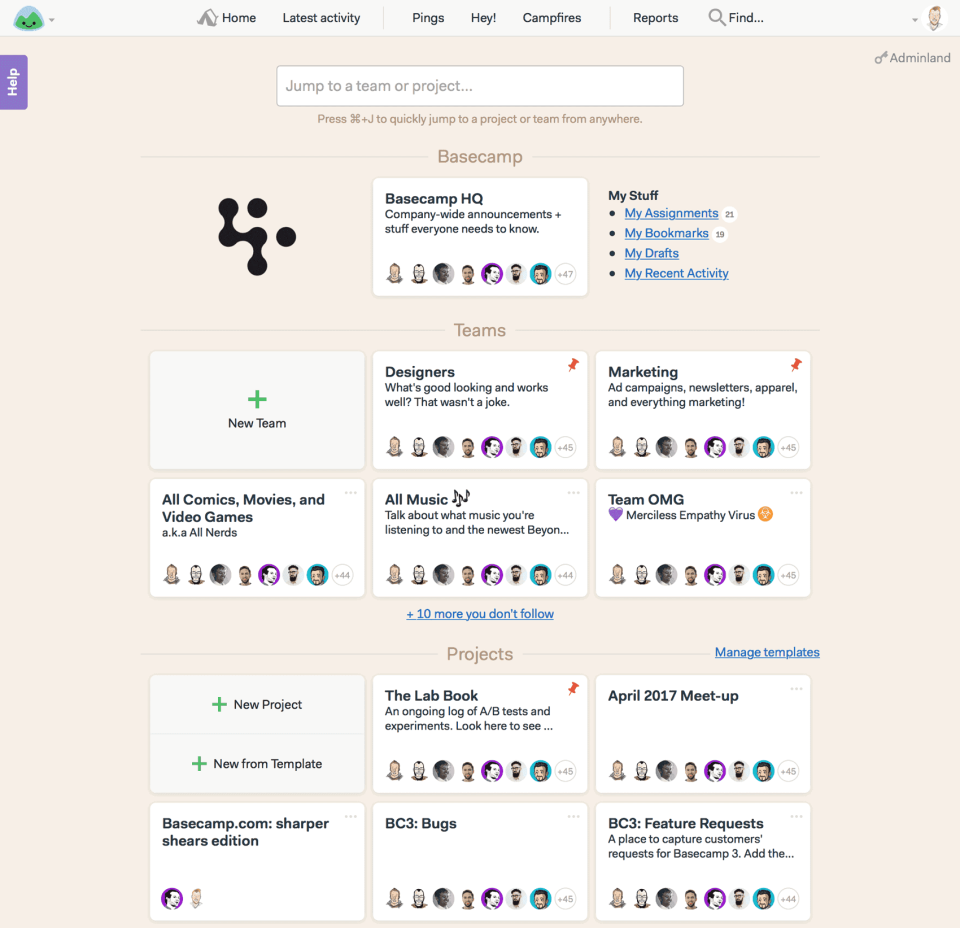
Projects at a glance in Basecamp (Source)
Celoxis
Pricing: $22.50 per user, per month (billed annually) for the cloud version. On-premise option is $450 per user, per year. Both options have a five-user minimum.
Why Celoxis is a good Microsoft Project alternative
If you need more enterprise-level functionality than Project offers, you might want to pay close attention to Celoxis.
Celoxis is a comprehensive, enterprise-level online project management tool for midsize to large businesses. Celoxis helps you plan and manage complex and diverse project portfolios. The software includes modules for resource management, budgeting, revenue forecasting, time and expense tracking, reporting, and team collaboration. Celoxis also includes critical path analysis. As part of its project planning functionality, Celoxis allows you to see if any project has a task dependency.
The platform offers integrations with Excel, Outlook, Salesforce, and other tools. While Celoxis can still work for smaller teams, it may have a lot of extra features such teams won't use.
Celoxis allows users to easily create an interactive Gantt chart to visualize tasks and view employees’ daily workload. Celoxis also uniquely includes a “bugs or issues” feature to help with issue tracking.
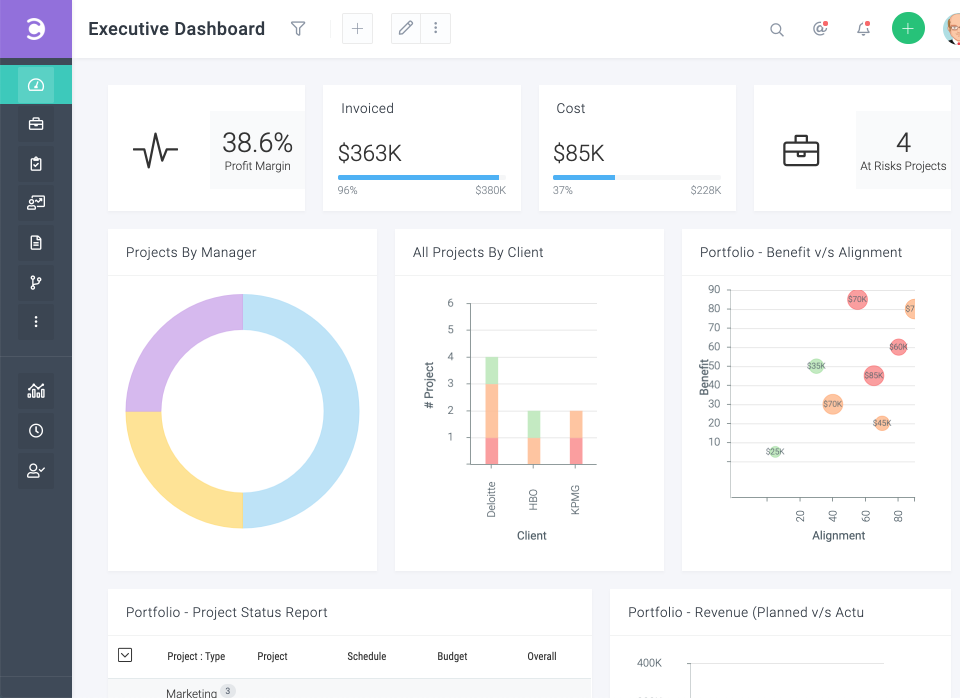
Executive dashboard in Celoxis (Source)
ClickUp
Pricing: Paid versions start at $9 per user, per month; discounts available if paying annually. ClickUp does offer a free version with limited features.
Why ClickUp is a good Microsoft Project alternative
For a more colorful and visually stimulating way to organize tasks than Microsoft Project, check out ClickUp.
ClickUp is a cloud-based collaboration and project management platform with features including communication tools, document sharing, task assignments and statuses, alerts, and a task toolbar.
Users can assign tasks and comments to specific team members. Tasks and comments can be marked as resolved or in progress, and users can also create custom statuses. Projects can be viewed from an Agile dashboard or organized by assignee. The activity stream displays tasks as they’re created and completed in real time.
ClickUp lets you set automations for routine tasks (e.g., “if a status change happens to a task, move this task to a specified list”). You can also automate with an external app, such as GitHub, Calendly, Dropbox, or Slack.
One unique aspect of ClickUp is its custom field option, which lets you create your own labels for things like reporting. This provides unlimited options to customize your workflows and includes a range of input options, such as currency, location, text, files, numbers, and formulas. With custom fields, you can also keep track of notes, client contact information, or overall progress.
ClickUp also offers task dependency and critical path functionality, so you can determine the critical steps your project needs to be completed.
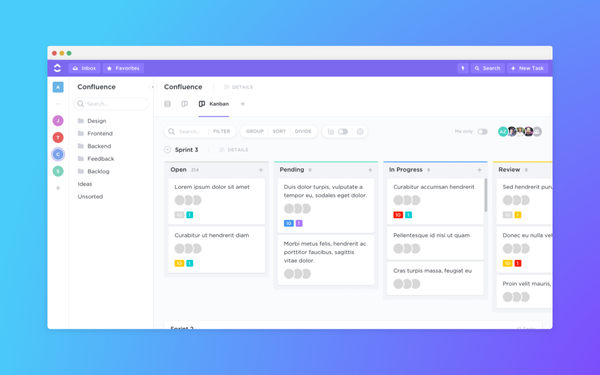
Board view in ClickUp (Source)
Freedcamp
Pricing: The most popular pricing option (according to Freedcamp) starts at $8.99 per user, per month. There is a discount if paying annually.
Why Freedcamp is a good Microsoft Project alternative
If you like the simplicity and clean design of Microsoft Project’s task layout, Freedcamp could be a good option.
Freedcamp is a project management tool for large organizations. It’s not industry-specific; its users operate in the advertising, architecture, engineering, interior design, IT services, manufacturing, and retail industries, to name a few. Freedcamp is primarily offered as a web-based solution.
Core Freedcamp features include project management, project scheduling, and document and issue tracking (in the premium version). The tool also includes project collaboration, portfolio management, reporting, and task and time tracking.
The system allows unlimited users and unlimited projects, and has no storage limit. A built-in calendar feature gives users the ability to track tasks, events, and milestones in one location. Additional Freedcamp features include invoicing and billing, displaying projects in a Gantt chart, and project templating.

Time tracking in Freedcamp (Source)
Smartsheet
Pricing: Standard individual plans start at $14.99 per month when paid annually, while the standard business plan starts at $25. Smartsheet also offers enterprise plans with more comprehensive features.
Why Smartsheet is a good Microsoft Project alternative
For more customizable dashboard options than Microsoft Project, check out Smartsheet, which allows you to drag and drop widgets for your preferred view.
Smartsheet is a work execution platform with a spreadsheet-like interface that helps teams plan, track, and manage projects in real time. The collaborative platform offers a range of project management tools, such as document management, resource management, project reporting, and timeline tracking.
This tool helps standardize project processes, increase speed, and improve collaboration. With Smartsheet, you can track projects, manage resources, and assign tasks to improve overall project visibility and work efficiency.
Smartsheet offers self-service reports and dashboards to maintain consistency across projects, from software development to marketing plans.
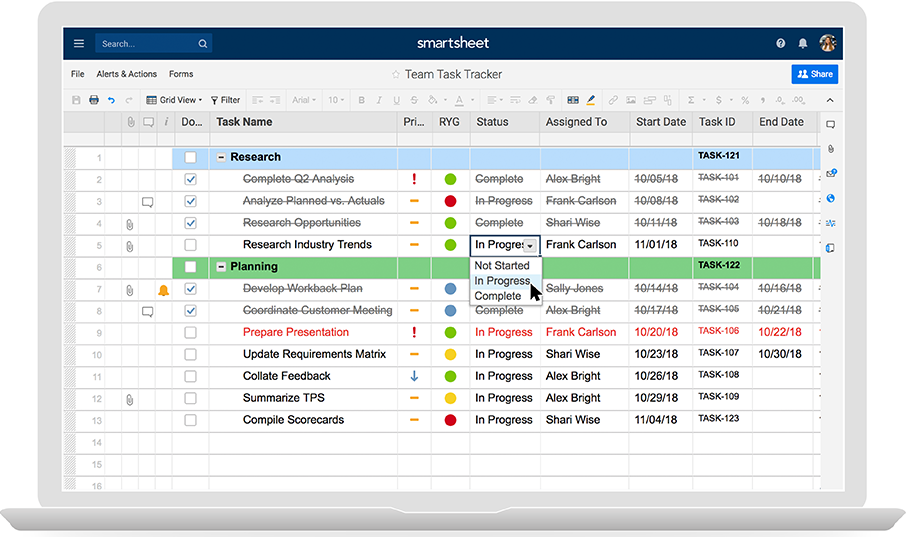
Spreadsheet-like interface in Smartsheet (Source)
Trello
Pricing: Plans start at $12.50 per user, per month, with a discount if paying annually. There is also a free version.
Why Trello is a good Microsoft Project alternative
If using a board or card view is your preferred visual organization scheme, check out Trello.
Trello is a visual collaboration tool for planning tasks and projects. While commonly used by Agile software development teams, the solution is also used by teams in marketing, sales, support, and HR, among others. This web-based solution provides tools to define projects and their requirements, as well as workflows to ensure projects are completed as planned.
Trello offers a digital board to create, organize, and prioritize actions. Administrators or managers can define workflows, assign tasks to individuals or teams, set deadlines, and monitor progress.
Trello cards allow users to collaborate with each other. Users can add comments, add members, and attach documents to their tasks.
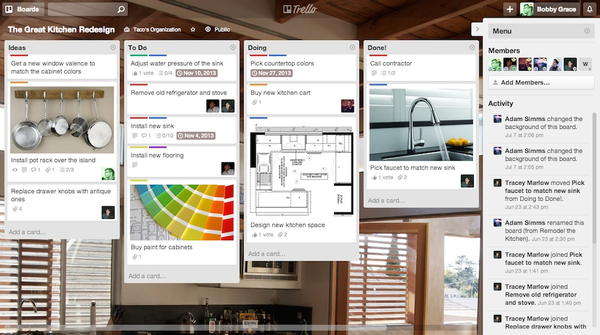
Card wall view in Trello (Source)
Find a best fit project management system by outlining your specific needs
Microsoft Project certainly comes with a lot of brand recognition, but there are countless project management options out there, all with their unique strengths.
The most important thing is choosing software that meets your particular needs and addresses your pain points.
None of these tools seem quite right for your business?
Check out our Category Leaders for project management. These products have high scores based on user reviews for ease of use, functionality, value for money, and more.
Once you’re on the Category Leaders page, you can use our compare tool to place up to four software options side-by-side and see how specific features stack up across products.
Methodology:
Products featured in this list were identified in user reviews as other products considered at the same time as Microsoft Project. They also had to meet the project management software definition which included the following core features:
Task management
Collaboration
Project tracking/reporting
Amanda Kennedy
mentioned in this article







More on Project Management


May 30, 2024

Jun 11, 2024

May 28, 2024