GetApp offers objective, independent research and verified user reviews. We may earn a referral fee when you visit a vendor through our links.
Our commitment
Independent research methodology
Our researchers use a mix of verified reviews, independent research, and objective methodologies to bring you selection and ranking information you can trust. While we may earn a referral fee when you visit a provider through our links or speak to an advisor, this has no influence on our research or methodology.
Verified user reviews
GetApp maintains a proprietary database of millions of in-depth, verified user reviews across thousands of products in hundreds of software categories. Our data scientists apply advanced modeling techniques to identify key insights about products based on those reviews. We may also share aggregated ratings and select excerpts from those reviews throughout our site.
Our human moderators verify that reviewers are real people and that reviews are authentic. They use leading tech to analyze text quality and to detect plagiarism and generative AI.
How GetApp ensures transparency
GetApp lists all providers across its website—not just those that pay us—so that users can make informed purchase decisions. GetApp is free for users. Software providers pay us for sponsored profiles to receive web traffic and sales opportunities. Sponsored profiles include a link-out icon that takes users to the provider’s website.
Slack vs Microsoft Teams: Which Is Right for My Business?
Slack or Microsoft Teams? It's one closely fought battle. Find out which is best for your business with an in-depth analysis of their pricing, features, and integrations.


Slack and Microsoft Teams are two of the most sought after collaboration software, especially in the remote work software market. Each has a large user base, a compelling list of features, and comparative pricing options. Since both the tools have similar attributes and competencies, deciding which one would suit your business can be tough.
In this article, we’ll help you differentiate between the two by providing pricing, features, user reviews, and integration options for both Slack and Microsoft Teams so you can find the best fit.
Pricing
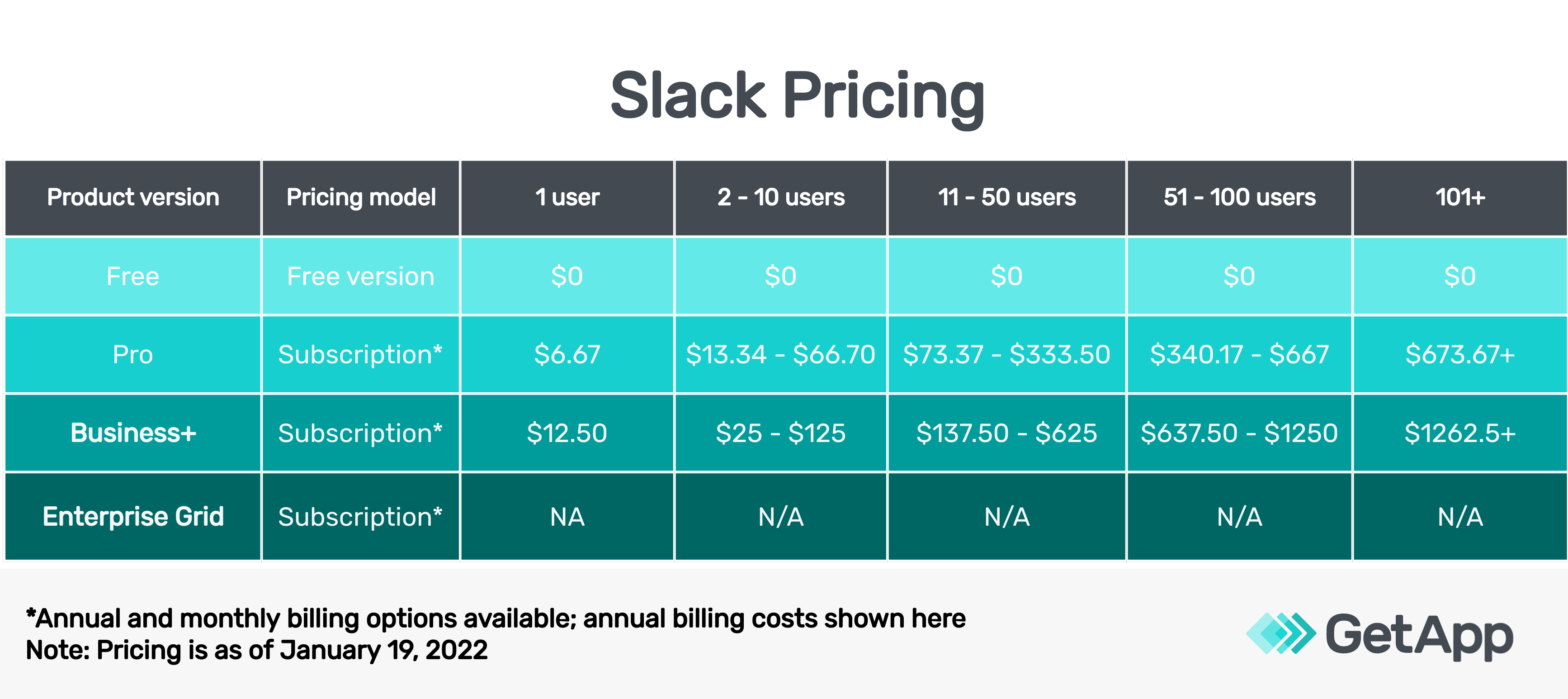
Slack offers four product versions: Free plan, Pro, Business+, and Enterprise Grid.
Pro plan is suitable for smaller teams looking for a collaboration tool. It is available for $6.67 per user per month (billed annually).
Business+ version costs $12.50 per user per month (billed annually).
The pricing for the Enterprise Grid is not disclosed by the vendor and can be obtained by contacting Slack’s sales team.
Both Business+ and Slack Enterprise Grid versions are suitable for large enterprises looking for a more scalable and flexible collaboration tool for cross-functional teams.
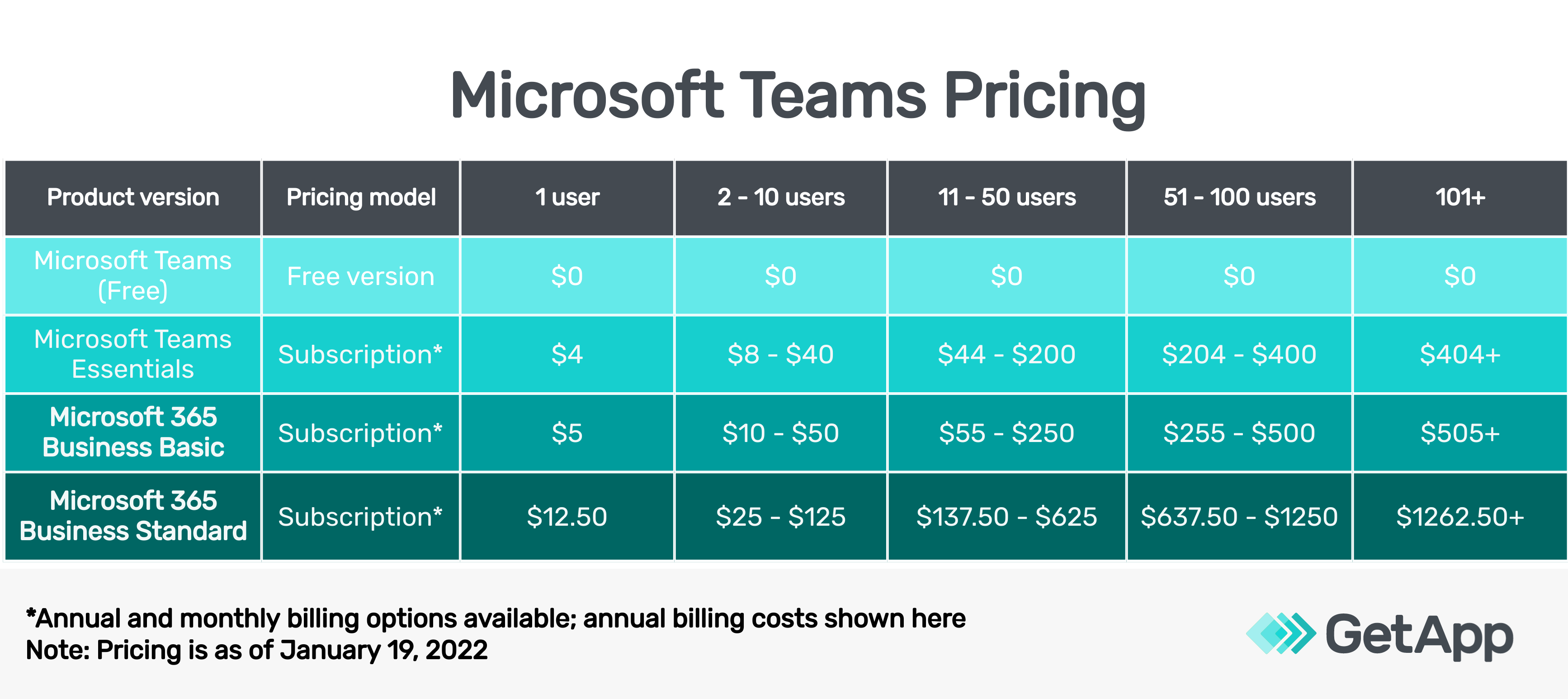
On the other hand, MS Teams for business is available as a free version and as a part of Microsoft’s application suites—Microsoft 365 Business Basic and Microsoft 365 Business Standard.
Microsoft Teams Essentials version costs $4.00 per user per month.
Microsoft 365 Business Basic plan and Business Standard plan are available for $5.00 per user per month and $12.50 per user per month, respectively.
Both Business Basic and Business Standard come with a one-month free plan.
Upon comparing the pricing plans for Slack and Microsoft Teams, Teams plans are more affordable. For both the tools, each paid version can be billed either annually or monthly; annual subscriptions are available at discounted prices and are usually cheaper than monthly plans.
Takeaway:
Microsoft Teams is less expensive than Slack and both the tools offer flexibility. However, both have four versions of the product, including a free version.
Features
Slack and Microsoft Teams share plenty of common features, but they do have some unique ones too that vary across product versions.
In Slack, features such as shared channels, guest access, file sharing, screen sharing, and two-factor authentication are common across all product versions (Standard, Plus, and Enterprise Grid). You can conduct video calls with up to 15 people in all the product versions.
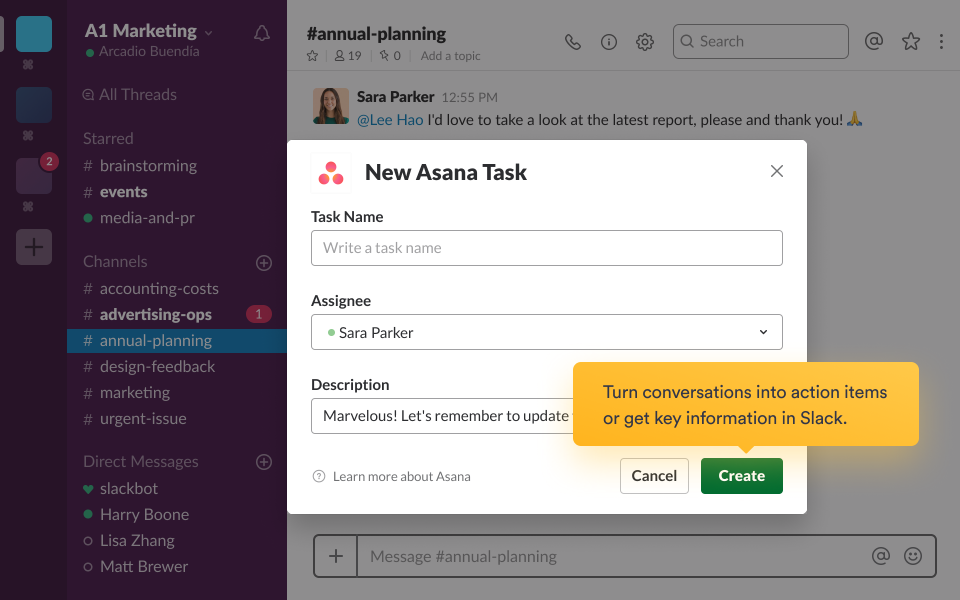
Slack Huddles enable you to oversee live, voice-only conversations in any channel or send direct messages. You can use Slack Clips to record and share short audio or video files, or share your screen for better collaboration. The software allows you to organize channels, messages, and applications into single, collapsible sections.
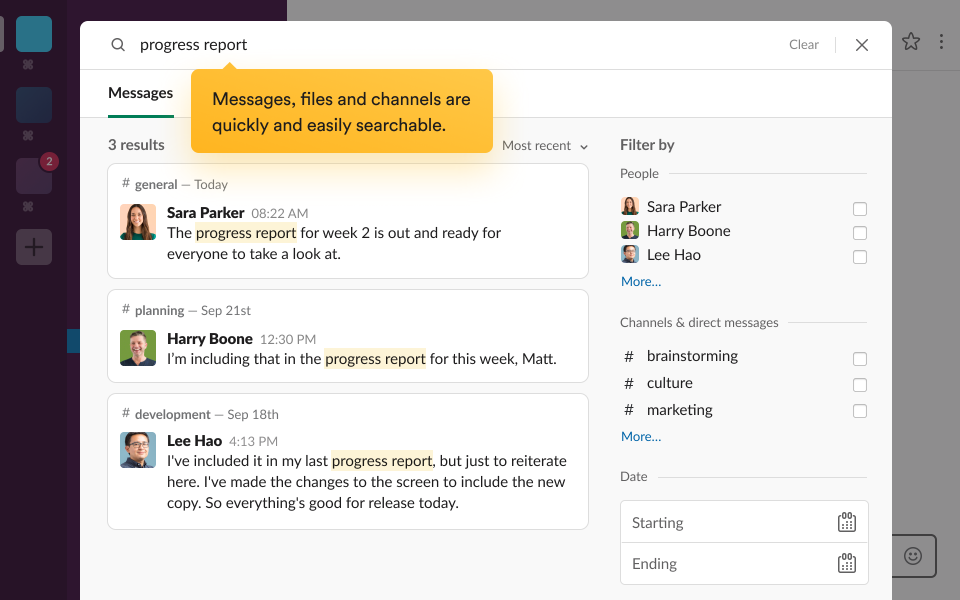
Single-sign-on, directory sync (with OneLogin, Okta, and Ping), and guaranteed uptime SLA are offered only with the Plus and Enterprise Grid versions, whereas audit log API and enterprise mobility management (EMM) integration are available only with the Enterprise Grid version.
The Enterprise Grid version lets you manage security, compliance, invoicing, and platform integration in a single view.
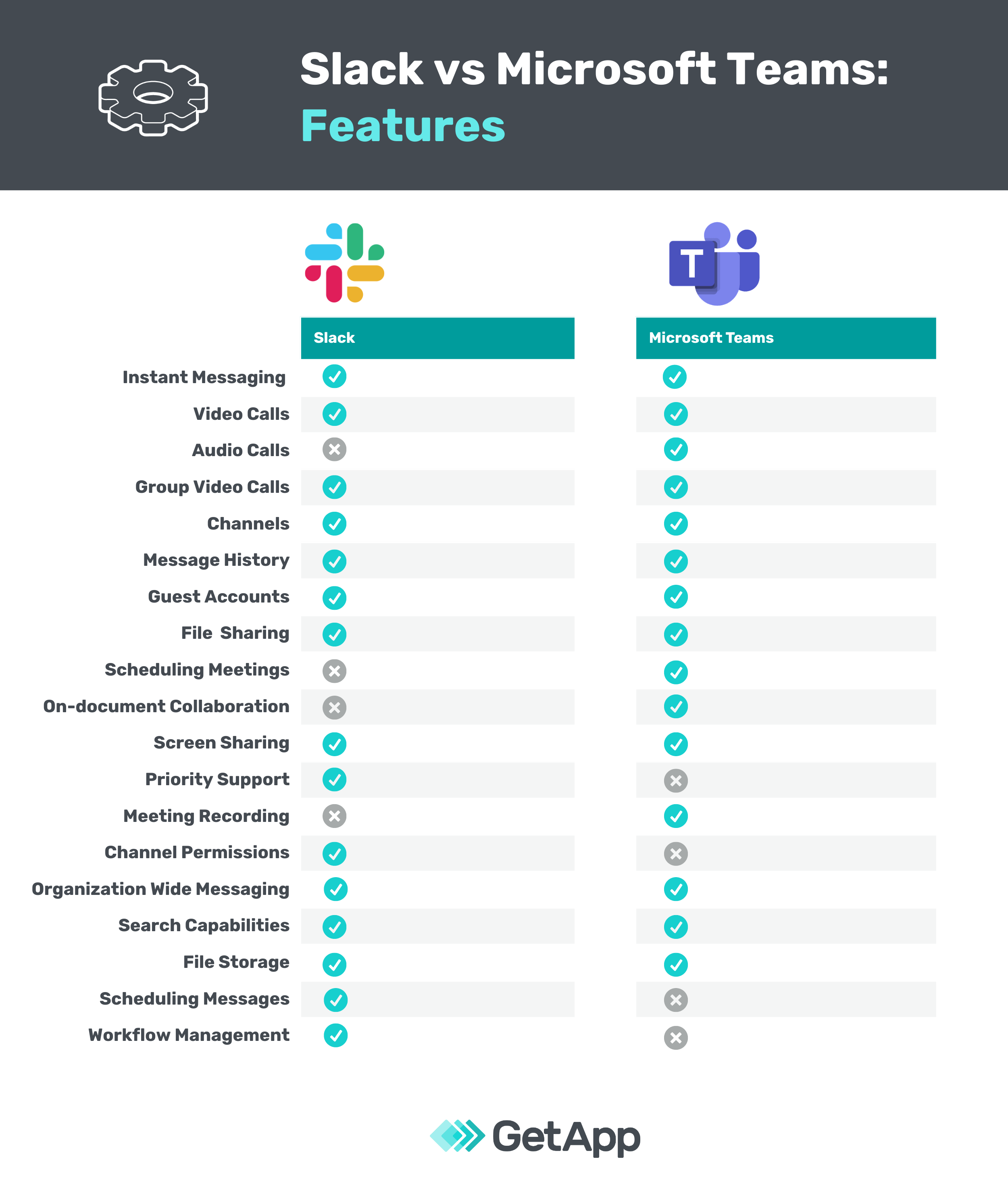
In Microsoft Teams, features such as audio calls, video calls, screen sharing, and file storage are common across all product versions, whereas features such as meeting recording and administration controls for app management are available only with the paid versions.
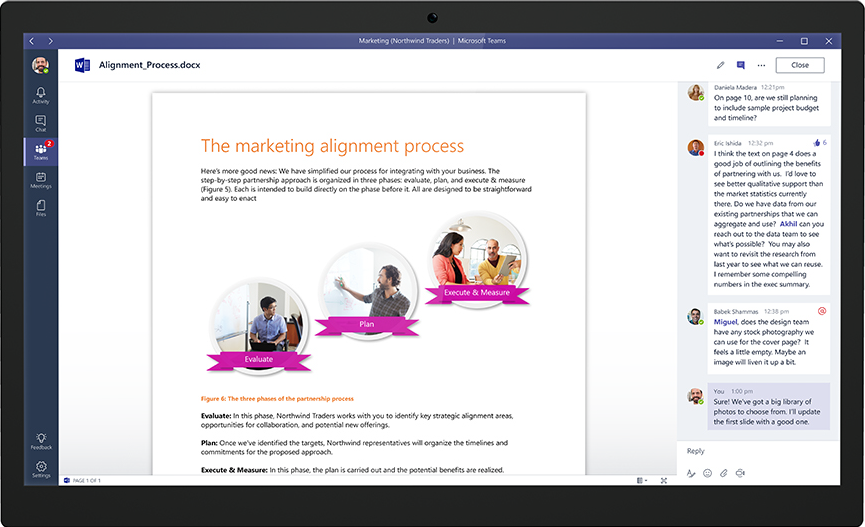
Collaboration and commenting in Microsoft Teams (Source)
While all four versions of Microsoft Teams offer real-time collaboration in Office mobile apps (Word, PowerPoint, and Excel), some features such as meeting recordings and transcripts, breakout rooms, and guest access are only available with Microsoft 365 Business Basic and Microsoft 365 Business Standard plans.
Online meetings via Teams calls, video conferencing, screen sharing, customizable backgrounds, and meeting scheduling capabilities are available with all the four Microsoft Teams plans.
Takeaway:
Slack focuses more on group collaborations, whereas Microsoft Teams has a higher focus on instant messaging and online meetings for team collaboration.
User reviews
Based on the average score from user reviews on GetApp.com as of January 21, 2022:
Slack has an overall rating of 4.7/5 with 95% positive reviews
Microsoft Teams has an overall rating of 4.5/5 with 90% positive reviews.
If we analyze the user reviews for both products across various parameters, Slack consistently scores slightly higher than Microsoft Teams. Here is a more detailed breakdown of how users rate these two tools on various criteria:
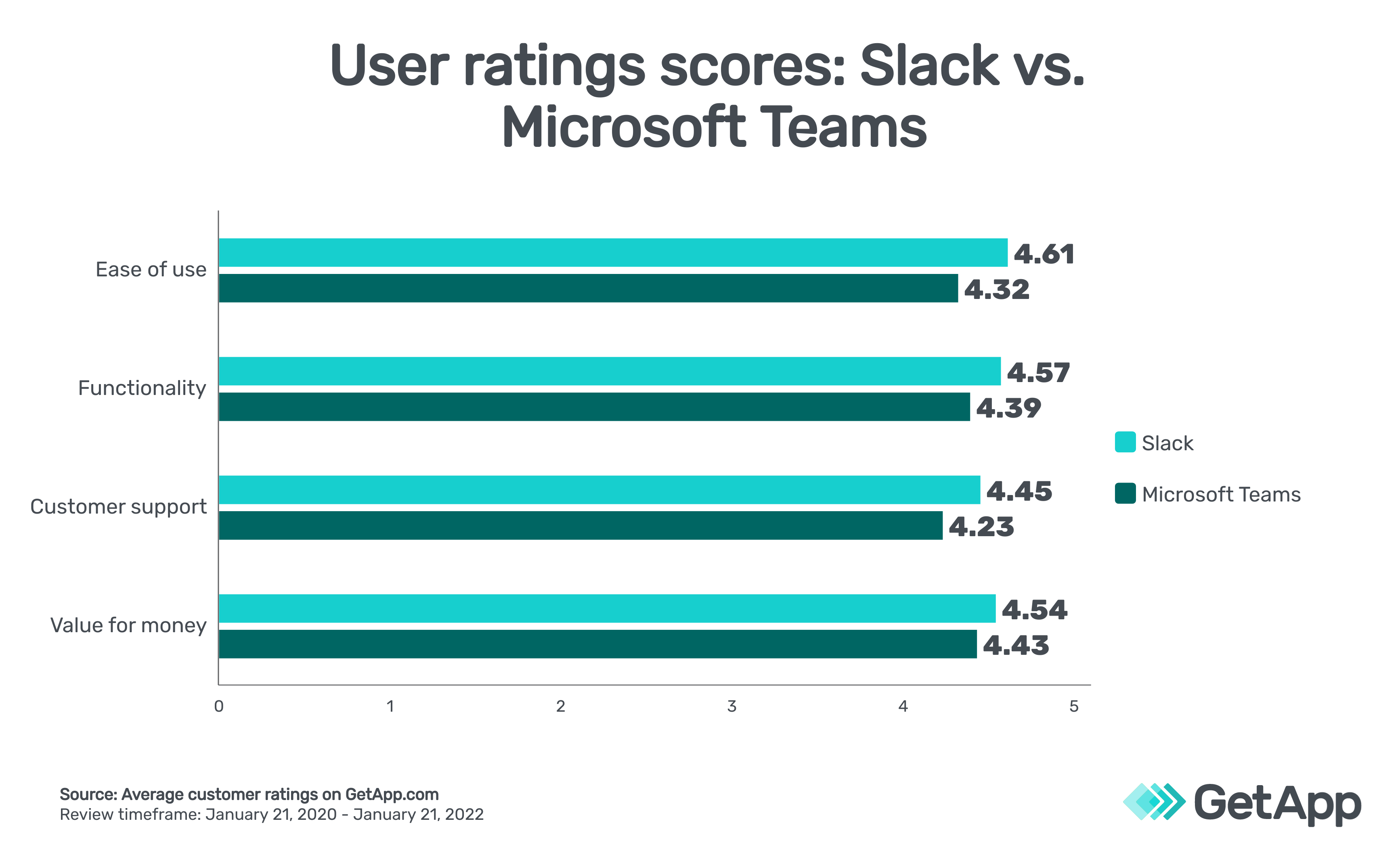
User ratings score: Slack vs Microsoft Teams
Takeaway:
While user sentiment on the core functionality of both doesn’t vary by a wide margin, users think Slack offers better value for money, is easier to use, and they are more likely to recommend it.
Integrations
Slack offers unlimited app integration, and it connects with over 1,500 apps listed on GetApp. The options are spread across categories such as email marketing, CRM, and survey software. Some of the most popular apps in the Slack app directory include Zoom, Zoho Survey, and GitHub.
Microsoft Teams integrates with over 500 apps (listed on GetApp) across categories such as video conferencing and collaboration software. Some of the popular apps in the Microsoft Teams integration directory are Microsoft Power BI, Jira, Asana, and Trello.
Takeaway:
Slack integrates with over five times the number of apps Microsoft Teams integrates with.
Slack vs. Microsoft Teams: Which collaboration platform is right for your business?
There are functionality overlaps between the two tools with some certain areas of uniqueness. Therefore, to choose the one best for you, factor in your own unique business needs and weigh them against the information we’ve shared to see which one addresses your needs better.
If you’re primarily looking for a system to stay on top of the goings-on in your team, you’d be better off with Slack.
If you’re searching for a robust communication platform that supports instant messaging and online meetings, Microsoft Teams is probably right for you. Besides, if your business is already using Microsoft Office, Teams would be a better choice for you.
Final takeaway:
Slack is a holistic collaboration tool, while Microsoft Teams is more focused on effective communication.
Read to know more about your options?
Methodology and Disclaimer
The ratings mentioned in this article were obtained from GetApp.com on January 21, 2022. The applications selected in this article are examples to show a feature in context and are not intended as endorsements or recommendations. They have been obtained from sources believed to be reliable at the time of publication.
With expertise in marketing and content strategy, Barkha’s work has been featured in Medium and educational websites. When not working, she can be found re-watching “The Office” or “Brooklyn Nine-Nine.”
More on Collaboration

May 31, 2024


Dec 12, 2023

Dec 26, 2021