

GetApp offers objective, independent research and verified user reviews. We may earn a referral fee when you visit a vendor through our links.
Our commitment
Independent research methodology
Our researchers use a mix of verified reviews, independent research, and objective methodologies to bring you selection and ranking information you can trust. While we may earn a referral fee when you visit a provider through our links or speak to an advisor, this has no influence on our research or methodology.
Verified user reviews
GetApp maintains a proprietary database of millions of in-depth, verified user reviews across thousands of products in hundreds of software categories. Our data scientists apply advanced modeling techniques to identify key insights about products based on those reviews. We may also share aggregated ratings and select excerpts from those reviews throughout our site.
Our human moderators verify that reviewers are real people and that reviews are authentic. They use leading tech to analyze text quality and to detect plagiarism and generative AI.
How GetApp ensures transparency
GetApp lists all providers across its website—not just those that pay us—so that users can make informed purchase decisions. GetApp is free for users. Software providers pay us for sponsored profiles to receive web traffic and sales opportunities. Sponsored profiles include a link-out icon that takes users to the provider’s website.
ECommerce Platform Comparison Made Easier With These 5 Options
Need to take your business online but can’t decide on an eCommerce platform? Here are the top five options and everything you need to know about them.


Setting up eCommerce stores used to be an overwhelming task about 10 years back. It required experts who could code the website, manage technical aspects of the digital storefront, and market the store to encourage people to spend on it. Incidentally, most small or midsize businesses stayed away from setting up an online store.
But it is 2020, and the world is different now.
Today, if you are the owner or marketer of a small or midsize business, you know that digital presence is critical. In 2019, ~$602 billion was spent on online retail in the U.S., and you wouldn’t want to miss a piece of that pie. Further, the coronavirus-induced lockdowns have forced businesses to quickly adopt online selling to remain open.
Fortunately, eCommerce platforms can help you out. They allow you to quickly set up an online store with relatively limited technical expertise and investment.
In this article, we’ll help you understand what these tools exactly are, what to look for in them, and what the current top tools (based on our eCommerce Category Leaders, 2020) have to offer.
What is an eCommerce platform?
eCommerce platform is a website builder tool that helps businesses set up online stores. They help in eCommerce website designing, product cataloging, managing orders and inventory, payment processing, and email and social media marketing. They also offer detailed and multi-level reporting to help analyze site-wide and product-specific sales trends.
Some providers of eCommerce software also offer integrations with third-party platforms such as Amazon, eBay, and Etsy to help streamline all online sales into one dashboard.
Here are some ways an eCommerce platform can help transform your online business.
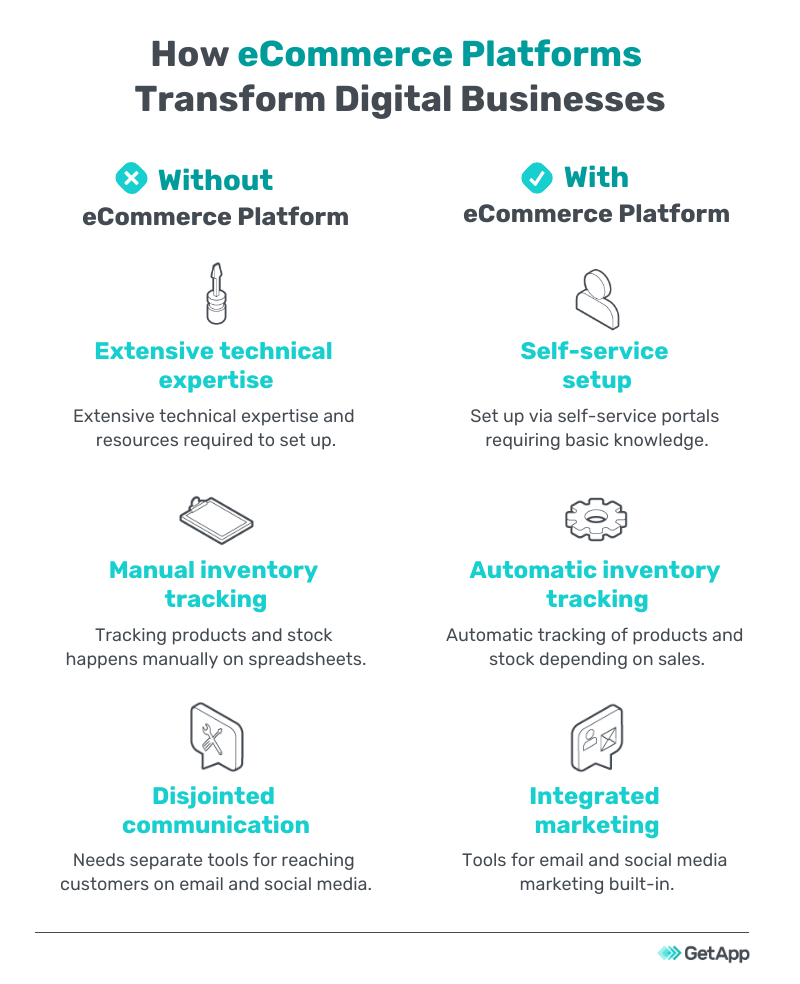
Things to consider when exploring eCommerce platforms
Just knowing what eCommerce platforms do and how they can help is not enough. It is important to know what to watch out for when exploring them.
Following are some things to consider:
Integrations
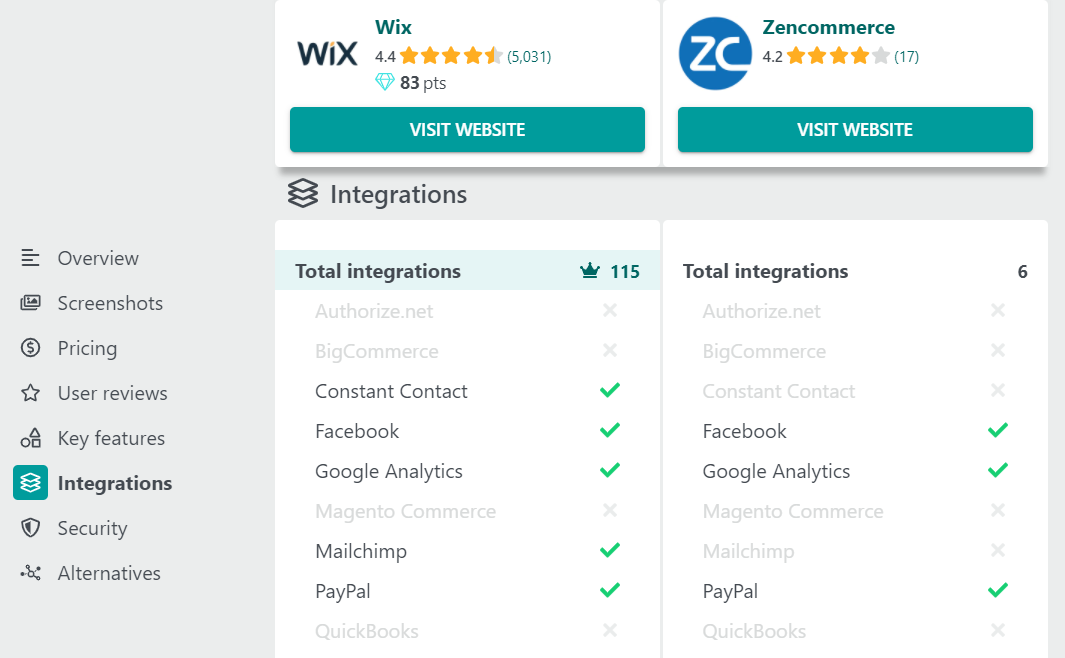
Comparison of integrations between Wix and Zencommerce (Source)
ECommerce platforms do not function in a silo. They need to work in tandem with other third-party tools for various functions, including:
Accounting to keep a track of finances
Email marketing to run email outreach campaigns
Social media management platforms for marketing and social selling
When making an eCommerce platform comparison, check the integrations different tools offer and ensure you can connect them to any third-party products you use or plan to use.
Security
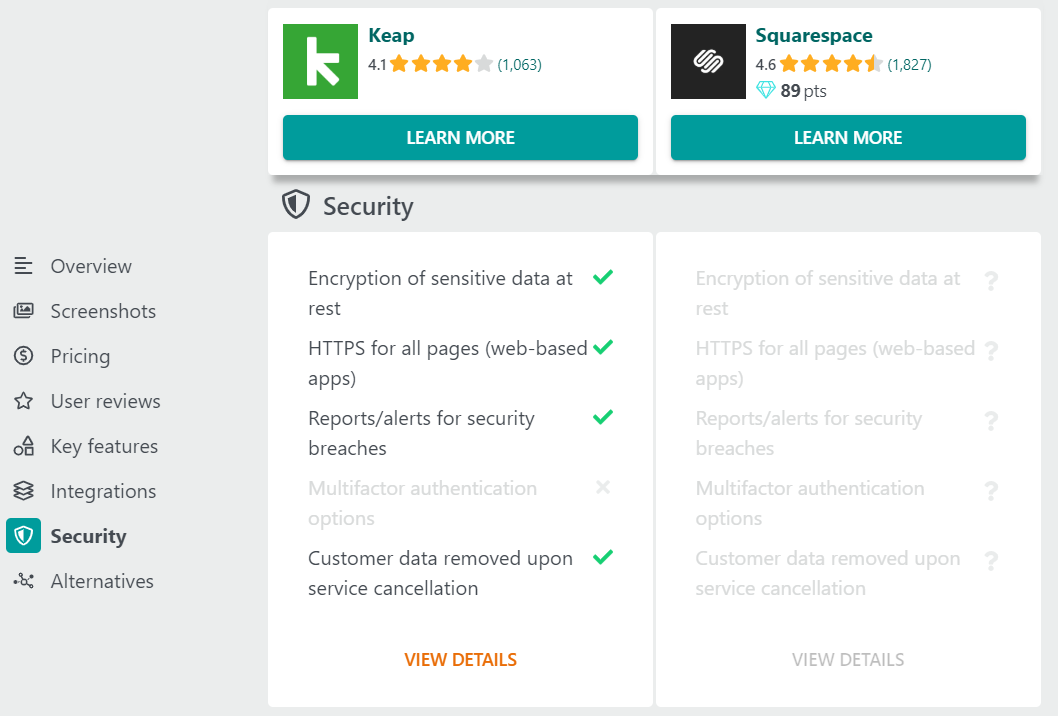
Comparison of security features between Keap and Squarespace (Source)
When setting up an eCommerce website, the security of your data and that of your customers’ become critical to your online business. Even a small breach can have customers feeling unsafe about transacting on your website.
Following are some points to check when making an eCommerce platform comparison:
PCI DSS compliance: The Payment Card Industry Data Security Standard (PCI DSS) prescribes 12 requirements that merchants and payment processors have to meet. These include protecting cardholder data, maintaining a privacy policy, implementing strong access, and control measures.
SSL certificate: Secure socket layer (SSL) certification is a digital certificate that enables encrypting data on a website. It is a global standard security technology; though SSL is one of the requirements of PCI DSS, it is important to be aware of it since website creators usually have to shell out money to get the certificate.
Tip
Every tool listed in this article is PCI DSS-compliant and offers SSL certifications. However, when evaluating eCommerce tools in general, be sure to check for both of these.
Top 5 eCommerce platforms compared
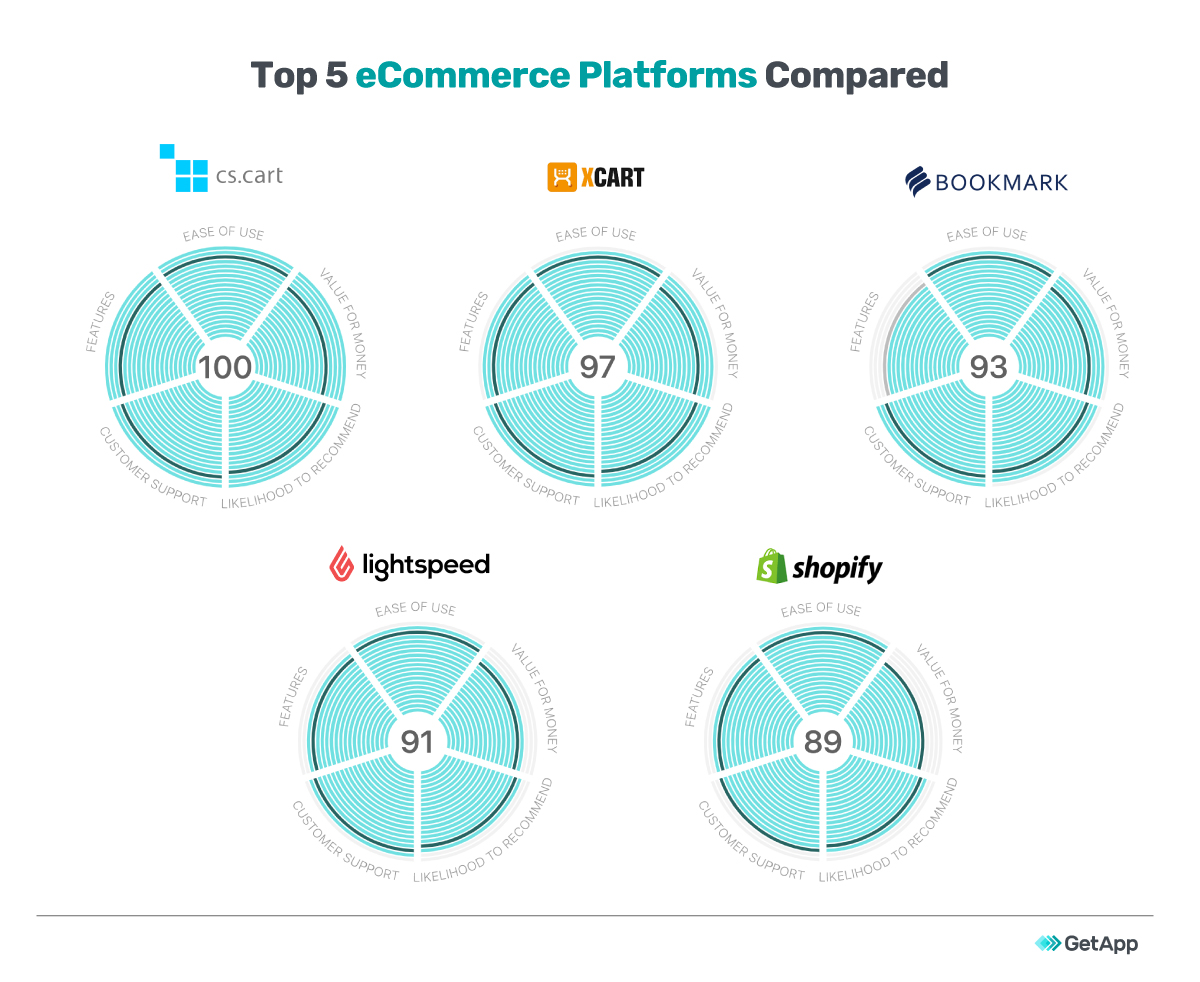
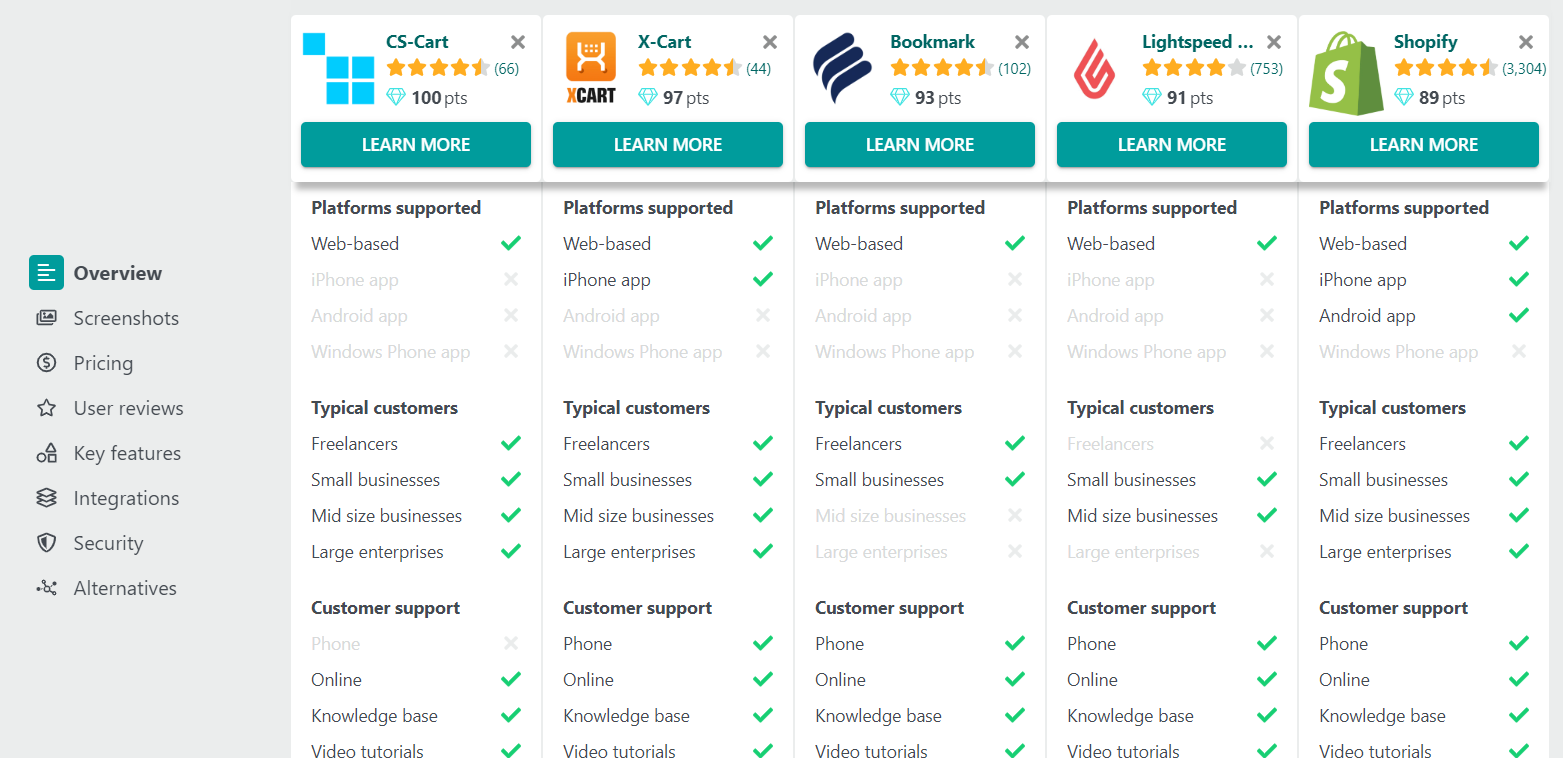
CS-Cart, X-Cart, Bookmark, Lightspeed POS, and Shopify are the top five eCommerce platforms in our eCommerce Category Leaders, 2020.
The category leaders are selected by our team of researchers using thousands of ratings from real users to identify five key areas: ease of use, value for money, functionality, customer support, and likelihood to recommend. You can review the detailed selection methodology here.
Here is a quick summary of their ratings before jumping into the LMS comparison:
1. CS-Cart
CS-Cart can be used to create digital storefronts for B2B as well as B2C businesses. The tool comes with multi-store functionality that allows creating and running several digital storefronts from a single administrative panel.
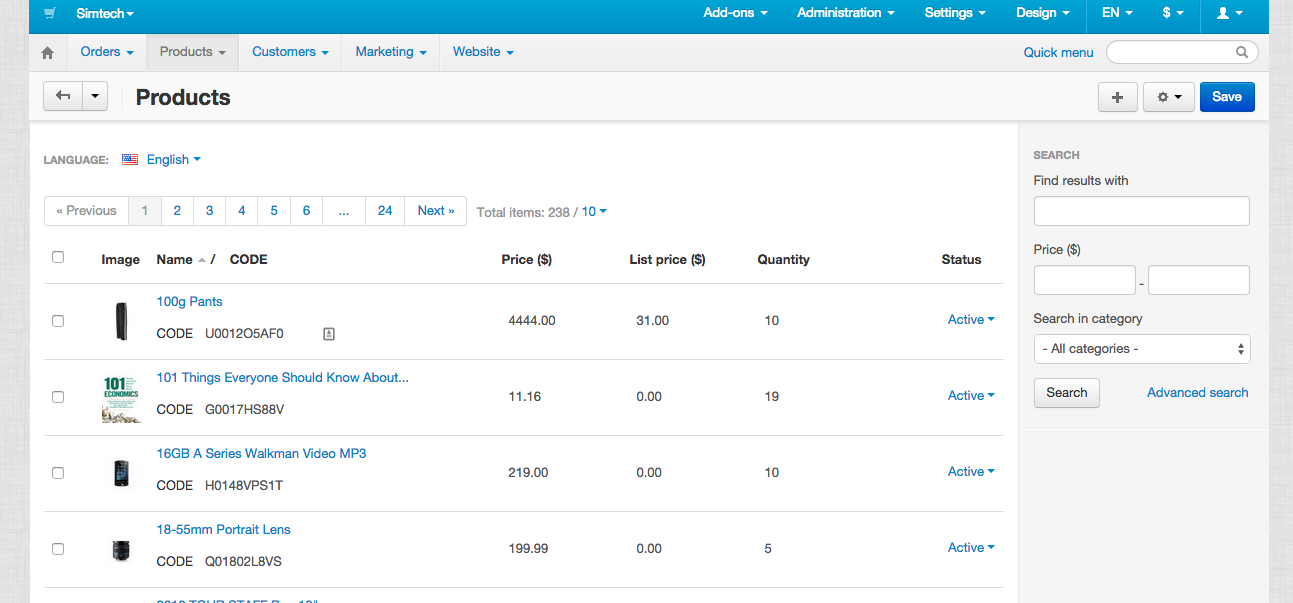
Managing product inventory in CS-Cart
Some of the highlights of this eCommerce platform include:
Layout editor with over 200 storefront themes that can be edited via drag-and-drop functions. The editor allows tech-savvy users to make changes to the website design and functionality by tinkering with the HTML/CSS coding.
Automatic tracking of shopping carts to keep tabs on customers who abandon carts without checking out. This data can be used to bring those customers back with bonuses and discounts or to send them reminder emails about their carts.
“Bestseller”, "at the same price", and "often bought together” features to set product recommendations on each product page. This helps businesses cross-sell and upsell products.
More than 50 payment systems, including leading banks, credit and debit cards, and digital wallets, for customers to choose from.
“Multi-channel commerce widget” mode to embed the digital store on any webpage by inserting a pre-prepared code into the page.
Integrations:
The software supports integrations with over 450 third-party platforms, including marketing tools, social media management tools, digital payment gateways, shipping and logistics solutions, and business intelligence tools. While some of these integrations are built-in free of cost, others can be bought off the software’s Marketplace.
Pricing and use cases:
| Plan | Ideal for |
|---|---|
| $385* | Small and midsize B2C businesses that already have a digital presence and want to run an extensive online store with hundreds of products. |
| $2,450* | Midsize and large B2B businesses that already have a digital presence and need to set up bulk product uploads and multiple users in one customer account. |
| $4,750* | Large businesses that either need to go digital from brick-and-mortar or already have an extensive digital presence and need warehouse management and unlimited digital storefronts. |
*One-time licensing fee
Reviewers of CS-Cart on GetApp share the following feedback:
| Pros | Cons |
|---|---|
| The option to pick storefront themes from the library or create new ones from scratch provides a lot of flexibility in the store design. | The number of features and functionality can be overwhelming for new users and result in a steep learning curve. |
Reviewer breakdown: Among the reviewers, 97% were small businesses, 2% were midsize businesses, and 2% were large businesses (numbers have been rounded off to the nearest whole number).
2. X-Cart
X-Cart is an open source shopping cart designed by the same company that later created another popular eCommerce solution called Ecwid. It offers separate modules for cloud and on-premise usage, as well as for multi-vendor, mobile, and omnichannel usages.
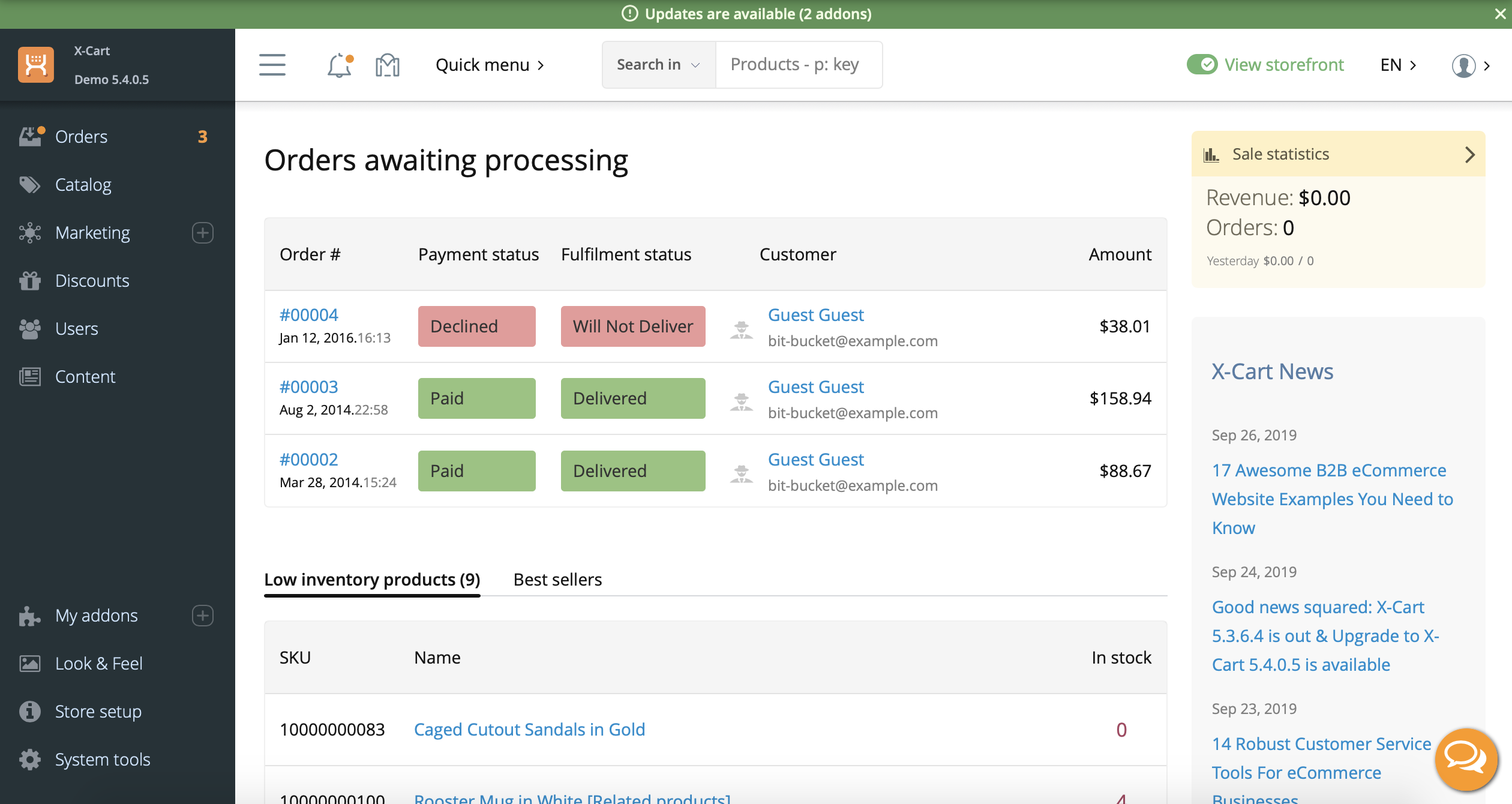
Admin dashboard in X-Cart
Some of the highlights of this eCommerce platform include:
More than 120 payment gateways, including Amazon Pay, Skrill, and PayPal. The platform also offers the ability to set up recurring payments with credit cards.
Multiple logistics partners, including UPS, USPS, FedEx, CanadaPost, Australia Post, and DHL, that can be plugged into the digital store to auto-update shipping rates in invoices without any manual intervention.
Abandoned cart recovery to allow customers to find previously selected items in their shopping carts. This data can also be used to send them reminder emails.
Online store builder with built-in themes to quickly put together a digital storefront. The platform also allows users to create storefronts by coding their own designs.
Integrations:
The platform offers integrations with multiple marketing, advertising, and analytics tools, including Yandex, Mailchimp, and Google Analytics.
Pricing and use cases:
| Plan | Ideal for |
|---|---|
| Hosted platform starting $49/month | Small and midsize businesses that need to manage digital stores with limited technical expertise. |
| On-premise enterprise module with custom quotes | Large businesses that have extensive technical expertise and want to manage an omnichannel presence. |
Reviewers of X-Cart on GetApp share the following feedback:
| Pros | Cons |
|---|---|
| The platform is scalable and features can be easily added and integrated as the business grows. | Updates for on-premise installations can be tricky and at times result in an unsmooth experience for customers visiting immediately after the update. |
Reviewer breakdown: Among the reviewers, 92% were small businesses, 5% were midsize businesses, and 3% were large businesses (numbers have been rounded off to the nearest whole number).
3. Bookmark
Bookmark is a website building software with a focus on eCommerce. It mirrors the experience of creating a blog into setting up and running digital storefronts. It provides multiple themes and a drag-and-drop website builder to allow users with minimal technical knowledge to set up online stores.
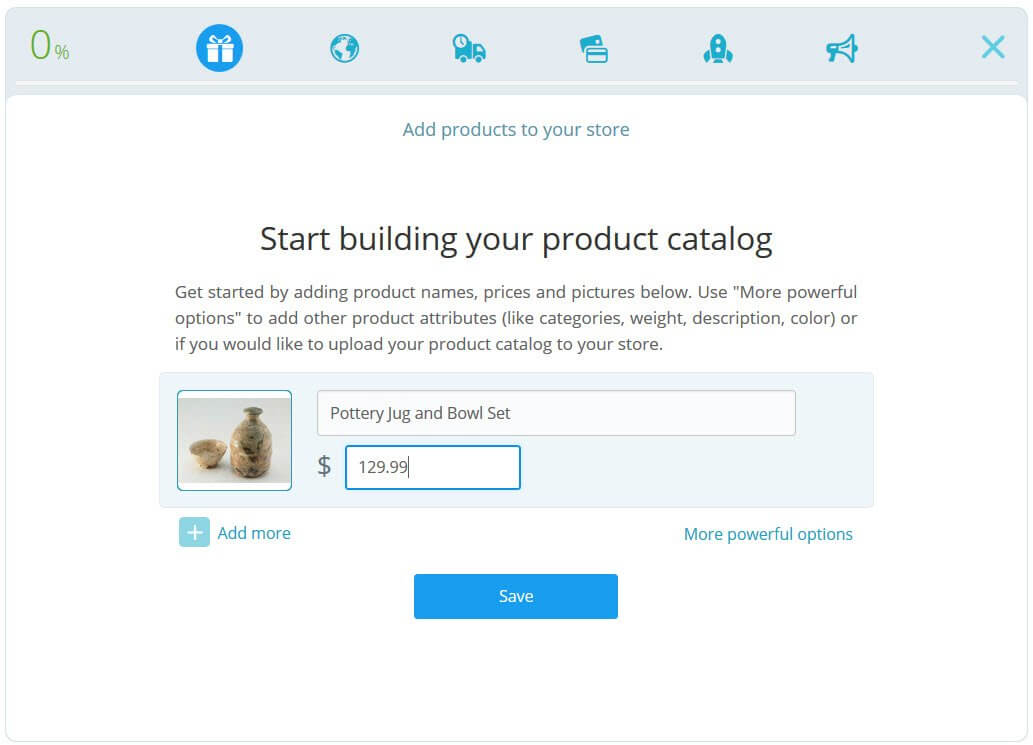
Some of the highlights of this software include:
Preview mode in the website builder to allow users to see how their digital storefront will look like.
Responsive design to autofit the storefront’s user interface to the device (phone, laptop, tablet, etc.) it is viewed on.
Android and iOS apps so that users can manage the store on the go.
Built-in plug-ins to add the storefront to Facebook, Instagram, Google Shopping, eBay, Amazon, and multiple other platforms.
Social community where users can get help from technical experts, professionals, and other Bookmark users.
Integrations:
The software provides integrations with multiple third-party tools for marketing, digital payments, and logistics and shipping services. The details of these can be found on the vendor website.
Pricing and use cases:
| Plan | Ideal for |
|---|---|
| Free | Individual entrepreneurs who want to delve into eCommerce and set up websites for a small product catalog. |
| $15/month | Small businesses that have a small catalog of products and want to start an eCommerce store, or want to take their brick and mortar business online. |
| $30/month | Small and midsize businesses that have a sizable catalog of products and want to take their brick and mortar store online, and want to sell not only via their website but also on social media platforms. |
Reviewers of Bookmark on GetApp share the following feedback:
| Pros | Cons |
|---|---|
| The tool is easy to understand and navigate, even for novice users, enabling setting up digital stores without external technical expertise. | The ability to customize web pages can feel limited compared to websites designed with more advanced tools or coded from scratch. |
Reviewer breakdown: Among the reviewers, 91% were small businesses, 2% were midsize businesses, and 7% were large businesses (numbers have been rounded off to the nearest whole number).
4. Lightspeed POS
Lightspeed POS is a point of sale solution that doubles as an eCommerce platform. It is ideal for brick and mortar businesses that want to expand to the online space and support an omnichannel model. The platform also offers some built-in marketing features such as email newsletters and social media selling.
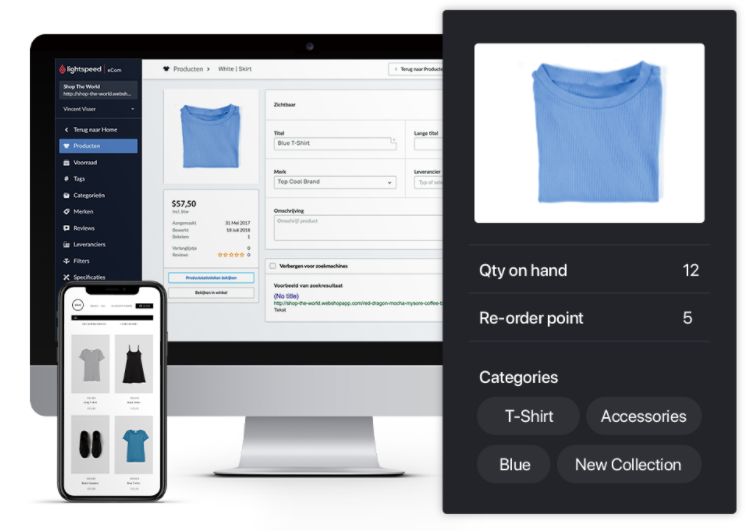
Managing inventory in Lightspeed POS (Source)
Following are some of the highlights of Lightspeed POS’s eCommerce module:
Easy importing of all products and inventory from physical stores into digital ones.
Dozens of mobile-responsive and customizable themes to design the store website without much technical expertise.
Built-in loyalty program to reward repeat customers.
Discount codes and promotions campaigns.
Integrations:
The platform offers integrations with multiple social media platforms such as Facebook, Instagram, and Twitter as well as with shipping and logistics service providers such as EasyPost and ShipStation.
Pricing and use cases:
| Plan | Ideal for |
|---|---|
| $99/month | Individual entrepreneurs who want to open an online store or take their brick and mortar business online. |
| $119/month | Small businesses and mom-and-pop stores that want to take their brick and mortar business online. |
| $169/month | Midsize businesses that want an omnichannel presence and need built-in account management and loyalty programs. |
| $229/month | Midsize and large businesses that want an omnichannel presence and detailed reporting of their operations. |
Reviewers of Lightspeed POS on GetApp share the following feedback:
| Pros | Cons |
|---|---|
| The tool makes it easy to customize the digital storefront to include multiple variations of products, detailed product descriptions, and curbside pickup. | Some customers report facing issues with credit card transactions, such as payment failure in a few instances. |
Reviewer breakdown: Among the reviewers, 94% were small businesses, 4% were midsize businesses, and 2% were large businesses (numbers have been rounded off to the nearest whole number).
5. Shopify
Shopify helps you set up digital storefronts or an omnichannel presence. It comes with a POS module for brick and mortar stores and eCommerce functions for digital storefronts. The vendor has its own fulfillment network that allows users to transfer part of their shipping responsibilities to the fulfillment center and ease their workload.
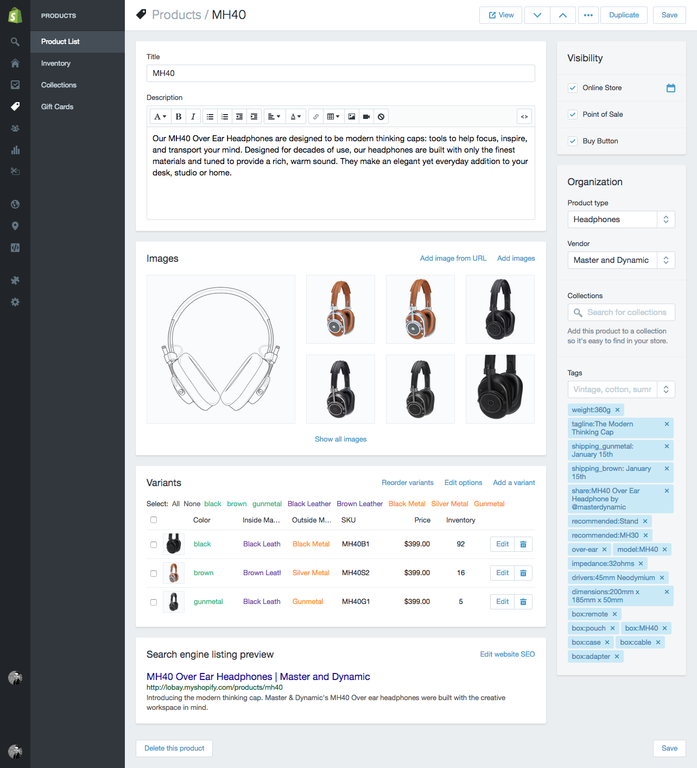
Backend of the product page in Shopify
Some of the highlights of this eCommerce platform include:
More than 70 themes for the digital storefront, from popular designers like Happy Cog, Clearleft, and Pixel Union, sorted by industry and the type of business.
Access to technical aspects such as HTML and CSS that allows users with technical expertise to make desired modifications and enhancements to the pre-designed themes.
Mobile app to manage all functions of the store on the go.
Abandoned cart recovery for sending reminders as well as discounts to encourage purchasing.
Automatic tax functionality that adds country and state taxes to the invoice based on the business’s location.
Integrations:
The platform integrates with over 100 payment gateways, most leading social media platforms, and dropshipping partners such as Ordoro, Inventory Source, and eCommHub. It also integrates with fulfillment partners including Shopify Fulfillment Network, Amazon, Rakuten Super Logistics, and Shipwire, and courier partners including UPS, USPS, and FedEx.
Pricing and use cases:
| Plan | Ideal for |
|---|---|
| $29/month | Individual entrepreneurs that want to start an eCommerce business or small businesses (with up to four locations) that want to go online. |
| $79/month | Small and midsize businesses (with up to five locations) that want to go online. |
| $299/month | Midsize businesses (with up to eight locations) that want to go online and require extensive reporting on all facets of their operations. |
Reviewers of Shopify on GetApp share the following feedback:
| Pros | Column 2 |
|---|---|
| The vast range of offerings from Shopify makes it easy to add features when required without having to start with an expensive plan. | Due to the extensive range of features offered, it can take users some time to understand and get used to all the functions. |
Reviewer breakdown: Among the reviewers, 81% were small businesses, 9% were midsize businesses, and 10% were large businesses (numbers have been rounded off to the nearest whole number).
Finding the right eCommerce platform — what type of buyer are you?
Now that you have a good understanding of eCommerce platforms and what the top ones offer, you might begin exploring and shortlisting options for your business. But beware that features, integrations, and security measures aren’t the only things to look out for — nor are they limited to the essentials we have covered.
It is important to spend time doing your own research and comparing multiple platforms. You can begin by trying to understand what type of buyer you are and what are your objectives for using the platform:
Businesses with an online-only presence: These businesses only have a digital presence and no brick and mortar stores. They fall into the following categories by business size:
Individual entrepreneurs or small businesses: Tools that enable creating and managing a digital storefront in a manner similar to a blog or social media profile are ideal for such buyers.
Midsize and large businesses: In addition to essential eCommerce features discussed above, they should explore platforms that offer services such as shipping management or fulfillment centers.
Businesses that want an omnichannel presence: These businesses have an existing brick and mortar presence that they want to take online. They fall into the following categories by business size:
Individual entrepreneurs and small businesses: In addition to the essential eCommerce features we’ve discussed above, they need to ensure that the platform provides either a built-in POS module or integrates with POS solutions. This can streamline the billing and inventory management between their brick and mortar store and digital storefront.
Midsize and large businesses: Just like the small businesses in this business type, they need to also ensure that the platform integrates with POS solutions or provides a built-in module.
Tip
Small businesses and individual entrepreneurs should focus on cloud-based platforms to avoid large investments required to host and maintain a website/platform.
Midsize and large businesses can explore open source platforms for their design flexibility. Such platforms might need additional investments for on-premise hosting, however, they provide extensive customization capabilities that can be critical for bigger businesses.
If you want to accelerate your product search, try the compare buttons beside each product in our software directory. This will eliminate all non-specific options and enable you to compare up to four products side-by-side to see which is the right one for you.
Notes
For the "user feedback trends (pros/cons)" sections, we performed sentiment analysis of reviews left for each product in the 12 months previous to the creation of this report. Reviews data may have changed since publication and may not reflect current conditions.
Listed pros and cons are derived from features listed on the product website and product user reviews on Gartner Digital Markets domains (Capterra, GetApp, and Software Advice). They do not represent the views of, nor constitute an endorsement by, GetApp or its affiliates.
Some applications selected in this article are examples to show a feature in context and are not intended as endorsements or recommendations. They have been obtained from sources believed to be reliable at the time of publication.
Rupal Bhandari
More on eCommerce


Sep 02, 2022
Aug 05, 2024


Jun 13, 2024

Sep 20, 2021