GetApp offers objective, independent research and verified user reviews. We may earn a referral fee when you visit a vendor through our links.
Our commitment
Independent research methodology
Our researchers use a mix of verified reviews, independent research, and objective methodologies to bring you selection and ranking information you can trust. While we may earn a referral fee when you visit a provider through our links or speak to an advisor, this has no influence on our research or methodology.
Verified user reviews
GetApp maintains a proprietary database of millions of in-depth, verified user reviews across thousands of products in hundreds of software categories. Our data scientists apply advanced modeling techniques to identify key insights about products based on those reviews. We may also share aggregated ratings and select excerpts from those reviews throughout our site.
Our human moderators verify that reviewers are real people and that reviews are authentic. They use leading tech to analyze text quality and to detect plagiarism and generative AI.
How GetApp ensures transparency
GetApp lists all providers across its website—not just those that pay us—so that users can make informed purchase decisions. GetApp is free for users. Software providers pay us for sponsored profiles to receive web traffic and sales opportunities. Sponsored profiles include a link-out icon that takes users to the provider’s website.
Wave Accounting vs. QuickBooks: Which Is Right for My Rental Property Business?
Wondering whether Wave Accounting or QuickBooks is right for your rental property business? You’ve come to the right place. We've got pricing, functionality, and integration details for both tools.


Managing the cash flow of rental properties can be a nightmare for small-business owners keeping track of ledgers, invoices, and expenses. Accounting software can help you automate and manage these tasks, but with no shortage of software options out there it can be hard to choose one.
To help you choose a tool and avoid bottlenecks, let's compare two of the most popular accounting software options: Wave Accounting and QuickBooks Online.
Since both tools offer features that serve small-business owners, let's compare their pricing, features, user ratings, and integration options to help you determine which is a better fit for your business.
Pricing
Wave Accounting is completely free for all users. The software provider doesn't charge any set-up or monthly fees. There are no pricing plans for this tool; all features are included in the free version.
If you accept online payments through Wave Accounting, you will be charged 2.9% + 30¢ to process most credit card payments, 3.4% + 30¢ for American Express, and 1% for bank payments.
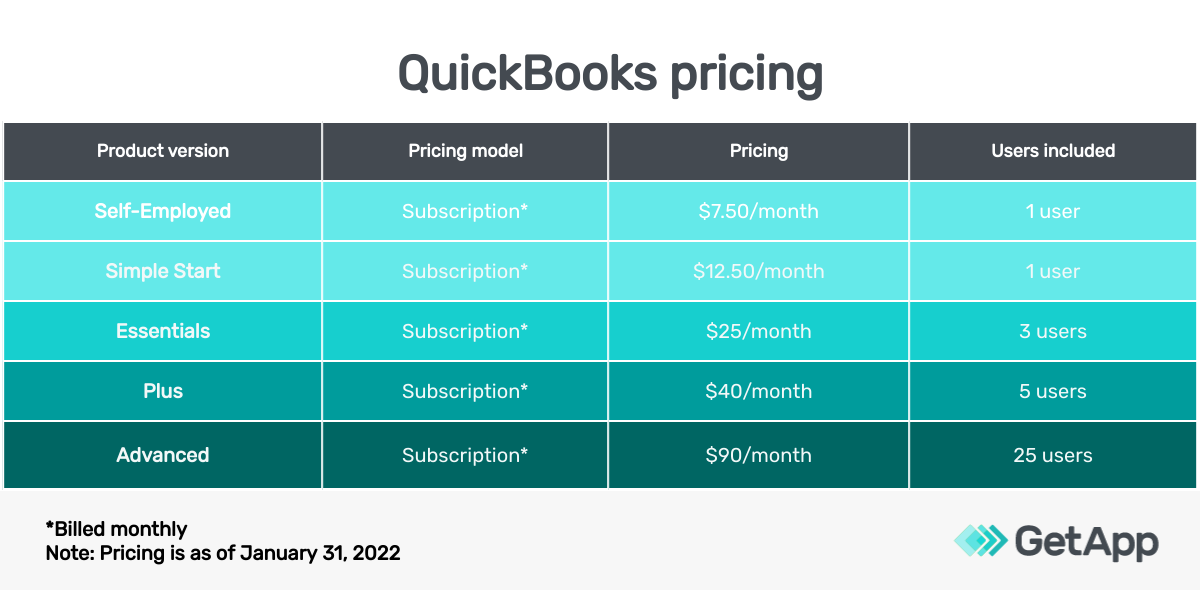
Comparatively, QuickBooks Online offers five paid versions/pricing plans. QuickBooks' payroll pricing plans are optional for users to add to any accounting plan. The software provider does offer a 30-day free trial.
The freelancers plan (the Self-Employed plan) is priced at $7.50 per month
For small businesses, QuickBooks Online offers four plans:
Simple Start is $12.50 per month
Essentials is $25 per month
Plus is $40 per month
Advanced is $90 per month
Takeaway:
In terms of pricing, Wave Accounting is more affordable. QuickBooks Online offers plan flexibility based on your required number of users and features, as well as a 30-day free trial.
Features
All Wave Accounting features are included in its free version. Users can register each rental property in their Wave account as an individual company and link that property's bank account.
Wave Accounting enables income, sales tax, and expense tracking. The tool allows unlimited collaborators, partners, and accountants, as well as unlimited invoicing.
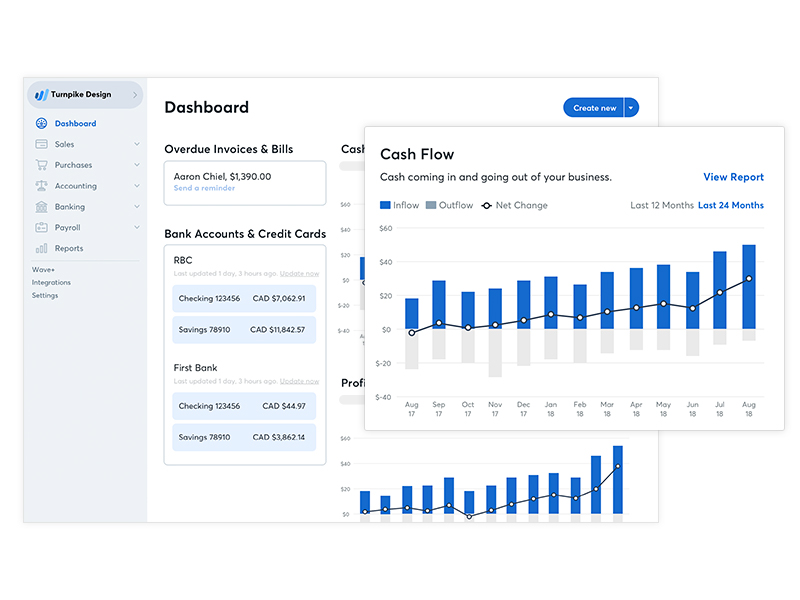
Dashboard in Wave Accounting (Source)
You can create multiple business profiles within one Wave account; each business profile represents a separate business with its industry type, country, and currency. You can generate a year-end financial report for each business to analyze income and expenses. The tool’s dashboard allows users to see how their businesses are performing, and each business can/will have its own dashboard.
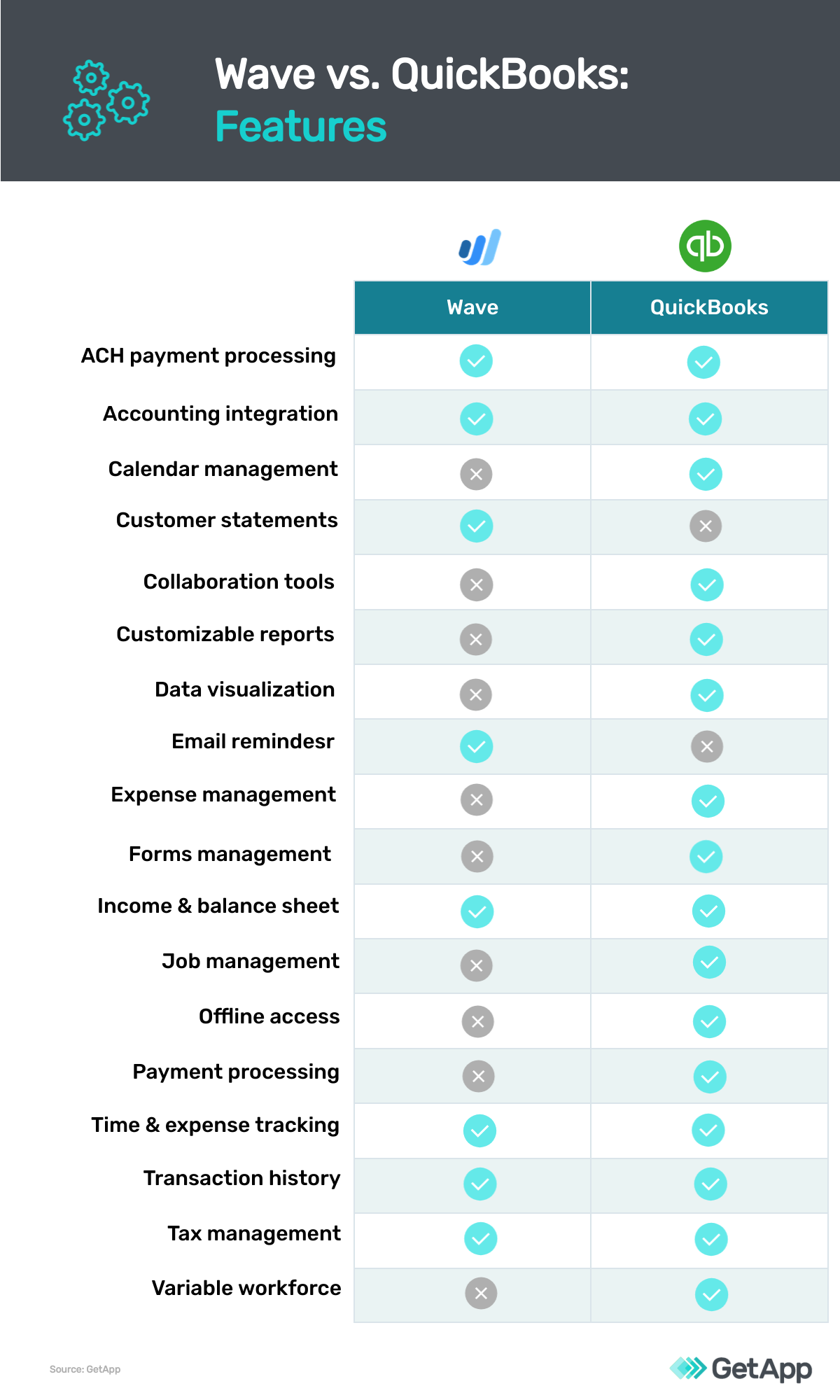
QuickBooks Online's features vary based on your chosen plan. The more expensive plans include more features.
The Self-Employed freelancer-focused plan unlocks basic features such as income and expense tracking, receipt capturing, quarterly tax estimation, and basic report creation.
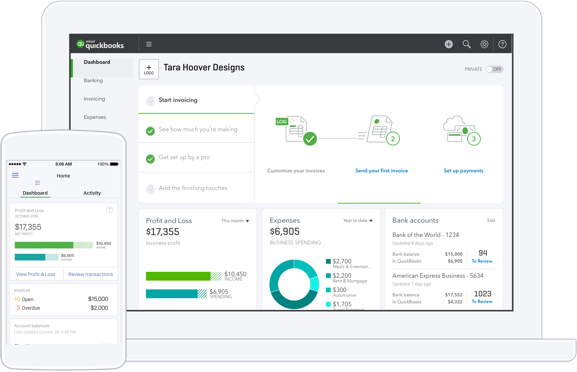
Dashboard of QuickBooks (Source)
With the QuickBooks Simple Start plan, users can manage basic tasks related to 1099 forms, create invoices, and enable payment processing. The Essentials plan adds bill management and payment along with time tracking functionality. The Plus plan allows users to track inventory and project profitability.
QuickBooks Online's Advanced plan offers features such as business analytics and insights, employee expense management, customized access by role, exclusive app integration, and more.
Takeaway:
QuickBooks Online offers more features than Wave Accounting. While both tools include core accounting functionality, QuickBooks has multiple features that serve more extensive accounting needs such as time tracking, automated tasks, and inventory management.
User reviews
As of January 31, 2022, WaveAccounting has a slightly higher overall average user rating on GetApp than QuickBooks Online:
Wave Accounting has an overall rating of 4.4 with 89% positive reviews
QuickBooks Online has an overall rating of 4.3 with 84% positive reviews
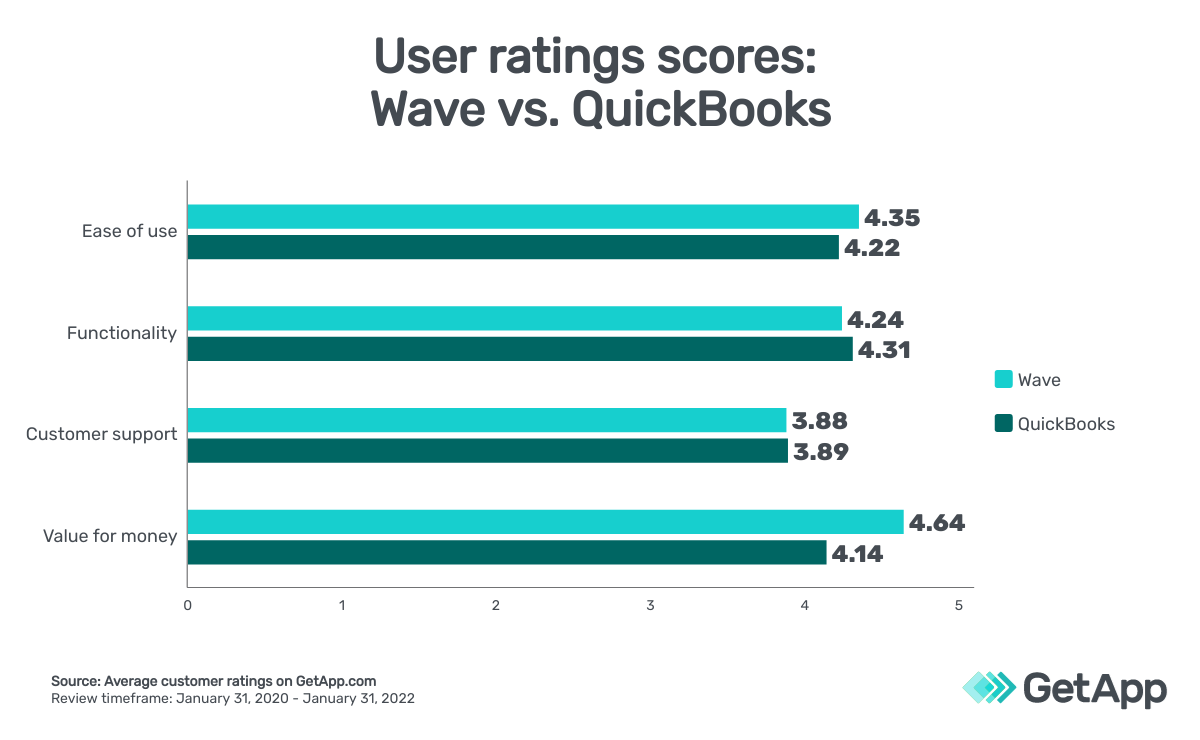
Users also rated both tools in categories such as ease of use, functionality, customer support, and value for money:
Takeaway:
Users preferred Wave for ease of use and value for money, while QuickBooks slightly wins out in functionality. The tools tied for customer support.
Integrations
QuickBooks Online offers more integrations than Wave Accounting.
QuickBooks' integration options are spread across categories such as payment gateway tools, payroll software, collaboration tools, and CRM software. Popular integrations include PayPal, Acuity Scheduling, HubSpot Marketing Hub, and Shopify. QuickBooks integrates with more than 1,000 tools.
Wave Accounting integrates with Google Workspace and Microsoft 365. It offers integrations with payment gateway tools such as PayPal and Stripe, IT management tools including Zapier, and project management tools such as Freedcamp and HubSpot CRM. Wave Accounting integrates with 30+ applications.
Takeaway:
While QuickBooks Online and Wave Accounting both integrate with popular tools, QuickBooks offers far more than Wave Accounting.
Wave Accounting vs. QuickBooks: Which tool is right for your rental property business?
Whether you have one property or multiple, keeping track of receivables and payables is crucial for a small-business owner. Underreporting expenses can lead to penalties, and overlooking deductions can result in unwanted tax bills.
Wave Accounting and QuickBooks Online are industry standards in the small business accounting space; here are some final considerations to help you decide which software better fits your needs:
For basic accounting needs and limited budgets, consider Wave Accounting. You will only be charged for payment processing and have access to standard features that can meet your core accounting needs.
If you need a more advanced accounting tool that helps you manage inventory, batch invoices and expenses, and provide detailed business insights, QuickBooks Online might be the best choice.
Final takeaway:
Wave Accounting helps with early-stage accounting while QuickBooks allows you to scale your accounting requirements.
Explore Wave Accounting and QuickBooks Online on GetApp.
Methodology
The ratings mentioned in this article were obtained from GetApp.com on January 31, 2022. The applications selected in this article are examples to show a feature in context and are not intended as endorsements or recommendations. They have been obtained from sources believed to be reliable at the time of publication.
Kritika Tyagi
mentioned in this article


More on Accounting & Finance