

GetApp offers objective, independent research and verified user reviews. We may earn a referral fee when you visit a vendor through our links.
Our commitment
Independent research methodology
Our researchers use a mix of verified reviews, independent research, and objective methodologies to bring you selection and ranking information you can trust. While we may earn a referral fee when you visit a provider through our links or speak to an advisor, this has no influence on our research or methodology.
Verified user reviews
GetApp maintains a proprietary database of millions of in-depth, verified user reviews across thousands of products in hundreds of software categories. Our data scientists apply advanced modeling techniques to identify key insights about products based on those reviews. We may also share aggregated ratings and select excerpts from those reviews throughout our site.
Our human moderators verify that reviewers are real people and that reviews are authentic. They use leading tech to analyze text quality and to detect plagiarism and generative AI.
How GetApp ensures transparency
GetApp lists all providers across its website—not just those that pay us—so that users can make informed purchase decisions. GetApp is free for users. Software providers pay us for sponsored profiles to receive web traffic and sales opportunities. Sponsored profiles include a link-out icon that takes users to the provider’s website.
Key CRM Features Explained
Hundreds of CRM products on the market don’t make it easy to choose the one right for your business. Here are some essential features you should look out for.

Imagine this: Ron is a small business owner who launched his store a few years ago. He used spreadsheets and handwritten notes to track customer information, and that was working fine until his business started to grow. Now he is struggling to maintain customer data and has even lost some of it, which is starting to affect his ability to maintain strong customer relationships.
He hears about something called a customer relationship management (CRM) tool from his fellow business owners. He decides to check online what it is and finds that such a tool is what he needs at the moment. But there is a problem: He doesn’t know what to look out for while selecting a CRM tool! And, without this knowledge, he is overwhelmed by the hundreds of options on the market.
If you can relate to Ron, this article is for you!
With so many options to choose from and each excelling at what it does, picking the right CRM product can be overwhelming. This article will help you understand which features you need to look for in a CRM tool and why. To learn how we selected these features, see our selection methodology at the bottom.
We will also list out some of our CRM Category Leaders for 2020, which are top-rated CRM software tools we picked as per our in-house research. We have have performed deep research into hundreds of CRM products to identify the top features you need in a CRM solution (for more details, refer to CRM buyers guide). Let’s dive deep into these features and the CRM Category Leaders for 2020 that fulfill these needs.
In our annual Category Leaders ranking, we use data from over one million user reviews to identify top-rated software tools across key areas including ease of use, value for money, functionality, customer support, and likelihood to recommend. Refer to our Category Leaders selection methodology to learn more about how we shortlist the market-leading products.
Key feature #1: Contact management
Contact management is the foundation of CRM software. It involves recording customers’ details, such as name, phone number, address, and social media handle, in a centralized and searchable database. Customer interaction tracking and lead capturing and monitoring capabilities are also included in contact management.
Here is how you can make sure the tool you’re looking at meets your contact management needs. Ask the vendor:
How many contacts can the tool store?
What customer details does the contact management feature capture?
What are the additional charges involved, if any, for increasing the number of contacts?
Here are two examples from our 2020 CRM Category Leaders report to give you some more context of the contact management feature.
Gold-Vision
In addition to the primary contact management capabilities, Gold-Vision allows tagging contacts to the organization or project they belong to. This is particularly useful for conglomerates or businesses with sister companies as users can easily map contact groups or create hierarchies by defining relationships between entities.
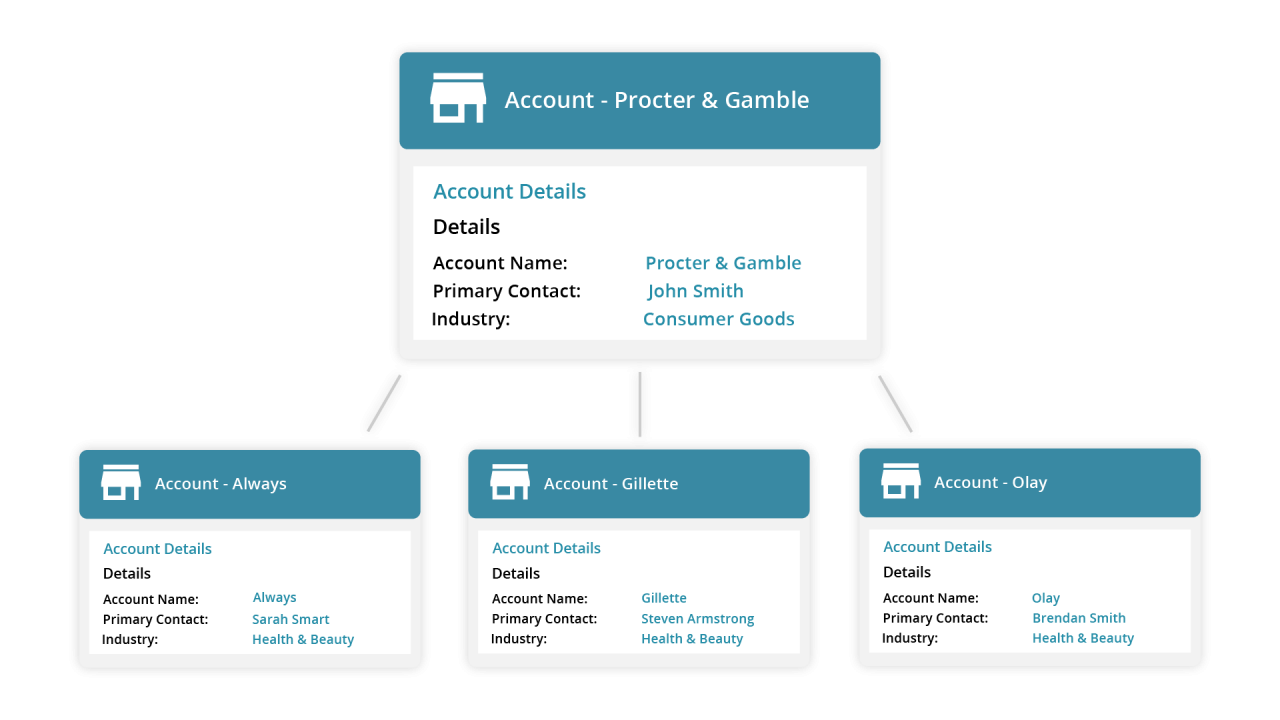
Contact management in Gold-Vision (Source)
VipeCloud
The contact management feature in VipeCloud stores contact information centrally to allow easy access and captures customer information from mailing lists and online directories. The feature also generates contact scores to gauge a contact’s overall interest level based on metrics such as email open rate, clicks, and bounces.
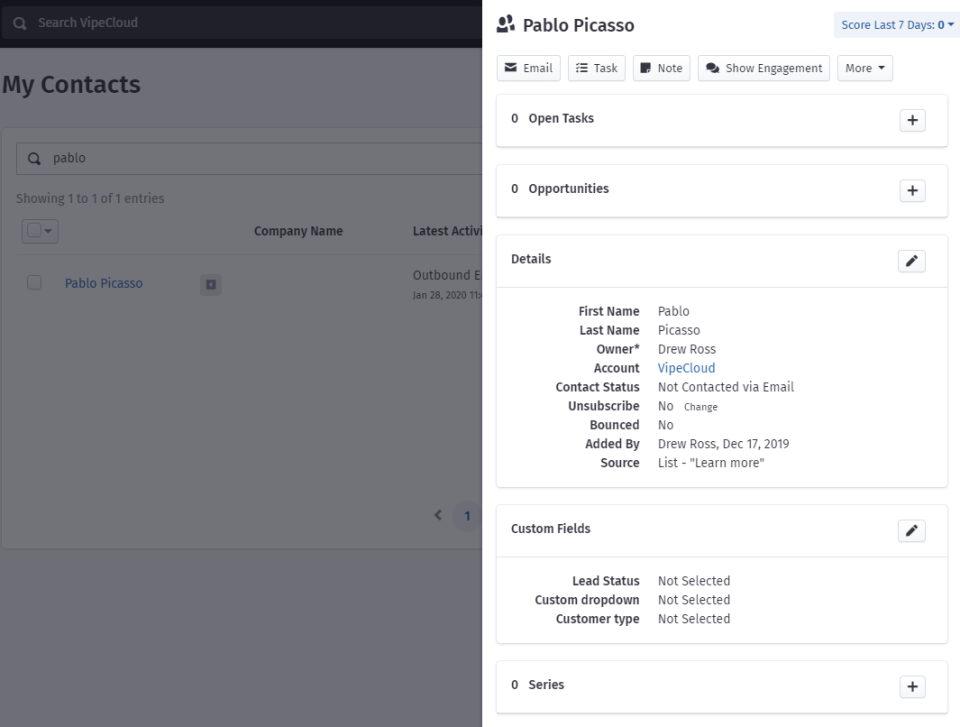
Check
If contact management is a vital capability you’re looking for and want a dedicated tool to do just that, explore our 2020 Contact Management Category Leaders.
Key feature #2: Analytics/CRM analytics
CRM analytics allows you to collect, organize, and analyze information such as sales data, email marketing campaign data (open rates, bounce rates, etc.), or supplier history.
Better visibility and understanding of customer data can allow you to resolve customer queries and grievances faster. When used proactively, it can help identify what customers are looking for and which products are best-suited to cross-sell and up-sell. Eventually, this feature helps make better customer decisions.
To ensure the tool you’re considering offers comprehensive analytics capabilities, ask the vendor:
Does the tool allow segmenting customers based on behavior or profile?
Can I get insights into customer-level tracking?
Can I track profit and loss data to determine my return on investment?
Does the tool offer web analytics to track customers’ website usage and behaviors?
Here are two examples from our 2020 CRM Category Leaders report to give you some more context of the CRM analytics feature.
FreeAgent CRM
FreeAgent CRM allows you to predict and plan the sales cycle by providing real-time sales pipeline snapshots. It also offers actionable insights to help manage sales expectations.
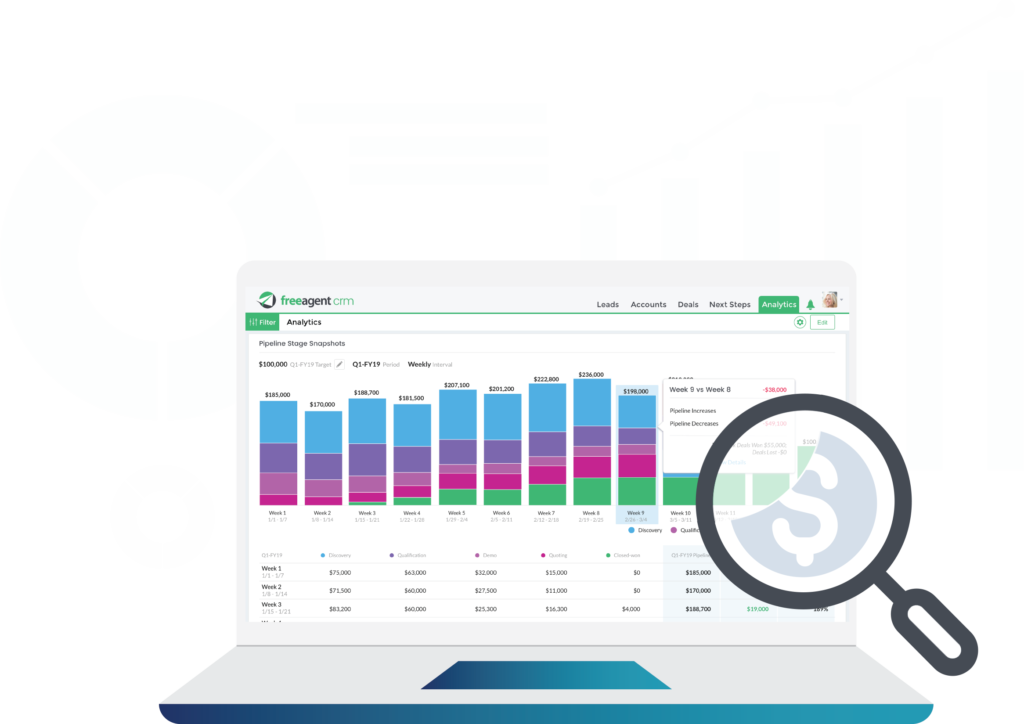
Real-time analytics in FreeAgent CRM (Source)
Freshworks
Apart from the mainstream analytics capabilities, Freshworks helps forecast sales cycles for all on-going deals and provides data around the probability of closing those deals, their estimated revenue, and their potential close dates.
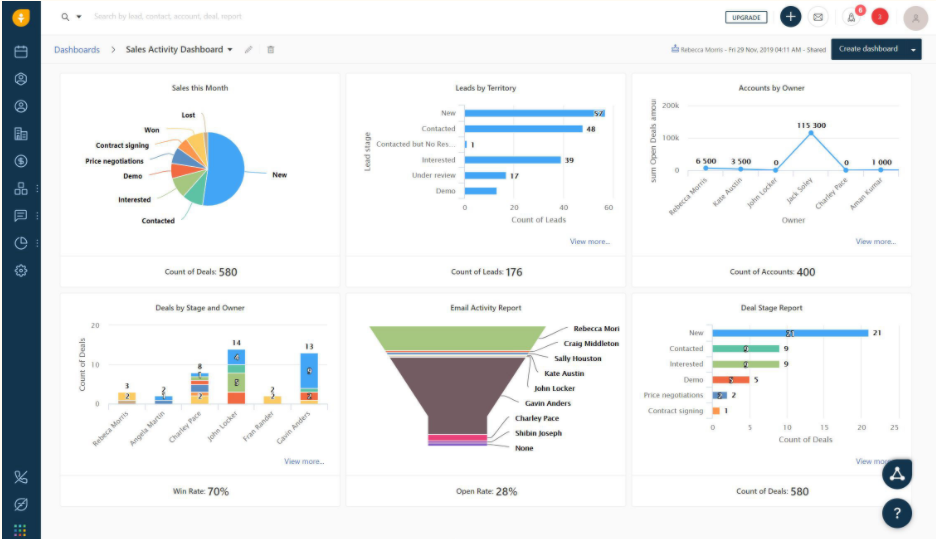
Sales reports in Freshworks (Source)
Key feature #3: Mobile access
Most businesses consider mobile access a must for effectively managing customer relationships. It’s because sales professionals are often on-the-move and have to remotely access and update prospect and customer information.
They also need an on-the-go repository for essential documents, contracts, and forms to address service requests. Moreover, managers and supervisors also need oversight into the workings of field-agents, their timelines, and the status of their tasks.
All of these requirements are addressed by mobile access to a CRM tool.
To make sure the tool you’re considering offers effective mobile access, ask the vendor:
Does the tool offer an Android or iOS mobile app?
Will I be able to integrate my calendar with the app?
Does the tool allow dialing into meetings with a click-to-call functionality?
Can I access and update leads, contacts, and opportunities?
Can I share files and access dashboards?
Here are two examples from our 2020 CRM Category Leaders report to give you some more context of the mobile access feature.
EngageBay
With EngageBay mobile app, users can access contact information, communicate across teams, share reports, and track activities anytime, anywhere. EngageBay’s mobile app is available for Android as well as iOS devices.

SalesNOW
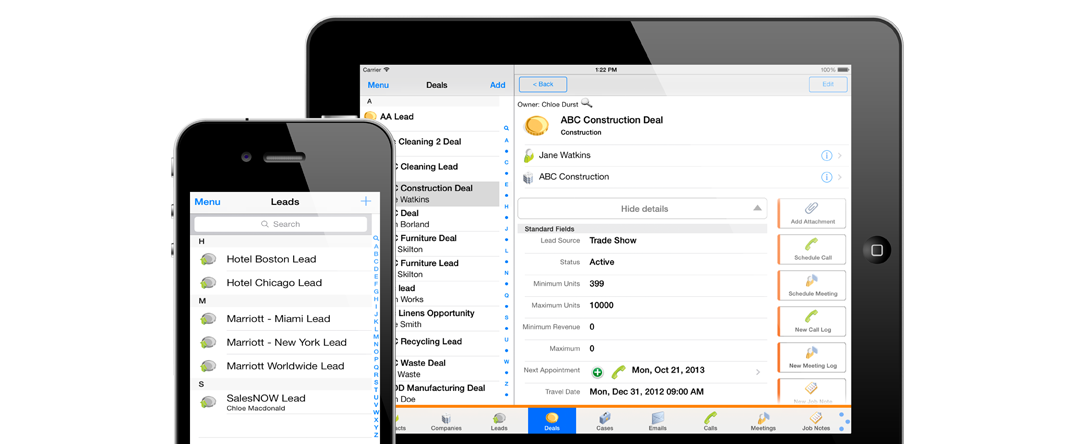
SalesNOW is a mobile CRM software that allows users to stay connected with customer accounts from anywhere using their mobile or tablet devices. The solution supports Android, iOS, as well as BlackBerry devices.
Key feature #4: Customization and scalability
Every business has unique requirements from its CRM tool. The tool you pick should be able to meet these requirements not only today but also in the future, as your business evolves. Essentially, the tool should:
Offer enough customization capabilities to mold as per business needs.
Integrate with subsystems and other external solutions your business already uses, which could include marketing and customer service tools.
Handle the growing scale of your business.
Here is what you should ask a vendor to make sure the tool you select addresses your needs:
Can it add as many numbers of users as my business wants without additional costs?
Can I customize workflows?
Can I modify it as per my business requirements?
Can it integrate with other systems?
Here are two examples from our 2020 CRM Category Leaders report to give you some more context of the customization and scalability feature.
Salesflare
Salesflare offers the ability to create different types of custom fields and tag a group of contacts and opportunities. It also offers Zapier integration that allows integrations with more than 700 apps such as Mailchimp and Slack to cater to the additional needs of clients.
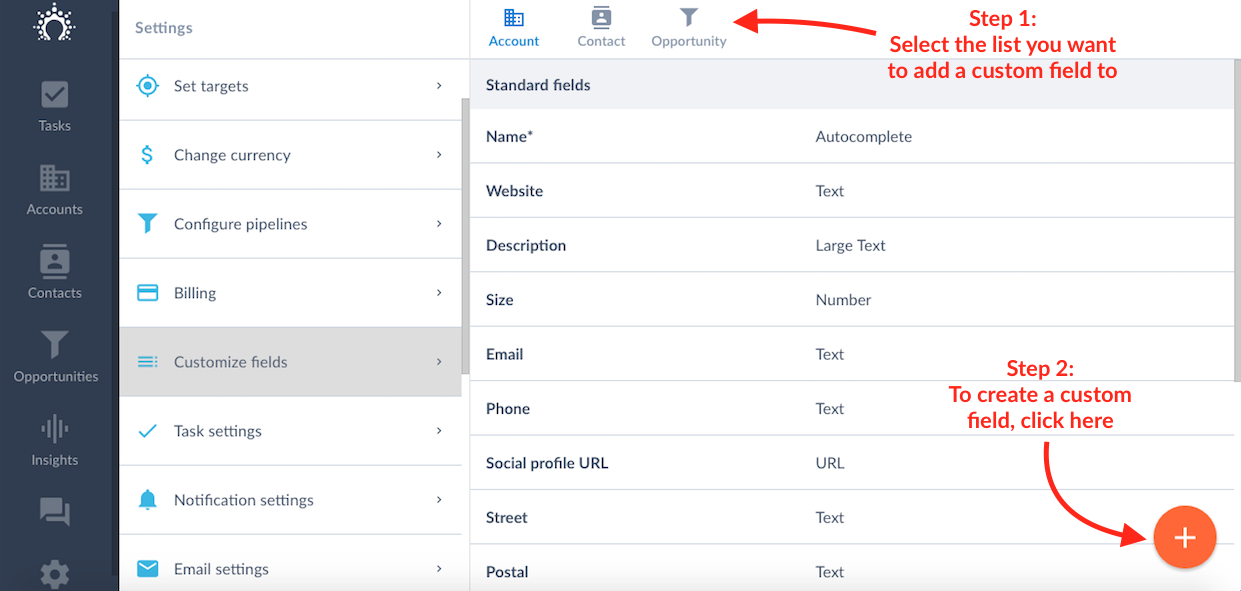
Custom fields in Salesflare (Source)
Salesmate
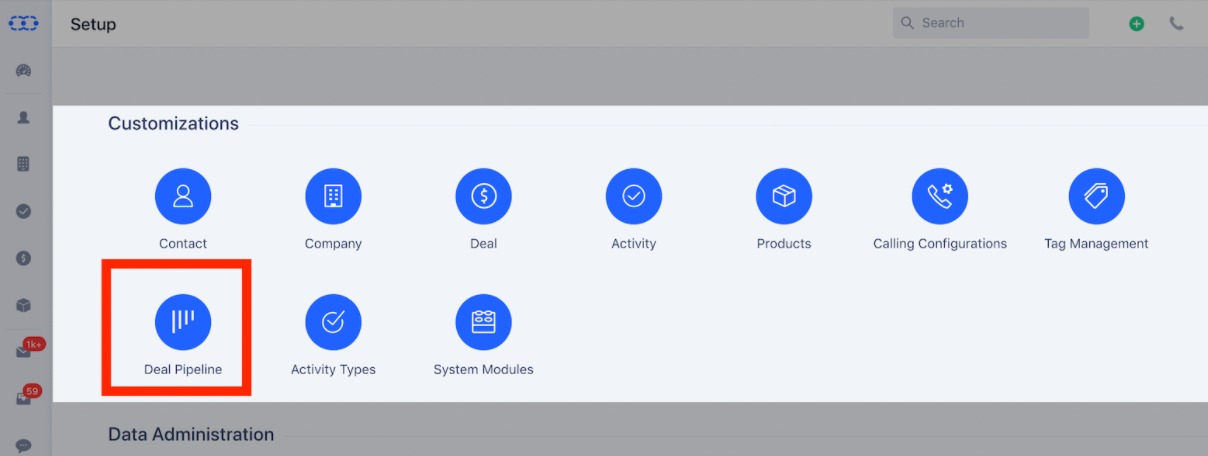
Salesmate allows you to create customized pipelines, layouts, and fields as per your requirements. It also addresses requirements for additional functionalities by integrating with multiple applications such as QuickBooks and RingCentral that allow you to continue operations without compromising on growth and scale.
What’s next?
Now that you know what to look out for, let’s see how you can filter the options and pick the right tool.
Speak with the vendor: While this article explains the basic CRM features, in reality, the complete set of features vary depending on the vendor, with some offering specialized products for a particular function or industry, such as construction CRM, financial CRM, or social CRM. Get in touch with the vendor and discuss your unique needs and their strengths or specializations. You may also check with them if a feature you need can be customized.
Read user reviews: Learn more on CRM software based on reviews. The reviews will give you first-hand insights about a product’s strengths and weaknesses and help you see through the marketing of a vendor.
Request a demo: Check if the vendor offers a product demo or a free trial of the tool as this will give you hands-on experience on the tool. Be sure to do your research beforehand and keep a list of key questions ready. Here is a list of 10 CRM Questions you can ask a vendor to be sure you’re making the right decision.
Check out this video for more insights into the ways basic CRM features can transform your business.
Methodology and note
Features listed have been picked from GetApp CRM Buyers Guides. Each feature has two examples, which have been picked randomly from GetApp’s 2020 CRM Category Leaders report so as to better explain the respective feature.
The applications selected in this article are examples to show a feature in context and are not intended as endorsements or recommendations. They have been obtained from sources believed to be reliable at the time of publication.
Bandita Awasthi, Priyanka Aggarwal
More on CRM


Apr 22, 2024

Jul 03, 2024

Mar 26, 2024

May 16, 2024

Mar 04, 2024