GetApp offers objective, independent research and verified user reviews. We may earn a referral fee when you visit a vendor through our links.
Our commitment
Independent research methodology
Our researchers use a mix of verified reviews, independent research, and objective methodologies to bring you selection and ranking information you can trust. While we may earn a referral fee when you visit a provider through our links or speak to an advisor, this has no influence on our research or methodology.
Verified user reviews
GetApp maintains a proprietary database of millions of in-depth, verified user reviews across thousands of products in hundreds of software categories. Our data scientists apply advanced modeling techniques to identify key insights about products based on those reviews. We may also share aggregated ratings and select excerpts from those reviews throughout our site.
Our human moderators verify that reviewers are real people and that reviews are authentic. They use leading tech to analyze text quality and to detect plagiarism and generative AI.
How GetApp ensures transparency
GetApp lists all providers across its website—not just those that pay us—so that users can make informed purchase decisions. GetApp is free for users. Software providers pay us for sponsored profiles to receive web traffic and sales opportunities. Sponsored profiles include a link-out icon that takes users to the provider’s website.
Top 7 Basecamp Alternatives for Your Project Management Needs
Seven user-recommended Basecamp alternatives to help oversee your projects from start to finish.

Over the years, the project management industry has witnessed many developments, with emerging competitors changing how businesses organize and plan their projects.
Introduced in 2004, Basecamp is one of the oldest project management tools on the market and a favorite among many users. However, it hasn't been quick to adapt to modern market developments and needs. Also, a steep starting price of $99 per month makes it expensive for small businesses or agencies.
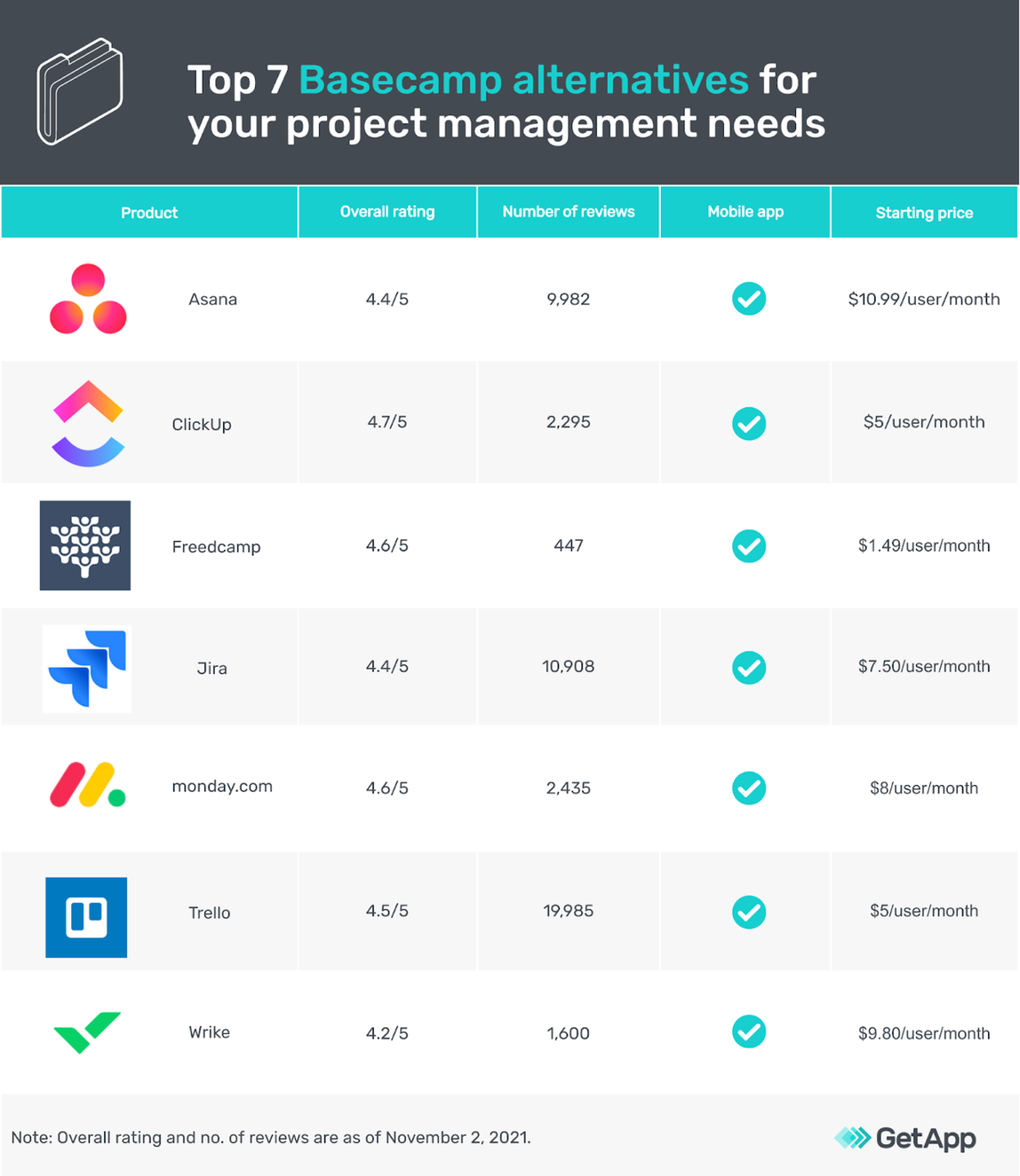
We asked users about the Basecamp alternatives they considered when purchasing project management software. Here are the top seven platforms (sorted alphabetically) they identified; all seven offer the same—or even more—features as Basecamp but at less than half the price. Our list can provide a starting point for your software search.
*See our full methodology for selecting these seven tools at the bottom of this article.
1. Asana
User rating: 4.4/5
No. of reviews: 9,982
Asana is project management software that lets you schedule daily tasks, create workflows, and collaborate with teammates on projects. It also helps plan product launches and marketing campaigns.
Asana allows you to create a shared workspace to collaborate with teammates on specific projects or tasks. It lets you select your preferred project view, such as a list, board, timeline, calendar, or project chart. You can also assign tasks, maintain a workflow timeline, and track project progress.
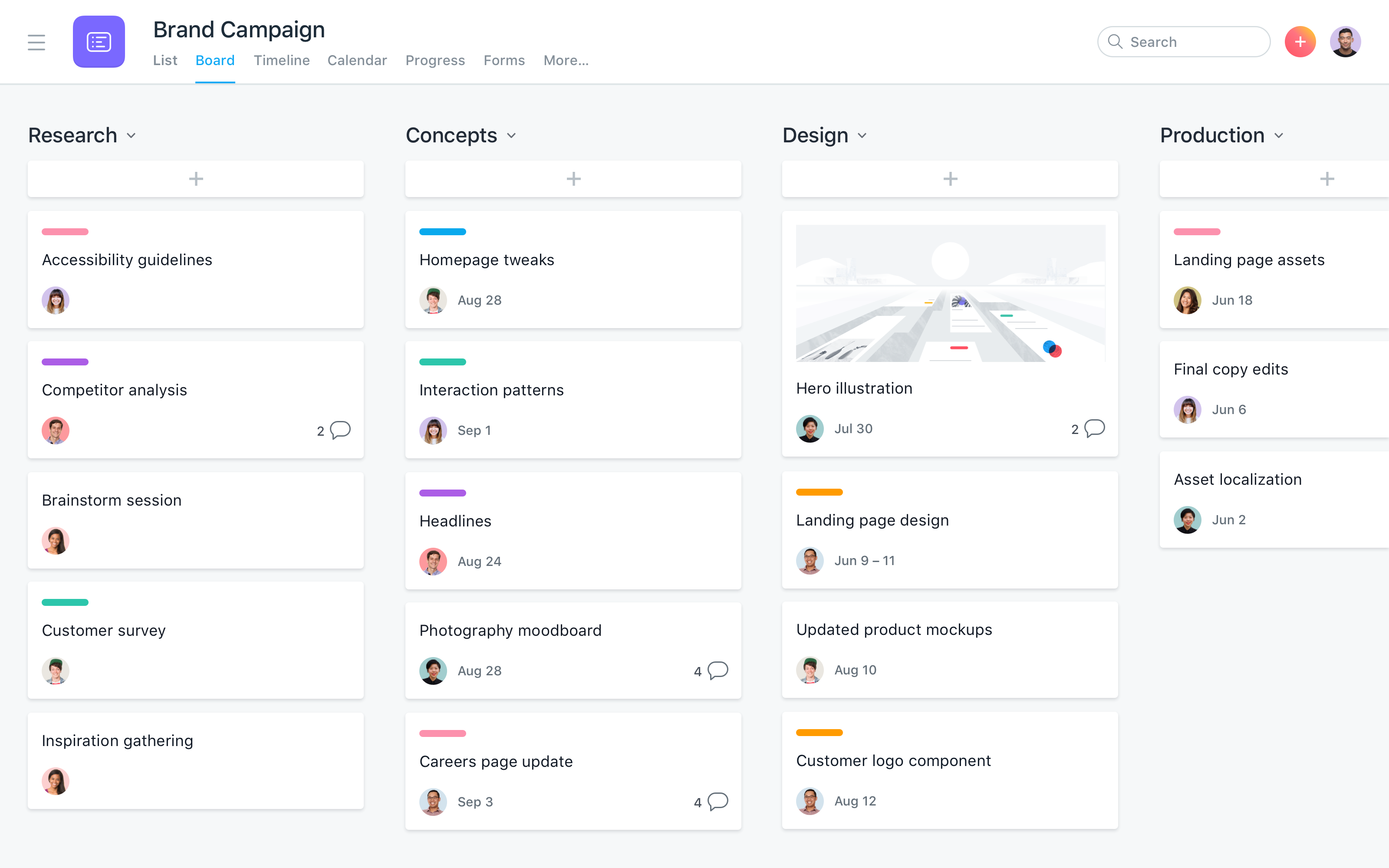
Brand campaign dashboard in Asana (Source)
Here’s how Asana compares with Basecamp
Both Asana and Basecamp are cloud-based project management software tools that focus on collaboration and creating smooth project workflows. But when it comes to project views, Basecamp offers only list, calendar, and file views, while Asana lets you pick from list, board, timeline, progress, and workload views.
| Platforms supported: | Both are web-based tools, and both offer a mobile app for iOS and Android devices. |
|---|---|
| Typical customers: | Both can be used by freelancers and small to midsize companies. However, for bigger teams, Asana could be a better fit. |
| Customer support: | Neither Basecamp nor Asana offers phone support, but both provide email and 24/7 chat support, video tutorials, and a knowledge base. |
| Pricing: | Both offer a free version for users. Basecamp has a flat fee of $99 per month, whereas paid plans for Asana start at $10.99 per user per month. |
Click here for a side-by-side comparison between Asana and Basecamp.
2. ClickUp
User rating: 4.7/5
No. of reviews: 2,295
ClickUp is a task management and team collaboration tool that helps plan and organize projects. It lets you create project tasks, assign them to teammates, and group them by priority.
With ClickUp, you can create knowledge bases and documents that you can edit with your teammates in real time. You can also use its built-in progress tracker to track project goals and deadlines.
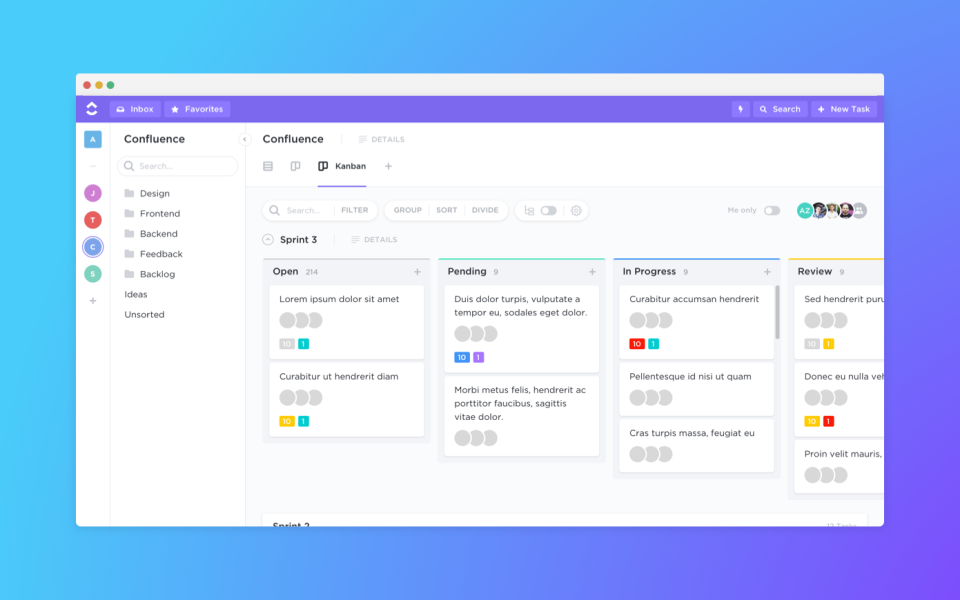
Project progress tracking in ClickUp (Source)
Here’s how ClickUp compares with Basecamp
While both are project management software solutions, Basecamp focuses more on creating easy-to-use workflows for teams. ClickUp, on the other hand, offers a holistic collaboration setup where you can plan and organize all your projects.
| Platforms supported: | Both are web-based tools, and both offer a mobile app for iOS and Android devices. |
|---|---|
| Typical customers: | Both can be used by freelancers, small to midsize businesses, and large enterprises. |
| Customer support: | ClickUp offers phone, email, and 24/7 chat support, whereas Basecamp offers only email and chat support. Both provide video tutorials and a knowledge base. |
| Pricing: | Both offer a free version for users. ClickUp’s paid plans start at $5 per user per month, while Basecamp has a flat fee of $99 per month. |
Click here for a side-by-side comparison between ClickUp and Basecamp.
3. Freedcamp
User rating: 4.6/5
No. of reviews: 447
Freedcamp is a project management tool that lets you collaborate with stakeholders. You can store files, contacts, and leads in a central repository; view multiple document versions; track issues across tasks; and split large tasks into small subtasks per requirements.
The software allows you to pull up reports to monitor the progress of tasks and team members, secure data using two-factor authentication, and create custom widgets to get all information in one location.
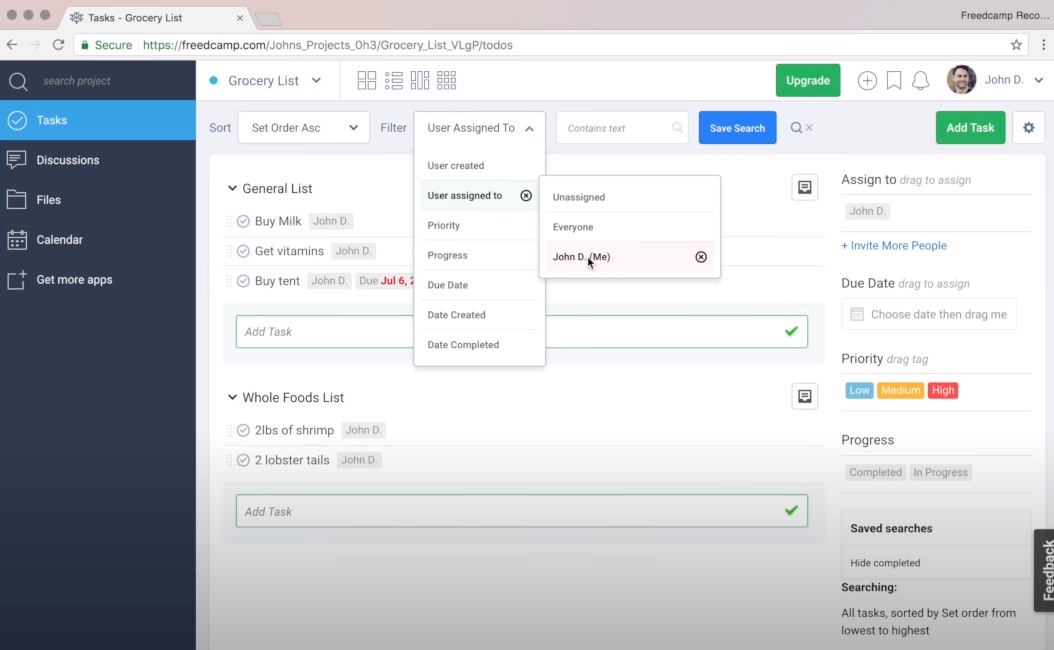
Task list in Freedcamp (Source)
Here’s how Freedcamp compares with Basecamp
Both tools work well for teams of all sizes. However, Freedcamp offers Gantt chart/timeline view and Kanban boards, which are lacking in Basecamp. It also provides time and expense tracking, which again Basecamp doesn't offer.
| Platforms supported: | Both are web-based tools, and both offer a mobile app for iOS and Android devices. |
|---|---|
| Typical customers: | Both can be used by freelancers, small to midsize businesses, and large enterprises. |
| Customer support: | Neither Basecamp nor Freedcamp offers phone support, but both provide email and 24/7 chat support. Also, both Basecamp and Freedcamp provide video tutorials and a knowledge base to users. |
| Pricing: | Both offer a free version for users wherein Freedcamp offers unlimited users, storage, and projects as part of its free plan. Basecamp has a flat fee of $99 per month, while Freedcamp’s paid plans start at $1.49 per user per month. |
Click here for a side-by-side comparison of Freedcamp and Basecamp.
4. Jira
User rating: 4.4/5
No. of reviews: 10,908
Jira is an issue tracker and task management tool for building product roadmaps. Mainly used by software development teams, it provides customizable Scrum and Kanban boards to communicate project plans to stakeholders. It lets you create deadlines for tasks, sort tasks by priority, and even automate approvals for recurring tasks.
With Jira, you can create workflows depending on the duration and complexity of your projects. The tool also sends automated notifications about changes in the project schedule or task dependency to your team members.
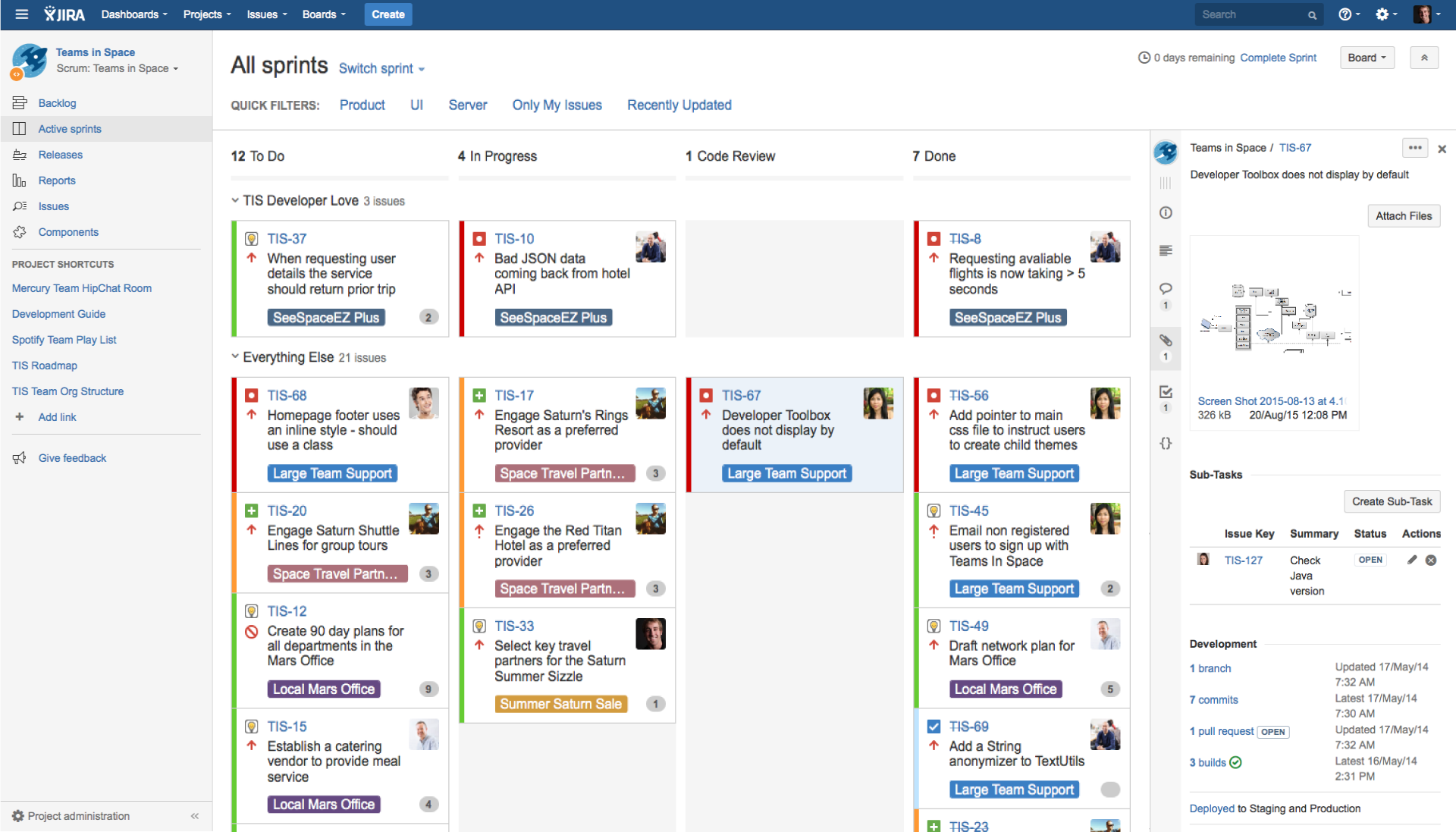
Sprint dashboard in Jira (Source)
Here’s how Jira compares with Basecamp
For teams focused on creating product roadmaps for software development, Jira would be an ideal choice. But if you're looking for an all-in-one solution for project task tracking, team communication, schedule management, and file sharing, Basecamp would be a better choice.
| Platforms supported: | Both are web-based tools, and both offer a mobile app for iOS and Android devices. |
|---|---|
| Typical customers: | Jira is mainly used by agile teams working on product development, while Basecamp offers a collaborative environment for agencies, freelancers, and small businesses. |
| Customer support: | Basecamp doesn’t offer phone support, while Jira does. Both provide email and 24/7 chat support, video tutorials, and a knowledge base. |
| Pricing: | Both offer a free version for users. Basecamp has a flat fee of $99 per month, while paid plans for Jira start at $7.50 per user per month. |
Click here for a side-by-side comparison of Jira and Basecamp.
5. monday.com
User rating: 4.6/5
No. of reviews: 2,435
monday.com is a project management tool for planning, tracking, and managing projects and project teams from a single platform. It offers multiple custom project templates to build your project plan and automate recurring tasks, such as replying to emails, scheduling meetings, and approving workflows.
With monday.com, you can visualize your project as a map, calendar, timeline, or Kanban board. You can approve project budgets and workflows for individual contributors. For projects involving multiple stakeholders, you can allow each stakeholder to edit the project layout per their preference.
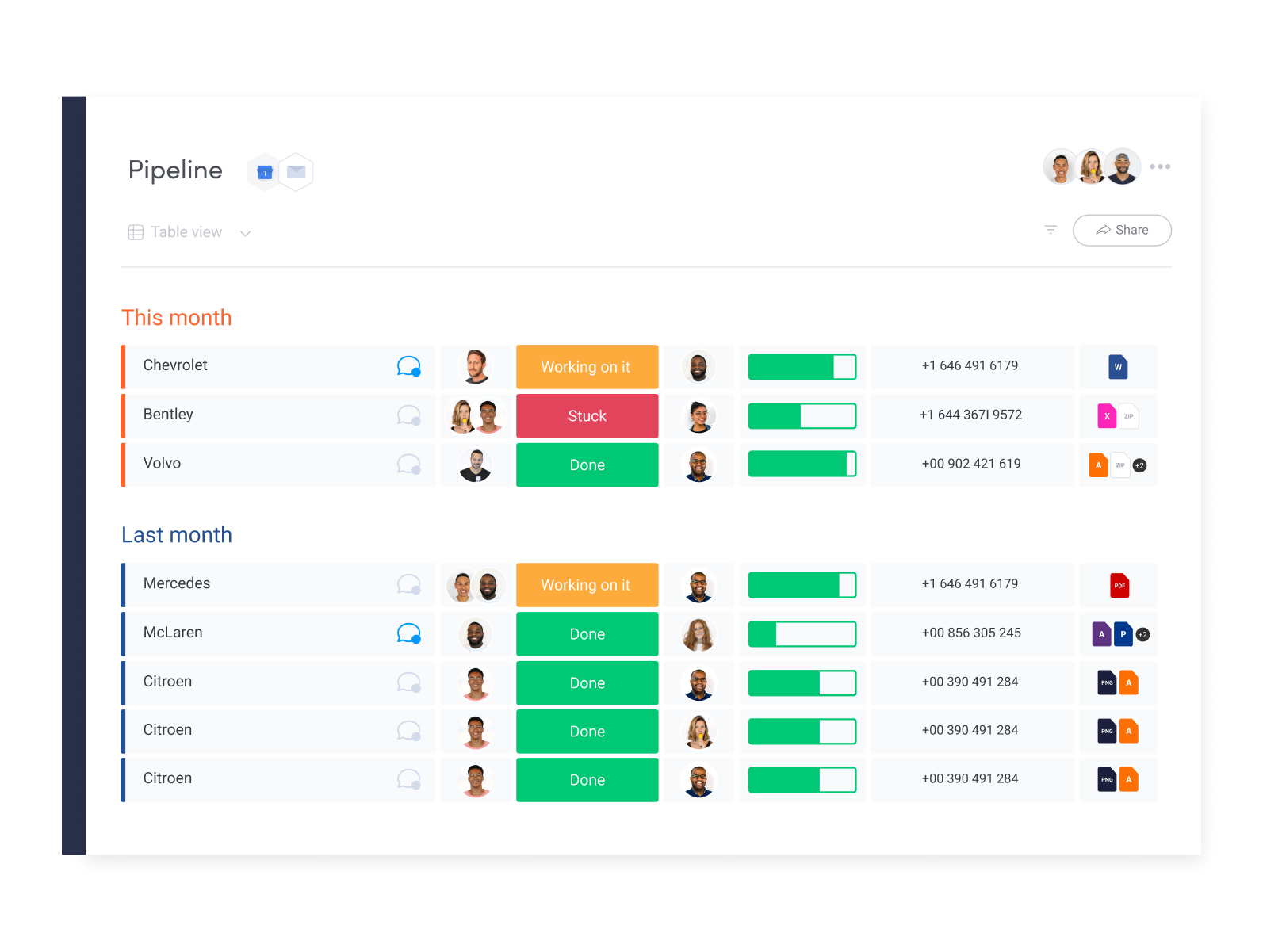
Task pipeline in monday.com (Source)
Here’s how monday.com compares with Basecamp
At their core, both tools help schedule and assign project tasks, collaborate with teammates, and track progress. However, monday.com offers better visibility by providing multiple project view options to sort tasks. It also offers budget and workload tracking, which Basecamp doesn’t.
| Platforms supported: | Both are web-based tools, and both offer a mobile app for iOS and Android devices. |
|---|---|
| Typical customers: | Both can be used by freelancers, small to midsize businesses, and large enterprises. |
| Customer support: | Basecamp doesn’t offer phone support, while monday.com does. Both provide email and 24/7 chat support, video tutorials, and a knowledge base. |
| Pricing: | Both offer a free version for users. Basecamp has a flat fee of $99 per month, while pricing for monday.com starts at $8 per user per month. |
Click here for a side-by-side comparison of monday.com and Basecamp.
6. Trello
User rating: 4.5/5
No. of reviews: 19,985
Trello is a team collaboration tool that helps create a shared environment for project teams. It can integrate with multiple third-party communication and design apps to bring projects and related communication onto one platform.
Trello features no-code automation that automates common tasks such as highlighting upcoming deadlines and scheduling tasks based on project priority and resource availability. It also offers multiple project views, such as lists, cards, and Gantt charts, to help your team organize projects.
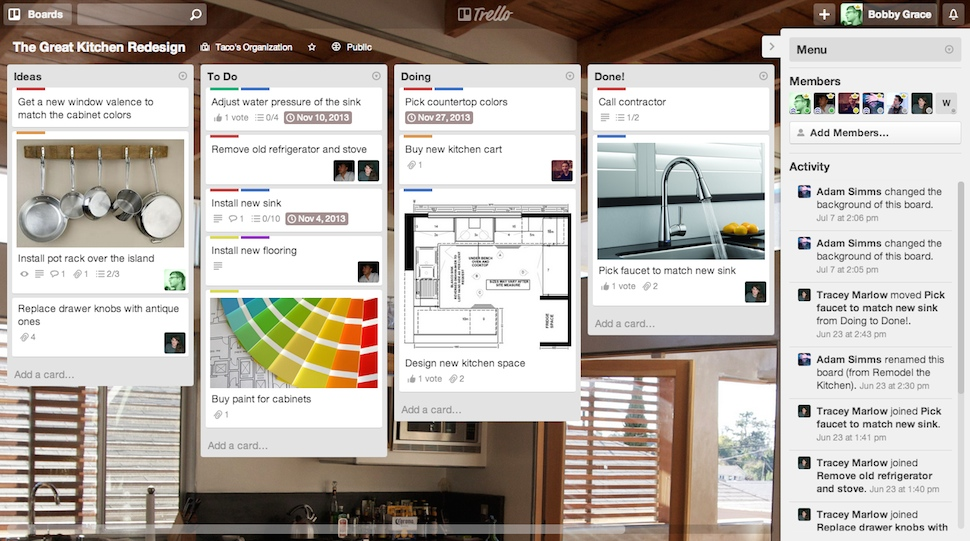
Card wall view in Trello (Source)
Here’s how Trello compares with Basecamp
Both are project management tools with capabilities such as a shared team calendar and file sharing. However, Trello offers custom branding for project board backgrounds, which isn’t available with Basecamp.
| Platforms supported: | Both are web-based tools, and both offer a mobile app for iOS and Android devices. |
|---|---|
| Typical customers: | Both can be used by freelancers, small to midsize businesses, and large enterprises. |
| Customer support: | Neither Basecamp nor Trello offers phone support, but both provide email and 24/7 chat support, video tutorials, and a knowledge base. |
| Pricing: | Both offer a free version for users. Basecamp has a flat $99 fee, while Trello’s paid plans start at $5 per user per month. |
Click here for a side-by-side comparison of Trello and Basecamp.
7. Wrike
User rating: 4.2/5
No. of reviews: 1,600
Wrike is a team collaboration and project management tool that helps collect and organize project requirements, create workflows, and visualize project schedules on Gantt charts. It lets you edit project tasks and sends automated notifications of the changes to your team.
Wrike offers a built-in time-tracking system that lets you track the hours spent on tasks and projects. As a manager, you can use this feature to evaluate employee performance and efficiency. You can also pull up reports to monitor project performance.
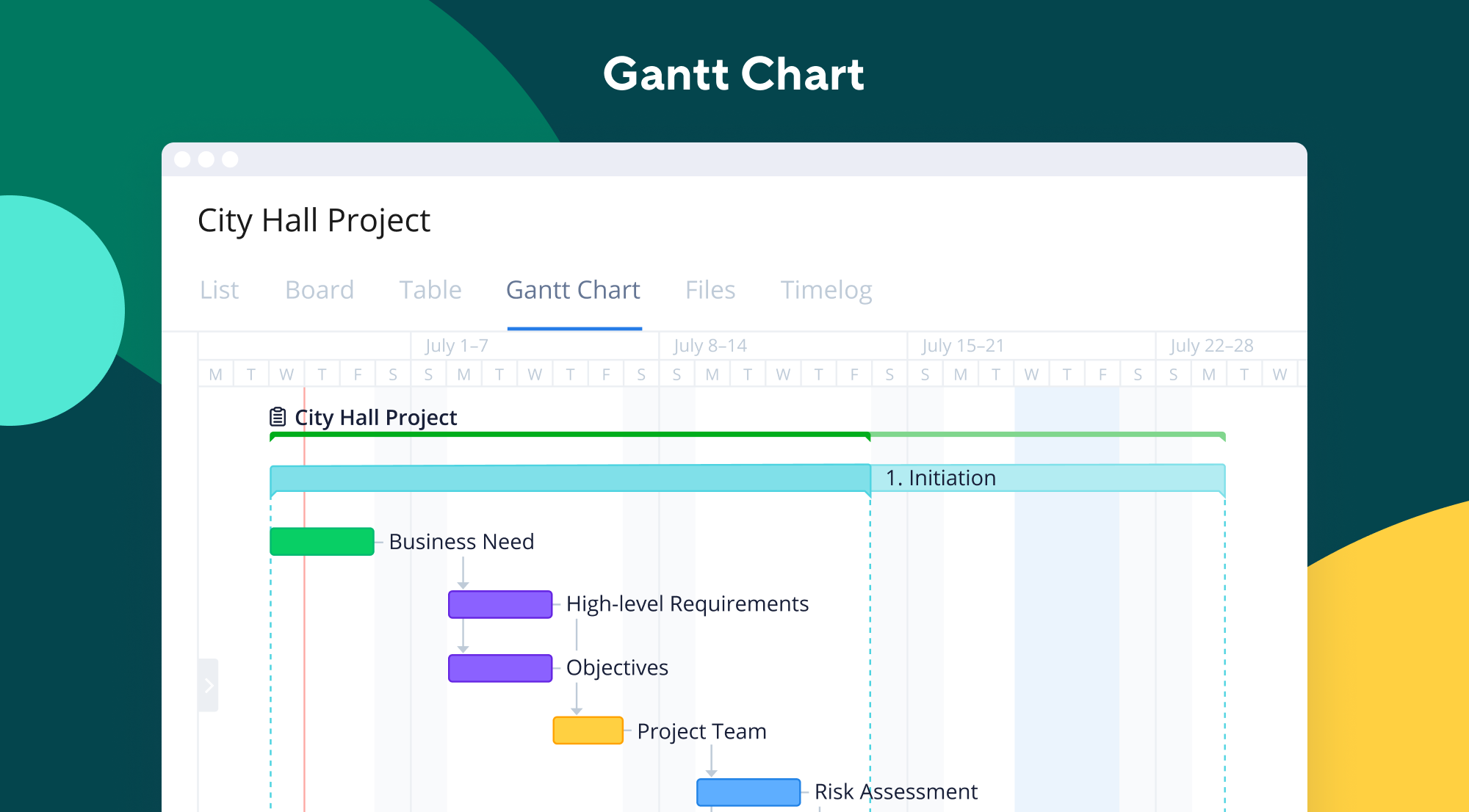
Gantt chart in Wrike (Source)
Here’s how Wrike compares with Basecamp
As project management software, Basecamp is more inclined toward team communication and project navigation, while Wrike offers better customization to fit every organization's project needs.
| Platforms supported: | Both are web-based tools, and both offer a mobile app for iOS and Android devices. |
|---|---|
| Typical customers: | Basecamp can be used by freelancers, small to midsize businesses, and large enterprises alike, whereas Wrike is more focused on small to midsize firms. |
| Customer support: | Basecamp doesn’t offer phone support, while Wrike does. Both provide email and 24/7 chat support, video tutorials, and a knowledge base. |
| Pricing: | Both offer a free version for users. Basecamp has a flat fee of $99 per month, while pricing for Wrike starts at $9.80 per user per month. |
Click here for a side-by-side comparison of Wrike and Basecamp.
Assess all options to select the best Basecamp alternative
Every business has unique project management needs. Therefore, to select the right Basecamp alternative for your business, have your project requirements in mind.
If your projects involve collaboration with many stakeholders and multiple iterations, Jira can be a good option. If you're part of a creative agency or work in marketing, monday.com and Asana can be beneficial, as they work well for small teams that have quick turnaround needs.
If your project team is looking for customization, Freedcamp and Trello can be great options, as both offer customizability in terms of planning projects and managing project workflows.
If you want multiple project views and multifeature dashboards, ClickUp can be a good alternative, and if you need time tracking and Gantt charts, Wrike can prove to be a good choice.
Want more options? Check out Basecamp’s comparisons page to find other project management tools that can be suitable Basecamp alternatives.
Methodology
Products featured in this article were identified in user reviews as other products considered at the same time as Basecamp. To be included in this list, alternative products had to provide the following core project management features: task management, collaboration, brainstorming, reporting, and project tracking.
Disclaimer:
Ratings and reviews data is as of Nov. 2, 2021. New reviews may have been added since the publication of this article, so the data in this piece may not reflect current conditions.
mentioned in this article







More on Collaboration

May 31, 2024


Dec 12, 2023