
App comparison
Add up to 4 apps below to see how they compare. You can also use the "Compare" buttons while browsing.
GetApp offers objective, independent research and verified user reviews. We may earn a referral fee when you visit a vendor through our links.
Our commitment
Independent research methodology
Our researchers use a mix of verified reviews, independent research, and objective methodologies to bring you selection and ranking information you can trust. While we may earn a referral fee when you visit a provider through our links or speak to an advisor, this has no influence on our research or methodology.
Verified user reviews
GetApp maintains a proprietary database of millions of in-depth, verified user reviews across thousands of products in hundreds of software categories. Our data scientists apply advanced modeling techniques to identify key insights about products based on those reviews. We may also share aggregated ratings and select excerpts from those reviews throughout our site.
Our human moderators verify that reviewers are real people and that reviews are authentic. They use leading tech to analyze text quality and to detect plagiarism and generative AI.
How GetApp ensures transparency
GetApp lists all providers across its website—not just those that pay us—so that users can make informed purchase decisions. GetApp is free for users. Software providers pay us for sponsored profiles to receive web traffic and sales opportunities. Sponsored profiles include a link-out icon that takes users to the provider’s website.

Xero
Based on GetApp‘s extensive, proprietary database of in-depth, verified user reviews
Cloud-based accounting software for small businesses
Table of Contents


Is this product right for your business?
Find out with a
Xero Review 2026: Pricing, Features & Alternatives


Written by and

Edited by
Last updated: January 2025
Xero overview
Xero is cloud-based accounting software that’s among 15 of the highest-rated accounting systems from our analysis of user reviews. We analyzed nearly 3,000 of these verified reviews to determine which of Xero’s features are most important to users. Some of the top features include invoice creation, bank reconciliation, online invoicing, and general ledger.[1]
According to our analysis of reviews, the most common use cases for this software aside from general accounting needs are billing and invoicing (cited by 46% of reviewers) and financial reporting (cited by 30%).
Our in-depth analysis of user-reported integrations revealed that Xero is among the top-scoring products in its category, as detailed in our Accounting Integration Leaders Report. Xero has its own app store that features over 1,000 third-party tool add-ons.[2]
Solutions that most commonly integrate with Xero include payment processing software such as Stripe and PayPal, and integration platforms such as Zapier.
User rating
4.3
/5
3.2K
Starting from
25
Per month
Who is Xero best for?
Xero describes itself as “designed” for small businesses, which is reflected in our analysis of business size data of its reviewers. [3] In fact, we found that 85% of Xero reviewers come from companies that have between one to 200 employees.
The platform has clients from various industries, from construction to healthcare. [4] Common roles and industries from our reviews data include accounting (14%), IT services (7%), and computer software (5%).
Backed by our research and thousands of user reviews, we’ll share below what Xero users like and dislike about the platform, as well as key features, integrations, and information about pricing. We’ll also cover what reviewers think about Xero’s ease of use, support and training resources, and security offerings, so you can decide whether Xero is a fit for your business.
Xero pros and cons based on reviews
To identify what users like and dislike about Xero, our data scientists apply advanced modeling techniques to our proprietary reviews data. We've sorted the resulting list of pros and cons based on the percentage of users who expressed positive sentiment toward the given topic in their reviews.



Cloud accounting accessibility
92% of reviewers feel positive about Xero’s cloud accounting accessibility. Being cloud-based, Xero allows users to access their financial data anytime, anywhere, as long as they have an internet connection. This flexibility is ideal for businesses with remote teams or those needing real-time data access.
Customizable dashboard
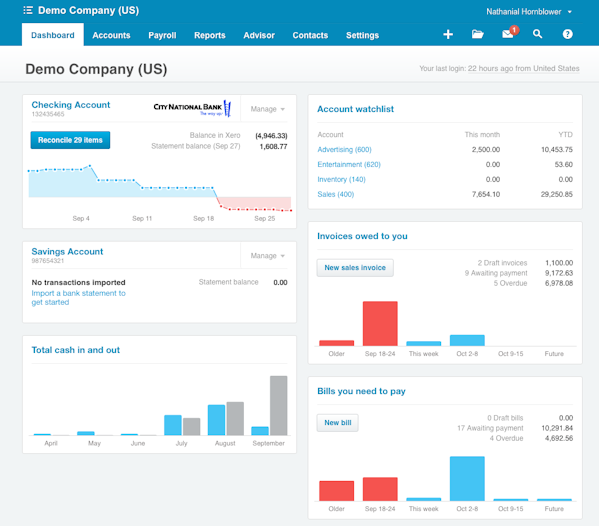
89% of reviewers feel positive about Xero’s dashboard, which they say provides a clear visual snapshot of a business's financial status. Users appreciate the ability to tailor the dashboard to display relevant information, aiding in quick decision-making and financial oversight.
User-friendly interface
88% of reviewers feel positive about Xero’s interface. Reviewers say Xero offers an intuitive and user-friendly interface, making it easy for users to navigate and access features without feeling overwhelmed. This simplicity is especially beneficial for non-accounting experts, who appreciate being able to manage their finances efficiently.
Poor customer support
Only 42% of reviewers feel positive about Xero’s customer support, which is often criticized for being slow and unresponsive. The lack of phone support and reliance on email or forums frustrates users who need immediate assistance, impacting their overall experience.
Limited payment management
Only 46% of reviewers feel positive about Xero’s payment management capabilities, which include handling refunds, recurring payments, and syncing transactions. Users indicate that limitations of these capabilities can complicate financial processes and require manual intervention.
Underdeveloped mobile access
Only 50% of reviewers feel positive about Xero’s mobile app, which they say lacks many features available on the desktop version, making it less functional for users who rely on mobile devices.
Xero’s key features rated by users
We analyzed our reviews for Xero to determine which features users rate as the most critical, and here they are:
Invoice creation
Reviewers comment on Xero's intuitive and straightforward invoice creation process, highlighting its ease of use and customization options, such as adding logos, payment terms, and itemized pricing. They value the ability to generate invoices quickly, automate recurring invoices, and send them directly to clients. However, some users mention the lack of a preview feature for products/services and the need for more flexible line item management. 99% of reviewers rate invoice creation as important or highly important.
Bank reconciliation
Users find Xero's bank reconciliation feature highly efficient, praising its automation, live bank feeds, and smart matching capabilities. They say the ability to import bank statements and reconcile transactions quickly saves significant time. However, some reviewers note occasional issues with bank feed connections and the need for manual input, which can be frustrating. 96% of reviewers rate bank reconciliation as important or highly important.
Online invoicing
Reviewers highlight the convenience of Xero's online invoicing, which helps them create, customize, and send invoices from anywhere. They appreciate the integration with payment gateways, such as Stripe, and the ability to track invoice status and customer interactions. Some users mention that while the basic features are sufficient, power users might find the lack of advanced functionalities limiting. 96% rate this feature as important or highly important.
Financial reporting
Users value Xero's comprehensive financial reporting capabilities, including customizable reports, real-time data tracking, and a variety of pre-made reports. They appreciate the ability to generate detailed financial statements, analyze trends, and export reports in different formats. However, some reviewers find the customization options overwhelming and note occasional inaccuracies in custom reports. 93% of reviewers rate financial reporting as important or highly important.
Billing and invoicing
Reviewers praise Xero's billing and invoicing features for their accuracy, ease of use, and customization options. They highlight the ability to automate recurring invoices, send reminders, and integrate with other systems. Users also appreciate the detailed tracking of accounts receivable and the option to attach files and notes to invoices. Some mention that the template creation process can be cumbersome. 91% of reviewers rate billing and invoicing as important or highly important.
General ledger
Users find Xero's general ledger feature essential for maintaining accurate financial records, with real-time updates and detailed transaction tracking. They appreciate the customizable chart of accounts, automated postings, and the ability to attach notes and files to transactions. However, some reviewers find the navigation and setup of the general ledger challenging and suggest improvements for better flexibility and user experience. 87% of reviewers rate this feature as important or highly important.
To get a sense of what individual users think of Xero’s functionality, see the review snippets below.
Barbara M.
Chief Vision Officer

Anna F.
Administrator
Shaun M.
Accountant
Xero pricing plans
Xero subscriptions are billed monthly based on the number of users. While there’s no free version, you do get the first month free when you sign up for any of its three plans, named to reflect stages of business growth: Early, Growing, and Established.
Xero’s Early plan is its most basic option and starts at $25 per month. [6] Features and functionalities for Early users include the ability to send quotes and up to 20 invoices, enter up to five bills, reconcile bank transactions, capture bills and receipts with Hubdoc, and manage W-9s and 1099s.
Xero’s Growing plan costs $55 per month. It offers all the same features and functionalities as the Early plan, with the addition of bulk reconcile transactions as well as unlimited bills and invoices.
Xero’s most advanced offering is its Established plan. Established users pay $90 per month for everything included in the Early and Growing plans, as well as the use of multiple currencies, project tracking, and advanced analytics, among other features.
To give you an idea of how these prices compare with what your peers are spending on similar software, we reviewed the planned budgets of over 3,000 accounting software buyers who spoke with a GetApp advisor over the past year. About 40% are planning on spending less than $50 per user per month for accounting software. [7]
While two of Xero’s pricing plans would work for that budget, it’s worth noting that user feedback on Xero’s pricing shows mixed sentiment. About half (46%) of reviewers feel negatively about the cost, with some saying the need to pay for add-ons and advanced features may be cost-prohibitive for startups and smaller teams.
That said, Xero offers a discount for users managing multiple companies under a single subscriber email address. This multi-company discount is applied automatically when all your organizations are in the same country. But if you are managing companies across different countries (say one in Australia and another in the U.S.), you can apply for the discount manually by contacting Xero customer support. Note that you can choose different subscription tiers for each of your organizations. [6]
Xero has also been known to offer temporary promotional pricing, such as 95% off your plan for 3 months for new users. [6] Terms and conditions apply to any promotional pricing plans, and Xero reserves the right to change pricing at any time.
To see what individual users think of Xero’s value for money, check out the review snippets below.
Sujata G.
Sales Rep
Swapnil M.
BIM Manager
Elvis O.
Apprentice
What do reviewers think about Xero’s ease of use?
We analyzed 170 Xero reviews that reference its usability and found 88% of those comments are positive. Many find it easy to navigate for both beginners and experienced users. Users cite the interface's simplicity and clean design which helps them quickly find what they need without feeling overwhelmed.
Users also praise these usability-related attributes:
- The ability to auto-categorize expenses
- “Seamless” integration with third-party apps
- Customization capabilities
While the majority of reviewers are happy with Xero’s interface, there are those who initially find it confusing, with a steeper learning curve than other platforms. There are also mentions of the interface feeling outdated and not particularly intuitive, which can make navigation and certain operations less straightforward. Despite these criticisms, many still find Xero's overall usability satisfactory once they become accustomed to the interface.
To learn more about what individual users think of Xero’s ease of use, see the review snippets below.
Anthony C.
University Intern
Afzal S.
Director
Hugues R.
Director
Xero integrations
Xero is among the top-scoring accounting software in GetApp’s Integration Leaders Report, which highlights products with strong user-reported integration capabilities and high overall rating.
Xero offers an app store with more than 1,000 add-ons, covering a wide range of business functions. [7] This includes both Xero's own apps, like Xero Expenses, and popular third-party business tools, such as Expensify. This extensive selection means users can use Xero’s built-in applications or connect their preferred external tools to create a customized workflow.
We looked through all of our reviews to determine which specific products are mentioned most frequently as Xero integrations:

Users integrate Xero with payment processing platform Stripe to streamline online payment processing, automate invoice payments, and handle multi-currency transactions. This integration simplifies the collection of credit card payments and ensures that payments are automatically marked to their respective invoices, enhancing overall payment efficiency.


 ActiveCollab
 ApprovalMax
 Capsule
Here are what some individual users say about Xero’s integrations.

Rosemary K.
Marketing Manager

Alberto L.
Sr Manager
Thomas S.
Design Lead
Xero customer support and training resources
Support options
Xero describes its customer service and training resources as free, unlimited, and available 24/7 to Xero subscribers. [8] Its primary support channel, Xero Central, includes support articles and discussion forums that subscribers can browse to answer questions or troubleshoot issues. [9]
Users who can't find a solution on Xero Central can go to the bottom of any support article to provide their contact information for a callback from the Xero support team. Xero does not provide a live chat option or a publicly available phone number for direct calls.
Analysis of our reviews data indicates that Xero's customer support is a common point of concern for users. Of 201 user reviews, only 42% express positive sentiments about it. The lack of immediate phone support and reliance on email or forums can be frustrating for those needing urgent assistance. However, some users appreciate the range of support resources and find the support staff knowledgeable and responsive.
Training options
Xero provides a range of training materials to accommodate users with varying skill levels and learning preferences. [10] Users can access these resources through Xero Central or their dashboards.
Much of Xero’s training materials involve self-paced courses and guides. Topics like setting up Xero for your small business are presented in a bite-sized format for fast learning. Users who want to go more in-depth may be interested in Xero’s free certification program, webinars, or in-person training sessions. Xero also has a YouTube channel with tutorials and tips for users. [11]
User feedback on Xero’s training resources is generally positive, with 93% of users (out of 43 reviews) expressing satisfaction with its training options. The combination of self-paced courses, videos, and certification programs help users maximize their use of the software.
See below for examples of individual reviews highlighting Xero’s customer service and training support.
Chopeshwar K.
Shyam digital
Larni J.
Practice Manager
Shaun M.
Accountant
Xero’s security offerings
Xero’s security offerings include data encryption, privacy controls, multi-factor authentication, free software updates, and regular data backups. [12]
Our reviews analysis suggests that user sentiment toward Xero’s security offerings is generally positive, with 90% of 30 reviews expressing satisfaction with security offerings. Key strengths that users appreciate include:
- The ability to set different access levels for users
- Multi-factor authentication for logins
- Secure data storage
Security-related issues that some users dislike include occasional disconnectivity problems and the lack of single sign-on (SSO) functionality.
Check out what individual users think about Xero’s security capabilities by exploring the review snippets below.

Bodamer T.
Foreign Language and Localization Administrator
Khevana P.
CRM Lead

Ali A.
Oilfield infrastructure Administrator
Is Xero a good fit for your business?
According to thousands of user reviews, Xero is ideal for small businesses with straightforward accounting needs that aren’t seeking advanced features or don’t mind spending extra on an upgraded plan. Its high overall user ratings, extensive integrations, and ability to serve multiple industries make it a solid option for buyers building a list of systems to compare.
Whether it’s a good fit for your business depends on several other factors unique to your company’s usage plans, support needs, and budget. We highlighted some of those factors below along with a summary of how Xero stacks up:
- Features and functionality: Xero’s top features, as rated by users, include several core and common functions in the accounting software market such as: online invoicing (rated 4.5 out of 5), invoice creation (4.4), bank reconciliation (4.4), financial reporting (4.4), and billing and invoicing (4.4).
- Customer support: Xero’s many learning modules and discussion forums could work for tech-savvy teams comfortable with self-service training and support offerings. However, some reviewers wish it were easier to contact Xero support by phone, and overall, reviewer sentiment regarding Xero’s customer support is more negative than positive.
- Value for money: Xero subscriptions are priced per user, per month, and its three plans range from $20 to $78. Some reviewers find this pricing to be relatively high for startups and very small teams given some of the limitations on its cheaper plans, such as a cap on the number of invoices you can send for its entry-level option.
- Ease of use: Reviews pertaining to Xero’s ease of use are generally positive. While most (88%) users appreciate the interface’s design and user-friendliness, some report a steep learning curve compared to other products.
Xero alternatives
In addition to the nearly 3,000 reviews we analyzed from Xero users, we also looked at 304 reviews from former Xero users who had switched to other products. Below are the most common product alternatives that came up in our analysis.

Users who switched to QuickBooks Enterprise like it for its advanced features, scalability, and robust reporting capabilities. They find it user-friendly, with a clean interface and reliable customer support options. According to reviewers, it offers extensive customization options and supports complex financial management needs, which some users say Xero lacks.

Users who switched to QuickBooks Online say they prefer its intuitive interface, comprehensive features, and integration capabilities. It provides real-time data and robust reporting, which reviewers credit with making it easier to manage finances. The platform is also noted by users for its scalability, cost-effectiveness, and superior customer support.

Users tell us they move to FreshBooks due to its user-friendly interface, efficient customer support, and reliable bank synchronization. Reviewers indicate that it offers advanced features at a lower cost, making it suitable for small businesses. They also report that FreshBooks provides better reporting tools and is easier to set up and use compared to Xero.

Users report choosing QuickBooks Time for its seamless integration with other business applications, enhanced functionality, and better support. Reviews indicate it offers a more practical and capable solution for time tracking and business management, addressing the inefficiencies and high costs associated with some reviews of Xero.

Users indicate they switch to NetSuite for its robust ERP capabilities, budget-friendly pricing, and extensive integrations. It supports complex organizational needs, including multi-currency ledgers and inventory control for larger businesses. These reviewers see NetSuite as a more comprehensive solution for growing companies compared to Xero.
Popular comparisons with Xero











Xero FAQs
Is Xero a good program?
Based on our analysis of Xero reviews, Xero is a good program for users seeking a user-friendly interface, cloud accounting accessibility, customizable dashboard, efficient bookkeeping, and small-business accounting. Users who require simplified payment management, developed mobile access, robust inventory management, and fast turnaround from customer support may want to look elsewhere.
How similar is Xero to QuickBooks?
Xero and QuickBooks Online are both web-based accounting software with similar features, such as general ledger and bank account reconciliation. Both vendors offer multiple pricing plans billed per user per month, though Quickbooks Online’s entry-level plan is more expensive at $35 compared to Xero’s $20 starting plan. We analyzed reviews from previous Xero users who switched to QuickBooks Online and found some of these users prefer Quickbooks’ interface and customer support, among other product attributes.
How reliable is Xero?
Reviews that mention reliability describe Xero as a reliable accounting software overall, with most users reporting consistent performance and minimal downtime. Nearly 85% of reviewers (among 31 reviews) have a positive view of Xero’s dependability for business use. Users typically find performing core accounting tasks on the platform easy and efficient, and most appreciate its ability to support multiple users across different locations without conflict.
Do accountants use Xero?
The largest percentage of Xero reviewers come from accounting (14%). Accounting is also the most widely cited use case for Xero, with over two-thirds (68%) of reviewers using the software for that purpose. Additionally, Xero offers products that are geared toward accountants and bookkeepers, [13] as well as a partner program for accountants and bookkeepers using Xero in their practice. [14]
Do I need a bookkeeper if I use Xero?
You don’t need a bookkeeper if you use Xero, but some users find it helpful to hire an accountant for quarterly consultations. Xero user and bagel shop owner Joan Kanner advises peers with basic accounting knowledge to consider doing day-to-day bookkeeping on their own while hiring an accountant for tax expertise and strategic advice. [15]
“Having the right accounting consultant means you’ll get money back through their tax expertise, and using accounting software means they’ll respect your business decisions and help you make better ones,” says Kanner.
Does Xero provide training for the tool?
Yes, Xero provides a variety of training resources and courses to help users learn the software. When you subscribe, you'll get access to its learning modules, which includes self-paced, short online courses and webinars. Xero also offers free certification programs if you want to become a more advanced user.

Amita Jain

Lauren Spiller

Carolyn Santa Maria
Related categories
Related articles




Sources
- GetApp reviews data: GetApp reviews are collected from verified users for individual software products. For this report, we analyzed all our reviews of Xero software.
- App Store, Xero
- Why Choose Xero for Your Small Business, Xero
- How Types of Small Businesses Like Yours Use Xero, Xero
- App Integrations, Xero
- GetApp advisor call data: Findings are based on data from conversations that GetApp's advisor team has daily with software buyers seeking guidance on purchase decisions. The data used to create this report is based on interactions with small and midsize businesses seeking accounting tools. For this report, we analyzed approximately 3,000 phone interactions from September 2023 to September 2024.
- Pricing Plans, Xero
- Contact Support, Xero
- Xero Central, Xero
- Xero Learning, Xero
- Xero Accounting Software, YouTube
- Security at Xero, Xero
- Accountants and Bookkeepers, Xero
- Xero Partner Program, Xero
- Joan Kanner, LinkedIn