
App comparison
Add up to 4 apps below to see how they compare. You can also use the "Compare" buttons while browsing.
GetApp offers objective, independent research and verified user reviews. We may earn a referral fee when you visit a vendor through our links.
Our commitment
Independent research methodology
Our researchers use a mix of verified reviews, independent research, and objective methodologies to bring you selection and ranking information you can trust. While we may earn a referral fee when you visit a provider through our links or speak to an advisor, this has no influence on our research or methodology.
Verified user reviews
GetApp maintains a proprietary database of millions of in-depth, verified user reviews across thousands of products in hundreds of software categories. Our data scientists apply advanced modeling techniques to identify key insights about products based on those reviews. We may also share aggregated ratings and select excerpts from those reviews throughout our site.
Our human moderators verify that reviewers are real people and that reviews are authentic. They use leading tech to analyze text quality and to detect plagiarism and generative AI.
How GetApp ensures transparency
GetApp lists all providers across its website—not just those that pay us—so that users can make informed purchase decisions. GetApp is free for users. Software providers pay us for sponsored profiles to receive web traffic and sales opportunities. Sponsored profiles include a link-out icon that takes users to the provider’s website.

Box
Based on GetApp‘s extensive, proprietary database of in-depth, verified user reviews
AI-driven content, collaboration and workflow management
Table of Contents


Is this product right for your business?
Find out with a
Box Review 2026: Pricing, Features & Alternatives

Written by

Edited by
Last updated: January 2025
Box overview
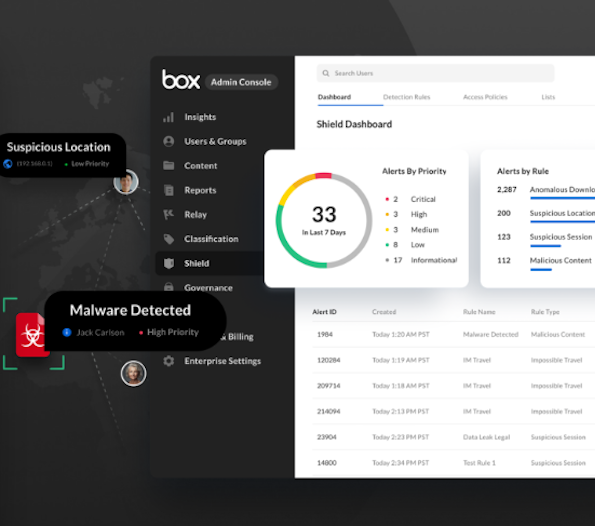
Box is a cloud-based content management and file sharing platform that’s among 15 of the highest-rated digital asset management systems from our analysis of user reviews. We analyzed over 5,500 verified Box reviews to determine which features are most important to users. Some of the top features include secure data storage, document management, version control, and file backup and recovery. [1]
According to our analysis of reviews, the most common use cases for this software are file sharing and document management (cited separately by 52% of reviewers) and cloud storage (cited by 47%).
Our in-depth analysis of reviews revealed that most users appreciate Box for its extensive integration capabilities. Box offers several native applications like Box Sign for e-signatures and integrates with over 1,500 third-party applications, helping users avoid being locked into a single vendor’s ecosystem. [2]
Solutions that most commonly integrate with Box include collaboration tools such as Slack and Zoom Workplace, project management software such as Asana and monday.com, and business process tools such as DocuSign and Salesforce Sales Cloud.
User rating
4.3
/5
5.6K
Starting from
20
/user
Per month
Who is Box best for?
Box is known for its security and compliance features, particularly valued by large businesses in regulated industries. Yet our analysis of verified Box reviews shows it's widely adopted by companies of all sizes—59% of reviews come from small businesses with one to 200 employees, followed by enterprise users (27% of reviewers), and midsize businesses (15%).
The platform serves clients across industries, with information technology and services (9%), computer software (8%), and marketing and advertising (6%) being the top segments represented in our review analysis.
Backed by our research and thousands of user reviews, we’ll share below what Box users like and dislike about the platform, as well as key features, integrations, and information about pricing. We’ll also cover what reviewers think about Box’s ease of use, support and training resources, and security offerings, so you can decide whether Box is a fit for your business.
Box pros and cons based on reviews
To identify what users like and dislike about Box, our data scientists apply advanced modeling techniques to our proprietary reviews data. We've sorted the resulting list of pros and cons based on the percentage of users who expressed positive sentiment toward the given topic in their reviews.



Secure file sharing
97% of reviewers feel positive about Box's file-sharing capabilities. Users report that they can securely share files containing confidential information with both internal and external stakeholders using password-protected links, different permission levels, and encryption options.
Team collaboration tools
92% of reviewers appreciate Box's collaboration capabilities, which help teams work simultaneously on documents even when members are remote. Users feel positive about Box’s real-time editing, commenting, and version-tracking features.
Convenient file access
91% of reviewers feel positive about the ease of accessing their files from anywhere. Box Sync and the mobile app let users work with their documents from any device, even offline, important for users who need their files on the go.
Slow file transfer speed
59% of reviewers express concerns about Box's file transfer speeds. Users note that uploading and downloading large files is time-consuming, particularly with slower internet connections, which can affect productivity.
Frequent issues and updates
59% of reviewers report problems with Box's system updates, mentioning frequent glitches, crashes, and the need for manual updates. This can disrupt daily workflow and sometimes require additional IT support.
File size limitations
55% of reviewers express concerns about Box's file size limitations on uploads. Users find that the 250MB cap in the free version is restrictive and even paid tiers have limits—starting at 5GB per file in the basic business plan—which can hinder sharing large files.
Box’s key features rated by users
We analyzed our reviews for Box to determine which features users rate as the most critical, and here they are:
Document storage
Reviewers comment on Box's approach to document storage, highlighting how easy it is to organize and retrieve files in their preferred structure. Users particularly appreciate the unlimited storage and support for various file formats, with the ability to access files from any device making it practical for both daily workflow and long-term archiving. However, some users note that the interface occasionally creates unnecessary duplicate files. 100% of reviewers rate document storage as important or highly important.
Secure data storage
Reviewers appreciate Box's secure data storage for protecting confidential business documents. Users highlight its comprehensive security features, including AES 256-bit encryption, password-protected shared links, and two-factor authentication. They particularly value being able to control who can view and edit sensitive content through granular permissions. However, some reviewers note the absence of end-to-end encryption in Box’s security toolkit. 99% of reviewers rate secure data storage as important or highly important.
File sharing
Reviewers comment on Box's file sharing capabilities for team collaboration, highlighting how easy it is to share files through links or direct invites, with custom permissions, expiration dates, and password protection that help them protect sensitive documents. Users also appreciate the platform’s integration capabilities with tools like Microsoft Office, Outlook, and Slack. However, some mention that requiring recipients to create Box accounts (to access password-protected shared links) sometimes complicates external sharing. 98% of reviewers rate file sharing as important or highly important.
Document management
Reviewers find Box’s document management features useful for tracking business files. Version control lets teams see changes over time and restore previous versions when needed, while real-time collaboration enables multiple users to work on files simultaneously. The platform also offers workflow automation for tasks like document approvals and content reviews. However, some users wish for more advanced document management features available on competing platforms. 96% of reviewers rated this feature as important or highly important.
Access controls or permissions
Reviewers value Box’s granular permission settings for protecting their content. Users can assign different access levels for viewing, editing, or downloading individual files and entire folders. However, some users note that the free version offers limited permission options. 95% of reviewers rate access controls and permission setting features as important or highly important.
Backup and recovery
Reviewers comment on Box's backup and recovery features, highlighting its auto-save and automated data backup capabilities. They appreciate being able to recover deleted files and access previous versions of a document, which helps them prevent data loss due to accidental deletions or device failures. However, some reviewers feel the tool’s backup and recovery options could be more robust than those offered by others. 92% of reviewers rate backup and recovery as important or highly important.
To get a sense of what individual users think of Box’s functionality, see the review snippets below.

Melanie M.
Owner
Shaun G.
Continuous Improvement Analyst
David W.
Grant Writer
Box pricing plans
Box subscriptions are billed monthly based on the number of users, with discounts available for annual commitments. While there’s no permanent free version for businesses, you do get a two-week free trial when you sign up for any of its four tiers: Business, Business Plus, Enterprise, and Enterprise Plus. All plans require a minimum of three users.
Box's Business plan starts at $20 per user per month, [3] providing unlimited storage and core features, including secure file sharing, version history, and basic collaboration tools. This tier limits single file uploads to 5GB, and external collaboration requires partners to have paid Box accounts.
The Business Plus plan, at $33 per user per month, builds on the Business plan with an increased single file upload limit to 15GB, advanced security controls, unlimited external collaborations, and more integration options.
At $47 per user per month, the Enterprise plan offers all the same features and functionalities as the Business Plus plan, with added security and industry compliance like HIPAA, increased single file upload limit to 50GB, advanced admin controls, and workflow automation capabilities.
Box's most comprehensive offering is the Enterprise Plus plan, available only with annual billing at $50 per user. Users get everything included in the Business, Business Plus, and Enterprise plan, as well as the highest single file upload limit of 150GB. It also includes advanced features like AI-powered content insights and the most robust security controls and unlimited third-party integrations.
Enterprise Advanced

No pricing info
Contact vendor for more details
Over half of Box reviewers (52%) feel positive about the cost, as users appreciate the value they get from the tool, especially unlimited storage at lower prices compared to mid-level options from competitors. Reviewers specifically highlight Box's data loss prevention and custom branding features as valuable additions that justify the pricing.
However, our analysis shows cost concerns from some users, particularly from small businesses and teams. A key point of contention is the three-user minimum requirement for business plans, which can make the solution cost-prohibitive for smaller organizations. Some users find it difficult to choose the right plan due to the complex pricing structure. Box provides support to help organizations understand plan options, with discounts available for non-profits.
To see what individual users think of Box’s value for money, check out the review snippets below.
Alvaro V.
Marketing Manager
Robert P.
Chief Technology Officer
Jothika K.
RPA Developer
What do reviewers think about Box’s ease of use?
We analyzed 502 Box reviews that reference its usability and found that 73% of those comments are positive. Many users find the interface clean and intuitive, helping both beginners and experienced users navigate core functions without requiring technical expertise.
Users also praise these usability-related attributes:
- The ability to securely access and share files with people outside of the company
- Seamless integration with third-party apps
- Straightforward web interface and Box Drive for file organization
While most reviewers are happy with Box’s interface, some find it overwhelming at first, citing issues like overly nested menus and a cluttered dashboard when handling many files. Users also note that the desktop and iOS mobile applications need visual improvements and better performance compared to the web version. Despite these challenges, reviewers indicate that Box becomes easier to navigate as teams get familiar with the platform.
To learn more about what individual users think of Box’s ease of use, see the review snippets below.
Sean M.
DevOps Engineer

Zoie Y.
Creator and Coach at TantricSense
Tina M.
Marketing Executive
Box integrations
Most reviewers appreciate Box for its integration capabilities. The platform connects with over 1,500 third-party applications [2] and includes several native tools, such as Box Sign for e-signatures and Box Governance for setting advanced retention policies, available as paid add-ons. [4] This flexibility to work with Box's built-in tools or connect their favorite external applications helps users support their unique workflows.
We looked through all of our reviews to determine which specific products are mentioned most frequently as Box integrations:

Users integrate Box with cloud storage platform Google Drive to expand their storage options and enhance file management capabilities. While many use both platforms for document management, reviewers note they often choose Box for sensitive documents due to its stronger security features. Some users maintain Box as a secure backup for their Google Drive content.

Users integrate Box with document management software Microsoft 365 to work, edit, and collaborate on MS Office documents directly within Box. This integration enables real-time editing and version control, letting teams work on documents simultaneously while maintaining file organization. Reviewers particularly value how easily they can edit files in Box without downloading them or switching platforms.

Users integrate Box with spreadsheet software Microsoft Excel to open, edit, and save spreadsheets directly to the platform. Teams find this integration particularly useful for collaborative spreadsheet work, though some reviewers mention occasional syncing delays when multiple users edit simultaneously.

Box’s integration with document management tool Google Docs lets users create and edit text documents within the Box platform. While Google Docs itself offers smooth real-time collaboration, reviewers appreciate Box's added security and document control features when working with sensitive information.

Users also integrate Box with cloud storage solution OneDrive to create a more comprehensive document management system. While OneDrive comes included with Microsoft 365, many reviewers choose Box alongside it for enhanced security features and additional storage options, particularly for sensitive business documents. Teams value the ability to maintain both platforms in their workflow, using Box for secure, long-term document storage.
 Docusign
 Zoom Workplace
 Okta
OktaHere is what some individual users say about Box’s integrations.
Afnan H.
Researcher
Manmohan S.
Manager
Angelica B.
Intern
Box customer support and training resources
Support options
Box offers tiered support services. All users get free access to product support teams, where they can submit tickets and receive general and specialist assistance during local business hours. [5]
Users needing more comprehensive support can purchase premier support, which includes dedicated help desk access, phone support, and prioritized ticket response. Enterprise Plus subscribers receive 24/7/365 assistance, ticket prioritization, and multi-channel agent access. Box also provides self-service options through FAQs [6] and a searchable support forum. [7]
Analysis of our review data indicates that users generally feel satisfied about Box’s customer support. Of 210 user reviews, 73% express positive sentiments about it. Reviewers appreciate the technical expertise of support staff and the availability of extensive documentation, including video tutorials and webinars. However, some users note the lack of direct phone support in basic plans and less comprehensive technical support for non-Windows platforms like Linux and Mac systems.
Training options
Box provides training resources through two main channels: Box University [8] for structured learning and Box Community [9] for peer-based support.
Box University offers self-paced courses and guided onboarding paths that cover topics from basic navigation to advanced features. Users can access video tutorials, and product guides, and do hands-on exercises designed for different skill levels. Box also provides specialized learning tracks for administrators, end users, and developers. The Box Community serves as a forum where users can share best practices, ask questions, and learn from others' experiences.
User feedback on Box’s training resources is generally positive, with 81% of users (out of 26 reviews) expressing satisfaction with its training options. Most users find Box intuitive enough to start using with minimal training.
See below for examples of individual reviews highlighting Box’s customer service and training support.
Resa M.
Senior Data Engineer
Koen G.
Software Engineer
Mohamed S.
Social media manager
Box’s security offerings
Box describes its security as designed with a zero trust architecture approach [10], which requires verification of every user and device attempting to access content. All files stored in Box are protected through multiple security layers, including AES 256-bit encryption, single sign-on (SSO), and two-factor authentication (MFA), along with detailed access controls that let users manage who views, edits, or downloads their files.
Our analysis of 638 reviews shows overwhelmingly positive sentiment about Box's security features, with 94% of reviewers expressing satisfaction. Key strengths that users appreciate include:
- Ability to share files securely through password-protected links
- Detailed audit trails tracking all file activities
- Data loss prevention with automated threat detection
- Industry-specific compliance capabilities (such as HIPAA and FedRAMP)
However, some users note that robust security measures can occasionally create friction in their workflow, particularly when sharing files with external partners.
Check out what individual users think about Box’s security capabilities by exploring the review snippets below.
Bilal K.
Project Manager
Princess N.
Legal Associate
Ar-jay A.
System Adminstrator
Is Box a good fit?
According to thousands of user reviews, Box is ideal for small and large businesses that need secure content management and file sharing capabilities, especially those handling sensitive information or operating in regulated industries. Its high overall user ratings in digital asset management, extensive integrations, and robust security features make it a strong contender for buyers building a list of systems to compare.
Whether it’s a good fit for your business depends on several other factors unique to your company's collaboration needs, security requirements, and budget. We highlight some of these factors below along with a summary of how Box stacks up according to our analysis of verified Box reviews:
- Features and functionality: Box’s top features, as rated by users, include several core and common functions in the document management software market such as secure data storage (rated 4.7 out of 5), document storage (4.6), file sharing (4.5), backup and recovery (4.5), access controls or permissions (4.5), and document management (4.2).
- Customer support: Box offers a mix of self-service resources and direct support options that could work well for teams comfortable with online documentation and ticket-based help. While most users (73%) feel positive about their overall customer support experience and extensive training material available on its site, some reviewers highlight that phone support requires a premium plan.
- Value for money: Box business subscriptions are priced per user, per month, and require a minimum of three users, with plans ranging from $20 to $47 per user/per month. While 52% of reviewers feel positive about the costs, some especially from small businesses find pricing structure to be complex and minimum user requirements challenging for their budget.
- Ease of use: User feedback about Box's ease of use is generally positive. Most reviewers appreciate its clean and straightforward interface for file management. However, some reviewers mention a learning curve for advanced features like creating custom workflows and setting different levels of permissions.
Box’s alternatives
We analyzed over 5,500 reviews from Box users and reviews from former Box users who had switched to other products. Below are the most common product alternatives that came up in our analysis.

Users who switched to Dropbox Business like it for its more intuitive interface and comprehensive toolset for file sharing and collaboration. Though many note their switch was driven by company policies or affordability rather than product preferences.

Users who moved to Google Drive say they value its free storage allowance (up to 15GB) and wide user base. Reviewers particularly appreciate its integration with other tools in Google’s ecosystem and more collaborative features. Some users mention cost savings as a key factor in their switch from Box to Google Drive.

Users who chose OneDrive highlight its natural integration with Microsoft 365 and better cost efficiency, especially when bundled with existing Microsoft subscriptions. While company policy often drives this switch, reviewers appreciate its familiar interface to other collaborators.

Users who transitioned to SharePoint typically did so as part of a broader move to Microsoft's ecosystem. Reviewers note that better integration with Microsoft Office products and potential cost savings influenced their switch, though many indicate the change was primarily a company decision.
Popular comparisons with Box











Box FAQs
What is Box software used for?
According to our analysis of over 5,500 verified reviews, Box software serves three main purposes. First, teams use it as an online workspace where they can share files with internal as well as external partners, collaborating on documents through comments, edits, and version tracking (mentioned by 52% of reviewers). Second, it functions as a document management system with unlimited storage, letting users set specific permission levels for viewing and editing files (52% of reviewers). Finally, users value Box as a cloud storage solution that provides them access to files from any device (47% of reviewers).
Is Box the same thing as DropBox?
No, while both Box and Dropbox store files in the cloud, our analysis of user reviews shows they serve different end needs. Box is built for businesses that need stronger security and control over their documents, especially in regulated industries. Dropbox is often chosen for simpler file sharing needs and an easy-to-navigate interface.
Many people use Dropbox for personal stuff, while businesses often choose Box when they need to keep strict control over who can see and edit their files.
What are the disadvantages of Box software?
Our analysis of Box reviews shows that the main limitations users mention are the requirement to buy at least three user licenses (costly for very small teams), file size restrictions on uploads, occasional slow transfer speed for large files, and complicated pricing structure. Users also mention that the search functionality is not very useful and mobile and desktop apps don't work as smoothly as the web version. Despite these drawbacks, the overall user sentiment leans towards Box being a reliable and secure cloud storage solution. You can assess if these potential drawbacks would impact your specific workflow through Box's two-week free trial.
What is the purpose of Box?
Box helps businesses securely store, share, and collaborate on documents. We analyzed over 5,500 verified Box reviews and found that users particularly value how it protects sensitive business documents through permission controls and other security features. It provides centralized storage where teams can work together while maintaining strict control over who can view, edit, or share files. Box serves various industries, with information technology (9%), computer software (8%), and marketing (6%) being the most common users.
Is Box like Google Drive?
Box and Google Drive both let you store files online, but they're designed for different purposes. Google Drive works great for personal use and real-time document collaboration, offering 15GB of free storage. Box is mainly built for businesses that need to keep tight control over their information, like healthcare providers protecting patients records or financial firms securing client data. It focuses more on security features and control over how files are shared and accessed.
Many companies use both—Google Drive for day-to-day collaboration and Box for secure document storage and sharing.
Is a Box secure for file sharing?
Yes. Our analysis of Box reviews shows that 94% of users feel Box is ideal for file sharing, especially where password-protected links and e-signatures are essential. Users can control exactly who accesses their files by setting passwords, expiration dates for shared links, and different permission levels for viewing or editing. Administrators can also track file access and get alerts about potential security risks.
Who owns Box Software?
Box is currently a public company listed on the New York Stock Exchange. [11] Being public means it's not owned by one person—instead, it's accountable to thousands of shareholders and has to be transparent about how it operates.
Is Box really secure?
Reviews that mention security describe Box as a trustworthy document management software overall, with 94% of users reporting it as secure for regulated industries like healthcare and financial services. Nearly 92% of reviewers (among 149 reviews) have a positive view of Box’s dependability and reliability for business use.
Users find managing documents on the platform gives them peace of mind with comprehensive security measures, including authentication with single sign-on, malware detection, and data loss prevention. While some users note that these security measures can make sharing slightly more complex, most find this a worthwhile trade-off for protecting sensitive business documents.
How much storage does Box give for free?
Box offers a free personal plan with 10GB storage for individual users. However, for businesses, Box doesn't have a free version but offers a two-week trial of their paid plans. All business plans offer unlimited storage and start at $20 per user/month. Keep in mind that you'll need to sign up for at least three users under each business plan.
What is the file limit for Box?
File size limits depend on your Box plan. The Business plan lets you upload files up to 5GB, Business Plus increases this to 15GB, Enterprise to 50GB, and Enterprise Plus to 150GB. [3] This means even the basic plan can handle large presentations or videos and higher plans can manage very large files like design projects or video productions.
Box also sets limits on total data you can transfer (upload or download) in a month. For business plans, the limit is 2TB per user per month for when someone downloads files through your shared links and 1TB per user per month when you personally upload or download files.

Amita Jain

Parul Sharma
Related categories
Related articles




Sources
- GetApp reviews data: GetApp reviews are collected from verified users for individual software products. For this report, we analyzed all our reviews of Box software. Learn more about GetApp’s software research methodology.
- Box App Integrations, Box
- Plans and Pricing, Box
- Box Products and Features, Box
- Box Product Support, Box
- FAQs, Box
- Box Support, Box
- Box University, Box
- Box Community, Box
- Security and Compliance, Box
- Box Inc., Wikipedia